最近在做一個項目,需要用到等待窗體,在DevExpress下面有SplashScreen控件可以使用,同時也有ProgressIndicator控件能用,但是如果沒有用Dev開發的話,我們就需要自定義一個等待窗體了。
首先,把截圖放上來:
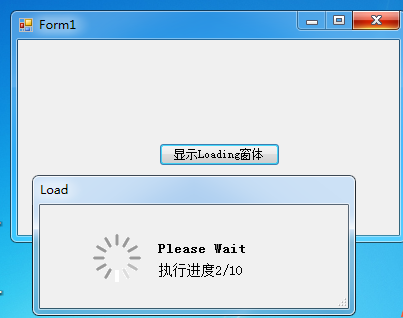
實現的功能比較簡單,就是在程序處理 一些耗時比較多的代碼時,將Loading窗體展示給用戶,並在後台進行執行。
這個程序,參考了 網名為 “八哥” 的一個程序,當時我在群裡面的時候,感謝他的熱情幫助。
現將我的代碼貼出來吧,裡面用的了委托的概念。大家如果不懂的話,可以百度一下,這裡給出幾個鏈接:
http://blog.csdn.net/ggz631047367/article/details/44646233
http://www.runoob.com/csharp/csharp-delegate.html
http://blog.csdn.net/sjj2011/article/details/7835200
http://blog.csdn.net/testcs_dn/article/details/37671513
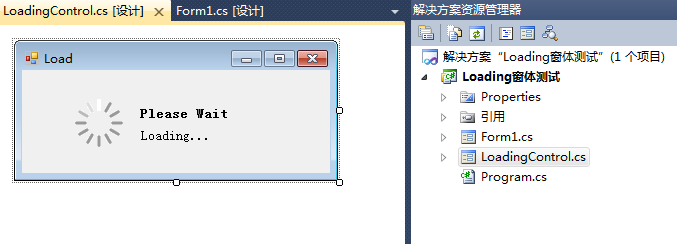
LoadingControl.cs代碼如下:

  1 using System;
  2 using System.Collections.Generic;
  3 using System.ComponentModel;
  4 using System.Data;
  5 using System.Drawing;
  6 using System.Linq;
  7 using System.Text;
  8 using System.Windows.Forms;
  9 using System.Threading;
 10
 11 namespace ControlToolsLibrary
 12 {
 13     public partial class LoadingControl : Form
 14     {
 15
 16         public delegate void mydelegate();
 17         public mydelegate eventMethod;
 18         private static LoadingControl pLoading = new LoadingControl();
 19         delegate void SetTextCallback(string title,string caption,string description);
 20         delegate void CloseFormCallback();
 21         public LoadingControl()
 22         {
 23             InitializeComponent();
 24             initLoadintForm();
 25             Thread t = new Thread(new ThreadStart(delegateEventMethod));
 26             t.IsBackground = true;
 27             t.Start();
 28         }
 29
 30         private void LoadingControl_FormClosing(object sender, FormClosingEventArgs e)
 31         {
 32             if (!this.IsDisposed)
 33             {
 34                 this.Dispose(true);
 35             }
 36         }
 37
 38         private void initLoadintForm() {
 39             this.ControlBox = false;   // 設置不出現關閉按鈕
 40             this.StartPosition = FormStartPosition.CenterParent;
 41         }
 42
 43         private void delegateEventMethod()
 44         {
 45             eventMethod();
 46         }
 47
 48         public static LoadingControl getLoading()
 49         {
 50             if (pLoading.IsDisposed)
 51             {
 52                 pLoading = new LoadingControl();
 53                 return pLoading;
 54             }
 55             else
 56             {
 57                 return pLoading;
 58             }
 59         }
 60
 61         //這種方法演示如何在線程安全的模式下調用Windows窗體上的控件。
 62         /// <summary>
 63         /// 設置Loading 窗體的 標題title,標簽 caption 和描述 description
 64         /// </summary>
 65         /// <param name="title">窗口的標題[為空時,取默認值]</param>
 66         /// <param name="caption">標簽(例如:please wait)[為空時,取默認值]</param>
 67         /// <param name="description">描述(例如:正在加載資源...)[為空時,取默認值]</param>
 68         public void SetCaptionAndDescription(string title,string caption, string description)
 69         {
 70             if (this.InvokeRequired&&LoadingControl.lbl_caption.InvokeRequired && LoadingControl.lbl_description.InvokeRequired)
 71             {
 72                 SetTextCallback d = new SetTextCallback(SetCaptionAndDescription);
 73                 this.Invoke(d, new object[] { title,caption, description });
 74             }
 75             else
 76             {
 77                 if (!title.Equals("")) {
 78                     this.Text = title;
 79                 }
 80                 if (!caption.Equals(""))
 81                 {
 82                     LoadingControl.lbl_caption.Text = caption;
 83                 }
 84                 if (!description.Equals("")) {
 85                     LoadingControl.lbl_description.Text = description;
 86                 }
 87             }
 88         }
 89
 90         public  void CloseLoadingForm()
 91         {
 92             if (this.InvokeRequired)
 93             {
 94                 CloseFormCallback d = new CloseFormCallback(CloseLoadingForm);
 95                 this.Invoke(d, new object[] {  });
 96             }
 97             else
 98             {
 99                 if (!this.IsDisposed)
100                 {
101                     this.Dispose(true);
102                 }
103             }
104         }
105
106         public void SetExecuteMethod(mydelegate method)
107         {
108               this.eventMethod += method;
109         }
110
111
112     }
113 }
View Code
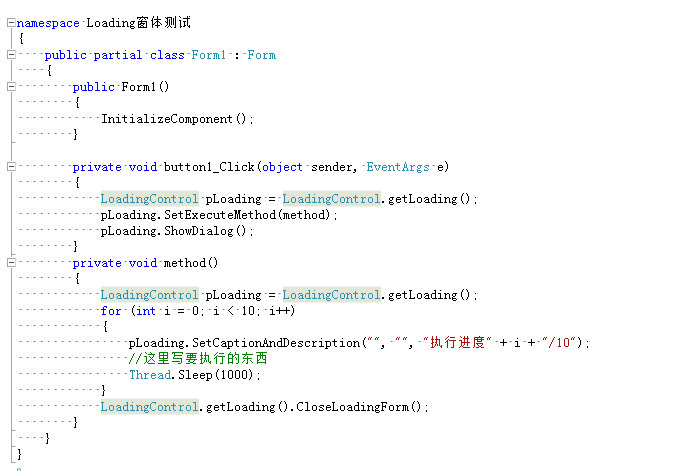
Form的調用的方法如下: