從Excel導入數據最令人頭疼的是數據格式的兼容性,特別是日期類型的兼容性。為了能夠無腦導入日期,折騰了一天的NPOI。在經過測試確實可以導入任意格式的合法日期後,寫下這篇小文,與大家共享。完整代碼請移步:https://github.com/xuanbg/Utility
2016-11-13 04:06 修正一個bug。由try DateCellValue改為判斷列數據類型,如類型為DateTiime返回DateCellValue,否則返回NumericCellValue或StringCellValue。
概述:
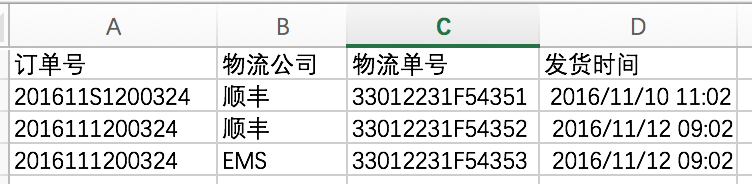
這個幫助類是一個泛型類,泛型參數對應的實體類還起到模板的作用。如果你的Excel文件使用與實體類不同的列標題的話,可以通過給屬性加上Alias特性,將列標題和屬性進行對應。例如:
Excel格式如圖:
實體類:
 1 using System;
 2 using Insight.Utils.Common;
 3
 4 namespace Insight.WS.Server.Common.Entity
 5 {
 6     public class Logistics
 7     {
 8         [Alias("訂單號")]
 9         public string OrderCode { get; set; }
10
11         [Alias("物流公司")]
12         public string Service { get; set; }
13
14         [Alias("物流單號")]
15         public string Number { get; set; }
16
17         [Alias("發貨時間")]
18         public DateTime DeliveryTime { get; set; }
19     }
20 }
返回的Json:
 1 [
 2   {
 3     "OrderCode": "201611S1200324",
 4     "Service": "順豐",
 5     "Number": "33012231F54351",
 6     "DeliveryTime": "2016-11-10T11:02:44"
 7   },
 8   {
 9     "OrderCode": "2016111200324",
10     "Service": "順豐",
11     "Number": "33012231F54352",
12     "DeliveryTime": "2016-11-12T09:02:44"
13   },
14   {
15     "OrderCode": "2016111200324",
16     "Service": "EMS",
17     "Number": "33012231F54353",
18     "DeliveryTime": "2016-11-12T09:02:44"
19   }
20 ]
1、類主體,負責根據傳入的文件路徑讀取數據,並調用其他私有方法對數據進行處理。最後轉換成List<T>並序列化成Json返回。
 1 using System;
 2 using System.Collections.Generic;
 3 using System.Data;
 4 using System.IO;
 5 using Insight.Utils.Entity;
 6 using NPOI.SS.UserModel;
 7
 8 namespace Insight.Utils.Common
 9 {
10     public class NpoiHelper<T> where T : new()
11     {
12         private readonly Result _Result = new Result();
13
14         /// <summary>
15         /// 導入Excel文件
16         /// </summary>
17         /// <param name="path">文件路徑</param>
18         /// <param name="index">Sheet索引</param>
19         /// <returns>Result</returns>
20         public Result Import(string path, int index = 0)
21         {
22             if (!File.Exists(path))
23             {
24                 _Result.FileNotExists();
25                 return _Result;
26             }
27
28             IWorkbook book;
29             using (var file = new FileStream(path, FileMode.Open, FileAccess.Read))
30             {
31                 book = WorkbookFactory.Create(file);
32             }
33
34             if (index >= book.NumberOfSheets)
35             {
36                 _Result.SheetNotExists();
37                 return _Result;
38             }
39
40             var sheet = book.GetSheetAt(index);
41             var table = GetSheetData(sheet);
42             var list = Util.ConvertToList<T>(table);
43             _Result.Success(list);
44             return _Result;
45         }
46     }
47 }
2、GetSheetData方法,負責將Sheet中的數據讀取到DataTable。這裡通過實體類屬性的特性值作為列名,屬性類型作為列數據類型來初始化DataTable。當然,首行是例外,因為首行是列標題而非數據。
 1         /// <summary>
 2         /// 讀取Sheet中的數據到DataTable
 3         /// </summary>
 4         /// <param name="sheet">當前數據表</param>
 5         /// <returns>DataTable</returns>
 6         private DataTable GetSheetData(ISheet sheet)
 7         {
 8             var table = InitTable(sheet);
 9             if (table == null) return null;
10
11             var rows = sheet.GetEnumerator();
12             while (rows.MoveNext())
13             {
14                 var row = (IRow) rows.Current;
15                 if (row.RowNum == 0) continue;
16
17                 var dr = table.NewRow();
18                 for (var i = 0; i < table.Columns.Count; i++)
19                 {
20                     try
21                     {
22                         var type = table.Columns[i].DataType;
23                         dr[i] = GetCellData(row.GetCell(i), type);
24                     }
25                     catch (Exception)
26                     {
27                         dr[i] = DBNull.Value;
28                     }
29
30                 }
31                 table.Rows.Add(dr);
32             }
33
34             return table;
35         }
初始化DataTable的方法:
 1         /// <summary>
 2         /// 初始化DataTable
 3         /// </summary>
 4         /// <param name="sheet">當前數據表</param>
 5         /// <returns>DataTable</returns>
 6         private DataTable InitTable(ISheet sheet)
 7         {
 8             var title = sheet.GetRow(0);
 9             if (title == null)
10             {
11                 _Result.NoRowsRead();
12                 return null;
13             }
14
15             try
16             {
17                 var dict = GetDictionary();
18                 var table = new DataTable();
19                 foreach (var cell in title.Cells)
20                 {
21                     var col_name = cell.StringCellValue;
22                     var col_type = dict[col_name];
23                     table.Columns.Add(cell.StringCellValue, col_type);
24                 }
25
26                 return table;
27             }
28             catch
29             {
30                 _Result.IncorrectExcelFormat();
31                 return null;
32             }
33         }
生成模板字典的方法:
 1         /// <summary>
 2         /// 獲取指定類型的屬性名稱/類型字典
 3         /// </summary>
 4         /// <returns>Dictionary</returns>
 5         private Dictionary<string, Type> GetDictionary()
 6         {
 7             var dict = new Dictionary<string, Type>();
 8             var propertys = typeof(T).GetProperties();
 9             foreach (var p in propertys)
10             {
11                 string name;
12                 var attributes = p.GetCustomAttributes(typeof(AliasAttribute), false);
13                 if (attributes.Length > 0)
14                 {
15                     var type = (AliasAttribute)attributes[0];
16                     name = type.Alias;
17                 }
18                 else
19                 {
20                     name = p.Name;
21                 }
22
23                 dict.Add(name, p.PropertyType);
24             }
25
26             return dict;
27         }
3、重點來了!
因為日期/時間在Excel中可能被表示為文本格式或日期格式(其實是Numeric類型),所以在CellType為String/Numeric的時候,如果列數據類型為DateTime,則取cell的DateCellValue,否則取cell的StringCellValue/NumericCellValue就好了。
這樣,無論日期是文本或日期格式,都可以完美獲取。
 1         /// <summary>
 2         /// 讀Excel單元格的數據
 3         /// </summary>
 4         /// <param name="cell">Excel單元格</param>
 5         /// <param name="type">列數據類型</param>
 6         /// <returns>object 單元格數據</returns>
 7         private object GetCellData(ICell cell, Type type)
 8         {
 9             switch (cell.CellType)
10             {
11                 case CellType.Numeric:
12                     if (type == typeof(DateTime)) return cell.DateCellValue;
13
14                     return cell.NumericCellValue;
15
16                 case CellType.String:
17                     if (type == typeof(DateTime)) return cell.DateCellValue;
18
19                     return cell.StringCellValue;
20
21                 case CellType.Boolean:
22                     return cell.BooleanCellValue;
23
24                 case CellType.Unknown:
25                 case CellType.Formula:
26                 case CellType.Blank:
27                 case CellType.Error:
28                     return null;
29                 default:
30                     return null;
31             }
32         }
4、DataTable轉成List<T>的方法:
 1         /// <summary>
 2         /// 將DataTable轉為List
 3         /// </summary>
 4         /// <param name="table">DataTable</param>
 5         /// <returns>List</returns>
 6         public static List<T> ConvertToList<T>(DataTable table) where T: new()
 7         {
 8             var list = new List<T>();
 9             var propertys = typeof(T).GetProperties();
10             foreach (DataRow row in table.Rows)
11             {
12                 var obj = new T();
13                 foreach (var p in propertys)
14                 {
15                     string name;
16                     var attributes = p.GetCustomAttributes(typeof(AliasAttribute), false);
17                     if (attributes.Length > 0)
18                     {
19                         var type = (AliasAttribute) attributes[0];
20                         name = type.Alias;
21                     }
22                     else
23                     {
24                         name = p.Name;
25                     }
26
27                     if (table.Columns.Contains(name))
28                     {
29                         if (!p.CanWrite) continue;
30
31                         var value = row[name];
32                         if (value == DBNull.Value) value = null;
33
34                         p.SetValue(obj, value, null);
35                     }
36                 }
37                 list.Add(obj);
38             }
39             return list;
40         }
自定義特性:
 1 using System;
 2
 3 namespace Insight.Utils.Common
 4 {
 5     [AttributeUsage(AttributeTargets.Property)]
 6     public class AliasAttribute : Attribute
 7     {
 8         /// <summary>
 9         /// 屬性別名
10         /// </summary>
11         public string Alias { get; }
12
13         /// <summary>
14         /// 構造方法
15         /// </summary>
16         /// <param name="alias">別名</param>
17         public AliasAttribute(string alias)
18         {
19             Alias = alias;
20         }
21     }
22 }
請大家對此多發表意見和建議,謝謝。