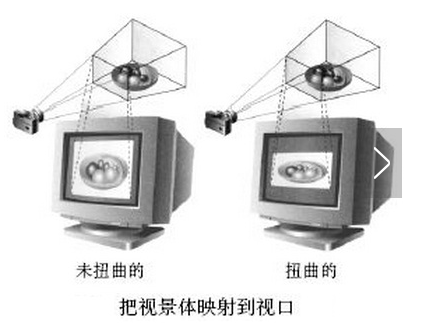
視口變換主是將視景體內投影的物體顯示到二維的視口平面上. 在計算機圖形學中,它的定義是將經過幾何變換, 投影變換和裁剪變換後的物體顯示於屏幕指定區域內.
前面我們討論過的透視投影, 正射投影, 它們都會產生一個視景體, 利用Viewport()函數, 就可以把這些視景體內投影的物體顯示到屏幕指定的區域內.
默認情況下, 視口就是你用來繪制3D圖像的整個矩形區域.
Viewport的原型是: Viewport(int x, int y, int width, int height)
我們來用示意圖描述一下這個函數的作用:
(1) Viewport定義了視口在窗口中的區域, 同時也規定了二維像素平面到視口區域的映射關系.
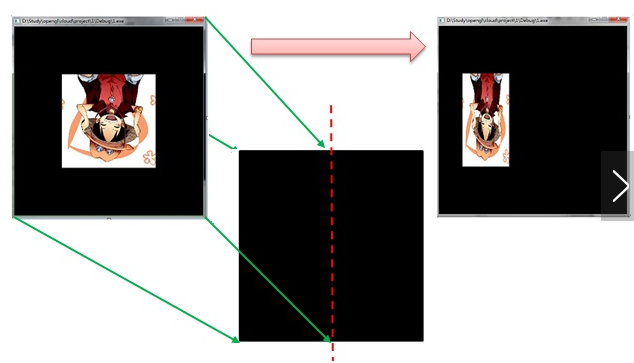
(2) 若有Viewport(0,0,w/2,h)則會有下面的效果:
(3) 也可以利用Viewport()生成多窗口效果:
Viewport(0,0, w/2, h/2); drawpic(); //左下角
Viewport(w/2,0, w/2, h/2); drawpic(); //右下角
Viewport(0, h/2, w/2, h/2); drawpic(); //左上角
Viewport(w/2, h/2, w/2, h/2); drawpic(); //右上角
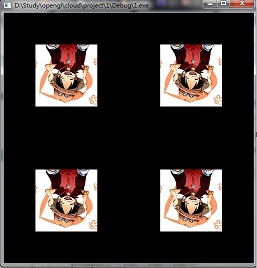
下面給出多窗口效果例子的源碼:
  1 using System;
  2 using System.Collections.Generic;
  3 using System.ComponentModel;
  4 using System.Data;
  5 using System.Drawing;
  6 using System.Linq;
  7 using System.Text;
  8 using System.Windows.Forms;
  9 using SharpGL;
 10
 11 namespace SharpGLWinformsApplication1
 12 {
 13     public partial class SharpGLForm : Form
 14     {
 15         public SharpGLForm()
 16         {
 17             InitializeComponent();
 18         }
 19
 20         private void openGLControl_OpenGLDraw(object sender, PaintEventArgs e)
 21         {
 22             OpenGL gl = openGLControl.OpenGL;
 23             gl.Clear(OpenGL.GL_COLOR_BUFFER_BIT | OpenGL.GL_DEPTH_BUFFER_BIT);
 24             gl.LoadIdentity();
 25             display(gl);
 26         }
 27
 28         void display(OpenGL gl)
 29         {
 30             gl.Color(1.0, 0.0, 0.0);
 31             //畫分割線,分成四個視見區
 32             gl.Viewport(0, 0, 400, 400);
 33             gl.Begin(OpenGL.GL_LINES);
 34             {
 35                 gl.Vertex(-1.0, 0);
 36                 gl.Vertex(1.0, 0);
 37                 gl.Vertex(0.0, -1.0);
 38                 gl.Vertex(0.0, 1.0);
 39             }
 40             gl.End();
 41            42
 43             //定義在左下角的區域
 44             gl.Color(0.0, 1.0, 0.0);
 45             gl.Viewport(0, 0, 200, 200);
 46             gl.Begin(OpenGL.GL_POLYGON);
 47             {
 48                 gl.Vertex(-0.5, -0.5);
 49                 gl.Vertex(-0.5, 0.5);
 50                 gl.Vertex(0.5, 0.5);
 51                 gl.Vertex(0.5, -0.5);
 52             }
 53             gl.End();
 54
 55             //定義在右上角的區域
 56             gl.Color(0.0, 0.0, 1.0);
 57             gl.Viewport(200, 200, 200, 200);
 58             gl.Begin(OpenGL.GL_POLYGON);
 59             {
 60                 gl.Vertex(-0.5, -0.5);
 61                 gl.Vertex(-0.5, 0.5);
 62                 gl.Vertex(0.5, 0.5);
 63                 gl.Vertex(0.5, -0.5);
 64             }
 65             gl.End();
 66
 67             //定義在左上角的區域
 68             gl.Color(1.0, 0.0, 0.0);
 69             gl.Viewport(0, 200, 200, 200);
 70             gl.Begin(OpenGL.GL_POLYGON);
 71             {
 72                 gl.Vertex(-0.5, -0.5);
 73                 gl.Vertex(-0.5, 0.5);
 74                 gl.Vertex(0.5, 0.5);
 75                 gl.Vertex(0.5, -0.5);
 76             }
 77             gl.End();
 78
 79             //定義在右下角
 80             gl.Color(1.0, 1.0, 1.0);
 81             gl.Viewport(200, 0, 200, 200);
 82             gl.Begin(OpenGL.GL_POLYGON);
 83             {
 84                 gl.Vertex(-0.5, -0.5);
 85                 gl.Vertex(-0.5, 0.5);
 86                 gl.Vertex(0.5, 0.5);
 87                 gl.Vertex(0.5, -0.5);
 88             }
 89             gl.End();
 90
 91             gl.Flush();
 92         }
 93
 94         private void openGLControl_OpenGLInitialized(object sender, EventArgs e)
 95         {
 96             OpenGL gl = openGLControl.OpenGL;
 97             gl.ClearColor(0, 0, 0, 0);
 98         }
 99
100
101         private void openGLControl_Resized(object sender, EventArgs e)
102         {
103             OpenGL gl = openGLControl.OpenGL;
104             gl.MatrixMode(OpenGL.GL_PROJECTION);
105             gl.LoadIdentity();
106
107             gl.Ortho2D(-1.0, 1.0, -1.0, 1.0);
108             gl.MatrixMode(OpenGL.GL_MODELVIEW);
109         }
110     }
111 }
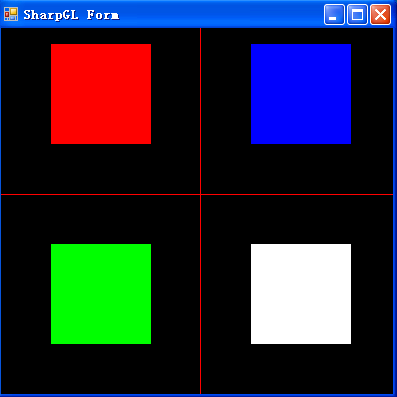
效果如下圖:
本節源代碼下載