首先,吐槽一下金數據的API文檔 http://help.jinshuju.net/articles/api-intro.html 寫的很粗糙啊...反正我是沒太看明白
拿表單api舉例,只告訴你了個地址https://jinshuju.net/api/v1/forms/ex27t2,然後呢,然後沒有了,估計大家也能猜到ex27t2應該是變化的,但是填什麼呢...
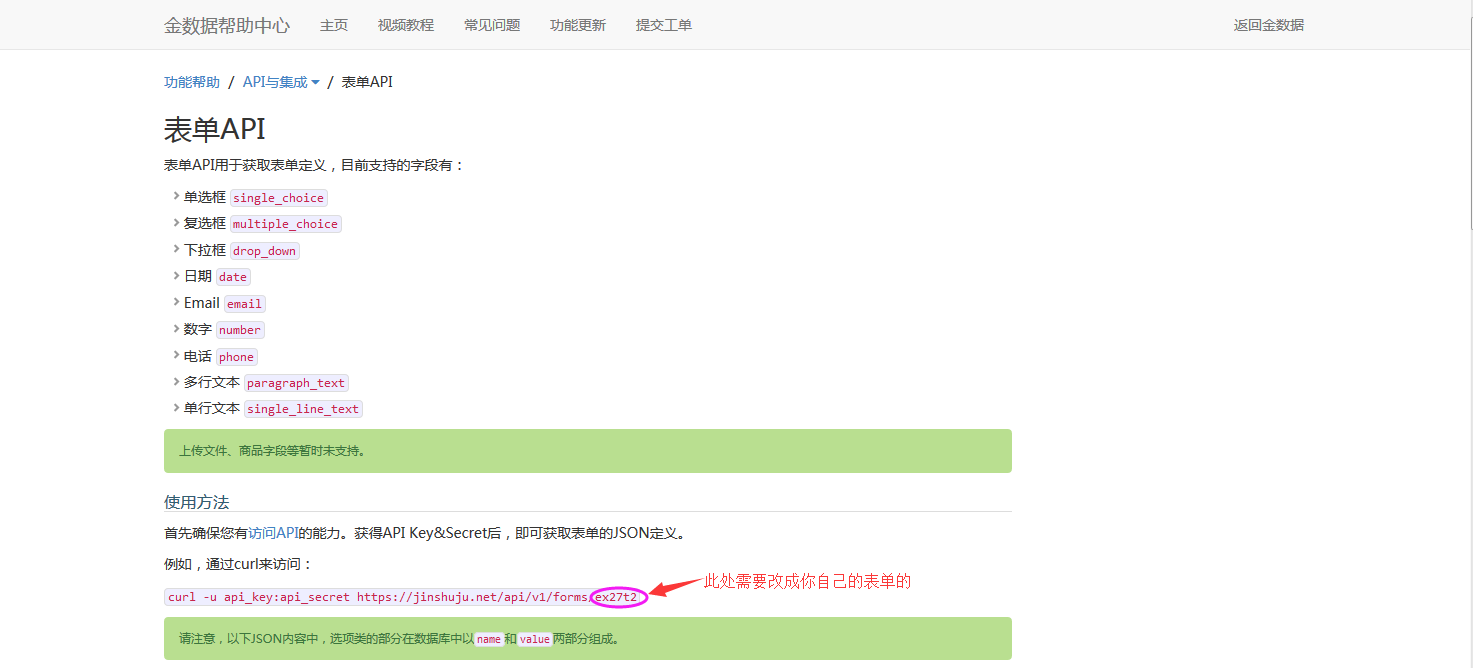
這裡應該填你表單的一個值,好像只有在這種地方有這個值,其他地方我沒發現..

而且提交咨詢工單也沒用,給我回的郵件僅回復了“我們目前不提供這類技術支持。若有其他問題請繼續提交工單。如果您還有問題,可以查看我們的幫助中心。歡迎關注金數據官方微信(金數據服務號/jinshuju-service)。”
自己動手,豐衣足食吧...
好了,不多說其他的了,直接上代碼
public class JinShuJu
    {
        private static string Key = "9hh6fIbLOqDrgin4Q_r6X";
        private static string Secret = "z3RSib8HeQBfau6zwRpRo";

        /// <summary>
        /// 獲取表單API
        /// </summary>
        /// <returns></returns>
        public static string GetFromAPI()
        {
            string uri = "https://jinshuju.net/api/v1/forms/RsE5EC";
            string result = string.Empty;
            WebRequest request = WebRequest.Create(new Uri(uri));

            request.Credentials = GetCredentialCache(uri, Key, Secret);
            request.Headers.Add("Authorization", GetAuthorization(Key, Secret));

            request.Timeout = 2000;
            WebResponse response = request.GetResponse();
            Stream stream = response.GetResponseStream();
            StreamReader sr = new StreamReader(stream);
            result = sr.ReadToEnd();
            sr.Close();
            stream.Close();

            return result;
        }

        /// <summary>
        /// 提交數據API
        /// </summary>
        /// <param name="JSONData"></param>
        /// <returns></returns>
        public static string PostFromAPI(string JSONData)
        {
            string uri = "https://jinshuju.net/api/v1/forms/RsE5EC";
            string result = string.Empty;
            WebRequest request = WebRequest.Create(new Uri(uri));

            request.Credentials = GetCredentialCache(uri, Key, Secret);
            request.Headers.Add("Authorization", GetAuthorization(Key, Secret));

            request.Timeout = 2000;

            byte[] bytes = Encoding.UTF8.GetBytes(JSONData);
            request.Method = "POST";
            request.ContentType = "application/json";
            string paraUrlCoded = JSONData;
            byte[] payload;
            payload = System.Text.Encoding.UTF8.GetBytes(paraUrlCoded);
            request.ContentLength = payload.Length;
            Stream writer = request.GetRequestStream();
            writer.Write(payload, 0, payload.Length);
            writer.Close();

            WebResponse response = request.GetResponse();
            Stream stream = response.GetResponseStream();
            StreamReader sr = new StreamReader(stream);
            result = sr.ReadToEnd();
            sr.Close();
            stream.Close();

            return result;
        }

        #region # 生成 Http Basic 訪問憑證 #
        private static CredentialCache GetCredentialCache(string uri, string username, string password)
        {
            string authorization = string.Format("{0}:{1}", username, password);
            CredentialCache credCache = new CredentialCache();
            credCache.Add(new Uri(uri), "Basic", new NetworkCredential(username, password));
            return credCache;
        }
        private static string GetAuthorization(string username, string password)
        {
            string authorization = string.Format("{0}:{1}", username, password);
            return "Basic " + Convert.ToBase64String(new ASCIIEncoding().GetBytes(authorization));
        }
        #endregion
    }
最後,還得吐槽下金數據數據API,明明說好了,要是如果不滿足校驗條件(必填/重復等),金數據會返回400,並給出提示。
但是!並沒有提示,只是會返回400 Bad Request!害得我搞了半天才明白,以為是頁面請求不存在了或者其他請求錯誤了,因為說好的提示並沒有給出來..