光陰似箭,歲月如梭!S1結束了 ,最後留給大家的就一個KTV項目了。
前台管理
主界面:
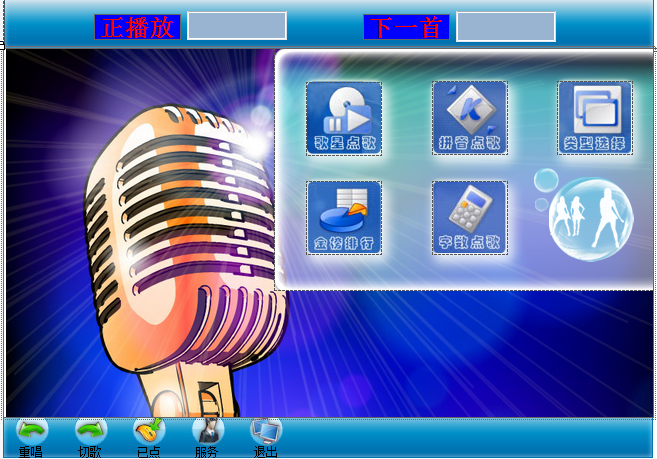
主要代碼:
 1
 2         private void MainForm_Load(object sender, EventArgs e)
 3         {
 4             // 加載時,運行播放窗體
 5             FrmPlay playForm = new FrmPlay();
 6             playForm.Show();
 7
 8             // 啟動定時器
 9             this.timer1.Start();
10
11             // 讀取資源路徑
12             DBHelper dbHelper = new DBHelper();
13             string sql = "select resource_path from resource_path where resource_type = 'singer_photo'";
14             SqlCommand command = new SqlCommand(sql, dbHelper.Connection);
15
16             // 讀取歌手照片路徑
17             try
18             {
19                 dbHelper.OpenConnection();
20                 KTVUtil.singerPhotoPath = command.ExecuteScalar().ToString();
21             }
22             catch (Exception ex)
23             {
24                 MessageBox.Show("資源路徑發生錯誤!", "錯誤", MessageBoxButtons.OK, MessageBoxIcon.Error);
25             }
26             finally
27             {
28                 dbHelper.CloseConnection();
29             }
30
31             // 讀取歌曲路徑
32             sql = "select resource_path from resource_path where resource_type = 'song'";
33             command.CommandText = sql;
34             try
35             {
36                 dbHelper.OpenConnection();
37                 KTVUtil.songPath = command.ExecuteScalar().ToString();
38             }
39             catch (Exception ex)
40             {
41                 MessageBox.Show("路徑錯誤", MessageBoxButtons.OK, MessageBoxIcon.Error);
42             }
43             finally
44             {
45                 dbHelper.CloseConnection();
46             }
47         }
1 /// <summary>
2 /// 顯示當前播放的歌曲名字
3 /// </summary>
4 public void ShowPlayingSongName()
5 {
6 this.lblPlayingSong.Text = PlayList.PlayingSongName();
7 this.lblNextSong.Text = PlayList.NextSongName();
8 }
同一窗體顯示不同界面
如果在一個窗體中顯示不同的界面呢??
我們可以轉換一下思路,所謂界面不同就是容器不同
解決方案:通過控制Form窗體中ListView控件的顯示和隱藏來實現多界面窗體
歌星點歌

點擊第一個LIstView,彈出第二個ListView解析:1.隱藏第一個ListView,顯示第二個ListView
 1         // 點擊後,顯示歌手類別
 2         private void lvOrder_Click(object sender, EventArgs e)
 3         {
 4             if (lvOrder.SelectedItems[0] != null)
 5             {
 6                 // 隱藏歌手性別,顯示歌手類別
 7                 pnlSingerSex.Visible = false;
 8                 pnlSingerType.Location = pnlSingerSex.Location;
 9                 pnlSingerType.Dock = DockStyle.Fill;
10                 pnlSingerType.Visible = true;
11                 this.singerSex = Convert.ToString(lvOrder.SelectedItems[0].Tag);  // 記錄選擇的性別
12             }
13
14             // 讀取歌手類別
15             DBHelper dbHelper = new DBHelper();
16             string sql = "select * from singer_type";
17             try
18             {
19                 // 查詢數據庫
20                 SqlCommand command = new SqlCommand(sql, dbHelper.Connection);
21                 dbHelper.OpenConnection();//相當於con.open
22                 SqlDataReader reader = command.ExecuteReader();
23
24                 // 循環將類別讀取出來添加到ListView中
25                 lvSingerType.Items.Clear();
26                 int i = 0;
27                 while (reader.Read())
28                 {
29                     ListViewItem item = new ListViewItem();
30                     item.Text = Convert.ToString(reader["singertype_name"]);
31                     item.Tag = Convert.ToInt32(reader["singertype_id"]);
32                     item.ImageIndex = i;
33                     lvSingerType.Items.Add(item);
34                     i++;
35                 }
36                 reader.Close();
37             }
38             catch (Exception ex)
39             {
40                 Console.WriteLine(ex.Message);
41                 MessageBox.Show("錯誤!");
42
43             }
44             finally
45             {
46                 dbHelper.CloseConnection();
47             }
48         }
需要將【男歌手】漢字傳遞到第二個ListView上 顯示5個國家的信息(包括文本和圖片)
需要將【男歌手】漢字傳遞到第二個ListView上 .顯示5個國家的信息(包括文本和圖片)
點擊第二個ListVIew,填出第三個ListView

    // 點擊類別後,顯示對應類別下的歌手列表
        private void lvSingerType_Click(object sender, EventArgs e)
        {
            // 隱藏歌手類別,顯示歌手列表
            pnlSingerType.Visible = false;
            pnlSingerList.Location = pnlSingerSex.Location;
            pnlSingerList.Dock = DockStyle.Fill;
            pnlSingerList.Visible = true;
            this.singerTypeId = Convert.ToInt32(lvSingerType.SelectedItems[0].Tag); // 保存選中的類別編號

            // 讀取數據庫,讀出歌手信息
            DBHelper dbHelper = new DBHelper();
            StringBuilder sql = new StringBuilder();
            sql.AppendFormat("select singer_id,singer_name,singer_photo_url from singer_info where singertype_id={0} and singer_gender='{1}'",
                this.singerTypeId,this.singerSex);

            try
            {
                SqlCommand command = new SqlCommand(sql.ToString(),dbHelper.Connection);
                dbHelper.OpenConnection();
                SqlDataReader reader = command.ExecuteReader();

                int imageIndex = 0; // 代表歌手頭像的索引
                ilSinger.Images.Clear();

                // 循環讀出歌手信息添加到窗體中顯示
                lvSinger.Items.Clear();
                while (reader.Read())
                {
                    // 將歌手頭像放在ImageList控件中
                    string photoURL = KTVUtil.singerPhotoPath + "\\" + Convert.ToString(reader["singer_photo_url"]);
                    ilSinger.Images.Add(Image.FromFile(photoURL));

                    // 將歌手添加到ListView中
                    ListViewItem item = new ListViewItem();
                    item.Text = Convert.ToString(reader["singer_name"]);
                    item.Tag = Convert.ToString(reader["singer_id"]);
                    item.ImageIndex = imageIndex;
                    lvSinger.Items.Add(item);

                    imageIndex++;
                }
                reader.Close();
            }
            catch (Exception ex)
            {
                Console.WriteLine(ex.Message);
                MessageBox.Show("錯誤!");
            }
            finally
            {
                dbHelper.CloseConnection();
            }
        }
第三個ListView出來後,點擊其中的一個歌手,彈出該歌手演唱的所有歌曲
我們都知道ListView綁定首列的數據是通過
 1 ListViewItem lvitem = new ListViewItem(stuno);
 2 顯示地區圖片的代碼:  SqlDataReader dr = command.ExecuteReader();
 3
 4
 5
 6                 // 循環將類別讀取出來添加到ListView中
 7
 8                 lvlisttwo.Items.Clear();
 9
10                 int i = 0;
11
12                 while (dr.Read())
13
14                 {
15
16                     ListViewItem item = new ListViewItem();
17
18                     item.Text = Convert.ToString(dr["singertype_name"]);
19
20                     item.Tag = Convert.ToInt32(dr["singertype_id"]);
21
22                     item.ImageIndex = i;
23
24                     lvlisttwo.Items.Add(item);
25
26                     i++;
27
28                 }
29
30       dr.Close();
詳細分析:
顯示歌手的圖片的代碼
 1 SqlDataReader dr = cmd.ExecuteReader();
 2
 3                 int imageIndex = 0; // 代表歌手頭像的索引
 4
 5                 imglistthree.Images.Clear();
 8
 9                 // 循環讀出歌手信息添加到窗體中顯示
10
11                 lvlistthree.Items.Clear();
12
13                 while (dr.Read())
14
15                 {
16
17                     // 將歌手頭像放在ImageList控件中
18
19                     string photoURL = KTVUtil.singerPhotoPath + "\\" + Convert.ToString(dr["singer_photo_url"]);
20
21                     imglistthree.Images.Add(Image.FromFile(photoURL));
24
25                     // 將歌手添加到ListView中
26
27                     ListViewItem item = new ListViewItem();
28
29                     item.Text = Convert.ToString(dr["singer_name"]);
30
31                     item.Tag = Convert.ToString(dr["singer_id"]);
32
33                     item.ImageIndex = imageIndex;
34
35                     lvlistthree.Items.Add(item);
36
37
38
39                     imageIndex++;
40
41                 }
42
43                 dr.Close();
44
45             }
10 .ListView控件首列不能居中問題
17. 實現播放歌曲功能
01.點擊某歌曲後,將選擇的歌曲添加到已點列表
02.在已點列表中放入一個Timer控件,實時檢測每首歌曲的狀態
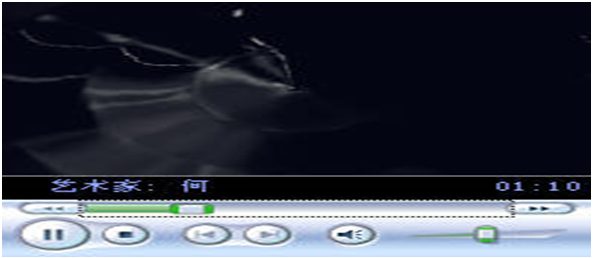
03.在播放窗口中放入一個Timer控件,實時檢測需要播放的歌曲
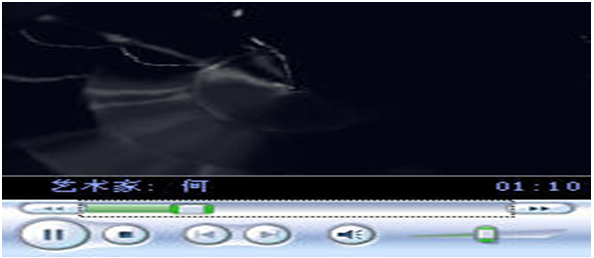
 1      private void PlayForm_Load(object sender, EventArgs e)
 2         {
 3             this.PlaySong();
 4             this.timer1.Start();
 5         }
 6
 7         /// <summary>
 8         /// 播放歌曲
 9         /// </summary>
10         private void PlaySong()
11         {
12             this.song = PlayList.GetPlayingSong(); // 獲取當前要播放的歌曲
13             if (song != null)
14             {
15                 this.song.SetSongPlayed();             // 將當前歌曲播放狀態設為已播放
16                 this.wmpSong.URL = KTVUtil.songPath + "\\" + this.song.SongURL;  // 得到當前播放歌曲的路徑
17             }
18         }
19
20         private void timer1_Tick(object sender, EventArgs e)
21         {
22             if(this.song == null)
23             {
24                 this.PlaySong();
25             }
26             if (this.wmpSong.playState == WMPLib.WMPPlayState.wmppsStopped)
27             {
28                 this.song = null; // 將歌曲設為空
29                 PlayList.MoveOn();
30             }
31             // 切歌
32             if (this.song != null && this.song.PlayState == SongPlayState.cut)
33             {
34                 this.wmpSong.URL = "";
35                 this.song = null;
36             }
37         }
實現播放列表操作:
1.KTVUtil 類:
1 class KTVUtil
2
3     {
4
5         public static string singerPhotoPath = "";  // 歌手照片路徑
6
7         public static string songPath = "";         // 歌曲路徑
8
9     }
2.編寫歌曲類(Song.cs)
 1 代碼例子:enum SongPlayState
 2
 3     {
 4
 5         unplayed, played, again, cut
 6
 7     }
 8
 9     // 歌曲類
10
11     class Song
12
13     {
14
15         //歌曲名稱
16
17         public string SongName
18
19         {
20
21             get { return songName; }
22
23             set { songName = value; }
24
25         }
26
27         //歌曲存放路徑
28
29         public string SongURL
30
31         {
32
33             get { return songURL; }
34
35             set { songURL = value; }
36
37         }
38
39         // 歌曲播放狀態
40
41         internal SongPlayState PlayState
42
43         {
44
45             get { return playState; }
46
47             set { playState = value; }
48
49         }
50
51         private string songName;
52
53         private string songURL;
54
55         // 歌曲播放狀態,默認為未播放狀態
56
57         private SongPlayState playState = SongPlayState.unplayed;
58
59         //將歌曲狀態改為已播放
60
61         public void SetSongPlayed()
62
63         {
64
65             this.playState = SongPlayState.played;
66
67         }
68
69         // 將歌曲狀態改為再撥放一次
70
71         public void SetPlayAgain()
72
73         {
74
75             this.playState = SongPlayState.again;
76
77         }
78
79         // 將歌曲狀態改為切歌
80
81         public void SetSongCut()
82
83         {
84
85             this.playState = SongPlayState.cut;
3.編寫播放列表類(PlayList.cs),提供播放列表的各種方法
代碼例子:// 播放列表管理
  1
  2     class PlayList
  3
  4     {
  5
  6         // 歌曲播放列表數組
  7
  8         private static Song[] songList = new Song[50];
  9
 10         // 當前播放的歌曲在數組中的索引
 11
 12         private static int songIndex = 0;
 13
 14  // 播放列表數組
 15
 16         public static Song[] SongList
 17
 18         {
 19
 20             get { return PlayList.songList; }
 21
 22         }
 23
 24         //當前播放歌曲的索引
 25
 26         public static int SongIndex
 27
 28         {
 29
 30             get { return PlayList.songIndex; }
 31
 32         }
 33
 34         // 當前播放的歌曲名稱
 35
 36         public static string PlayingSongName()
 37
 38         {
 39
 40             string songName = ""; // 歌曲名稱
 41
 42             if (SongList[SongIndex] != null)
 43
 44             {
 45
 46                 songName = SongList[SongIndex].SongName;
 47
 48             }
 49
 50             return songName;
 51
 52         }
 53
 54         //獲取當前播放的歌曲
 55
 56         public static Song GetPlayingSong()
 57
 58         {
 59
 60             if (SongList[songIndex] != null)
 61
 62            {
 63                return SongList[songIndex];
 64             }
 65
 66             else
 67
 68             {
 69                 return null;
 70
 71             }
 72
 73         }
 74
 75         //下一首要播放的歌曲名稱
 76
 77         public static string NextSongName()
 78
 79         {
 80
 81             string songName = ""; // 歌曲名稱
 82
 83             if (SongList[SongIndex + 1] != null)
 84
 85             {
 86                 songName = SongList[SongIndex + 1].SongName;
 87             }
 88             return songName;
 89
 90         }
 91
 92
 93
 94         // 點播,及添加播放,一首歌曲
 95
 96         public static bool AddSong(Song song)
 97
 98         {
 99
100             //默認為沒有添加播放歌曲
101
102             bool success = false;
103
104             //for遍歷Song[],
105
106             for (int i = 0; i < SongList.Length; i++)
107             {
108                 if (SongList[i] == null)
109
110                 {
111
112                     SongList[i] = song;
113
114                     // Console.WriteLine(song.SongName);
115
116                     //返回要播放的歌曲,
117
118                     success = true;
119
120                     break;
121                 }
122             }
123     return success;
124
125         }
126     // 切歌 要切歌曲的編號,如果是切當前播放的歌曲傳入-1
127
128         public static void CutSong(int index)
129
130         {
131
132             int i;  // 循環變量,代表切歌的位置
133
134             if (index == -1)
135
136             {
137                 i = SongIndex;
138             }
139             else
140             {
141                 i = index; // 從切歌的位置開始,將歌曲逐個向前移一個位置
142             }
143                     SongList[i].SetSongCut();
144             while (SongList[i] != null)
145             {
146                 SongList[i] = SongList[i + 1];
147                 i++;
148           // 如果到達數組最後一個元素,就將最後一個元素指向空
149                 if (i == SongList.Length)
150                 {
151                     SongList[i] = null;
152                 }
153
154             }
155
156         }
157    // 重放當前歌曲
158         public static void PlayAgain()
159         {
160             if (SongList[songIndex] != null)
161             {
162                 SongList[songIndex].SetPlayAgain();
163             }
164         }
165 // 播放下一首
166         public static void MoveOn()
167
168         {
169             if (SongList[songIndex] != null && SongList[songIndex].PlayState == SongPlayState.again)
170             {
171                 SongList[songIndex].SetSongPlayed();
172             }
173             else
174             {
175                 songIndex++;
176
177             }    }
去Time控件:在Tick事件中寫代碼
代碼例子: // 定時掃描歌曲列表,顯示當前播放歌曲的名稱
 1   private void PlaySong()
 2
 3         {
 4             this.song = PlayList.GetPlayingSong(); // 獲取當前要播放的歌曲
 5
 6             if (song != null)
 7             {
 8
 9                 this.song.SetSongPlayed();             // 將當前歌曲播放狀態設為已播放
10                 this.Winplaymedia.URL = KTVUtil.songPath + "\\" + this.song.SongURL;  // 得到當前播放歌曲的路徑
11
12             }
13
14         }
15  private void timer1_Tick(object sender, EventArgs e)
16
17         {
18
19             // 在文本框中顯示當前播放的歌曲名字
20
21             this.txtplay.Text = PlayList.PlayingSongName();
22
23             this.txtnextsong.Text = PlayList.NextSongName();
24
25             if (this.song == null)
26
27             {
28                 this.PlaySong();
29             }
30
31             if (this.Winplaymedia.playState == WMPLib.WMPPlayState.wmppsStopped)
32
33             {
34
35                 this.song = null; // 將歌曲設為空
36
37                 PlayList.MoveOn();
38
39             }
40
41             // 切歌
42
43             if (this.song != null && this.song.PlayState == SongPlayState.cut)
44
45             {
46
47                this.Winplaymedia.URL = "";
48
49                 this.song = null;
50
51             }
在Load時中啟動計時器:
代碼例子:
this.time.Start();
01:切歌:
1 代碼例子:  DialogResult re = MessageBox.Show("確定要切歌嗎?", "提示", MessageBoxButtons.OK, MessageBoxIcon.Information);
2
3             if (re == DialogResult.OK)
4
5             {
6
7                 PlayList.CutSong(-1);
8
9             }
02:重唱:
代碼例子:
1 PlayList.PlayAgain();
2
3             PlaySong();
4
5
移動窗體的代碼:
 1   private Point mouseOffset;        //記錄鼠標指針的坐標
 2
 3         private bool isMouseDown = false; //記錄鼠標按鍵是否按下
 4
 5         private void pnlon_MouseDown(object sender, MouseEventArgs e)
 6
 7         {
 8
 9             int xOffset;
10
11             int yOffset;
12
13             if (e.Button == MouseButtons.Left)
14
15             {
16                 xOffset = -e.X - SystemInformation.FrameBorderSize.Width;
17
18                 yOffset = -e.Y - SystemInformation.CaptionHeight - SystemInformation.FrameBorderSize.Height;
19
20                 mouseOffset = new Point(xOffset, yOffset);
21
22                 isMouseDown = true;
23
24             }
25
26         }
27    private void pnlon_MouseMove(object sender, MouseEventArgs e)
28
29         {
30             if (isMouseDown)
31
32             {
33                 Point mousePos = Control.MousePosition;
34
35                 mousePos.Offset(mouseOffset.X + 5, mouseOffset.Y + 30);
36                 Location = mousePos;
37
38             }
39
40         }
41
42
43
44         private void pnlon_MouseUp(object sender, MouseEventArgs e)
45
46         {
47             // 修改鼠標狀態isMouseDown的值
48
49             // 確保只有鼠標左鍵按下並移動時,才移動窗體
50
51             if (e.Button == MouseButtons.Left)
52
53             {
54
55                 isMouseDown = false;
56
57             }
58
59         }
60
61
拼音點歌
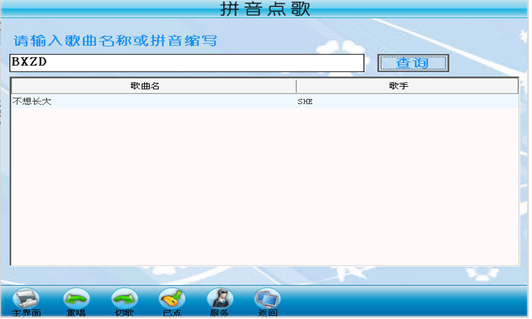
 1  // 查詢歌曲顯示在窗體中
 2         private void btnSearch_Click(object sender, EventArgs e)
 3         {
 4             DBHelper dbHelper = new DBHelper();
 5             DataSet dataSet = new DataSet();
 6             StringBuilder sb = new StringBuilder();
 7             sb.Append("select song_id,song_name,singer_name,song_url  from song_info inner join singer_info on singer_info.singer_id=song_info.singer_id ");
 8             sb.AppendFormat("where song_name like '%{0}%' or song_ab like '{0}'",this.txtSongName.Text);
 9
10             Console.WriteLine(sb.ToString());
11
12             SqlDataAdapter adapter = new SqlDataAdapter(sb.ToString(), dbHelper.Connection);
13
14              // 清空當前列表
15             if (dataSet.Tables["songList"] != null)
16             {
17                 dataSet.Tables["songList"].Clear();
18             }
19
20             adapter.Fill(dataSet, "songList");
21             this.dgvSong.DataSource = dataSet.Tables["songList"];
22         }
23
24         private void tsbtnExit_Click(object sender, EventArgs e)
25         {
26             this.Close();
27         }
28
29         private void dgvSong_CellClick(object sender, DataGridViewCellEventArgs e)
30         {
31             if (dgvSong.SelectedRows[0].Cells["songName"]!=null)
32             {
33                 // 創建一個歌曲對象,並將當權選中的歌曲名和路徑賦給該對象
34                 Song song = new Song();
35                 song.SongName = dgvSong.SelectedRows[0].Cells["songName"].Value.ToString();
36                 song.SongURL = dgvSong.SelectedRows[0].Cells["songURL"].Value.ToString();
37                 PlayList.AddSong(song);
38
39                 // 更新數據庫,將選中的歌曲點播次數加1
40                 int songId = Convert.ToInt32(dgvSong.SelectedRows[0].Cells["songId"].Value);
41                 string sql = string.Format("update song_info set song_play_count=song_play_count+1 where song_id={0}", songId);
42                 DBHelper dbHelper = new DBHelper();
43                 try
44                 {
45                     SqlCommand command = new SqlCommand(sql, dbHelper.Connection);
46                     dbHelper.OpenConnection();
47                     command.ExecuteNonQuery();
48                 }
49                 catch (Exception ex)
50                 {
51                     Console.WriteLine(ex.Message);
52                     MessageBox.Show("錯誤!");
53                 }
54                 finally
55                 {
56                     dbHelper.CloseConnection();
57                 }
58             }
59         }
實現分類點歌功能

 1         // 窗體加載時,顯示歌曲類別
 2         private void OrderBySongTypeForm_Load(object sender, EventArgs e)
 3         {
 4             // 讀取歌曲類別
 5             DBHelper dbHelper = new DBHelper();
 6             string sql = "select * from song_type";
 7             try
 8             {
 9                 // 查詢數據庫
10                 SqlCommand command = new SqlCommand(sql, dbHelper.Connection);
11                 dbHelper.OpenConnection();
12                 SqlDataReader reader = command.ExecuteReader();
13
14                 // 循環將類別讀取出來添加到ListView中
15                 this.lvSongType.Items.Clear();
16                 int i = 0;
17                 while (reader.Read())
18                 {
19                     ListViewItem item = new ListViewItem();
20                     item.Text = Convert.ToString(reader["songtype_name"]);
21                     item.Tag = Convert.ToInt32(reader["songtype_id"]);
22                     item.ImageIndex = i;
23                     this.lvSongType.Items.Add(item);
24                     i++;
25                 }
26                 reader.Close();
27             }
28             catch (Exception ex)
29             {
30                 Console.WriteLine(ex.Message);
31                 MessageBox.Show("cuowu!");
32
33             }
34             finally
35             {
36                 dbHelper.CloseConnection();
37             }
38         }
39
40         private void lvSongType_Click(object sender, EventArgs e)
41         {
42             // 讀取數據庫,讀出該歌手的所有歌曲
43             DBHelper dbHelper = new DBHelper();
44             StringBuilder sb = new StringBuilder();
45             sb.Append("select song_id,song_name, singer_name,song_url  from song_info inner join singer_info on song_info.singer_id=singer_info.singer_id ");
46             sb.AppendFormat("where songtype_id={0}",Convert.ToInt32(lvSongType.SelectedItems[0].Tag));
47             Console.WriteLine(sb.ToString());
48             FrmSongList songList = new FrmSongList();
49             songList.Sql = sb.ToString();
50             songList.Previous = PrevioisForm.SongType;
51             songList.Show();
52             this.Close();
53         }
字數點歌
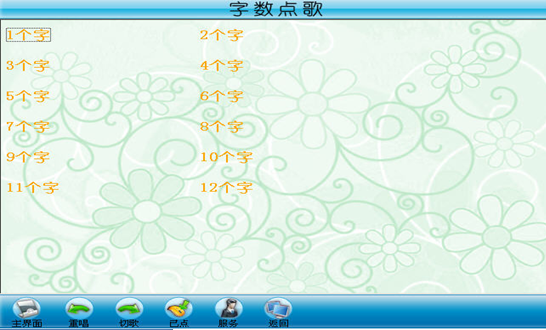
 1   private void OrderByWordCountForm_Load(object sender, EventArgs e)
 2         {
 3             // 將字數列表添加到窗體中
 4             for (int i = 0; i < 12; i++)
 5             {
 6                 // 循環生成字數項添加到窗體中
 7                 ListViewItem item = new ListViewItem();
 8                 item.Text = (i + 1)+"個字";
 9                 item.Tag = i + 1;
10                 lvWordCount.Items.Add(item);
11             }
12
13         }
14
15         private void lvWordCount_Click(object sender, EventArgs e)
16         {
17             if (lvWordCount.SelectedItems[0] != null)
18             {
19                 // 讀取數據庫,讀出該歌手的所有歌曲
20                 DBHelper dbHelper = new DBHelper();
21                 StringBuilder sb = new StringBuilder();
22                 sb.Append("select song_id,song_name, singer_name,song_url  from song_info inner join singer_info on song_info.singer_id=singer_info.singer_id ");
23                 sb.AppendFormat("where song_word_count={0}", Convert.ToInt32(lvWordCount.SelectedItems[0].Tag));
24                 Console.WriteLine(sb.ToString());
25                 FrmSongList songList = new FrmSongList();
26                 songList.Sql = sb.ToString();
27                 songList.Previous = PrevioisForm.WordCount;
28                 songList.Show();
29                 this.Close();
30             }
31         }
已點歌曲:
 1      //刷新歌曲列表
 2
 3   private void timer1_Tick(object sender, EventArgs e){
 4
 5  this.newSonglist();
 6
 7 }
 8
 9    private void newSonglist()
10
11         {
12
13             // 清空原列表
14
15             lvlist.Items.Clear();
16
17             int index = 0;
18
19             while (PlayList.SongList[index] != null)
20
21             {
22
23                 ListViewItem item = new ListViewItem();
24
25                 //獲取歌曲的名稱
26
27                 item.Text = PlayList.SongList[index].SongName;
28
29                 item.Tag = index;
30
31                 //歌曲的播放狀態
32
33                 string playState = PlayList.SongList[index].PlayState == SongPlayState.unplayed ? "未播放" : "已播放";
34
35                 item.SubItems.Add(playState);
36
37                 lvlist.Items.Add(item);
38
39                 index++;
40
41             }
42
43         }
44
45 //切割
46
47         private void tsbtnCut_Click_1(object sender, EventArgs e)
48
49         {
50
51             int songId = -1;  // 切歌的編號
52
53             DialogResult re = MessageBox.Show("確定要切歌嗎?", "提示", MessageBoxButtons.OK, MessageBoxIcon.Information);
54
55             if (re == DialogResult.OK)
57             {
58
59                 if (this.lvlist.SelectedItems.Count > 0)
60
61                 {
62
63                     songId = Convert.ToInt32(this.lvlist.SelectedItems[0].Tag);
64
65                 }
66
67                 PlayList.CutSong(songId);
68
69                 this.newSonglist();
70
71             }
72
73
歌曲列表:
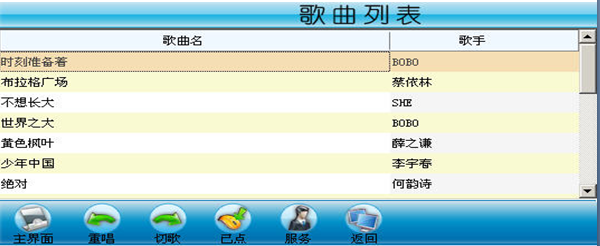
 1    // 窗體加載時查詢歌曲列表
 2         private void SongListForm_Load(object sender, EventArgs e)
 3         {
 4             DBHelper dbHelper = new DBHelper();
 5             DataSet dataSet = new DataSet();
 6             SqlDataAdapter adapter = new SqlDataAdapter(this.Sql,dbHelper.Connection);
 7             adapter.Fill(dataSet, "songList");
 8             dgvSong.DataSource = dataSet.Tables["songList"];
 9         }
10
11         // 點播一首歌曲
12         private void dgvSong_CellClick(object sender, DataGridViewCellEventArgs e)
13         {
14             // 創建一個歌曲對象,並將當權選中的歌曲名和路徑賦給該對象
15             Song song = new Song();
16             song.SongName = dgvSong.SelectedRows[0].Cells["songName"].Value.ToString();
17             song.SongURL = dgvSong.SelectedRows[0].Cells["songURL"].Value.ToString();
18             PlayList.AddSong(song);
19
20             // 更新數據庫,將選中的歌曲點播次數加1
21             int songId = Convert.ToInt32(dgvSong.SelectedRows[0].Cells["songId"].Value);
22             string sql = string.Format("update song_info set song_play_count=song_play_count+1 where song_id={0}", songId);
23             DBHelper dbHelper = new DBHelper();
24             try
25             {
26                 SqlCommand command = new SqlCommand(sql, dbHelper.Connection);
27                 dbHelper.OpenConnection();
28                 command.ExecuteNonQuery();
29             }
30             catch (Exception ex)
31             {
32                 Console.WriteLine(ex.Message);
33                 MessageBox.Show("錯誤!");
34             }
35             finally
36             {
37                 dbHelper.CloseConnection();
38             }
39         }
後台管理
KTVUtil 類:
 1 public   class  KTVUtil
 2
 3     {
 4
 5         //保存歌曲的目錄
 6
 7         public static string songURL = "";
 8
 9         //保存歌手圖片的目錄
10
11         public static string singer_photoURL = "";
12
13 }
主窗體的Load事件:
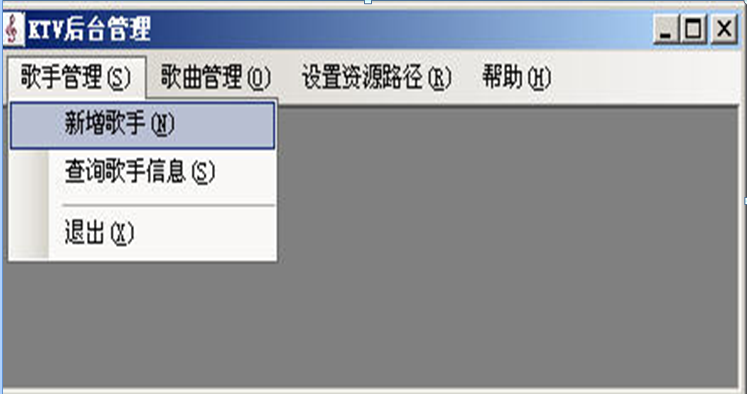
 1  private void frmKTV_Load(object sender, EventArgs e)
 2
 3         {
 4
 5
 6
 7             // 歌曲路徑
 8
 9             string sql = "select resource_path from Resource_path where resource_id=2";
10
11             KTVUtil.songURL = song_path(sql);
12
13             // 歌手圖片路徑
14
15             string sql1 = "select resource_path from Resource_path where resource_id=1";
16
17             KTVUtil.singer_photoURL = song_path(sql1);
18
19         }
20
21    //路徑
22
23         private string song_path(string sql)
24
25         {
26
27             SqlConnection con = new SqlConnection(DBHelp.str);
28
29             SqlCommand cmd = new SqlCommand(sql, con);
30
31             string path = "";
32
33
34
35             con.Open();
36
37             SqlDataReader dr = cmd.ExecuteReader();
38
39
40
41             if (dr != null)
42
43             {
44
45                 if (dr.HasRows)
46
47                 {
48
49                     while (dr.Read())
50
51                     {
52
53                         path = dr["resource_path"].ToString();
增加修改歌手信息:
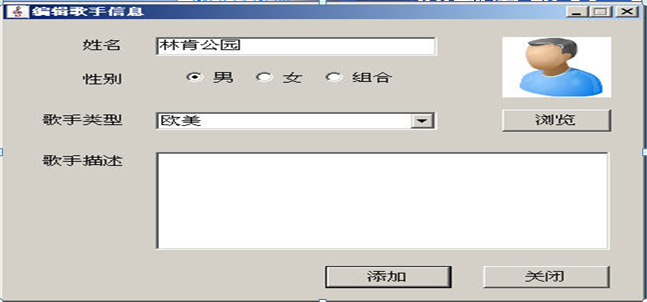
 1 獲取圖片的代碼:
 2
 3   //相對路徑
 4
 5         public string FileName;
 6
 7         //絕對路徑
 8
 9         public string Path;
10
11  //獲取
12
13         private void btnLiu_Click(object sender, EventArgs e)
14
15         {
16
17             DialogResult result = open.ShowDialog();
18
19
20
21             if (result == DialogResult.OK)//獲取路徑
22
23             {
24
25                 //相對路徑
26
27                 FileName = open.SafeFileName;
28
29                 //絕對路徑
30
31                 Path = open.FileName;
32
33                 pic.Image = Image.FromFile(Path);
39             }
40
41         }
42
43 //復制圖片的路徑
44
45 if (Path != null)
46
47                     {
48
49                         if (Path != KTVUtil.singer_photoURL + FileName)
50
51                         {
52
53                             File.Copy(Path, KTVUtil.singer_photoURL + FileName, true);
54
55                         }
56
57                     }
58
59
60
61   private void 修改ToolStripMenuItem_Click(object sender, EventArgs e)
62
63         {
64
65             if (dgvlist.SelectedRows[0].Cells[0].Value.ToString() != "")
66
67             {
68
69                 //獲取選中行的歌曲編號
70
71                 int songid = Convert.ToInt32(dgvlist.SelectedRows[0].Cells["song_id"].Value);
72
73                 FrmAddSong frm = new FrmAddSong();
74
75                 frm.songid = songid;
76
77                 frm.Show();
78
79             }
80
81             else
82
83             {
84
85                 MessageBox.Show("選歌曲");
86
87             }
查詢,刪除,歌手信息
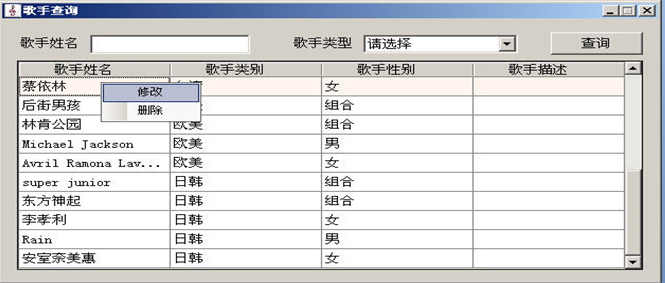
  1    public void deletesonginfo()
  2         {
  3             //獲取選中行的歌手編號
  4             singer_id = Convert.ToInt32(dgvlist.SelectedRows[0].Cells["siigid"].Value);
  5             string sql = "delete song_info where singer_id=" + singer_id + "";
  6
  7             SqlCommand cmd = new SqlCommand(sql, con);
  8             con.Open();
  9             cmd.ExecuteNonQuery();
 10             con.Close();
 11
 12         }
 13         //刪除歌手
 14         public void deletesingerinfo()
 15         {
 16             //獲取選中行的歌手編號
 17             singer_id = Convert.ToInt32(dgvlist.SelectedRows[0].Cells["siigid"].Value);
 18             string sql1 = "select song_id from song_info where singer_id=" + singer_id + "";
 19             SqlConnection con1 = new SqlConnection(DBHelp.str);
 20             SqlCommand cmd1 = new SqlCommand(sql1, con1);
 21             con1.Open();
 22             int song_id = Convert.ToInt32(cmd1.ExecuteScalar());
 23             con1.Close();
 24             if (song_id != 0)
 25             {
 26                 MessageBox.Show("刪除該歌手的歌曲信息");
 27
 28             }
 29             else
 30             {
 31                 string sql = "delete dbo.singer_info where singer_id=" + singer_id + " ";
 32
 33                 SqlCommand cmd = new SqlCommand(sql, con);
 34                 con.Open();
 35                 int count = cmd.ExecuteNonQuery();
 36                 if (count > 0)
 37                 {
 38                     MessageBox.Show("成功!");
 39                     string RowFilter = "";
 40                     SelectInfo(RowFilter);
 41                 }
 42                 else
 43                 {
 44                     MessageBox.Show("失敗!");
 45                 }
 46
 47                 con.Close();
 48
 49             }
 50
 51         }
 52         //給dgvlist控件綁定數據的方法
 53         public void SelectInfo(string RowFilter)
 54         {
 55             dgvlist.AutoGenerateColumns = false;
 56             //歌手姓名,歌手類型,歌手性別,歌手描述
 57
 58             string sql = "select singer_info.singertype_id,singer_name,singer_id,singertype_name,singer_gender,singer_description from dbo.singer_info,dbo.singer_type where singer_info.singertype_id=singer_type.singertype_id ";
 59             SqlDataAdapter da = new SqlDataAdapter(sql, con);
 60             DataSet ds = new DataSet();
 61             try
 62             {
 63                 da.Fill(ds, "info");
 64                 DataView dv = new DataView(ds.Tables["info"]);
 65                 dv.RowFilter = RowFilter;
 66                 dgvlist.DataSource = dv;
 67             }
 68             catch (Exception)
 69             {
 70
 71                 MessageBox.Show("網絡異常!");
 72             }
 73             finally
 74             {
 75                 con.Close();
 76             }
 77         }
 78         private void btnselect_Click(object sender, EventArgs e)
 79         {
 80
 81             if (txtname.Text == "" && cboty.Text == "全部")
 82             {
 83                 string RowFilter = "";
 84                 SelectInfo(RowFilter);
 85             }
 86             else if (txtname.Text != "")
 87             {
 88                 //獲取要查詢歌手的姓名
 89                 name = txtname.Text;
 90                 //獲取要查詢的歌手類型
 91                 int type = Convert.ToInt32(cboty.SelectedValue);
 92                 string RowFilter = "singer_name like '%" + name + "%'";
 93                 SelectInfo(RowFilter);
 94
 95             }
 96             else
 97             {
 98
 99                 //獲取要查詢歌手的姓名
100                 name = txtname.Text;
101                 //獲取要查詢的歌手類型
102                 int type = Convert.ToInt32(cboty.SelectedValue);
103                 string RowFilter = "singer_name like '%" + name + "%' and singertype_id=" + type + "";
104                 SelectInfo(RowFilter);
105             }
106
107         }
108         //給歌手類型下拉框綁定數據的方法
109         public void LoadINGO()
110         {
111
112             string sql = "select * from dbo.singer_type";
113             SqlDataAdapter da = new SqlDataAdapter(sql, con);
114             DataSet ds = new DataSet();
115             try
116             {
117                 da.Fill(ds, "info");
118                 cboty.DataSource = ds.Tables["info"];
119                 cboty.DisplayMember = "singertype_name";
120                 cboty.ValueMember = "singertype_id";
121                 DataRow row = ds.Tables["info"].NewRow();
122                 row["singertype_id"] = -1;
123                 row["singertype_name"] = "全部";
124                 ds.Tables["info"].Rows.InsertAt(row, 0);
125                 cboty.SelectedIndex = 0;
126
127
128             }
129             catch (Exception)
130             {
131
132                 MessageBox.Show("網路異常!");
133             }
134             finally
135             {
136                 con.Close();
137             }
138         }
139         private void FrmSelectSinger_Load(object sender, EventArgs e)
140         {
141
142             // 給歌手類型下拉框綁定數據的方法
143             LoadINGO();
144             //給dgvlist控件綁定數據
145             string RowFilter = "";
146             SelectInfo(RowFilter);
147         }
148
149         private void 刪除ToolStripMenuItem_Click_1(object sender, EventArgs e)
150         {
151             if (dgvlist.SelectedRows[0].Cells[0].Value.ToString() != "")
152             {
153                 DialogResult result = MessageBox.Show("確定刪除?", "提示", MessageBoxButtons.OKCancel, MessageBoxIcon.Question);
154                 if (result == DialogResult.OK)
155                 {
156                     //刪除歌手信息的方法
157                     deletesonginfo();
158                     deletesingerinfo();
159                     string RowFilter = "";
160                     SelectInfo(RowFilter);
增加歌曲和修改歌曲:
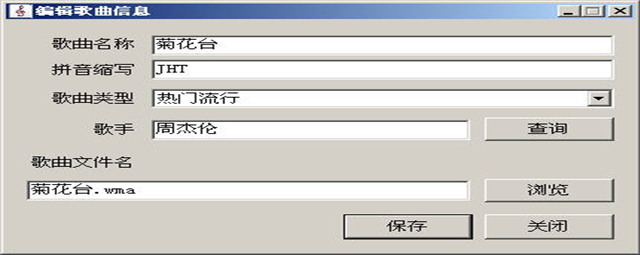
 1 public int songid;
 2
 3         public string Path;
 4
 5         //相對路徑
 6
 7         public string txtxdpath;
 8
 9   //新增歌曲信息的方法
10
11         public void addinfo()
12
13         {
14
15             //獲取歌曲名稱
16
17             string song_name = txtname.Text;
18
19             //獲取拼音縮寫信息
20
21             string py = txtsuo.Text;
22
23             //獲取歌曲類型對應的隱藏值
24
25             int type_id = Convert.ToInt32(cboty.SelectedValue);
26
27             //獲取歌手姓名對應的編號
28
29             int singe_id = Convert.ToInt32(txtsername.Tag);
30
31             //獲取歌曲文件名
32
33             string url = txtsongurl.Text;
34
35             //獲取歌曲名稱的長度
36
37             int length = song_name.Length;
38
39         //拼接sql語句
40
41             string sql = "insert into song_info values('" + song_name + "','" + py + "'," + length + "," + type_id + "," + singe_id + ",'" + url + "',default)";
42
43       SqlCommand cmd = new SqlCommand(sql, con);
44
45        con.Open();
46
47             int result = cmd.ExecuteNonQuery();
48
49             if (result > 0)
50
51             {
52
53                 MessageBox.Show("保存成功!");
54
55                 if (Path != null)
56
57                 {
58
59                     if (Path != KTVUtil.songURL + txtxdpath)
60
61                     {
62
63                         File.Copy(Path, KTVUtil.songURL + txtxdpath, true);
64
65                     }
66                 }
67
68             }
69
70             else
71
72             {
查詢,刪除歌曲信息
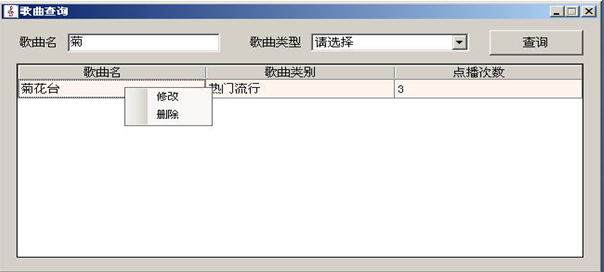
  1   //刪除歌曲信息的方法
  2         public void deletesong()
  3         {
  4
  5             if (dgvlist.SelectedRows[0].Cells[0].Value.ToString() != "")
  6             {
  7                 //獲取選中行的歌曲編號
  8                 int song_id = Convert.ToInt32(dgvlist.SelectedRows[0].Cells["song_id"].Value);
  9                 DialogResult result = MessageBox.Show("刪除?", "提示", MessageBoxButtons.OKCancel, MessageBoxIcon.Question);
 10                 if (result == DialogResult.OK)
 11                 {
 12                     SqlConnection con = new SqlConnection(DBHelp.str);
 13                     string sql = "delete song_info where song_id=" + song_id + "";
 14                     SqlCommand cmd = new SqlCommand(sql, con);
 15
 16                     con.Open();
 17                     int count = cmd.ExecuteNonQuery();
 18                     if (count > 0)
 19                     {
 20                         MessageBox.Show("成功!");
 21                         string RowFilter="";
 22                         LoadAllINFO(RowFilter);
 23                     }
 24                     else
 25                     {
 26                         MessageBox.Show("失敗!");
 27                     }
 28
 29                     con.Close();
 30
 31                 }
 32
 33             }
 34             else
 35             {
 36
 37                 MessageBox.Show("選歌曲");
 38
 39             }
 40         }
 41         //給歌曲類型下拉框賦值的方法
 42         public void LoadINFO()
 43         {
 44
 45             SqlConnection con = new SqlConnection(DBHelp.str);
 46             string sql = "select * from song_type";
 47             SqlDataAdapter da = new SqlDataAdapter(sql, con);
 48             DataSet ds = new DataSet();
 49
 50             da.Fill(ds, "info");
 51             cbolist.DataSource = ds.Tables["info"];
 52             cbolist.DisplayMember = "songtype_name";
 53             cbolist.ValueMember = "songtype_id";
 54
 55             DataRow row = ds.Tables["info"].NewRow();
 56             row["songtype_id"] = -1;
 57             row["songtype_name"] = "全部";
 58             ds.Tables["info"].Rows.InsertAt(row, 0);
 59             cbolist.SelectedIndex = 0;
 60
 61
 62
 63
 64             con.Close();
 65
 66
 67         }
 68
 69         //給dgvlist綁定數據的方法
 70         public void LoadAllINFO(string RowFilter)
 71         {
 72             //取消英文列自動生成
 73             dgvlist.AutoGenerateColumns = false;
 74             SqlConnection con = new SqlConnection(DBHelp.str);
 75             string sql = "select  song_id,song_name,songtype_name,song_play_count,song_info.songtype_id from song_info,song_type where song_info.songtype_id=song_type.songtype_id";
 76             SqlDataAdapter da = new SqlDataAdapter(sql, con);
 77             DataSet ds = new DataSet();
 78
 79             da.Fill(ds, "info");
 80             DataView dv = new DataView(ds.Tables["info"]);
 81             dv.RowFilter = RowFilter;
 82             dgvlist.DataSource = dv;
 83
 84             con.Open();
 85
 86
 87         }
 88         private void btnselect_Click(object sender, EventArgs e)
 89         {
 90
 91
 92             if (txtname.Text == "" && cbolist.Text == "全部")
 93             {
 94                 string RowFilter = "";
 95                 LoadAllINFO(RowFilter);
 96             }
 97             else if (txtname.Text != "")
 98             {
 99                 //獲取歌曲名稱
100                 string song_name = txtname.Text;
101                 //獲取歌曲類型對應的隱藏值
102                 int type_id = Convert.ToInt32(cbolist.SelectedValue);
103                 string RowFilter = "song_name like '%" + song_name + "%'";
104                 LoadAllINFO(RowFilter);
105
106             }
107             else
108             {
109
110                 //獲取歌曲名稱
111                 string song_name = txtname.Text;
112                 //獲取歌曲類型對應的隱藏值
113                 int type_id = Convert.ToInt32(cbolist.SelectedValue);
114                 string RowFilter = "song_name like '%" + song_name + "%' and songtype_id =" + type_id + "";
115                 LoadAllINFO(RowFilter);
116
117             }
118         }
119
120         private void 修改ToolStripMenuItem_Click(object sender, EventArgs e)
121         {
122             if (dgvlist.SelectedRows[0].Cells[0].Value.ToString() != "")
123             {
124                 //獲取選中行的歌曲編號
125                 int songid = Convert.ToInt32(dgvlist.SelectedRows[0].Cells["song_id"].Value);
126                 FrmAddSong frm = new FrmAddSong();
127                 frm.songid = songid;
128                 frm.Show();
129             }
130             else
131             {
132                 MessageBox.Show("選歌曲");
133             }
134         }
135
136         private void 刪除ToolStripMenuItem_Click(object sender, EventArgs e)
137         {
138
139             //刪除歌曲信息的方法
140             deletesong();
141         }
142
143         private void frmselectSong_Load(object sender, EventArgs e)
144         {
145             //給歌曲類型下拉框賦值
146             LoadINFO();
147             //給dgvlist綁定數據
148             string RowFilter = "";
149             LoadAllINFO(RowFilter);
150         }
歌曲路徑:
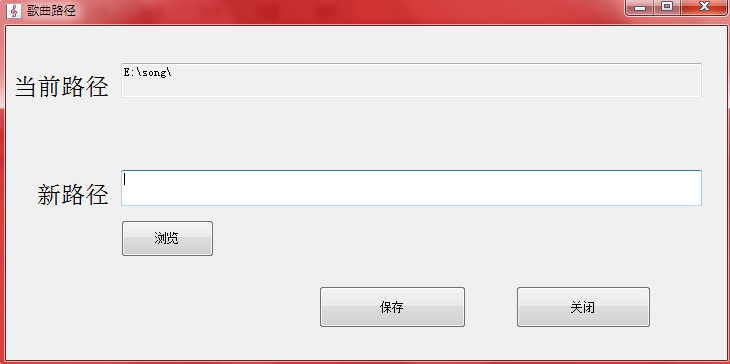
 1    private void frmAddSongURL_Load(object sender, EventArgs e)
 2
 3         {
 4
 5             string sql = "select resource_path from Resource_path where resource_id=2";
 6
 7             txtoldurl.Text = song_path(sql);
 8
 9         }
10
11 //給當前路徑賦值
12
13         private string song_path(string sql)
14
15         {
16
17
18
19             SqlCommand cmd = new SqlCommand(sql, con);
20
21             string path = "";
22
23             try
24
25             {
26
27                 con.Open();
28
29                 SqlDataReader dr = cmd.ExecuteReader();
30
31
32
33                 if (dr != null)
34
35                 {
36
37                     if (dr.HasRows)
38
39                     {
40
41                         while (dr.Read())
42
43                         {
44
45                             path = dr["resource_path"].ToString();
46
47                         }
48
49
50
51 DialogResult re = MessageBox.Show("修改路徑?", "提示", MessageBoxButtons.YesNo, MessageBoxIcon.Question);
52
53                 if (re == DialogResult.Yes)
54
55                 {
56
57
58
59                     Directory.Delete(txtnewurl.Text);
60
61                     Directory.Move(txtoldurl.Text, txtnewurl.Text);
62
63                     string newUrl = txtnewurl.Text;
64
65                     SqlConnection con = new SqlConnection(DBHelp.str);
66
67                     string sql = "update Resource_path set resource_path='" + newUrl + "' where resource_type='song'";
68
69                     SqlCommand cmd = new SqlCommand(sql, con);
70
71                     try
72
73                     {
74
75                         con.Open();
76
77                         int count = cmd.ExecuteNonQuery();
78
79                         if (count > 0)
80
81 //浏覽新路徑
82
83         private void btnLiu_Click(object sender, EventArgs e)
84
85         {
86
87
88
89             DialogResult result = brow.ShowDialog();
90
91             if (result == DialogResult.OK)
92
93             {
94
95                 txtnewurl.Text = brow.SelectedPath + "\\";
96
97             }
 1 //歌曲的文件名:
 2
 3 //浏覽
 4
 5   private void btnLiu_Click(object sender, EventArgs e)
 6
 7         {
 8
 9             open.Filter = "歌曲文件|*.mp3;";
10
11             DialogResult result = open.ShowDialog();
12
13             if (result == DialogResult.OK)//獲取路徑
14
15             {
16
17                 //相對路徑
18
19                 txtxdpath = open.SafeFileName;
20
21                 txtsongurl.Text = txtxdpath;
22
23                 //絕對路徑
24
25                 Path = open.FileName;
26
27
28
29                 int dot = txtxdpath.LastIndexOf('.');
30
31                 string fileType = txtxdpath.Substring(dot + 1);
32
33                 if (fileType != "mp3")
34
35                 {
36
37                     MessageBox.Show("文件類型不對!");
歌手圖片的路徑:
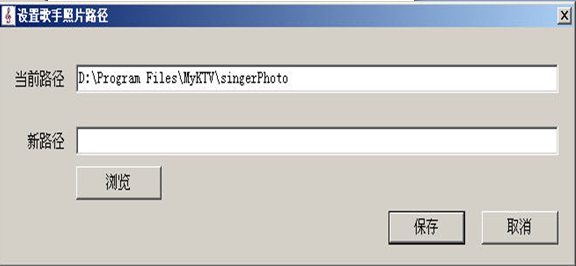
 1 //給當前路徑賦值
 2
 3         private string song_path(string sql)
 4
 5         {
 6
 7             SqlConnection con = new SqlConnection(DBHelp.str);
 8
 9             SqlCommand cmd = new SqlCommand(sql, con);
10
11             string path = "";
12
13
14
15             con.Open();
16
17             SqlDataReader dr = cmd.ExecuteReader();
18
19
20
21             if (dr != null)
22
23             {
24
25                 if (dr.HasRows)
26
27                 {
28
29                     while (dr.Read())
30
31                     {
32
33                         path = dr["resource_path"].ToString();
34
35                     }
36
37  private void btnSa_Click(object sender, EventArgs e)
38
39         {
40
41             // 如果新路徑為空,提示
42
43             if (this.txtnewurl.Text.Trim() == "")
44
45             {
46
47                 MessageBox.Show("請選擇新路徑!");
48
49             }
50
51             else
52
53             {
54
55                 // 用戶確認修改
56
57                 if (MessageBox.Show("確定要修改路徑嗎?", "操作提示", MessageBoxButtons.YesNo, MessageBoxIcon.Question) == DialogResult.Yes)
58
59                 {
60
61
62
63                     Directory.Delete(txtnewurl.Text);
64
65                     Directory.Move(txtoldurl.Text, txtnewurl.Text);
66
67                     string newUrl = txtnewurl.Text;
68
69                     SqlConnection con = new SqlConnection(DBHelp.str);
70
71                     string sql = "update Resource_path set resource_path='" + newUrl + "' where resource_type='singer_photo'";
72
73                     SqlCommand cmd = new SqlCommand(sql, con);
74
75                     con.Open();
76
77                     int count = cmd.ExecuteNonQuery();
78
79                     if (count > 0)
80
81                     {
82
83 //浏覽
84
85 private void btnLiu_Click(object sender, EventArgs e)
86
87         {
88
89             DialogResult result = brow.ShowDialog();
90
91             if (result == DialogResult.OK)
92
93             {
94
95                 txtnewurl.Text = brow.SelectedPath + "\\";
96
97             }
漢字轉拼音首字母
 1   public static string GetChineseSpell(string strText)
 2         {
 3             if (strText == null || strText.Length == 0)
 4                 return strText;
 5             System.Text.StringBuilder myStr = new System.Text.StringBuilder();
 6             foreach (char vChar in strText)
 7             {
 8                 // 若是字母則直接輸出
 9                 if ((vChar >= 'a' && vChar <= 'z') || (vChar >= 'A' && vChar <= 'Z'))
10                     myStr.Append(char.ToUpper(vChar));
11                 else if ((int)vChar >= 19968 && (int)vChar <= 40869)
12                 {
13                     // 若字符Unicode編碼在編碼范圍則 查漢字列表進行轉換輸出
14                     foreach (string strList in strChineseCharList)
15                     {
16                         if (strList.IndexOf(vChar) > 0)
17                         {
18                             myStr.Append(strList[0]);
19                             break;
20                         }
21                     }
22                 }
23             }
24             return myStr.ToString();
25         }// GetChineseSpell
26
27
這可是我辛辛苦苦的成果哦,希望大家認真看,會有收獲的