接上一篇文章繼續說String類
六,字符串的刪除
字符串的刪除是通過Remove方法實現的,格式為:
(1)字符串.Remove(開始位置)
(2)字符串.Remove(開始位置,移除數)
其中,開始位置是指字符串的索引,是一個整數,且小於字符串的長度。第一種格式,是將字符串開始位置後的所有子子符刪除,而第二種是將從開始位置開始數到移除數位置的字符刪除。
例六,實現字符串str的刪除
using System;
using System.Collections.Generic;
using System.Linq;
using System.Text;
using System.Threading.Tasks;

namespace 字符串
{
    class Program
    {
        static void Main(string[] args)
        {
            string str = "0123456789";
            string delstr1;
            string delstr2;
            delstr1 = str.Remove(6);//刪除字符串索引為6後面的字符
            delstr2 = str.Remove(5,5);//刪除字符串索引自5開始後數5個長度的字符
            Console.WriteLine(delstr1);
            Console.WriteLine(delstr2);
            Console.ReadLine();
        }
    }
}
輸出的結果為:012345
01234
七,字符串的復制
字符串的復制是通過Copy方法和CopyTo方法實現的。若想把一個字符串復制到另一個字符數組中,可以使用String的靜態方法Copy來實現。其格式為:string.Copy(要復制的字符串)。
CopyTo方法可以實現Copy同樣的功能,但是功能更為豐富,可以復制原字符串的一部分到一個字符數組中,其格式為:CopyTo(要復制的字符起始位置,目標字符數組,目標數組中的開始存放位置,要復制的字符個數)。
例七,實現字符串str的復制
using System;
using System.Collections.Generic;
using System.Linq;
using System.Text;
using System.Threading.Tasks;

namespace 字符串
{
    class Program
    {
        static void Main(string[] args)
        {
            string str = "This is a string";
            string copystr;
            copystr = string.Copy(str);
            char[] newchar=new char[20];
            str.CopyTo(5,newchar,0,11);
            Console.WriteLine(copystr);
            Console.WriteLine(newchar);
            Console.ReadLine();
        }
    }
}
輸出的結果為:This is a string
is a string
八,字符串的大小寫轉換
字符串大小寫轉換是通過String類的ToLower方法和ToUpper方法實現的,ToLower方法是將字符串轉換為小寫形式,ToUpper是將字符串轉換為大寫形式。
例八,實現字符串str的大小寫轉換
using System;
using System.Collections.Generic;
using System.Linq;
using System.Text;
using System.Threading.Tasks;

namespace 字符串
{
    class Program
    {
        static void Main(string[] args)
        {
            string str = "This is a string";
            string lowerstr;
            string upperstr;
            lowerstr = str.ToLower();
            upperstr = str.ToUpper();
            Console.WriteLine("小寫形式:{0}",lowerstr);
            Console.WriteLine("大寫形式:{0}",upperstr);
            Console.ReadLine();
        }
    }
}
輸出的結果為:this is a string
THIS IS A STRING
九,字符串的查找
字符串的查找是通過IndexOf方法和LastIndexOf方法實現的。其格式為:
字符串.IndexOf(要查找的字符或字符串)
字符串.LastIndexOf(要查找的字符或字符串)
其中,IndexOf方法是返回要查找的字符或字符串第一次在所要查找的字符串出現的位置,LastIndexOf方法是返回要查找的字符或字符串最後一次在所要查找的字符串中出現的位置。IndexOf方法和LastIndexOf方法都返回一個整數,如果在所要查找的字符串內不包含要查找的字符或字符串則返回一個負數。
例九,實現字符串str的查找
using System;
using System.Collections.Generic;
using System.Linq;
using System.Text;
using System.Threading.Tasks;

namespace 字符串
{
    class Program
    {
        static void Main(string[] args)
        {
            string str = "This is a string";
            int rh1 = str.IndexOf("i");
            int rh2 = str.LastIndexOf("i");
            if (rh1>=0)
            {
                Console.WriteLine("字符i在字符串str第一次出現的位置是:{0}",rh1);
                Console.WriteLine("字符i在字符串str最後一次出現的位置是:{0}", rh2);
            }
            else
            {
                Console.WriteLine("字符i在字符串str未出現");
            }
            Console.ReadLine();
        }
    }
}
輸出的結果為:字符i在字符串str第一次出現的位置是:2
字符i在字符串str最後一次出現的位置是:13
十,字符串的追加
在使用System.String類中的方法時,都要在內存中創建一個新的字符串對象,這就需要為該新對象分配新的空間。在需要對字符串執行重復修改的情況下,與創建新的String對象相關的系統開銷就可能非常高。為了解決這個問題,C#提供了一個類StringBuilder。
使用StringBuilder類時,首先要引入System.Text命名空間,然後通過new關鍵字對其進行初始化。StringBuilder類的方法使用和String類的方法使用是一樣的。
例十,實現對字符串str的追加
using System;
using System.Collections.Generic;
using System.Linq;
using System.Text;
using System.Threading.Tasks;

namespace 字符串
{
    class Program
    {
        static void Main(string[] args)
        {
            StringBuilder str =new StringBuilder( "Hellow World!");
            Console.WriteLine("---Append---");
            str.Append("What a beautiful day");
            Console.WriteLine("追加後的字符串為:{0}",str);
            Console.ReadLine();
        }
    }
}
輸出的結果為:---Append---
追加後的字符串為:Hellow World! What a beautiful day
補充:轉義字符
轉義字符具有特定的含義,不同於字符原有的意義的字符。在C#語言中,轉義字符是指“\”,主要用來表示那些用一般字符不方便表示的控制代碼。
對於轉義字符的輸出C#語言有著特殊的格式:
using System;
using System.Collections.Generic;
using System.Linq;
using System.Text;
using System.Threading.Tasks;

namespace 字符串
{
    class Program
    {
        static void Main(string[] args)
        {
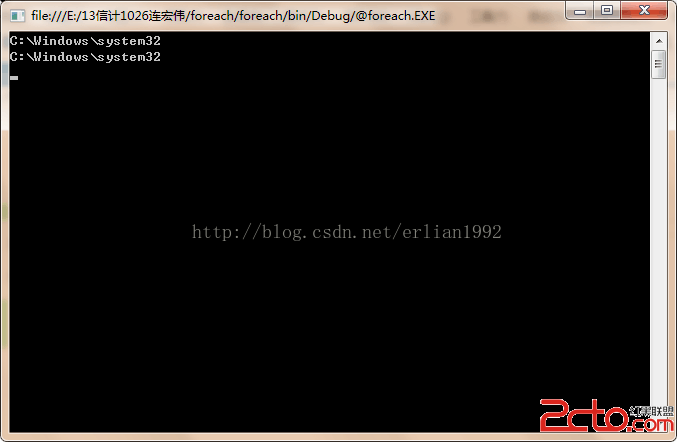
            Console.WriteLine(@"C:\Windows\system32");//第一種輸出格式就是在前面加@
            Console.WriteLine("C:\\Windows\\system32");//第二種輸出格式就是將"\"改成"\\"
            Console.ReadLine();
        }
    }
}
輸出的結果為: