C# Json.Net解析實例。本站提示廣大學習愛好者:(C# Json.Net解析實例)文章只能為提供參考,不一定能成為您想要的結果。以下是C# Json.Net解析實例正文
Json.Net is a Popular high-performance JSON framework for .NET.
Json.Net是當前比較流行的高效的Json解析的.Net框架。主要支持序列化,反序列化,手動解析,Linq等功能,可謂是功能強大而使用簡單。
具體如下圖所示【序列化和反序列化】:
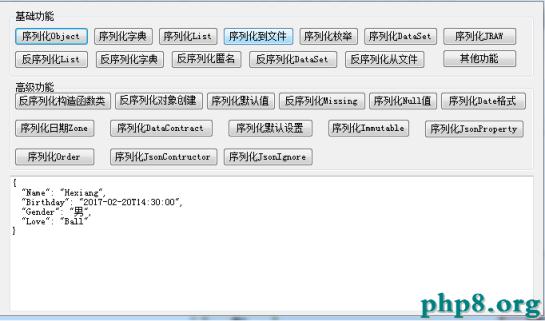
序列化和反序列化的代碼如下


1 public partial class JsonForm : Form
2 {
3 public JsonForm()
4 {
5 InitializeComponent();
6 }
7
8 /// <summary>
9 /// 序列化對象
10 /// </summary>
11 /// <param name="sender"></param>
12 /// <param name="e"></param>
13 private void btnSerializeObject_Click(object sender, EventArgs e)
14 {
15 Person p = new Person()
16 {
17 Name = "Hexiang",
18 Birthday = DateTime.Parse("2017-02-20 14:30:00"),
19 Gender = "男",
20 Love = "Ball"
21 };
22 string strJson = JsonConvert.SerializeObject(p, Formatting.Indented);
23 this.txtJson.Text = strJson;
24 }
25
26 /// <summary>
27 /// 序列化字典
28 /// </summary>
29 /// <param name="sender"></param>
30 /// <param name="e"></param>
31 private void btnSerializeDictionary_Click(object sender, EventArgs e)
32 {
33 Dictionary<string, int> dicPoints = new Dictionary<string, int>(){
34 { "James", 9001 },
35 { "Jo", 3474 },
36 { "Jess", 11926 }
37 };
38
39 string strJson = JsonConvert.SerializeObject(dicPoints, Formatting.Indented);
40
41 this.txtJson.Text = strJson;
42
43 }
44
45 /// <summary>
46 /// 序列化List
47 /// </summary>
48 /// <param name="sender"></param>
49 /// <param name="e"></param>
50 private void btnSerializeList_Click(object sender, EventArgs e)
51 {
52 List<string> lstGames = new List<string>()
53 {
54 "Starcraft",
55 "Halo",
56 "Legend of Zelda"
57 };
58
59 string strJson = JsonConvert.SerializeObject(lstGames);
60
61 this.txtJson.Text = strJson;
62 }
63
64 /// <summary>
65 /// 序列化到文件
66 /// </summary>
67 /// <param name="sender"></param>
68 /// <param name="e"></param>
69 private void btnSerializeToFile_Click(object sender, EventArgs e)
70 {
71 Person p = new Person()
72 {
73 Name = "Hexiang",
74 Birthday = DateTime.Parse("2017-02-20 14:30:00"),
75 Gender = "男",
76 Love = "Ball"
77 };
78 using (StreamWriter file = File.CreateText(@"d:\person.json"))
79 {
80 JsonSerializer serializer = new JsonSerializer();
81 serializer.Serialize(file, p);
82 }
83 }
84
85 /// <summary>
86 /// 序列化枚舉
87 /// </summary>
88 /// <param name="sender"></param>
89 /// <param name="e"></param>
90 private void btnSerializeEnum_Click(object sender, EventArgs e)
91 {
92 List<StringComparison> stringComparisons = new List<StringComparison>
93 {
94 StringComparison.CurrentCulture,
95 StringComparison.Ordinal
96 };
97
98 string jsonWithoutConverter = JsonConvert.SerializeObject(stringComparisons);
99
100 this.txtJson.Text = jsonWithoutConverter;//序列化出來是枚舉所代表的整數值
101
102
103 string jsonWithConverter = JsonConvert.SerializeObject(stringComparisons, new StringEnumConverter());
104 this.txtJson.Text += "\r\n";
105 this.txtJson.Text += jsonWithConverter;//序列化出來是枚舉所代表的文本值
106 // ["CurrentCulture","Ordinal"]
107
108 List<StringComparison> newStringComparsions = JsonConvert.DeserializeObject<List<StringComparison>>(
109 jsonWithConverter,
110 new StringEnumConverter());
111 }
112
113 /// <summary>
114 /// 序列化DataSet
115 /// </summary>
116 /// <param name="sender"></param>
117 /// <param name="e"></param>
118 private void btnSerializeDataSet_Click(object sender, EventArgs e)
119 {
120 DataSet dataSet = new DataSet("dataSet");
121 dataSet.Namespace = "NetFrameWork";
122 DataTable table = new DataTable();
123 DataColumn idColumn = new DataColumn("id", typeof(int));
124 idColumn.AutoIncrement = true;
125
126 DataColumn itemColumn = new DataColumn("item");
127 table.Columns.Add(idColumn);
128 table.Columns.Add(itemColumn);
129 dataSet.Tables.Add(table);
130
131 for (int i = 0; i < 2; i++)
132 {
133 DataRow newRow = table.NewRow();
134 newRow["item"] = "item " + i;
135 table.Rows.Add(newRow);
136 }
137
138 dataSet.AcceptChanges();
139
140 string json = JsonConvert.SerializeObject(dataSet, Formatting.Indented);
141 this.txtJson.Text = json;
142 }
143
144 /// <summary>
145 /// 序列化JRaw
146 /// </summary>
147 /// <param name="sender"></param>
148 /// <param name="e"></param>
149 private void btnSerializeRaw_Click(object sender, EventArgs e)
150 {
151 JavaScriptSettings settings = new JavaScriptSettings
152 {
153 OnLoadFunction = new JRaw("OnLoad"),
154 OnUnloadFunction = new JRaw("function(e) { alert(e); }")
155 };
156
157 string json = JsonConvert.SerializeObject(settings, Formatting.Indented);
158
159 this.txtJson.Text = json;
160
161 }
162
163 /// <summary>
164 /// 反序列化List
165 /// </summary>
166 /// <param name="sender"></param>
167 /// <param name="e"></param>
168 private void btnDeserializeList_Click(object sender, EventArgs e)
169 {
170 string json = @"['Starcraft','Halo','Legend of Zelda']";
171 List<string> videogames = JsonConvert.DeserializeObject<List<string>>(json);
172 this.txtJson.Text = string.Join(", ", videogames.ToArray());
173 }
174
175 /// <summary>
176 /// 反序列化字典
177 /// </summary>
178 /// <param name="sender"></param>
179 /// <param name="e"></param>
180 private void btnDeserializeDictionary_Click(object sender, EventArgs e)
181 {
182 string json = @"{
183 'href': '/account/login.aspx',
184 'target': '_blank'
185 }";
186
187 Dictionary<string, string> dicAttributes = JsonConvert.DeserializeObject<Dictionary<string, string>>(json);
188
189 this.txtJson.Text = dicAttributes["href"];
190 this.txtJson.Text += "\r\n";
191 this.txtJson.Text += dicAttributes["target"];
192
193
194 }
195
196 /// <summary>
197 /// 反序列化匿名類
198 /// </summary>
199 /// <param name="sender"></param>
200 /// <param name="e"></param>
201 private void btnDeserializeAnaymous_Click(object sender, EventArgs e)
202 {
203 var definition = new { Name = "" };
204
205 string json1 = @"{'Name':'James'}";
206 var customer1 = JsonConvert.DeserializeAnonymousType(json1, definition);
207 this.txtJson.Text = customer1.Name;
208 this.txtJson.Text += "\r\n";
209
210 string json2 = @"{'Name':'Mike'}";
211 var customer2 = JsonConvert.DeserializeAnonymousType(json2, definition);
212 this.txtJson.Text += customer2.Name;
213
214 }
215
216 /// <summary>
217 /// 反序列化DataSet
218 /// </summary>
219 /// <param name="sender"></param>
220 /// <param name="e"></param>
221 private void btnDeserializeDataSet_Click(object sender, EventArgs e)
222 {
223 string json = @"{
224 'Table1': [
225 {
226 'id': 0,
227 'item': 'item 0'
228 },
229 {
230 'id': 1,
231 'item': 'item 1'
232 }
233 ]
234 }";
235
236 DataSet dataSet = JsonConvert.DeserializeObject<DataSet>(json);
237
238 DataTable dataTable = dataSet.Tables["Table1"];
239 this.txtJson.Text = dataTable.Rows.Count.ToString();
240
241
242 foreach (DataRow row in dataTable.Rows)
243 {
244 this.txtJson.Text += "\r\n";
245 this.txtJson.Text += (row["id"] + " - " + row["item"]);
246 }
247
248 }
249
250 /// <summary>
251 /// 從文件反序列化
252 /// </summary>
253 /// <param name="sender"></param>
254 /// <param name="e"></param>
255 private void btnDeserializeFrmFile_Click(object sender, EventArgs e)
256 {
257 using (StreamReader file = File.OpenText(@"d:\person.json"))
258 {
259 JsonSerializer serializer = new JsonSerializer();
260 Person p = (Person)serializer.Deserialize(file, typeof(Person));
261 this.txtJson.Text = p.Name;
262 }
263 }
264
265 /// <summary>
266 /// 反序列化帶構造函數人類
267 /// </summary>
268 /// <param name="sender"></param>
269 /// <param name="e"></param>
270 private void btnDeserializeConstructor_Click(object sender, EventArgs e)
271 {
272 string json = @"{'Url':'http://www.google.com'}";
273
274 //直接序列化會報錯,需要設置JsonSerializerSettings中ConstructorHandling才可以。
275 Website website = JsonConvert.DeserializeObject<Website>(json, new JsonSerializerSettings
276 {
277 ConstructorHandling = ConstructorHandling.AllowNonPublicDefaultConstructor
278 });
279
280 this.txtJson.Text = website.Url;
281
282 }
283
284 /// <summary>
285 /// 反序列化對象,如果有構造函數中,創建對象,則用Json的進行替換
286 /// </summary>
287 /// <param name="sender"></param>
288 /// <param name="e"></param>
289 private void btnDeserializeObjectCreation_Click(object sender, EventArgs e)
290 {
291 //
292 string json = @"{
293 'Name': 'James',
294 'Offices': [
295 'Auckland',
296 'Wellington',
297 'Christchurch'
298 ]
299 }";
300
301 UserViewModel model1 = JsonConvert.DeserializeObject<UserViewModel>(json);
302
303 this.txtJson.Text = string.Join(",", model1.Offices);//默認會重復
304 this.txtJson.Text += "\r\n";
305
306 //每次從Json中創建新的對象
307 UserViewModel model2 = JsonConvert.DeserializeObject<UserViewModel>(json, new JsonSerializerSettings
308 {
309 ObjectCreationHandling = ObjectCreationHandling.Replace
310 });
311
312 this.txtJson.Text = string.Join(",", model2.Offices);
313
314 }
315
316 /// <summary>
317 /// 序列化默認值處理,沒有賦值的則不序列化出來
318 /// </summary>
319 /// <param name="sender"></param>
320 /// <param name="e"></param>
321 private void btnSerializeDefautValue_Click(object sender, EventArgs e)
322 {
323 Person person = new Person();
324
325 string jsonIncludeDefaultValues = JsonConvert.SerializeObject(person, Formatting.Indented);
326
327 this.txtJson.Text=(jsonIncludeDefaultValues);//默認的序列化,帶不賦值的屬性
328
329 this.txtJson.Text += "\r\n";
330
331 string jsonIgnoreDefaultValues = JsonConvert.SerializeObject(person, Formatting.Indented, new JsonSerializerSettings
332 {
333 DefaultValueHandling = DefaultValueHandling.Ignore //去掉不賦值的屬性
334 });
335
336 this.txtJson.Text+=(jsonIgnoreDefaultValues);
337 }
338
339 /// <summary>
340 /// 如果實體類中沒有對應屬性,則如何處理
341 /// </summary>
342 /// <param name="sender"></param>
343 /// <param name="e"></param>
344 private void btnDeserializeMissingMember_Click(object sender, EventArgs e)
345 {
346 string json = @"{
347 'FullName': 'Dan Deleted',
348 'Deleted': true,
349 'DeletedDate': '2013-01-20T00:00:00'
350 }";
351
352 try
353 {
354 JsonConvert.DeserializeObject<Account>(json, new JsonSerializerSettings
355 {
356 MissingMemberHandling = MissingMemberHandling.Error //要麼忽略,要麼報錯
357 });
358 }
359 catch (JsonSerializationException ex)
360 {
361 this.txtJson.Text=(ex.Message);
362 // Could not find member 'DeletedDate' on object of type 'Account'. Path 'DeletedDate', line 4, position 23.
363 }
364 }
365
366 /// <summary>
367 /// 序列化時Null值的處理
368 /// </summary>
369 /// <param name="sender"></param>
370 /// <param name="e"></param>
371 private void btnSerializeNull_Click(object sender, EventArgs e)
372 {
373 Person person = new Person
374 {
375 Name = "Nigal Newborn"
376 };
377
378 //默認的序列化
379 string jsonIncludeNullValues = JsonConvert.SerializeObject(person, Formatting.Indented);
380
381 this.txtJson.Text=(jsonIncludeNullValues);
382 this.txtJson.Text += "\r\n";
383
384 //去掉Null值的序列化
385 string jsonIgnoreNullValues = JsonConvert.SerializeObject(person, Formatting.Indented, new JsonSerializerSettings
386 {
387 NullValueHandling = NullValueHandling.Ignore //可以忽略,可以包含
388 });
389
390 this.txtJson.Text+=(jsonIgnoreNullValues);
391
392 }
393
394 /// <summary>
395 /// 序列化日期格式
396 /// </summary>
397 /// <param name="sender"></param>
398 /// <param name="e"></param>
399 private void btnSerializeDateTime_Click(object sender, EventArgs e)
400 {
401 DateTime mayanEndOfTheWorld = new DateTime(2012, 12, 21);
402
403 string jsonIsoDate = JsonConvert.SerializeObject(mayanEndOfTheWorld);
404
405 this.txtJson.Text = (jsonIsoDate);
406
407 this.txtJson.Text += "\r\n";
408 string jsonMsDate = JsonConvert.SerializeObject(mayanEndOfTheWorld, new JsonSerializerSettings
409 {
410 DateFormatHandling = DateFormatHandling.MicrosoftDateFormat
411 });
412
413 this.txtJson.Text += (jsonMsDate);
414 // "\/Date(1356044400000+0100)\/"
415 this.txtJson.Text += "\r\n";
416 string json = JsonConvert.SerializeObject(mayanEndOfTheWorld, new JsonSerializerSettings
417 {
418 DateFormatString = "yyyy-MM-dd",
419 Formatting = Formatting.Indented
420 });
421 this.txtJson.Text += json;
422 }
423
424 private void btnSerializeDateZone_Click(object sender, EventArgs e)
425 {
426 Flight flight = new Flight
427 {
428 Destination = "Dubai",
429 DepartureDate = new DateTime(2013, 1, 21, 0, 0, 0, DateTimeKind.Unspecified),
430 DepartureDateUtc = new DateTime(2013, 1, 21, 0, 0, 0, DateTimeKind.Utc),
431 DepartureDateLocal = new DateTime(2013, 1, 21, 0, 0, 0, DateTimeKind.Local),
432 Duration = TimeSpan.FromHours(5.5)
433 };
434
435 string jsonWithRoundtripTimeZone = JsonConvert.SerializeObject(flight, Formatting.Indented, new JsonSerializerSettings
436 {
437 DateTimeZoneHandling = DateTimeZoneHandling.RoundtripKind
438 });
439
440 this.txtJson.Text=(jsonWithRoundtripTimeZone);
441 this.txtJson.Text += "\r\n";
442 string jsonWithLocalTimeZone = JsonConvert.SerializeObject(flight, Formatting.Indented, new JsonSerializerSettings
443 {
444 DateTimeZoneHandling = DateTimeZoneHandling.Local
445 });
446
447 this.txtJson.Text+=(jsonWithLocalTimeZone);
448 this.txtJson.Text += "\r\n";
449
450 string jsonWithUtcTimeZone = JsonConvert.SerializeObject(flight, Formatting.Indented, new JsonSerializerSettings
451 {
452 DateTimeZoneHandling = DateTimeZoneHandling.Utc
453 });
454
455 this.txtJson.Text += (jsonWithUtcTimeZone);
456 this.txtJson.Text += "\r\n";
457
458 string jsonWithUnspecifiedTimeZone = JsonConvert.SerializeObject(flight, Formatting.Indented, new JsonSerializerSettings
459 {
460 DateTimeZoneHandling = DateTimeZoneHandling.Unspecified
461 });
462
463 this.txtJson.Text += (jsonWithUnspecifiedTimeZone);
464
465 }
466
467 private void btnSerializeDataContract_Click(object sender, EventArgs e)
468 {
469 CFile file = new CFile
470 {
471 Id = Guid.NewGuid(),
472 Name = "ImportantLegalDocuments.docx",
473 Size = 50 * 1024
474 };
475
476 string json = JsonConvert.SerializeObject(file, Formatting.Indented);
477
478 this.txtJson.Text=(json);
479 }
480
481 /// <summary>
482 /// 序列化默認設置
483 /// </summary>
484 /// <param name="sender"></param>
485 /// <param name="e"></param>
486 private void btnSerializeDefaultSetting_Click(object sender, EventArgs e)
487 {
488 // settings will automatically be used by JsonConvert.SerializeObject/DeserializeObject
489 JsonConvert.DefaultSettings = () => new JsonSerializerSettings
490 {
491 Formatting = Formatting.Indented,
492 ContractResolver = new CamelCasePropertyNamesContractResolver()
493 };
494
495 Person s = new Person()
496 {
497 Name = "Eric",
498 Birthday = new DateTime(1980, 4, 20, 0, 0, 0, DateTimeKind.Utc),
499 Gender = "男",
500 Love = "Web Dude"
501 };
502
503 string json = JsonConvert.SerializeObject(s);
504 this.txtJson.Text = json;
505 }
506
507 /// <summary>
508 /// 序列化Immutable
509 /// </summary>
510 /// <param name="sender"></param>
511 /// <param name="e"></param>
512 private void btnSerializeImmutable_Click(object sender, EventArgs e)
513 {
514 //ImmutableList<string> l = ImmutableList.CreateRange(new List<string>
515 // {
516 // "One",
517 // "II",
518 // "3"
519 // });
520
521 //string json = JsonConvert.SerializeObject(l, Formatting.Indented);
522
523 }
524
525 /// <summary>
526 /// 序列化JsonProperty
527 /// </summary>
528 /// <param name="sender"></param>
529 /// <param name="e"></param>
530 private void btnSerializeJsonProperty_Click(object sender, EventArgs e)
531 {
532 Videogame starcraft = new Videogame
533 {
534 Name = "Starcraft",
535 ReleaseDate = new DateTime(1998, 1, 1)
536 };
537
538 string json = JsonConvert.SerializeObject(starcraft, Formatting.Indented);
539
540 this.txtJson.Text = json;
541 }
542
543 /// <summary>
544 /// 序列化排序,值越小,月靠前,默認是0
545 /// </summary>
546 /// <param name="sender"></param>
547 /// <param name="e"></param>
548 private void btnSerializeOrder_Click(object sender, EventArgs e)
549 {
550 Account0 account = new Account0
551 {
552 FullName = "Aaron Account",
553 EmailAddress = "aaron@example.com",
554 Deleted = true,
555 DeletedDate = new DateTime(2013, 1, 25),
556 UpdatedDate = new DateTime(2013, 1, 25),
557 CreatedDate = new DateTime(2010, 10, 1)
558 };
559
560 string json = JsonConvert.SerializeObject(account, Formatting.Indented);
561
562 this.txtJson.Text=(json);
563
564 }
565
566 private void btnSerializeJsonConstructor_Click(object sender, EventArgs e)
567 {
568 string json = @"{
569 ""UserName"": ""domain\\username"",
570 ""Enabled"": true
571 }";
572
573 User user = JsonConvert.DeserializeObject<User>(json);
574
575 this.txtJson.Text=(user.UserName);
576
577 }
578
579 private void btnSerializeJsonIgnore_Click(object sender, EventArgs e)
580 {
581 Account1 account = new Account1
582 {
583 FullName = "Joe User",
584 EmailAddress = "joe@example.com",
585 PasswordHash = "VHdlZXQgJ1F1aWNrc2lsdmVyJyB0byBASmFtZXNOSw=="
586 };
587
588 string json = JsonConvert.SerializeObject(account);
589 this.txtJson.Text = json;
590 }
591
592 /// <summary>
593 /// 其他功能
594 /// </summary>
595 /// <param name="sender"></param>
596 /// <param name="e"></param>
597 private void btnOtherFunction_Click(object sender, EventArgs e)
598 {
599 JsonForm1 jsonOther = new JsonForm1();
600 jsonOther.ShowDialog();
601 }
602 }
View Code
具體如下圖所示【其他功能】:
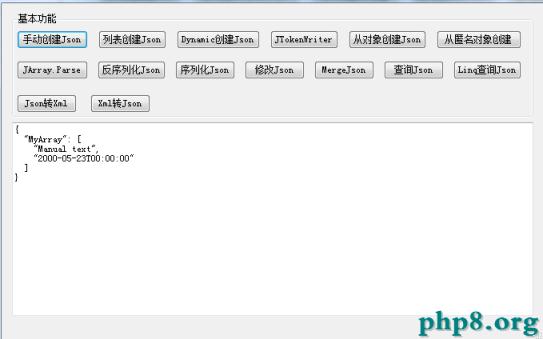
其他功能代碼如下
1 public partial class JsonForm1 : Form
2 {
3 public JsonForm1()
4 {
5 InitializeComponent();
6 }
7
8 /// <summary>
9 /// 手動創建Json
10 /// </summary>
11 /// <param name="sender"></param>
12 /// <param name="e"></param>
13 private void btnCreateJsonManually_Click(object sender, EventArgs e)
14 {
15 JArray array = new JArray();
16 array.Add("Manual text");
17 array.Add(new DateTime(2000, 5, 23));
18
19 JObject o = new JObject();
20 o["MyArray"] = array;
21
22 string json = o.ToString();
23 this.txtJson.Text = json;
24
25 }
26
27 /// <summary>
28 /// 列表創建Json
29 /// </summary>
30 /// <param name="sender"></param>
31 /// <param name="e"></param>
32 private void btnCollectionJson_Click(object sender, EventArgs e)
33 {
34 JObject o = new JObject()
35 {
36 { "Cpu", "Intel" },
37 { "Memory", 32 },
38 {
39 "Drives", new JArray
40 {
41 "DVD",
42 "SSD"
43 }
44 }
45 };
46
47 this.txtJson.Text = o.ToString();
48 }
49
50 private void btnCreateJsonByDynamic_Click(object sender, EventArgs e)
51 {
52 dynamic product = new JObject();
53 product.ProductName = "Elbow Grease";
54 product.Enabled = true;
55 product.Price = 4.90m;
56 product.StockCount = 9000;
57 product.StockValue = 44100;
58 product.Tags = new JArray("Real", "OnSale");
59 this.txtJson.Text = product.ToString();
60
61 }
62
63 /// <summary>
64 /// 從JTokenWriter創建Json
65 /// </summary>
66 /// <param name="sender"></param>
67 /// <param name="e"></param>
68 private void btnJTokenWriter_Click(object sender, EventArgs e)
69 {
70 JTokenWriter writer = new JTokenWriter();
71 writer.WriteStartObject();
72 writer.WritePropertyName("name1");
73 writer.WriteValue("value1");
74 writer.WritePropertyName("name2");
75 writer.WriteStartArray();
76 writer.WriteValue(1);
77 writer.WriteValue(2);
78 writer.WriteEndArray();
79 writer.WriteEndObject();
80
81 JObject o = (JObject)writer.Token;
82
83 this.txtJson.Text = o.ToString();
84 }
85
86 /// <summary>
87 /// 從對象創建Json
88 /// </summary>
89 /// <param name="sender"></param>
90 /// <param name="e"></param>
91 private void btnCreateJsonFromObject_Click(object sender, EventArgs e)
92 {
93 JValue i = (JValue)JToken.FromObject(12345);
94
95 Console.WriteLine(i.Type);
96 // Integer
97 Console.WriteLine(i.ToString());
98 // 12345
99
100 JValue s = (JValue)JToken.FromObject("A string");
101
102 Console.WriteLine(s.Type);
103 // String
104 Console.WriteLine(s.ToString());
105 // A string
106
107 Computer computer = new Computer
108 {
109 Cpu = "Intel",
110 Memory = 32,
111 Drives = new List<string>
112 {
113 "DVD",
114 "SSD"
115 }
116 };
117
118 JObject o = (JObject)JToken.FromObject(computer);
119
120 Console.WriteLine(o.ToString());
121 // {
122 // "Cpu": "Intel",
123 // "Memory": 32,
124 // "Drives": [
125 // "DVD",
126 // "SSD"
127 // ]
128 // }
129
130 JArray a = (JArray)JToken.FromObject(computer.Drives);
131
132 Console.WriteLine(a.ToString());
133 // [
134 // "DVD",
135 // "SSD"
136 // ]
137 }
138
139 /// <summary>
140 /// 從匿名對象創建
141 /// </summary>
142 /// <param name="sender"></param>
143 /// <param name="e"></param>
144 private void btnCreateFromAnaymous_Click(object sender, EventArgs e)
145 {
146 List<Post> posts = new List<Post>
147 {
148 new Post
149 {
150 Title = "Episode VII",
151 Description = "Episode VII production",
152 Categories = new List<string>
153 {
154 "episode-vii",
155 "movie"
156 },
157 Link = "episode-vii-production.aspx"
158 }
159 };
160
161 JObject o = JObject.FromObject(new
162 {
163 channel = new
164 {
165 title = "Star Wars",
166 link = "http://www.starwars.com",
167 description = "Star Wars blog.",
168 item =
169 from p in posts
170 orderby p.Title
171 select new
172 {
173 title = p.Title,
174 description = p.Description,
175 link = p.Link,
176 category = p.Categories
177 }
178 }
179 });
180
181 this.txtJson.Text=o.ToString();
182
183 }
184
185 /// <summary>
186 /// Parse
187 /// </summary>
188 /// <param name="sender"></param>
189 /// <param name="e"></param>
190 private void btnJArrayParse_Click(object sender, EventArgs e)
191 {
192 string json = @"[
193 'Small',
194 'Medium',
195 'Large'
196 ]";
197
198 JArray a = JArray.Parse(json);
199
200 this.txtJson.Text = a.ToString();
201 this.txtJson.Text += "\r\n";
202
203 json = @"{
204 CPU: 'Intel',
205 Drives: [
206 'DVD read/writer',
207 '500 gigabyte hard drive'
208 ]
209 }";
210
211 JObject o = JObject.Parse(json);
212
213 this.txtJson.Text += o.ToString();
214
215 JToken t1 = JToken.Parse("{}");
216
217 Console.WriteLine(t1.Type);
218 // Object
219
220 JToken t2 = JToken.Parse("[]");
221
222 Console.WriteLine(t2.Type);
223 // Array
224
225 JToken t3 = JToken.Parse("null");
226
227 Console.WriteLine(t3.Type);
228 // Null
229
230 JToken t4 = JToken.Parse(@"'A string!'");
231
232 Console.WriteLine(t4.Type);
233 // String
234 }
235
236 private void btnDeserializeJsonLinq_Click(object sender, EventArgs e)
237 {
238 string json = @"[
239 {
240 'Title': 'Json.NET is awesome!',
241 'Author': {
242 'Name': 'James Newton-King',
243 'Twitter': '@JamesNK',
244 'Picture': '/jamesnk.png'
245 },
246 'Date': '2013-01-23T19:30:00',
247 'BodyHtml': '<h3>Title!</h3>\r\n<p>Content!</p>'
248 }
249 ]";
250
251 JArray blogPostArray = JArray.Parse(json);
252
253 IList<BlogPost> blogPosts = blogPostArray.Select(p => new BlogPost
254 {
255 Title = (string)p["Title"],
256 AuthorName = (string)p["Author"]["Name"],
257 AuthorTwitter = (string)p["Author"]["Twitter"],
258 PostedDate = (DateTime)p["Date"],
259 Body = HttpUtility.HtmlDecode((string)p["BodyHtml"])
260 }).ToList();
261
262 this.txtJson.Text=(blogPosts[0].Body);
263
264 }
265
266 private void btnSerializeJson_Click(object sender, EventArgs e)
267 {
268 IList<BlogPost> blogPosts = new List<BlogPost>
269 {
270 new BlogPost
271 {
272 Title = "Json.NET is awesome!",
273 AuthorName = "James Newton-King",
274 AuthorTwitter = "JamesNK",
275 PostedDate = new DateTime(2013, 1, 23, 19, 30, 0),
276 Body = @"<h3>Title!</h3>
277 <p>Content!</p>"
278 }
279 };
280
281 JArray blogPostsArray = new JArray(
282 blogPosts.Select(p => new JObject
283 {
284 { "Title", p.Title },
285 {
286 "Author", new JObject
287 {
288 { "Name", p.AuthorName },
289 { "Twitter", p.AuthorTwitter }
290 }
291 },
292 { "Date", p.PostedDate
293 },
294 { "BodyHtml", HttpUtility.HtmlEncode(p.Body) },
295 })
296 );
297
298 this.txtJson.Text=(blogPostsArray.ToString());
299
300 }
301
302 /// <summary>
303 /// 修改Json
304 /// </summary>
305 /// <param name="sender"></param>
306 /// <param name="e"></param>
307 private void btnModifyJson_Click(object sender, EventArgs e)
308 {
309 string json = @"{
310 'channel': {
311 'title': 'Star Wars',
312 'link': 'http://www.starwars.com',
313 'description': 'Star Wars blog.',
314 'obsolete': 'Obsolete value',
315 'item': []
316 }
317 }";
318
319 JObject rss = JObject.Parse(json);
320
321 JObject channel = (JObject)rss["channel"];
322
323 channel["title"] = ((string)channel["title"]).ToUpper();
324 channel["description"] = ((string)channel["description"]).ToUpper();
325
326 channel.Property("obsolete").Remove();
327
328 channel.Property("description").AddAfterSelf(new JProperty("new", "New value"));
329
330 JArray item = (JArray)channel["item"];
331 item.Add("Item 1");
332 item.Add("Item 2");
333
334 this.txtJson.Text=rss.ToString();
335 }
336
337 /// <summary>
338 /// 合並Json
339 /// </summary>
340 /// <param name="sender"></param>
341 /// <param name="e"></param>
342 private void btnMergeJson_Click(object sender, EventArgs e)
343 {
344 JObject o1 = JObject.Parse(@"{
345 'FirstName': 'John',
346 'LastName': 'Smith',
347 'Enabled': false,
348 'Roles': [ 'User' ]
349 }");
350 JObject o2 = JObject.Parse(@"{
351 'Enabled': true,
352 'Roles': [ 'User', 'Admin' ]
353 }");
354
355 o1.Merge(o2, new JsonMergeSettings
356 {
357 // union array values together to avoid duplicates
358 MergeArrayHandling = MergeArrayHandling.Union
359 });
360
361 this.txtJson.Text = o1.ToString();
362 }
363
364 /// <summary>
365 /// 查詢Json
366 /// </summary>
367 /// <param name="sender"></param>
368 /// <param name="e"></param>
369 private void btnQueryJson_Click(object sender, EventArgs e)
370 {
371 string json = @"{
372 'channel': {
373 'title': 'James Newton-King',
374 'link': 'http://james.newtonking.com',
375 'description': 'James Newton-King\'s blog.',
376 'item': [
377 {
378 'title': 'Json.NET 1.3 + New license + Now on CodePlex',
379 'description': 'Annoucing the release of Json.NET 1.3, the MIT license and the source on CodePlex',
380 'link': 'http://james.newtonking.com/projects/json-net.aspx',
381 'category': [
382 'Json.NET',
383 'CodePlex'
384 ]
385 },
386 {
387 'title': 'LINQ to JSON beta',
388 'description': 'Annoucing LINQ to JSON',
389 'link': 'http://james.newtonking.com/projects/json-net.aspx',
390 'category': [
391 'Json.NET',
392 'LINQ'
393 ]
394 }
395 ]
396 }
397 }";
398
399 JObject rss = JObject.Parse(json);
400
401 string rssTitle = (string)rss["channel"]["title"];
402
403 Console.WriteLine(rssTitle);
404 // James Newton-King
405
406 string itemTitle = (string)rss["channel"]["item"][0]["title"];
407
408 Console.WriteLine(itemTitle);
409 // Json.NET 1.3 + New license + Now on CodePlex
410
411 JArray categories = (JArray)rss["channel"]["item"][0]["category"];
412
413 Console.WriteLine(categories);
414 // [
415 // "Json.NET",
416 // "CodePlex"
417 // ]
418
419 string[] categoriesText = categories.Select(c => (string)c).ToArray();
420
421 Console.WriteLine(string.Join(", ", categoriesText));
422 // Json.NET, CodePlex
423 }
424
425 private void btnQueryWithLinq_Click(object sender, EventArgs e)
426 {
427 string json = @"{
428 'channel': {
429 'title': 'James Newton-King',
430 'link': 'http://james.newtonking.com',
431 'description': 'James Newton-King\'s blog.',
432 'item': [
433 {
434 'title': 'Json.NET 1.3 + New license + Now on CodePlex',
435 'description': 'Annoucing the release of Json.NET 1.3, the MIT license and the source on CodePlex',
436 'link': 'http://james.newtonking.com/projects/json-net.aspx',
437 'category': [
438 'Json.NET',
439 'CodePlex'
440 ]
441 },
442 {
443 'title': 'LINQ to JSON beta',
444 'description': 'Annoucing LINQ to JSON',
445 'link': 'http://james.newtonking.com/projects/json-net.aspx',
446 'category': [
447 'Json.NET',
448 'LINQ'
449 ]
450 }
451 ]
452 }
453 }";
454
455 JObject rss = JObject.Parse(json);
456
457 var postTitles =
458 from p in rss["channel"]["item"]
459 select (string)p["title"];
460
461 foreach (var item in postTitles)
462 {
463 Console.WriteLine(item);
464 }
465 //LINQ to JSON beta
466 //Json.NET 1.3 + New license + Now on CodePlex
467
468 var categories =
469 from c in rss["channel"]["item"].Children()["category"].Values<string>()
470 group c by c
471 into g
472 orderby g.Count() descending
473 select new { Category = g.Key, Count = g.Count() };
474
475 foreach (var c in categories)
476 {
477 Console.WriteLine(c.Category + " - Count: " + c.Count);
478 }
479 //Json.NET - Count: 2
480 //LINQ - Count: 1
481 //CodePlex - Count: 1
482 }
483
484 private void btnJsonToXml_Click(object sender, EventArgs e)
485 {
486 string json = @"{
487 '@Id': 1,
488 'Email': 'james@example.com',
489 'Active': true,
490 'CreatedDate': '2013-01-20T00:00:00Z',
491 'Roles': [
492 'User',
493 'Admin'
494 ],
495 'Team': {
496 '@Id': 2,
497 'Name': 'Software Developers',
498 'Description': 'Creators of fine software products and services.'
499 }
500 }";
501
502 XNode node = JsonConvert.DeserializeXNode(json, "Root");
503
504 this.txtJson.Text=(node.ToString());
505
506 }
507
508 private void btnXmlToJson_Click(object sender, EventArgs e)
509 {
510 string xml = @"<?xml version='1.0' standalone='no'?>
511 <root>
512 <person id='1'>
513 <name>Alan</name>
514 <url>http://www.google.com</url>
515 </person>
516 <person id='2'>
517 <name>Louis</name>
518 <url>http://www.yahoo.com</url>
519 </person>
520 </root>";
521
522 XmlDocument doc = new XmlDocument();
523 doc.LoadXml(xml);
524
525 string json = JsonConvert.SerializeXmlNode(doc);
526
527 this.txtJson.Text=json;
528 }
529 }
View Code
備注:
關於Json的功能有很多,這裡只是列舉了一些基本的例子,其他的功能需要自己在用到的時候去查閱相關文檔了。
關於使用說明文檔可以去官網【http://www.newtonsoft.com/json】查看。Samples實例的網址如下:http://www.newtonsoft.com/json/help/html/Samples.htm
--------------------------------------------------------------------------------