WCF,很好,卻又麻煩,很多時候不想用WCF的原因就是:用這個真麻 煩...
麻煩的地方,比如:
一堆一堆的服務配置,散落在一個一個的folder下,更新系統時容易出錯
客戶端除了要知道WCF Contract外,還要知道服務Provider所在位置
所以想了個辦法來簡化這些,主要思路是:
加入Internal Communication Service,簡稱ICS。用來插入自定義的中間層
編寫一個Service Locator Service,用來將WCF服務提供者信息抽取統一保存 ,如:url, endpoint類型,做到wcf服務提供者位置無關性
完成後,WCF客戶端(包括WCF服務內部調用了其他WCF服務的服務...)調用代 碼會變成如下方式:
//不支持事務的調用方式
IUser userSrv = ICSFactory.Create<IUser>();
var result = userSrv.GetUserName("1", "2",

"3");
ICSFactory.Close(userSrv);


//支持事務的調用方式
string result = string.Empty;
using (TransactionScope ts = new TransactionScope())
{
      IUser userSrv = ICSFactory.Create<IUser>();
      IAdmin adminSrv = ICSFactory.Create<IAdmin>();

      result = userSrv.GetUserName("1", "2",

"3");
      result = adminSrv.CheckPermission(100).ToString();

      ts.Complete();

      ICSFactory.Close(userSrv);
      ICSFactory.Close(adminSrv);
}
WCF客戶端的配置信息去哪了呢? A:在appSetting中,有個key,用來表示服 務配置信息文件所在路徑,如:\\fs\root\a2d.service.config,配置文件如下 :
<?xml version="1.0" encoding="utf-8" ?>
<A2D>
    <ServiceLocator>
        <Service ContractNamespace="DEsbInterface"

Contract="IUser">
            <Url

EndpointType="Tcp">net.tcp://192.168.1.100:9999/usersrv<

;/Url>
        </Service>
        <Service ContractNamespace="DEsbInterface"

Contract="IAdmin">
            <Url

EndpointType="Tcp">net.tcp://192.168.1.100:9998/adminsrv&l

t;/Url>
        </Service>
    </ServiceLocator>
</A2D>
如果調用WCF服務的客戶端只有一個程序,就沒多大用了,但是如果有很多客 戶端程序,那就有用了,如下場景:
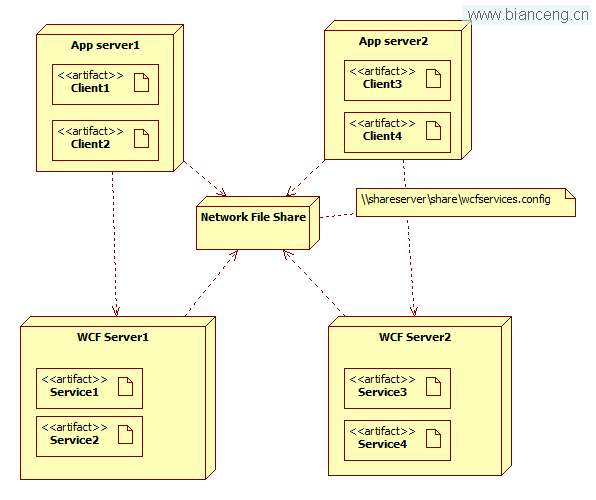
4台server都作為客戶端進行WCF服務的調用
ICS原理:
在本例中,ICS其實就是ICSFactory,用來建立WCF服務代理,通過代碼方式加 入binding、address、transaction信息,底層調用的是ChannelFactory來建立通信,代碼如下:
public class ICSFactory
    {
        /// <summary>
        /// 創建WCF服務代理對象
        /// </summary>
        /// <typeparam name="T">WCF的Contract類型</typeparam>
        /// <returns></returns>
        public static T Create<T>()
        {
            string contractNamespace = typeof(T).Namespace;
            string contract = typeof(T).Name;

            //根據WCF Contract信息找到相應的位置信息
            Location location = ServiceLocator.Locate(contractNamespace, contract);

            //生成綁定信息
            NetTcpBinding binding = new NetTcpBinding();
            binding.ReceiveTimeout = new TimeSpan(0, 10, 0);
            binding.Security.Mode = SecurityMode.None;
            binding.Security.Transport.ClientCredentialType = TcpClientCredentialType.None;

            //事務設置
            binding.TransactionFlow = true;
            binding.TransactionProtocol = TransactionProtocol.OleTransactions;

            //地址信息
            EndpointAddress address = new EndpointAddress(location.Url);

            //建立信道
            T broker=ChannelFactory<T>.CreateChannel(binding, address);

            //返回代理對象
            return broker;
        }

        /// <summary>
        /// Dispose代理對象
        /// </summary>
        /// <param name="broker"></param>
        public static void Close(object broker)
        {
            if (broker == null)
                return;

            IDisposable disposable = broker as IDisposable;
            if (disposable == null)
                return;

            disposable.Dispose();
        }
    }
Service Locator Service原理:
也就是ServiceLocator.Locate函數。
程序啟動時會根據配置讀取config文件的xml到內存對象中:Service、Url。 具體代碼略。
Locate函數的代碼如下:
/// <summary>
        /// 根據Contract的命名空間及Contract名找到服務的真實地址信息
        /// </summary>
        /// <param name="contractNamespace"></param>
        /// <param name="contract"></param>
        /// <returns></returns>
        public static Location Locate(string contractNamespace, string contract)
        {
            Service srv=null;

            string key = string.Format("{0}.{1}", contractNamespace, contract);
            if (!serviceCache.ContainsKey(key))
            {
                srv = FindService(contractNamespace, contract, srv);
                serviceCache[key] = srv;
            }
            else
            {
                srv=serviceCache[key];
            }
            if(srv.Urls==null||srv.Urls.Count==0)
                throw new Exception(string.Format("Service' url not found [{0}.{1}]", contractNamespace, contract));

            Url url=srv.Urls.First();

            Location location = new Location();
            location.EndpointType = url.EndpointType;
            location.Url = url.ReferenceUrl;return location;
        }

        private static Service FindService(string contractNamespace, string contract, Service srv)
        {
            List<Service> matchedServices = LocatorServiceConfiguration.Services.Where(t =>
                    t.Contract.CompareTo(contract) == 0
                    &&
                    t.ContractNamespace.CompareTo(contractNamespace) == 0
            ).ToList();

            if (matchedServices == null || matchedServices.Count == 0)
                throw new Exception(string.Format("Service not found [{0}.{1}]", contractNamespace, contract));

            srv = matchedServices.First();
            return srv;
        }
查看本欄目