這幾天想把SharpMap的數據源改為服務器向客戶端提供數據,看到園子裡很多朋友在研究WCF.故而心癢 難耐,也想趕一把時髦!
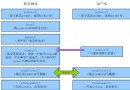
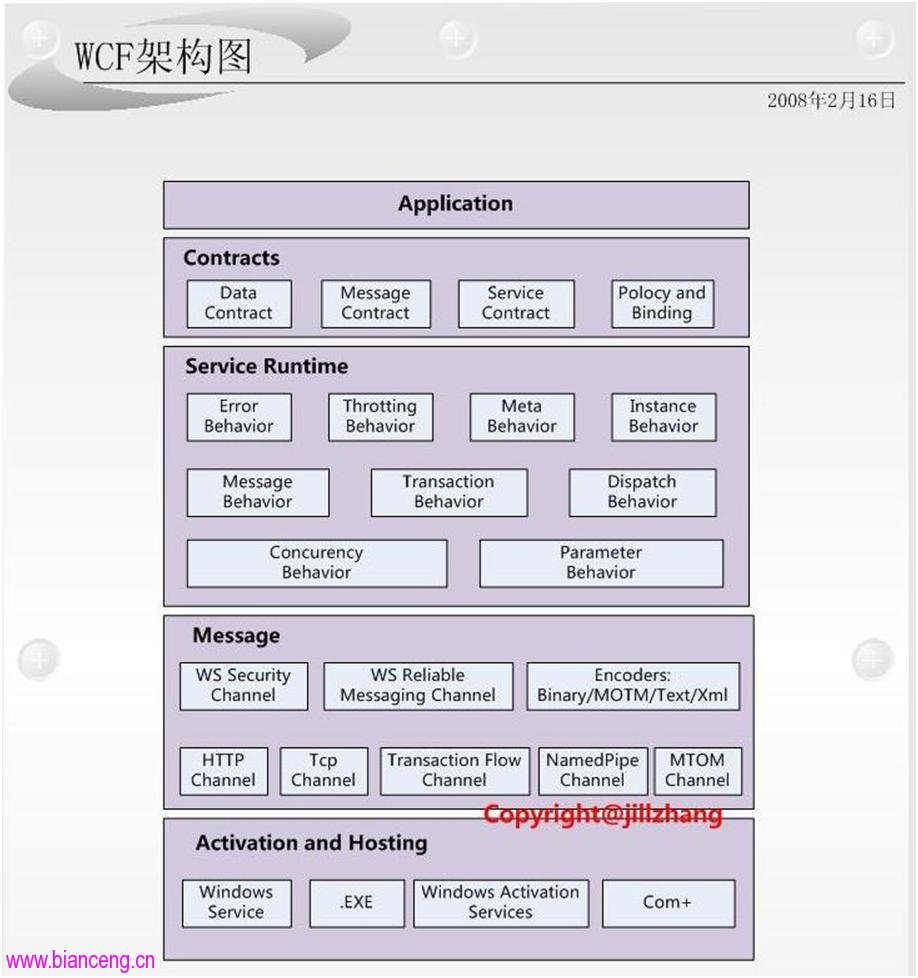
WCF的構架圖:
應用到項目中的層次模型:
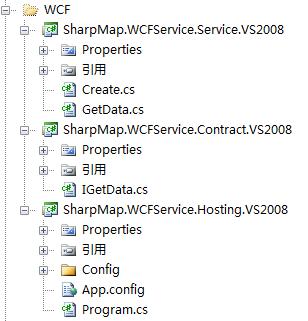
相信各位看官通過名字就可以了解他的層次了 .
Contract就是WCF中最重要的數據契約層了.其代碼如下:
 1[ServiceContract]

 2    public interface IGetData

 3    {

 4        //獲取圖片目錄

 5        [OperationContract]

 6        string GetPICAddress();

 7

 8        //獲取VectorLayer樣式

 9        [OperationContract]

10        byte[] GetVStyleAddress(string DataBase,ref int VLayerCount);

11

12        //獲取LableLayer樣式

13        [OperationContract]

14        byte[] GetLStyleAddress(string DataBase, ref int LLayerCount);

15

16        //讀取XML文檔(樣式表單)

17        [OperationContract]

18        byte[] ReadXML(string DataBase, string XMLName);

19

20        //讀取XML文檔(更換地圖源)

21        [OperationContract]

22        byte[] MapDataBase(string address);

23

24        //獲取VectorLayer地圖數據源

25        [OperationContract]

26        byte[] GetMapDataSource(GetVDataSource VDataSource);

27    }
作為Service,在Contract上簽字的方式就是實現這樣的一個Interface。下面的Service得到code
 1  public class GetData : IGetData

 2    {

 3        Create create = new Create();

 4

 5        IGetData 成員#region IGetData 成員

 6

 7        public string GetPICAddress()

 8        {

 9            return "http://www.cnblogs.com/Config/Style/pic/";

10        }

11

12        public byte[] GetVStyleAddress(string DataBase, ref int VLayerCount)

13        {

14            return Compression.SerializeData(create.GetLayers

("http://www.cnblogs.com/Config/Style/" + DataBase + "/VectorLayerXML.xml", ref

VLayerCount));

15        }

16

17        public byte[] GetLStyleAddress(string DataBase, ref int LLayerCount)

18        {

19            return Compression.SerializeData(create.GetLayers

("http://www.cnblogs.com/Config/Style/" + DataBase + "/LableLayerXML.xml", ref

LLayerCount));

20        }

21

22        public byte[] ReadXML(string DataBase, string XMLName)

23        {

24            return Compression.SerializeData(create.ReadXML

("http://www.cnblogs.com/Config/Style/" + DataBase + "/" + XMLName + ".xml"));

25        }

26

27        public byte[] MapDataBase(string address)

28        {

29            return Compression.SerializeData(create.ReadXML(address));

30        }

31

32        public byte[] GetMapDataSource(GetVDataSource VDataSource)

33        {

34            IProvider data=new MsSql(VDataSource.ConnStr,

VDataSource.TableName, VDataSource.GeometryColumnName, VDataSource.OID_ColumnName);

35            return Compression.SerializeData(data);

36        }

37

38        #endregion

39    }
以上的內容是不是很簡單,這樣我們只需要一個宿主.也就是將這些服務提供給客戶端的服務源.
Host的本質就是把一個Service 置於一個運行中的進程中,並以Endpoint的形式暴露出來,並開始監 聽來自Client端的請求。
1static void Main(string[] args)

2        {

3            using (ServiceHost GetDataHost = new ServiceHost(typeof(GetData)))

4            {

5                GetDataHost.Opened += delegate { Console.WriteLine

("Calculator Service begin to listen via the Address:{0}", GetDataHost.BaseAddresses

[0].ToString()); };

6                GetDataHost.Open();

7                Console.Read();

8            }

9        }
這裡重中之重的就是App.config文件了.其實我們也可以不用它,只是這樣可以避免程序的改動所帶來 的系統重新編譯.比如我們把原來存在Intranet的Service放到Internet上,原來可能基於TCP的Binding必 須改成基於Http的Binding,在這種情況下,我們依然可修改配置文件就可以了,這樣的改動通常是很小 的,並且修改了配置文件之後我們不需要對現有的代碼進行重編譯和重部署,它們可以其實生效。
 1<?xml version="1.0" encoding="utf-8" ?>

 2<configuration>

 3    <system.serviceModel>

 4        <services>

 5          <service name="SharpMap.WCFService.Service.GetData"

behaviorConfiguration="GetDataBehavior">

 6            <host>

 7              <baseAddresses>

 8                <add baseAddress="http://127.0.0.1:8888/GetData"/>

 9              </baseAddresses>

10            </host>

11            <endpoint address="" binding="basicHttpBinding"

contract="SharpMap.WCFService.Contract.IGetData" />

12          </service>

13        </services>

14      <behaviors>

15        <serviceBehaviors>

16          <behavior name="GetDataBehavior">

17            <serviceMetadata httpGetEnabled="true" httpGetUrl=""/>

18          </behavior>

19        </serviceBehaviors>

20      </behaviors>

21    </system.serviceModel>

22</configuration>
通過以上的代碼我們就構建出了一個提供SharpMap地圖數據傳輸的服務器端.那麼我們怎麼才能獲得這 些服務呢?
其實也很簡單,只需要在客戶端編寫一個類繼承Contract中的接口。
 public class WCFClient : ClientBase<IGetData>,IGetData

    {

        internal WCFClient():base(){}


        #region IGetData 成員

        //獲取圖片地址

        public string GetPICAddress()

        {

            return this.Channel.GetPICAddress();

        }

        //獲取VectorLayer樣式列表

        public byte[] GetVStyleAddress(string DataBase, ref int VLayerCount)

        {

            return this.Channel.GetVStyleAddress(DataBase,ref VLayerCount);

        }

        //獲取LabelLayer樣式列表

        public byte[] GetLStyleAddress(string DataBase, ref int LLayerCount)

        {

            return this.Channel.GetLStyleAddress(DataBase, ref LLayerCount);

        }

        //獲取地圖渲染列表

        public byte[] ReadXML(string DataBase, string XMLName)

        {

            return this.Channel.ReadXML(DataBase, XMLName);

        }

        //獲取地圖數據源

        public byte[] MapDataBase(string address)

        {

            return this.Channel.MapDataBase(address);

        }

        //返回地圖連接地址

        public byte[] GetMapDataSource(GetVDataSource VDataSource)

        {

            return this.Channel.GetMapDataSource(VDataSource);

        }

        #endregion

        //返回VectorLayer樣式列表

        public DataSet GetVStyle(string DataBase, ref int VLayerCount)

        {

            return (DataSet)Compression.DeserializeData(GetVStyleAddress

(DataBase, ref VLayerCount));

        }

        //返回地圖渲染列表

        public DataSet GetXML(string DataBase, string XMLName)

        {

            return (DataSet)Compression.DeserializeData(ReadXML(DataBase,

XMLName));

        }

        //返回LabelLayer樣式列表

        public DataSet GetLStyle(string DataBase, ref int LLayerCount)

        {

            return (DataSet)Compression.DeserializeData(GetLStyleAddress

(DataBase, ref LLayerCount));

        }

    }
哈哈是不是很簡單。可是我們還需要在客戶端寫一個App.config文件。
他的作用是通過App.config文件來獲取Hosting提供的服務。
1<?xml version="1.0" encoding="utf-8" ?>

2<configuration>

3  <system.serviceModel>

4    <client>

5      <endpoint address="http://127.0.0.1:8888/GetData"

contract="SharpMap.WCFService.Contract.IGetData"  binding="basicHttpBinding"/>

6    </client>

7  </system.serviceModel>

8</configuration>
現在可以說是大功告成了!
由於是第一次實驗,對WCF的很多功能上不是很了解。希望大家拍磚,以便於我的進步!