新進階的程序員可能對async、await用得比較多,卻對之前的異步了解甚少。本人就是此類,因此打算回顧學習下異步的進化史。
本文主要是回顧async異步模式之前的異步,下篇文章再來重點分析async異步模式。
APM 異步編程模型,Asynchronous Programming Model
早在C#1的時候就有了APM。雖然不是很熟悉,但是多少還是見過的。就是那些類是BeginXXX和EndXXX的方法,且BeginXXX返回值是IAsyncResult接口。
在正式寫APM示例之前我們先給出一段同步代碼:
//1、同步方法
private void button1_Click(object sender, EventArgs e)
{
    Debug.WriteLine("【Debug】線程ID:" + Thread.CurrentThread.ManagedThreadId);

    var request = WebRequest.Create("https://github.com/");//為了更好的演示效果,我們使用網速比較慢的外網
    request.GetResponse();//發送請求

    Debug.WriteLine("【Debug】線程ID:" + Thread.CurrentThread.ManagedThreadId);
    label1.Text = "執行完畢!";
}
【說明】為了更好的演示異步效果,這裡我們使用winform程序來做示例。(因為winform始終都需要UI線程渲染界面,如果被UI線程占用則會出現“假死”狀態)
【效果圖】
BeginGetResponse、EndOfStream 所謂的APM異步模型)
private void button2_Click(object sender, EventArgs e)
{
    //1、APM 異步編程模型,Asynchronous Programming Model
    //C#1[基於IAsyncResult接口實現BeginXXX和EndXXX的方法]
    Debug.WriteLine("【Debug】主線程ID:" + Thread.CurrentThread.ManagedThreadId);

    var request = WebRequest.Create("https://github.com/");
    request.BeginGetResponse(new AsyncCallback(t =>
    {
        var response = request.EndGetResponse(t);//執行完成後的回調
        var stream = response.GetResponseStream();//獲取返回數據流

        using (StreamReader reader = new StreamReader(stream))
        {
            StringBuilder sb = new StringBuilder();
            while (!reader.EndOfStream)
            {
                var content = reader.ReadLine();
                sb.Append(content);
            }
            Debug.WriteLine("【Debug】" + sb.ToString().Trim().Substring(0, 100) + "...");//只取返回內容的前100個字符
            Debug.WriteLine("【Debug】異步線程ID:" + Thread.CurrentThread.ManagedThreadId);
            label1.Invoke((Action)(() => { label1.Text = "執行完畢!"; }));//這裡跨線程訪問UI需要做處理
        }
    }), null);

    Debug.WriteLine("【Debug】主線程ID:" + Thread.CurrentThread.ManagedThreadId);
}
【效果圖】
(下面是基本的偽代碼實現)
public class MyWebRequest : IAsyncResult
{
    public object AsyncState
    {
        get { throw new NotImplementedException(); }
    }

    public WaitHandle AsyncWaitHandle
    {
        get { throw new NotImplementedException(); }
    }

    public bool CompletedSynchronously
    {
        get { throw new NotImplementedException(); }
    }

    public bool IsCompleted
    {
        get { throw new NotImplementedException(); }
    }
}
這樣肯定是不能用的,起碼也得有個存回調函數的屬性吧,下面我們稍微改造下:
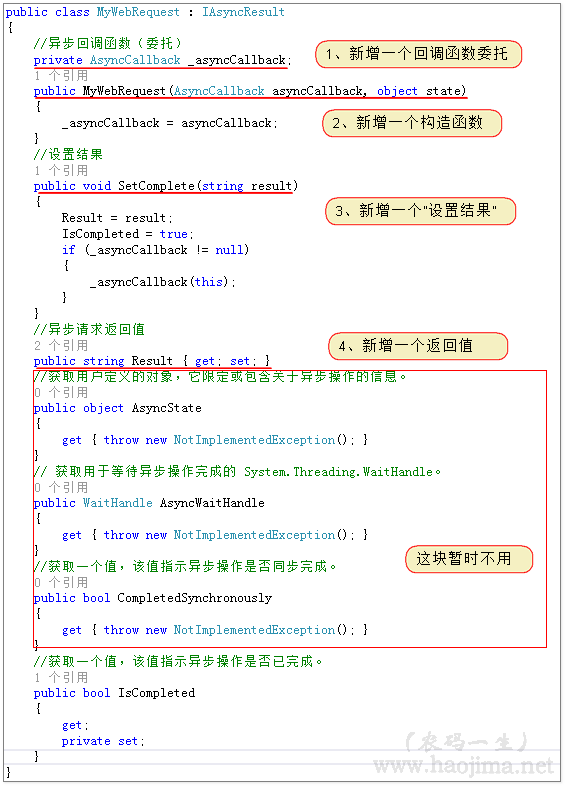
然後我們可以自定義APM異步模型了:(成對的Begin、End)
public IAsyncResult MyBeginXX(AsyncCallback callback)
{
    var asyncResult = new MyWebRequest(callback, null);
    var request = WebRequest.Create("https://github.com/");
    new Thread(() =>  //重新啟用一個線程
    {
        using (StreamReader sr = new StreamReader(request.GetResponse().GetResponseStream()))
        {
            var str = sr.ReadToEnd();
            asyncResult.SetComplete(str);//設置異步結果
        }

    }).Start();
    return asyncResult;//返回一個IAsyncResult
}

public string MyEndXX(IAsyncResult asyncResult)
{
    MyWebRequest result = asyncResult as MyWebRequest;
    return result.Result;
}
調用如下:
 private void button4_Click(object sender, EventArgs e)
 {
     Debug.WriteLine("【Debug】主線程ID:" + Thread.CurrentThread.ManagedThreadId);
     MyBeginXX(new AsyncCallback(t =>
     {
         var result = MyEndXX(t);
         Debug.WriteLine("【Debug】" + result.Trim().Substring(0, 100) + "...");
         Debug.WriteLine("【Debug】異步線程ID:" + Thread.CurrentThread.ManagedThreadId);
     }));
     Debug.WriteLine("【Debug】主線程ID:" + Thread.CurrentThread.ManagedThreadId);
 }
效果圖:
while (!asyncResult.IsCompleted)//循環,直到異步執行完成 (輪詢方式)
{
Thread.Sleep(100);
}
var stream2 = request.EndGetResponse(asyncResult).GetResponseStream();
或
asyncResult.AsyncWaitHandle.WaitOne();//阻止線程,直到異步完成 (阻塞等待)
var stream2 = request.EndGetResponse(asyncResult).GetResponseStream();
補充:如果是普通方法,我們也可以通過委托異步:(BeginInvoke、EndInvoke)
 public void MyAction()
 {
     var func = new Func<string, string>(t =>
     {
         Thread.Sleep(2000);
         return "name:" + t + DateTime.Now.ToString();
     });

     var asyncResult = func.BeginInvoke("張三", t =>
     {
         string str = func.EndInvoke(t);
         Debug.WriteLine(str);
     }, null);
 }
EAP 基於事件的異步模式,Event-based Asynchronous Pattern
此模式在C#2的時候隨之而來。
先來看個EAP的例子:
 private void button3_Click(object sender, EventArgs e)
 {
     Debug.WriteLine("【Debug】主線程ID:" + Thread.CurrentThread.ManagedThreadId);

     BackgroundWorker worker = new BackgroundWorker();
     worker.DoWork += new DoWorkEventHandler((s1, s2) =>
     {
         Thread.Sleep(2000);
         Debug.WriteLine("【Debug】異步線程ID:" + Thread.CurrentThread.ManagedThreadId);
     });//注冊事件來實現異步
     worker.RunWorkerAsync(this);
     Debug.WriteLine("【Debug】主線程ID:" + Thread.CurrentThread.ManagedThreadId);
 }
【效果圖】(同樣不會阻塞UI界面)
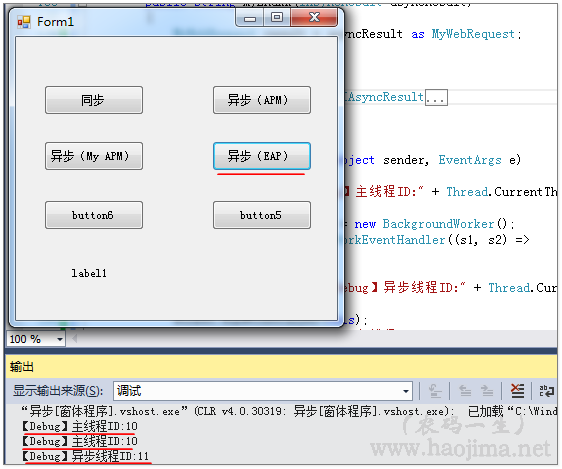
【特征】
例子很簡單,但是和APM模式相比,是不是沒有那麼清晰透明。為什麼可以這樣實現?事件的注冊是在干嘛?為什麼執行RunWorkerAsync會觸發注冊的函數?
感覺自己又想多了...
我們試著反編譯看看源碼:
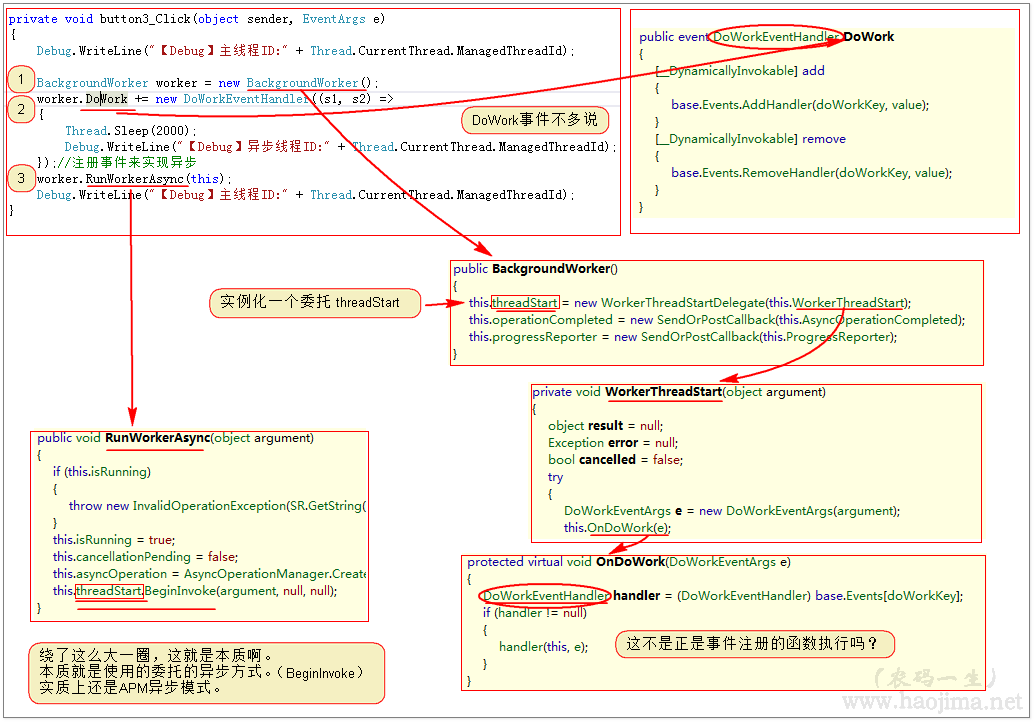
只想說,這麼玩,有意思嗎?
TAP 基於任務的異步模式,Task-based Asynchronous Pattern
到目前為止,我們覺得上面的APM、EAP異步模式好用嗎?好像沒有發現什麼問題。再仔細想想...如果我們有多個異步方法需要按先後順序執行,並且需要(在主進程)得到所有返回值。
首先定義三個委托:
public Func<string, string> func1()
{
    return new Func<string, string>(t =>
    {
        Thread.Sleep(2000);
        return "name:" + t;
    });
}
public Func<string, string> func2()
{
    return new Func<string, string>(t =>
    {
        Thread.Sleep(2000);
        return "age:" + t;
    });
}
public Func<string, string> func3()
{
    return new Func<string, string>(t =>
    {
        Thread.Sleep(2000);
        return "sex:" + t;
    });
}
然後按照一定順序執行:
public void MyAction()
{
    string str1 = string.Empty, str2 = string.Empty, str3 = string.Empty;
    IAsyncResult asyncResult1 = null, asyncResult2 = null, asyncResult3 = null;
    asyncResult1 = func1().BeginInvoke("張三", t =>
    {
        str1 = func1().EndInvoke(t);
        Debug.WriteLine("【Debug】異步線程ID:" + Thread.CurrentThread.ManagedThreadId);
        asyncResult2 = func2().BeginInvoke("26", a =>
        {
            str2 = func2().EndInvoke(a);
            Debug.WriteLine("【Debug】異步線程ID:" + Thread.CurrentThread.ManagedThreadId);
            asyncResult3 = func3().BeginInvoke("男", s =>
            {
                str3 = func3().EndInvoke(s);
                Debug.WriteLine("【Debug】異步線程ID:" + Thread.CurrentThread.ManagedThreadId);
            }, null);
        }, null);
    }, null);

    asyncResult1.AsyncWaitHandle.WaitOne();
    asyncResult2.AsyncWaitHandle.WaitOne();
    asyncResult3.AsyncWaitHandle.WaitOne();
    Debug.WriteLine(str1 + str2 + str3);
}
除了難看、難讀一點好像也沒什麼 。不過真的是這樣嗎?
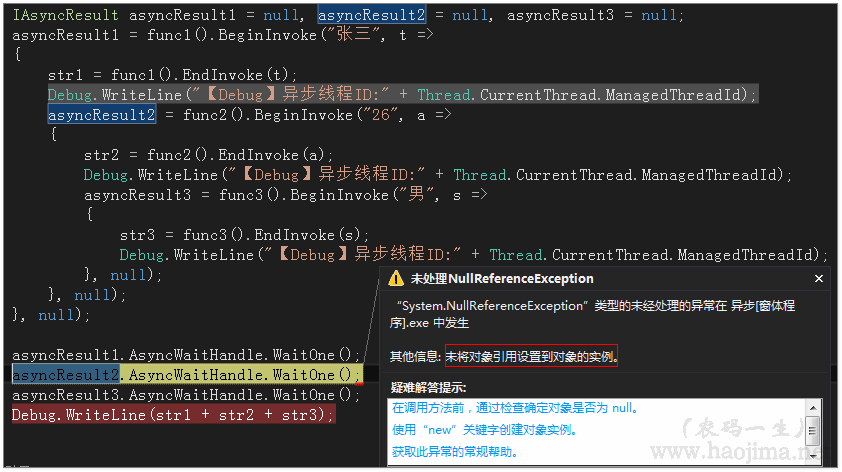
asyncResult2是null?
由此可見在完成第一個異步操作之前沒有對asyncResult2進行賦值,asyncResult2執行異步等待的時候報異常。那麼如此我們就無法控制三個異步函數,按照一定順序執行完成後再拿到返回值。(理論上還是有其他辦法的,只是會然代碼更加復雜)
是的,現在該我們的TAP登場了。
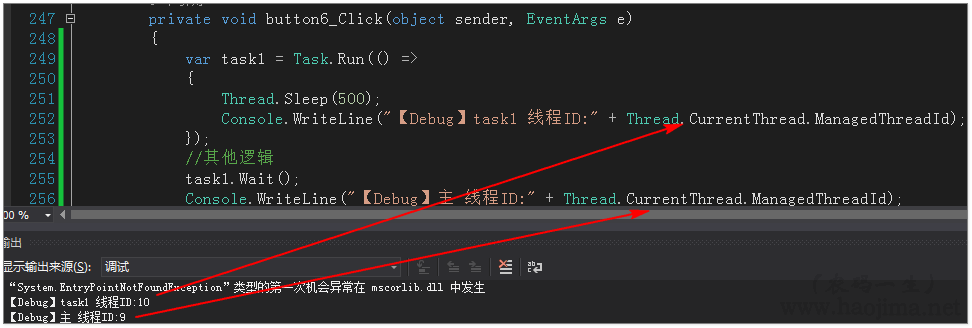
只需要調用Task類的靜態方法Run,即可輕輕松松使用異步。
獲取返回值:
var task1 = Task<string>.Run(() =>
{
    Thread.Sleep(1500);
    Console.WriteLine("【Debug】task1 線程ID:" + Thread.CurrentThread.ManagedThreadId);
    return "張三";
});
//其他邏輯
task1.Wait();
var value = task1.Result;//獲取返回值
Console.WriteLine("【Debug】主 線程ID:" + Thread.CurrentThread.ManagedThreadId);
現在我們處理上面多個異步按序執行:
Console.WriteLine("【Debug】主 線程ID:" + Thread.CurrentThread.ManagedThreadId);
string str1 = string.Empty, str2 = string.Empty, str3 = string.Empty;
var task1 = Task.Run(() =>
{
    Thread.Sleep(500);
    str1 = "姓名:張三,";
    Console.WriteLine("【Debug】task1 線程ID:" + Thread.CurrentThread.ManagedThreadId);
}).ContinueWith(t =>
{
    Thread.Sleep(500);
    str2 = "年齡:25,";
    Console.WriteLine("【Debug】task2 線程ID:" + Thread.CurrentThread.ManagedThreadId);
}).ContinueWith(t =>
{
    Thread.Sleep(500);
    str3 = "愛好:妹子";
    Console.WriteLine("【Debug】task3 線程ID:" + Thread.CurrentThread.ManagedThreadId);
});

Thread.Sleep(2500);//其他邏輯代碼

task1.Wait();

Debug.WriteLine(str1 + str2 + str3);
Console.WriteLine("【Debug】主 線程ID:" + Thread.CurrentThread.ManagedThreadId);
[效果圖]
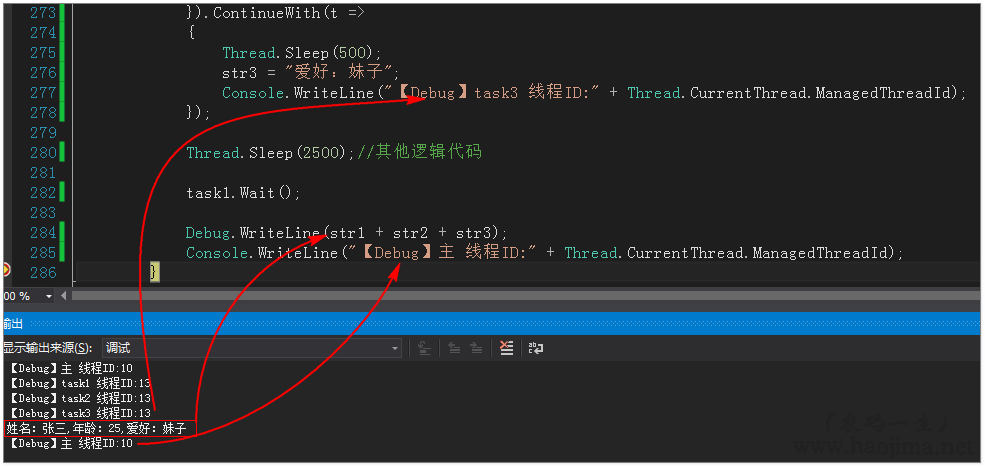
我們看到,結果都得到了,且是異步按序執行的。且代碼的邏輯思路非常清晰。如果你感受還不是很大,那麼你現象如果是100個異步方法需要異步按序執行呢?用APM的異步回調,那至少也得異步回調嵌套100次。那代碼的復雜度可想而知。
WaitOne完成等待的原理
異步為什麼會提升性能
線程的使用數量和CPU的使用率有必然的聯系嗎
問題1:WaitOne完成等待的原理
在此之前,我們先來簡單的了解下多線程信號控制AutoResetEvent類。
var _asyncWaitHandle = new AutoResetEvent(false);
_asyncWaitHandle.WaitOne();
此代碼會在 WaitOne 的地方會一直等待下去。除非有另外一個線程執行 AutoResetEvent 的set方法。
var _asyncWaitHandle = new AutoResetEvent(false);
_asyncWaitHandle.Set();
_asyncWaitHandle.WaitOne();
如此,到了 WaitOne 就可以直接執行下去。沒有有任何等待。
現在我們對APM 異步編程模型中的 WaitOne 等待是不是知道了點什麼呢。我們回頭來實現之前自定義異步方法的異步等待。
public class MyWebRequest : IAsyncResult
{
    //異步回調函數(委托)
    private AsyncCallback _asyncCallback;
    private AutoResetEvent _asyncWaitHandle;
    public MyWebRequest(AsyncCallback asyncCallback, object state)
    {
        _asyncCallback = asyncCallback;
        _asyncWaitHandle = new AutoResetEvent(false);
    }
    //設置結果
    public void SetComplete(string result)
    {
        Result = result;
        IsCompleted = true;
        _asyncWaitHandle.Set();
        if (_asyncCallback != null)
        {
            _asyncCallback(this);
        }
    }
    //異步請求返回值
    public string Result { get; set; }
    //獲取用戶定義的對象,它限定或包含關於異步操作的信息。
    public object AsyncState
    {
        get { throw new NotImplementedException(); }
    }
    // 獲取用於等待異步操作完成的 System.Threading.WaitHandle。
    public WaitHandle AsyncWaitHandle
    {
        //get { throw new NotImplementedException(); }

        get { return _asyncWaitHandle; }
    }
    //獲取一個值,該值指示異步操作是否同步完成。
    public bool CompletedSynchronously
    {
        get { throw new NotImplementedException(); }
    }
    //獲取一個值,該值指示異步操作是否已完成。
    public bool IsCompleted
    {
        get;
        private set;
    }
}
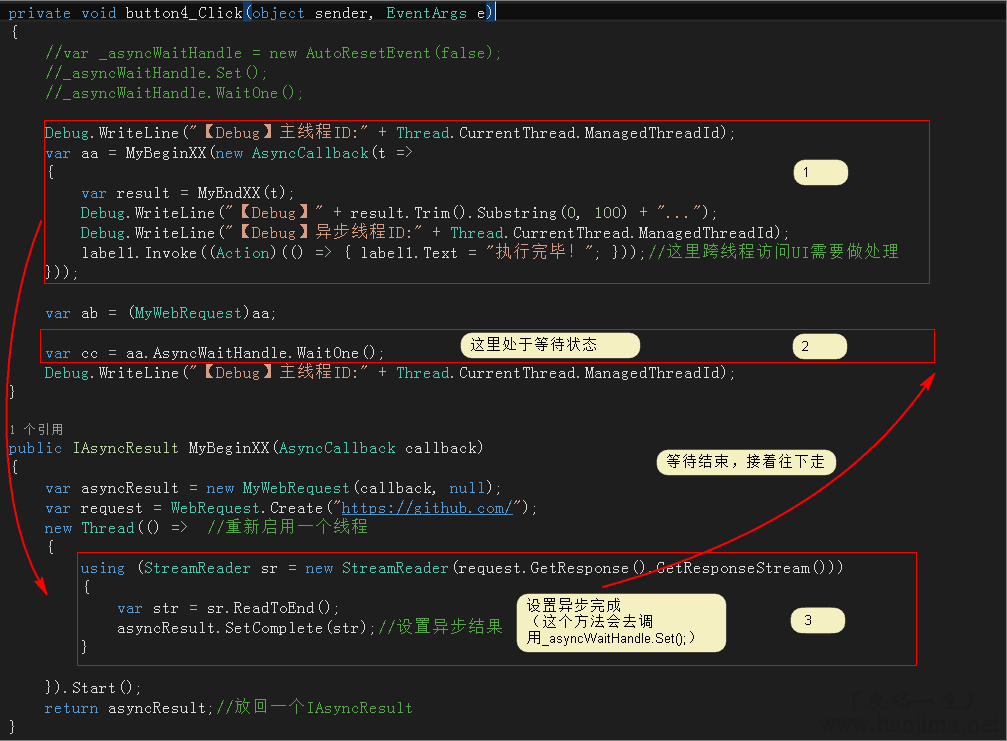
紅色代碼就是新增的異步等待。
【執行步驟】
問題2:異步為什麼會提升性能
比如同步代碼:
Thread.Sleep(10000);//假設這是個訪問數據庫的方法
Thread.Sleep(10000);//假設這是個訪問FQ網站的方法
這個代碼需要20秒。
如果是異步:
var task = Task.Run(() =>
{
    Thread.Sleep(10000);//假設這是個訪問數據庫的方法
});
Thread.Sleep(10000);//假設這是個訪問FQ網站的方法
task.Wait();
如此就只要10秒了。這樣就節約了10秒。
如果是:
var task = Task.Run(() =>
{
    Thread.Sleep(10000);//假設這是個訪問數據庫的方法
});
task.Wait();
異步執行中間沒有耗時的代碼那麼這樣的異步將是沒有意思的。
或者:
var task = Task.Run(() =>
{
    Thread.Sleep(10000);//假設這是個訪問數據庫的方法
});
task.Wait();
Thread.Sleep(10000);//假設這是個訪問FQ網站的方法
把耗時任務放在異步等待後,那這樣的代碼也是不會有性能提升的。
還有一種情況:
如果是單核CPU進行高密集運算操作,那麼異步也是沒有意義的。(因為運算是非常耗CPU,而網絡請求等待不耗CPU)
問題3:線程的使用數量和CPU的使用率有必然的聯系嗎
答案是否。
還是拿單核做假設。
情況1:
long num = 0;
while (true)
{
    num += new Random().Next(-100,100);
    //Thread.Sleep(100);
}
單核下,我們只啟動一個線程,就可以讓你CPU爆滿。
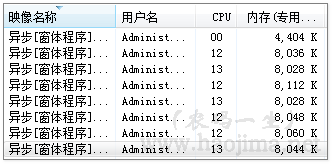
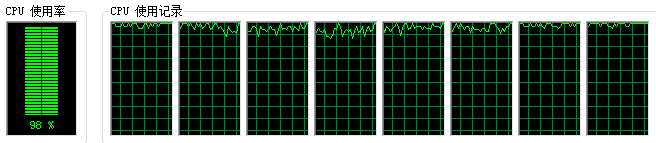
啟動八次,八進程CPU基本爆滿。
情況2:
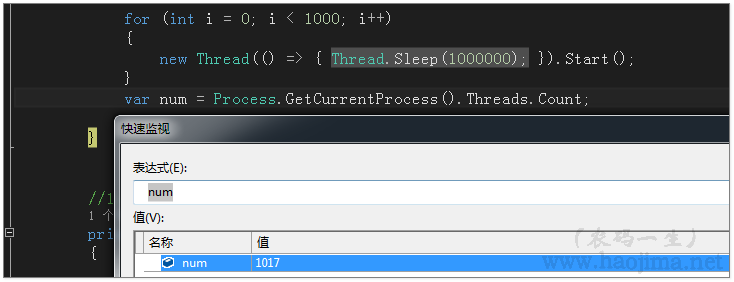

一千多個線程,而CPU的使用率竟然是0。由此,我們得到了之前的結論,線程的使用數量和CPU的使用率沒有必然的聯系。
雖然如此,但是也不能毫無節制的開啟線程。因為:
demo:http://pan.baidu.com/s/1slOxgnF
本文已同步至索引目錄:《C#基礎知識鞏固》
對於異步編程了解不深,文中極有可能多處錯誤描述和觀點。
感謝廣大園友的指正。
本著相互討論的目的,絕無想要誤導大家的意思。
【推薦】
http://www.cnblogs.com/wisdomqq/archive/2012/03/26/2412349.html