在項目開發中,尤其是企業的業務系統中,對文檔的操作是非常多的,有時幾乎給人一種錯覺的是”這個系統似乎就是專門操作文檔的“。畢竟現在的很多辦公中大都是在PC端操作文檔等軟件,在這些龐大而繁重的業務中,單單依靠人力去做文檔的操作需要的代價是巨大的,比如數據統計,數據分析等業務要求。這就需要我們在開發系統時,應該盡量減少使用者的一些工作量,例如將數據直接寫入文檔,獲取網頁信息後直接存為PDF保存,以便以後繼續查看。軟件開發的目地是對使用者便捷,但這一要求未必對開發者來說也是便捷的。
在前面介紹過一款開源免費的組件DocX,這個組件主要是對文檔進行操作。另一種對Excel操作的組件NPOI組件。今天介紹一款.NET Office操作組件Spire,這是一個企業級的.NET Office操作組件,但是這是一款不免費也不開源的組件。可能很多人聽到這裡就不想再讀下去了,的確,在國內畢竟免費才可以占用主流市場,因為很多客戶希望減少成本,所以希望采用免費的工具。
作為開發者,我也會有這樣的觀點,不過有的時候也會思考收費與免費的工具到底哪一個好,其實這樣的思考到最後似乎是沒有意義的,因為事物存在既有價值,免費的可以減少成本,收費的可以獲取穩定而安全的支持,各有優勢和特點。任何一個軟件的生成都是需要成本的,因為任何軟件都是人員開發出來的,需要支付對應的成本,此處不收錢,其他的地方也會收費。無論收費與免費的哪一個好,技術總是沒有錯的,收費的東西,我們也可以了解,做一個技術儲備。
今天要介紹的一款組件有收費的部分和免費的部分,但是這款軟件的功能的確比較的強大,使用起來也比較簡單,因為要收費的東西,畢竟需要做到人性化,不然誰會出錢去買,畢竟便宜而好用的東西很少。此組件的使用方式很簡單,官方提供了比較完備的操作demo,所以今天的文章只做為一個引子。
由於Spire的組件較多,今天就用Spire.PDF for .NET做個引子,不一定收費就沒有客戶會選擇,如果需要穩定的服務支持,收費的組件是可以考慮的,或者遇到土豪客戶,也可以在項目中使用一下,畢竟使用起來很便捷。
一.Spire.PDF for .NET組件概述:
Spire.PDF for .NET是一個專業的PDF組件,用於在.NET應用程序中創建,編寫,編輯,處理和閱讀PDF文件,而不需要任何外部依賴。 使用這個.NET PDF庫,您可以實現豐富的功能從頭開始創建PDF文件或完全通過C#/ VB.NET處理現有的PDF文檔,而無需安裝Adobe Acrobat。
.NET PDF API支持許多豐富的功能,例如安全設置(包括數字簽名),PDF文本/附件/圖像提取,PDF合並/拆分,元數據更新,段,圖像/圖像繪制和插入,表創建 以及處理和導入數據等。
此外,Spire.PDF for .NET可以應用於使用C#/ VB.NET以高質量輕松地將文本,圖像和HTML轉換為PDF。
以下是一個官方給出的組件解析圖:
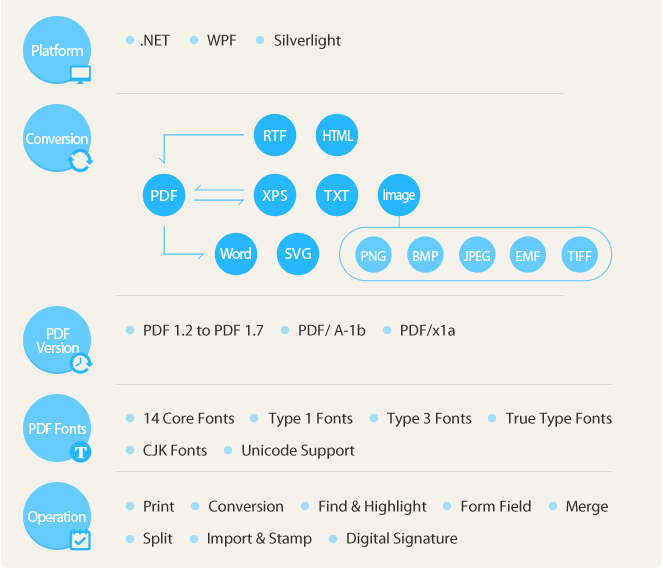
Spire.PDF for .NET支持將HTML,RTF,XPS,文本和圖像轉換為具有高效性能的PDF文檔。 開發人員可以將PDF轉換為Word,XPS,SVG,EMF,JPG,PNG,BMP,TIFF,文本格式。 此外,隨著Spire.Doc for .NET和Spire.XLS for .NET,開發人員可以將Word(Doc / Docx),Excel(Xls / Xlsx)和XML轉換為PDF。
此組件的功能還是非常強大的,每個開發人員都知道,產品做得不好,想要客戶的錢還是很難的。看一下組件的主要功能:
1.文本格式,多語言支持,文本對齊等。
2.筆和畫筆將形狀元素,文本,圖像繪制成PDF文檔。
3.圖層,透明圖形,顏色空間和條形碼創建可以呈現為PDF文檔。
4.PDF / A-1b和PDF / x1a:2001合規性,可以應用這兩種標准。
5.添加標量/矢量圖像和掩碼,並將它們放在指定的位置。
6.Spire.PDF for .NET可支持表和表樣式
7.插入交互式元素,包括注釋,操作,JavaScript,附件,書簽和指定地點和外觀。
以上對組件的相關背景做了一個簡單的介紹,並且對組件的功能和使用情形做了簡單的羅列。
二.Spire.PDF for .NET相關類的解析:
在這裡主要介紹Spire的Spire.PDF組件部分,此組件有免費的和收費的兩個版本,免費的版本在功能沒有收費的多,但是穩定性和實用性還是較高的。我們具體看一下此組件的主要的類和方法,這裡是主要介紹PDF的操作,就先看一下有關PDF的操作類和方法。
這裡看以下命名空間的主要類:
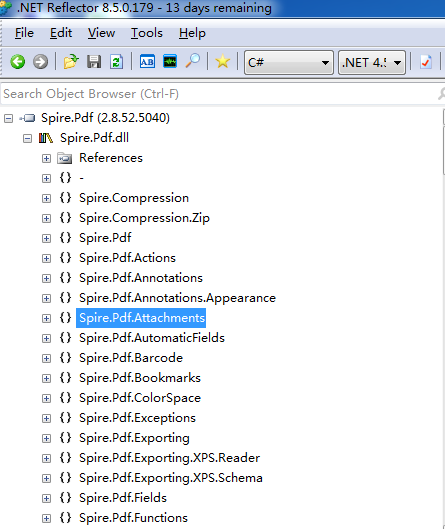
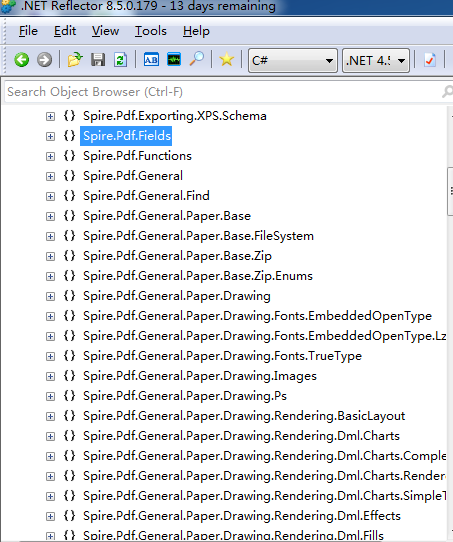
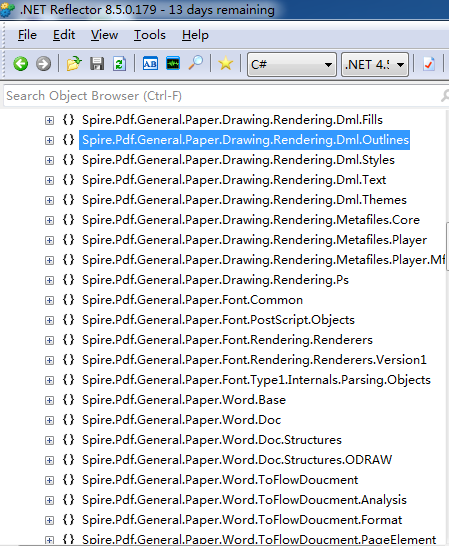
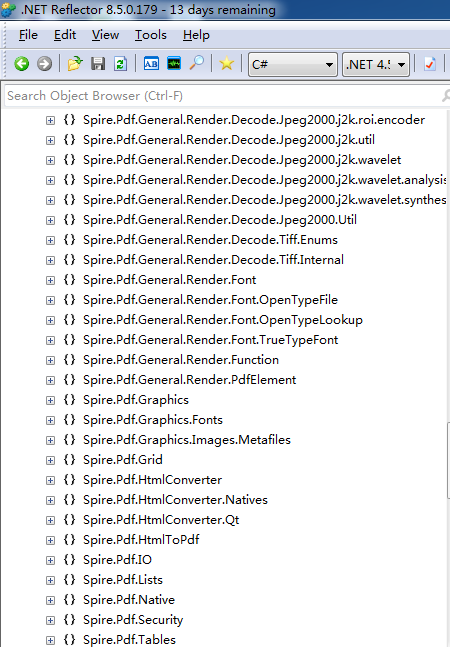
以上的方法中只是操作PDF部分類,由於包含的類較多,過大的介紹篇幅就顯得多余,在對PDF的操作中提供了較多的方法,因此在功能上會較為的豐富,使用起來也較為的便捷。
1.PdfDocument類:聲明PDF文檔:
(1).PdfDocument類的構造函數:
public PdfDocument();
  public PdfDocument(string filename);
  public PdfDocument(byte[] bytes);
  public PdfDocument(Stream stream);
  public PdfDocument(string filename, string password);
  public PdfDocument(byte[] bytes, string password);
  public PdfDocument(Stream stream, string password);
該類提供了7個構造函數的重載版本,對應的參數類型就不做詳細的介紹
(2).PdfDocument.LoadFromHTML():加載HTML頁面:
 public void LoadFromHTML(string Url, bool enableJavaScript, bool enableHyperlinks, bool autoDetectPageBreak)
{
  // This item is obfuscated and can not be translated.
  PdfHtmlLayoutFormat format;
  int num;
  goto Label_001E;
Label_008F:
  num = 0;
Label_0002:
  switch (num)
  {
    case 0:
      break;

    case 1:
      if (!autoDetectPageBreak)
      {
        format.Layout = PdfLayoutType.OnePage;
        format.FitToPage = Clip.Width;
        format.FitToHtml = Clip.Height;
        num = 2;
      }
      else
      {
        num = 3;
      }
      goto Label_0002;

    case 2:
      switch ((1 == 1))
      {
        case 2:
          goto Label_008F;
      }
      if (0 != 0)
      {
      }
      break;

    case 3:
      format.Layout = PdfLayoutType.Paginate;
      format.FitToPage = Clip.Width;
      goto Label_008F;

    default:
      goto Label_001E;
      if (1 != 0)
      {
      }
      format = new PdfHtmlLayoutFormat();
      num = 1;
      goto Label_0002;
  }
  this.Sections.Add().LoadFromHTML(Url, enableJavaScript, enableHyperlinks, format);
}
2.HtmlConverter名稱空間:Html轉換器。
namespace Spire.Pdf.HtmlConverter
{
  public enum AspectRatio

  public enum Clip

  [ToolboxItem(false)]
  public class HtmlConverter : UserControl, sprᰐ, sprᶪ, sprṳ, sprẝ, sprẏ

  public enum ImageType

  public class PdfHtmlLayoutFormat
}
private Metafile ();
  static HtmlConverter();
  public HtmlConverter();
  public int Authenticate(ref IntPtr phwnd, ref IntPtr pszUsername, ref IntPtr pszPassword);
  public HtmlToPdfResult Convert(string url, ImageType type, int width, int height, AspectRatio aspectRatio);
  public HtmlToPdfResult Convert(string html, string baseurl, ImageType type, int width, int height, AspectRatio aspectRatio);
  public HtmlToPdfResult Convert(string url, ImageType type, int width, int height, AspectRatio aspectRatio, string username, string password);
  public Image ConvertToImage(string url, ImageType type);
  public Image ConvertToImage(Stream stream, Encoding encoding, ImageType type);
  public Image ConvertToImage(string url, ImageType type, int width);
  public Image ConvertToImage(Stream stream, Encoding encoding, ImageType type, int width);
  public Image ConvertToImage(string url, ImageType type, int width, int height);
  public Image ConvertToImage(string url, ImageType type, string username, string password);
  public Image ConvertToImage(Stream stream, Encoding encoding, ImageType type, int width, int height);
  public Image ConvertToImage(string url, ImageType type, int width, int height, AspectRatio aspectRatio);
  public Image ConvertToImage(string url, ImageType type, int width, string username, string password);
  public Image ConvertToImage(Stream stream, Encoding encoding, ImageType type, int width, int height, AspectRatio aspectRatio);
  public Image ConvertToImage(string url, ImageType type, int width, int height, string username, string password);
  public Image ConvertToImage(string url, ImageType type, int width, int height, AspectRatio aspectRatio, string username, string password);
  [DispId(-5512)]
  public int CustomizeDownload();
  protected override void Dispose(bool disposing);
  public Image FromString(string html, ImageType type, int width);
  public Image FromString(string html, string baseUrl, ImageType type);
  public Image FromString(string html, ImageType type, int width, int height);
  public Image FromString(string html, string baseUrl, ImageType type, int width);
  public Image FromString(string html, ImageType type, int width, int height, AspectRatio aspectRatio);
  public Image FromString(string html, string baseUrl, ImageType type, int width, int height);
  public Image FromString(string html, string baseUrl, ImageType type, int width, int height, AspectRatio aspectRatio);
  public Image FromString(string html, string baseUrl, ImageType type, int width, int height, AspectRatio aspectRatio, string username, string password);
  public Image[] GetImagesFromString(string html, string baseUrl, ImageType type);
  public int QueryService(ref Guid guidService, ref Guid riid, out IntPtr ppvObject);int sprẏ.GetSecurityId(string pwszUrl, IntPtr pbSecurityId, ref uint pcbSecurityId, ref uint dwReserved);
  int sprẏ.GetSecuritySite(out IntPtr pSite);
  int sprẏ.GetZoneMappings(uint dwZone, out IEnumString ppenumString, uint dwFlags);
  int sprẏ.MapUrlToZone(string pwszUrl, out uint pdwZone, uint dwFlags);
  int sprẏ.ProcessUrlAction(string pwszUrl, uint dwAction, IntPtr pPolicy, uint cbPolicy, IntPtr pContext, uint cbContext, uint dwFlags, uint dwReserved);
  int sprẏ.QueryCustomPolicy(string pwszUrl, ref Guid guidKey, out IntPtr ppPolicy, out uint pcbPolicy, IntPtr pContext, uint cbContext, uint dwReserved);
  int sprẏ.SetSecuritySite(IntPtr pSite);
  int sprẏ.SetZoneMapping(uint dwZone, string lpszPattern, uint dwFlags);
  int sprᶪ.GetContainer(object ppContainer);
  int sprᶪ.GetMoniker(uint dwAssign, uint dwWhichMoniker, object ppmk);
  int sprᶪ.OnShowWindow(bool fShow);
  int sprᶪ.RequestNewObjectLayout();
  int sprᶪ.SaveObject();
  int sprᶪ.ShowObject();
以上是對PDF操作的相關類和方法的查看,由於此軟件為商業軟件,只能查看部分對外公開的代碼,但是從可以查看到的代碼就可以看出其內部實現的復雜度。
三.Spire.PDF for .NET實例:
由於本文主要講解HTML頁面轉換為PDF文檔,所以先提供一種GET請求HTML頁面,以及一種獲取頁面圖片的操作方法。接著介紹創建PDF文檔、Text轉化為PDF, XPS轉換為PDF,Image轉換為PDF等操作方法。
1.創建HTTP的GET請求,獲取網頁信息:
/// <summary>
    /// 指定路徑發送GET請求
    /// </summary>
    /// <param name="getUrl"></param>
    /// <returns></returns>
    public static string HttpGet(string getUrl)
    {
      try
      {
        if (string.IsNullOrEmpty(getUrl))
          throw new ArgumentNullException(getUrl);
        var request = WebRequest.Create(getUrl) as HttpWebRequest;
        if (request == null)
          return null;
        var cookieContainer = new CookieContainer();
        request.CookieContainer = cookieContainer;
        request.AllowAutoRedirect = true;
        request.Method = "GET";
        request.ContentType = "application/x-www-form-urlencoded";
        var response = request.GetResponse() as HttpWebResponse;
        if (response != null)
        {
          var instream = response.GetResponseStream();
          if (instream == null)
            throw new ArgumentNullException("getUrl");
          string content;
          using (var sr = new StreamReader(instream, Encoding.UTF8))
          {
            content = sr.ReadToEnd();
          }
          return content;
        }
      }
      catch (Exception er)
      {
        throw new Exception(er.Message);
      }
      return null;
    }
2.取得HTML中所有圖片的 URL:
/// <summary>
    /// 取得HTML中所有圖片的 URL。
    /// </summary>
    /// <param name="url">HTML代碼</param>
    /// <returns>圖片的URL列表</returns>
    public static string HtmlCodeRequest(string url)
    {
      if (string.IsNullOrEmpty(url))
      {
        throw new ArgumentNullException(url);
      }
      try
      {
        //創建一個請求
        var httprequst = (HttpWebRequest)WebRequest.Create(url);
        //不建立持久性鏈接
        httprequst.KeepAlive = true;
        //設置請求的方法
        httprequst.Method = "GET";
        //設置標頭值
        httprequst.UserAgent = "User-Agent:Mozilla/4.0 (compatible; MSIE 6.0; Windows NT 5.2; .NET CLR 1.0.3705";
        httprequst.Accept = "*/*";
        httprequst.Headers.Add("Accept-Language", "zh-cn,en-us;q=0.5");
        httprequst.ServicePoint.Expect100Continue = false;
        httprequst.Timeout = 5000;
        //是否允許302
        httprequst.AllowAutoRedirect = true;
        ServicePointManager.DefaultConnectionLimit = 30;
        //獲取響應
        var webRes = (HttpWebResponse)httprequst.GetResponse();
        //獲取響應的文本流
        string content;
        using (var stream = webRes.GetResponseStream())
        {
          using (var reader = new StreamReader(stream, Encoding.GetEncoding("utf-8")))
          {
            content = reader.ReadToEnd();
          }
        }
        //取消請求
        httprequst.Abort();
        //返回數據內容
        return content;
      }
      catch (Exception ex)
      {
        throw new Exception(ex.Message);
      }
    }
3.創建PDF文檔:
PdfDocument doc = new PdfDocument();

      doc.LoadFromHTML(url, false, true, true);

      doc.Close();
以上沒有將操作組裝為一個方法,由於創建操作較為簡單,所以不做詳細介紹,url為網頁路徑地址。
HtmlConverter.Convert
("http://www.wikipedia.org/","HTMLtoPDF.pdf",
 //enable javascript
 true,
 //load timeout
* 1000,
//page size
new SizeF(612, 792),
//page margins
new PdfMargins(0, 0));
4.Text轉化為PDF:
 public static void TextLayout()
    {
      //Create a pdf document.
      PdfDocument doc = new PdfDocument();

      // Create one page
      PdfPageBase page = doc.Pages.Add();
      float pageWidth = page.Canvas.ClientSize.Width;
      float y = 0;

      //page header
      PdfPen pen1 = new PdfPen(Color.LightGray, 1f);
      PdfBrush brush1 = new PdfSolidBrush(Color.LightGray);
      PdfTrueTypeFont font1 = new PdfTrueTypeFont(new Font("Arial", 8f, FontStyle.Italic));
      PdfStringFormat format1 = new PdfStringFormat(PdfTextAlignment.Right);
      String text = "Demo of Spire.Pdf";
      page.Canvas.DrawString(text, font1, brush1, pageWidth, y, format1);
      SizeF size = font1.MeasureString(text, format1);
      y = y + size.Height + 1;
      page.Canvas.DrawLine(pen1, 0, y, pageWidth, y);

      //title
      y = y + 5;
      PdfBrush brush2 = new PdfSolidBrush(Color.Black);
      PdfTrueTypeFont font2 = new PdfTrueTypeFont(new Font("Arial", 16f, FontStyle.Bold));
      PdfStringFormat format2 = new PdfStringFormat(PdfTextAlignment.Center);
      format2.CharacterSpacing = 1f;
      text = "Summary of Science";
      page.Canvas.DrawString(text, font2, brush2, pageWidth / 2, y, format2);
      size = font2.MeasureString(text, format2);
      y = y + size.Height + 6;

      //icon
      PdfImage image = PdfImage.FromFile(@"..\..\..\..\..\..\Data\Wikipedia_Science.png");
      page.Canvas.DrawImage(image, new PointF(pageWidth - image.PhysicalDimension.Width, y));
      float imageLeftSpace = pageWidth - image.PhysicalDimension.Width - 2;
      float imageBottom = image.PhysicalDimension.Height + y;

      //refenrence content
      PdfTrueTypeFont font3 = new PdfTrueTypeFont(new Font("Arial", 9f));
      PdfStringFormat format3 = new PdfStringFormat();
      format3.ParagraphIndent = font3.Size * 2;
      format3.MeasureTrailingSpaces = true;
      format3.LineSpacing = font3.Size * 1.5f;
      String text1 = "(All text and picture from ";
      String text2 = "Wikipedia";
      String text3 = ", the free encyclopedia)";
      page.Canvas.DrawString(text1, font3, brush2, 0, y, format3);

      size = font3.MeasureString(text1, format3);
      float x1 = size.Width;
      format3.ParagraphIndent = 0;
      PdfTrueTypeFont font4 = new PdfTrueTypeFont(new Font("Arial", 9f, FontStyle.Underline));
      PdfBrush brush3 = PdfBrushes.Blue;
      page.Canvas.DrawString(text2, font4, brush3, x1, y, format3);
      size = font4.MeasureString(text2, format3);
      x1 = x1 + size.Width;

      page.Canvas.DrawString(text3, font3, brush2, x1, y, format3);
      y = y + size.Height;

      //content
      PdfStringFormat format4 = new PdfStringFormat();
      text = System.IO.File.ReadAllText(@"..\..\..\..\..\..\Data\Summary_of_Science.txt");
      PdfTrueTypeFont font5 = new PdfTrueTypeFont(new Font("Arial", 10f));
      format4.LineSpacing = font5.Size * 1.5f;
      PdfStringLayouter textLayouter = new PdfStringLayouter();
      float imageLeftBlockHeight = imageBottom - y;
      PdfStringLayoutResult result
        = textLayouter.Layout(text, font5, format4, new SizeF(imageLeftSpace, imageLeftBlockHeight));
      if (result.ActualSize.Height < imageBottom - y)
      {
        imageLeftBlockHeight = imageLeftBlockHeight + result.LineHeight;
        result = textLayouter.Layout(text, font5, format4, new SizeF(imageLeftSpace, imageLeftBlockHeight));
      }
      foreach (LineInfo line in result.Lines)
      {
        page.Canvas.DrawString(line.Text, font5, brush2, 0, y, format4);
        y = y + result.LineHeight;
      }
      PdfTextWidget textWidget = new PdfTextWidget(result.Remainder, font5, brush2);
      PdfTextLayout textLayout = new PdfTextLayout();
      textLayout.Break = PdfLayoutBreakType.FitPage;
      textLayout.Layout = PdfLayoutType.Paginate;
      RectangleF bounds = new RectangleF(new PointF(0, y), page.Canvas.ClientSize);
      textWidget.StringFormat = format4;
      textWidget.Draw(page, bounds, textLayout);

      //Save pdf file.
      doc.SaveToFile("TextLayout.pdf");
      doc.Close();

      //Launching the Pdf file.
      PDFDocumentViewer("TextLayout.pdf");
    }
5.XPS轉換為PDF:
public void XPStoPDF()
    {
      //xps file
      String file = @"..\..\..\..\..\..\Data\Sample4.xps";

      //open xps document
      PdfDocument doc = new PdfDocument();
      doc.LoadFromXPS(file);

      //convert to pdf file.
      doc.SaveToFile("Sample4.pdf");
      doc.Close();

      //Launching the Pdf file.
      PDFDocumentViewer("Sample4.pdf");
    }
6.Image轉換為PDF:
 public void ImageToPdf()
    {
      //Create a pdf document.
      PdfDocument doc = new PdfDocument();

      // Create one page
      PdfPageBase page = doc.Pages.Add();

      //Draw the text
      page.Canvas.DrawString("Hello, World!",
                  new PdfFont(PdfFontFamily.Helvetica, 30f),
                  new PdfSolidBrush(Color.Black),
                  10, 10);
      //Draw the image
      PdfImage image = PdfImage.FromFile(@"..\..\..\..\..\..\Data\SalesReportChart.png");
      float width = image.Width * 0.75f;
      float height = image.Height * 0.75f;
      float x = (page.Canvas.ClientSize.Width - width) / 2;

      page.Canvas.DrawImage(image, x, 60, width, height);

      //Save pdf file.
      doc.SaveToFile("Image.pdf");
      doc.Close();

      //Launching the Pdf file.
      PDFDocumentViewer("Image.pdf");
    }
以上提供了對網站發起HTTP請求,獲取網站頁面信息,以及采用Spire.PDF組件創建PDF文檔。如果有需要可以直接將HTTP請求獲取到的信息直接加載如Spire.PDF的組件中,
由組件直接將網頁信息轉化為PDF文件,在這裡就不再做更多的贅述,由於官方提供了很完善的demo和操作文檔,在這裡就不再過多的介紹使用方法。
四.總結:
以上介紹了一款收費不開源的組件,沒有更多的深入的去介紹,由於組件不開源,無法進行反編譯,畢竟存在版權問題,如果需要使用到企業級的文檔操作組件,並且公司不缺錢的話,可以使用一下此組件,組件的底層方法封裝度較高,所以在使用的時候,開發者所需要考慮的是如何去使用組件完成功能。
個人認為軟件收費應該是趨勢,畢竟任何軟件都是需要投入,無論是人力成本,還是資金和時間成本。本文雖然是一篇介紹技術的文章,但是也提出了一個所有開發者都在想的問題,在項目開發中到底需不需要使用收費的軟件,其實這個就是看使用環境。