批量導入功能對於大部分後台系統來說都是不可或缺的一部分,常見的場景-基礎數據的錄入(部門,用戶),用批量導入方便快捷。最近項目需要用到批量導入,決定花點時間寫套比較通用的Excel導入功能。經過考慮,最終的實現需要達到
1.不同業務導入無需考慮npoi相關操作,只需要關注自己的業務邏輯,這裡的業務邏輯最重要的兩點(數據校驗和數據保存)
2.導入異常(模板不匹配,數據填寫錯誤...),提醒信息准確精細,達到幫助用戶修正數據的目地
在線體驗地址:http://tm.myscloud.cn:9000,最終實現效果
導入成功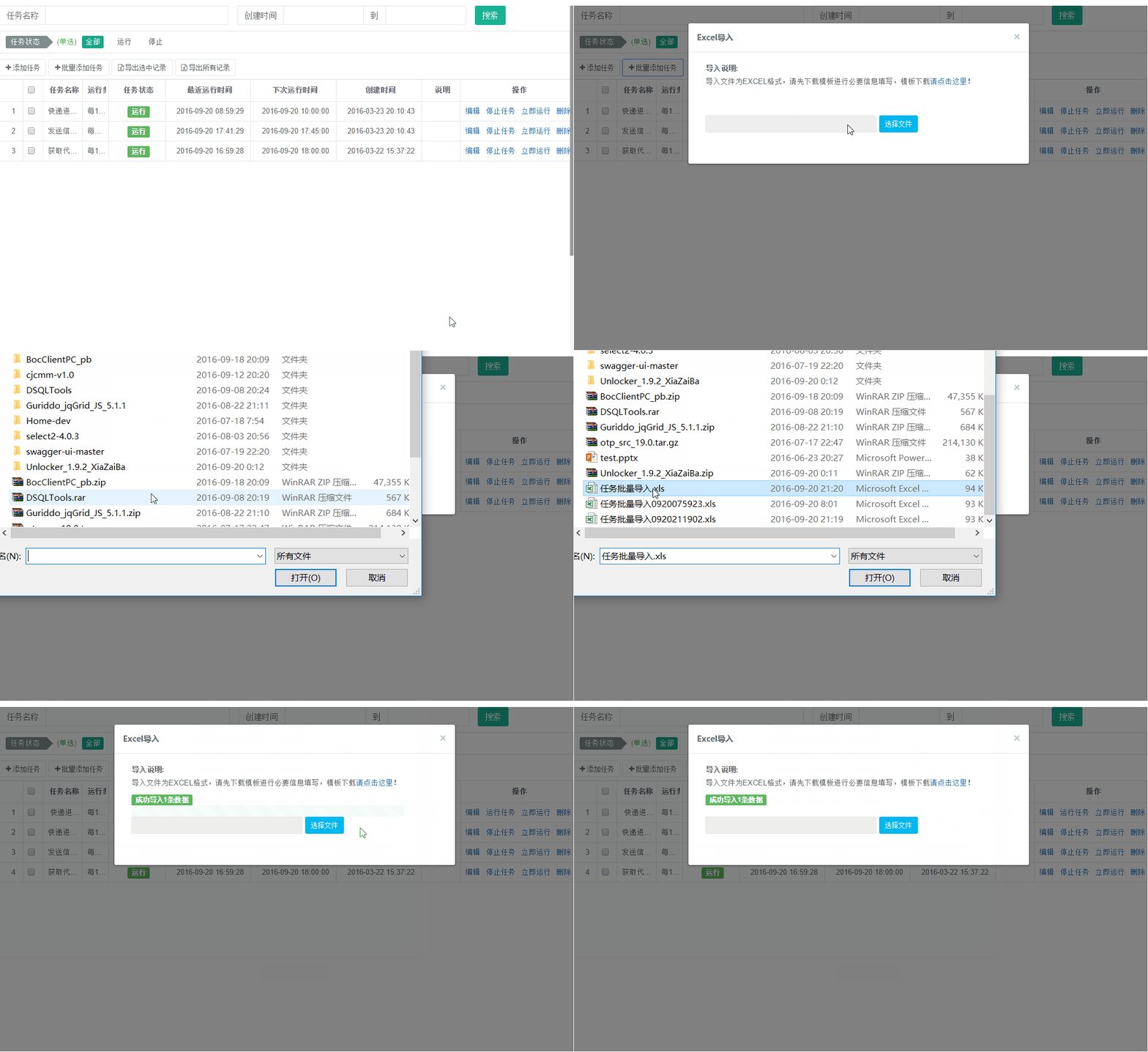
導入失敗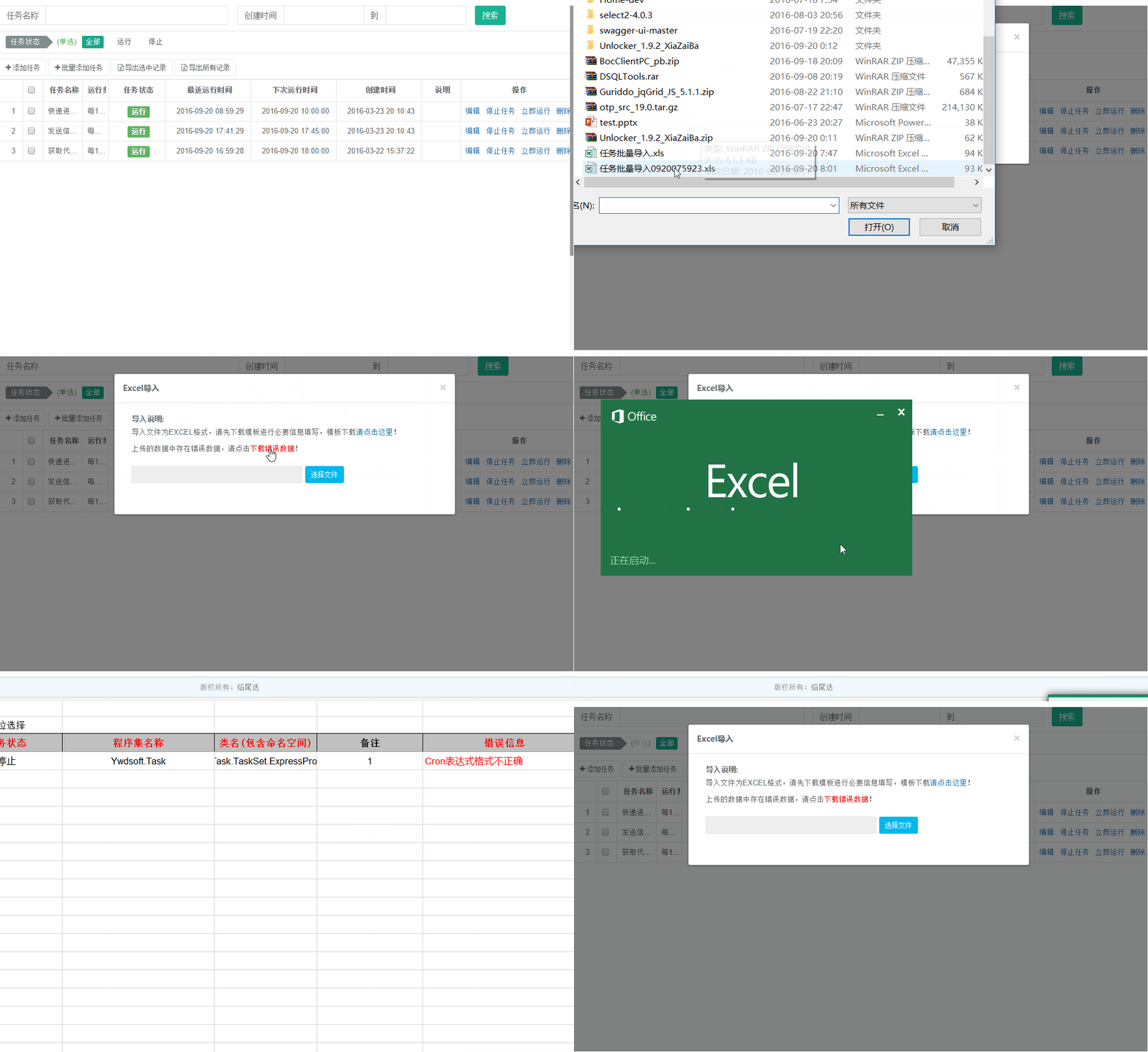
閱讀目錄
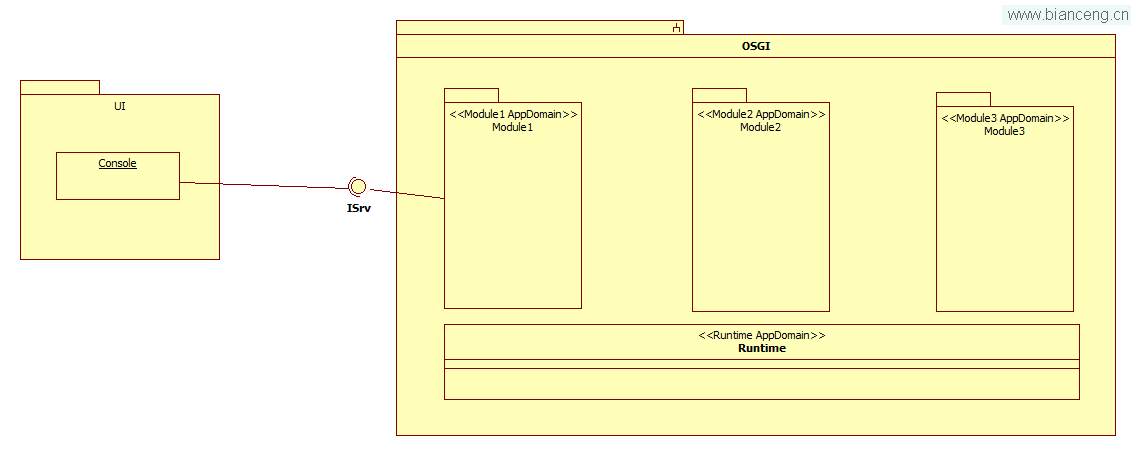
本文使用的npoi版本:1.2.5,可以nuget下載相應包。系統相關流程和重要類的類圖如下。

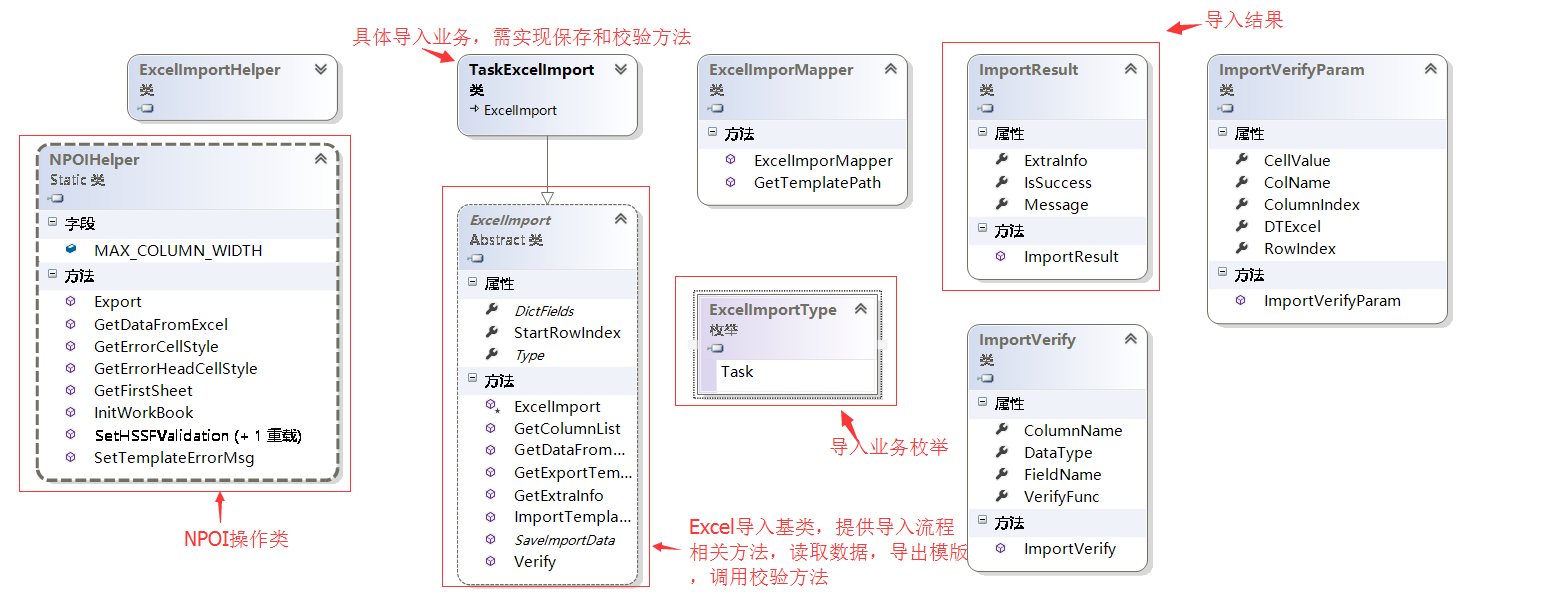
設計原則:
1.通用操作與業務無關代碼在基類裡面實現
2.對於個性化業務可以重寫基類方法實現
開發流程:
1.制作Excel導入模版
2.添加繼承ExcelImport業務導入類
3.在ExcelImportMapper中添加枚舉和該業務枚舉對應模版路徑地址
4.業務導入類重寫Type,DictFields,SavaImportData,根據模版決定是否重寫GetExportTemplate方法
回到頂部
1.返回導入模版
默認實現,直接根據模版文件路徑返回到響應流中
        /// <summary>
        ///返回對應的導出模版數據
        /// </summary>
        /// <param name="FilePath">模版的路徑</param>
        /// <param name="s">響應流</param>
        /// <returns>模版MemoryStream</returns>
        public virtual void GetExportTemplate(string FilePath, Stream s)
        {
            byte[] m_buffer = new byte[BUFFER_SIZE];
            int count = 0;
            using (FileStream fs = File.OpenRead(FilePath))
            {
                do
                {
                    count = fs.Read(m_buffer, 0, BUFFER_SIZE);
                    s.Write(m_buffer, 0, count);
                } while (count == BUFFER_SIZE);
            }
        }
個性化實現,比如導出模版有下拉選項
        /// <summary>
        ///返回對應的導出模版數據
        /// </summary>
        /// <param name="FilePath">模版的路徑</param>
        /// <param name="s">響應流</param>
        /// <returns>模版MemoryStream</returns>
        public override void GetExportTemplate(string FilePath, Stream s)
        {
            //寫入下拉框值 任務狀態
            var sheet = NPOIHelper.GetFirstSheet(FilePath);

            string[] taskStatus = GetStatusDict().Keys.ToArray();

            int dataRowIndex = StartRowIndex + 1;
            NPOIHelper.SetHSSFValidation(sheet, taskStatus, dataRowIndex, 3);

            sheet.Workbook.Write(s);
        }
2.導入模版
抽象類提供的導入流程
        /// <summary>
        ///返回對應的導出模版數據
        /// </summary>
        /// <param name="ins">導入文件流</param>
        /// <param name="fileName">文件名</param>
        /// <param name="userInfo">用戶信息</param>
        /// <returns>ImportResult</returns>
        public virtual ImportResult ImportTemplate(Stream ins, string fileName, UserInfo userInfo)
        {
            if (DictFields == null)
            {
                throw new ArgumentNullException("Excel字段映射及校驗緩存字典DictFields空異常");
            }
            //1.讀取數據
            ISheet datasheet = null;
            DataTable dt = GetDataFromExcel(ins, out datasheet);

            //2.校驗列是否正確
            //相同列數
            int equalCount = (from p in GetColumnList(dt)
                              join q in DictFields.Keys
                              on p equals q
                              select p).Count();
            if (equalCount < DictFields.Keys.Count)
            {
                throw new Exception(string.Format("模版列和規定的不一致,正確的列為({0})", string.Join(",", DictFields.Keys)));
            }


            //2.改變列名為英文字段名
            ImportVerify objVerify = null;
            List<string> columns = new List<string>();
            List<string> removeColumns = new List<string>();
            foreach (DataColumn dc in dt.Columns)
            {
                if (DictFields.TryGetValue(dc.ColumnName, out objVerify))
                {
                    if (objVerify != null)
                    {
                        dc.ColumnName = objVerify.FieldName;
                        columns.Add(objVerify.FieldName);
                        continue;
                    }
                }
                removeColumns.Add(dc.ColumnName);
            }
            //3.刪除無效列
            foreach (string remove in removeColumns)
            {
                dt.Columns.Remove(remove);
            }

            //4.獲取校驗所需額外參數
            Dictionary<string, object> extraInfo = GetExtraInfo(columns, dt);

            // 英文字段名到中文列名映射關系
            Dictionary<string, ImportVerify> DictColumnFields = DictFields.Values.ToDictionary(e => e.FieldName, e => e);

            //5.開始校驗
            ImportResult result = Verify(dt, datasheet, extraInfo, userInfo, fileName, DictColumnFields);

            if (result.IsSuccess)
            {
                //校驗完成後進行數據類型轉換
                ImportVerify iv = null;
                Type columnType = null;
                DataTable dtNew = dt.Clone();
                foreach (DataColumn dc in dtNew.Columns)
                {
                    if (DictColumnFields != null && DictColumnFields.TryGetValue(dc.ColumnName, out iv))
                    {
                        if (iv.DataType != null)
                        {
                            columnType = iv.DataType;
                        }
                        else
                        {
                            columnType = dc.DataType;
                        }
                    }
                    else
                    {
                        columnType = typeof(string);
                    }
                    dc.DataType = columnType;
                }
                //復制數據到克隆的datatable裡
                try
                {
                    foreach (DataRow dr in dt.Rows)
                    {
                        dtNew.ImportRow(dr);
                    }
                }
                catch { }

                //6.保存數據
                result.ExtraInfo = SaveImportData(dtNew, extraInfo, userInfo);
                result.Message = string.Format("成功導入{0}條數據", dtNew.Rows.Count);
            }
            return result;
        }
抽象類校驗流程
        /// <summary>
        /// 校驗數據是否正常
        /// </summary>
        /// <param name="dt">數據集</param>
        /// <param name="outputStream">輸出流</param>
        /// <param name="sheet">數據sheet</param>
        /// <param name="userInfo">用戶信息</param>
        /// <param name="fileName">文件名稱</param>
        /// <param name="DictColumnFields">英文字段名到中文列名映射關系</param>
        /// <returns>ImportResult</returns>
        public virtual ImportResult Verify(DataTable dt, ISheet sheet, Dictionary<string, object> extraInfo, UserInfo userInfo, string fileName, Dictionary<string, ImportVerify> DictColumnFields)
        {
            IWorkbook wb = sheet.Workbook;
            ImportResult result = new ImportResult();

            string[] arrErrorMsg = null;
            string errorMsg = string.Empty;
            int columnCount = dt.Columns.Count;
            string columnName = string.Empty;
            ImportVerify objVerify = null;
            ImportVerifyParam objVerifyParam = new ImportVerifyParam { DTExcel = dt, CellValue = null, ColName = columnName, ColumnIndex = 0, RowIndex = 0 };
            DataRow row = null;
            object objExtra = null;
            bool isCorrect = true;

            //錯誤數據行樣式
            var cellErrorStyle = NPOIHelper.GetErrorCellStyle(wb);
            ICell errorCell = null;
            IRow sheetRow = null;

            for (int i = 0, rLength = dt.Rows.Count; i < rLength; i++)
            {
                row = dt.Rows[i];
                arrErrorMsg = new string[columnCount];
                for (int j = 0; j < columnCount; j++)
                {
                    columnName = dt.Columns[j].ColumnName;
                    if (DictColumnFields.TryGetValue(columnName, out objVerify))
                    {
                        if (objVerify.VerifyFunc != null)
                        {
                            objVerifyParam.CellValue = row[j];
                            objVerifyParam.ColumnIndex = j;
                            objVerifyParam.RowIndex = i;
                            objVerifyParam.ColName = objVerify.ColumnName;
                            if (extraInfo != null)
                            {
                                extraInfo.TryGetValue(columnName, out objExtra);
                            }
                            arrErrorMsg[j] = objVerify.VerifyFunc(objVerifyParam, objExtra);
                        }
                    }
                }
                errorMsg = string.Join(",", arrErrorMsg.Where(e => !string.IsNullOrEmpty(e)));
                if (!string.IsNullOrEmpty(errorMsg))
                {
                    isCorrect = false;
                    //設置錯誤信息
                    sheetRow = sheet.GetRow(StartRowIndex + 1 + i);
                    errorCell = sheetRow.GetCell(columnCount);
                    if (errorCell == null)
                    {
                        errorCell = sheetRow.CreateCell(columnCount);
                    }
                    errorCell.CellStyle = cellErrorStyle;
                    errorCell.SetCellValue(errorMsg);
                }
            }

            //輸出錯誤信息模版
            if (!isCorrect)
            {
                sheetRow = sheet.GetRow(StartRowIndex);
                errorCell = sheetRow.GetCell(columnCount);
                if (errorCell == null)
                {
                    errorCell = sheetRow.CreateCell(columnCount);
                }
                ICellStyle copyStyle = sheetRow.GetCell(columnCount - 1).CellStyle;
                ICellStyle style = NPOIHelper.GetErrorHeadCellStyle(wb);
                IFont font = style.GetFont(wb);
                IFont copyfont = copyStyle.GetFont(wb);
                font.FontHeight = copyfont.FontHeight;
                font.FontName = copyfont.FontName;
                style.FillForegroundColor = copyStyle.FillForegroundColor;
                style.BorderBottom = copyStyle.BorderBottom;
                style.BorderLeft = copyStyle.BorderLeft;
                style.BorderRight = copyStyle.BorderRight;
                style.BorderTop = copyStyle.BorderTop;
                errorCell.CellStyle = style;
                errorCell.SetCellValue("錯誤信息");

                //自適應列寬度
                sheet.AutoSizeColumn(columnCount);
                int width = sheet.GetColumnWidth(columnCount) + 2560;
                sheet.SetColumnWidth(columnCount, width > NPOIHelper.MAX_COLUMN_WIDTH ? NPOIHelper.MAX_COLUMN_WIDTH : width);

                result.Message = ExcelImportHelper.GetErrorExcel(wb, fileName);
            }
            else
            {
                result.IsSuccess = true;
            }
            return result;
        }
業務類保存方法
        /// <summary>
        /// 批量保存數據
        /// </summary>
        /// <param name="dt">數據</param>
        /// <param name="extraInfo">額外參數</param>
        /// <param name="userInfo">用戶信息</param>
        public override object SaveImportData(DataTable dt, Dictionary<string, object> extraInfo, UserInfo userInfo)
        {
            string columnName = string.Empty;
            object objExtra = null;
            Dictionary<string, string> dict = null;
            object objCellValue = null;

            List<string> listAssetsId = new List<string>();
            string strAssetsId = string.Empty;

       //下拉選項text轉成Value
            foreach (DataRow dr in dt.Rows)
            {
                foreach (DataColumn dc in dt.Columns)
                {
                    columnName = dc.ColumnName;
                    if (extraInfo.TryGetValue(columnName, out objExtra))
                    {
                        dict = objExtra as Dictionary<string, string>;
                        if (dict != null)
                        {
                            objCellValue = dr[columnName];
                            if (!ExcelImportHelper.ObjectIsNullOrEmpty(objCellValue))
                            {
                                dr[columnName] = dict[objCellValue.ToString()];
                            }
                        }
                    }
                }
            }

            try
            {
                //保存任務數據
                List<TaskUtil> list = dt.ToList<TaskUtil>();
                foreach (var item in list)
                {
                    TaskHelper.SaveTask(item);
                }
                return dt;
            }
            catch (Exception ex)
            {
                throw ex;
            }
        }
3.前端代碼封裝
上傳插件基於百度的webuploader插件,帶進度條效果不錯
模版下載方法
    /*
    * 功能:    根據業務類型下載導入數據得模版文件
    * 參數:    type:業務類型 取值參照 Ywdsoft.Utility.Excel.ExcelImportType 枚舉
    * 返回值:  無
    * 創建人:  焰尾迭
    * 創建時間:2016-08-19
    */
    DownloadExcelTemplate: function (type) {
        if (type == "undefined") {
            return;
        }
        var param = { type: type };
        $.download("/Excel/DownLoadTemplate", param, "get");
    },
模版上傳
/*
* 功能: 根據業務類型下載導入數據的模版文件
* 參數: options:
{
type:業務類型, 取值參照 Ywdsoft.Utility.Excel.ExcelImportType 枚舉
Ext:可導入文件類型,
ReturnDetailData:是否返回詳細數據
after:function(){}//回調函數
}
* 返回值: 無
* 創建人: 焰尾迭
* 創建時間:2016-08-22
*/
ImportExcelTemplate: function (options) {
if ($.isPlainObject(options)) {
var defaults = {
ReturnDetailData: 0
};
var param = $.extend({}, defaults, options);
if (param.type != "undefined") {
//加載樣式和js文件
$.loadFile("/Content/Css/plugins/webuploader/webuploader.css");
$.loadFile("/Content/Scripts/plugins/webuploader/webuploader.min.js");
if (!WebUploader.Uploader.support()) {
var error = "上傳控件不支持您的浏覽器!請嘗試升級flash版本或者使用Chrome引擎的浏覽器。<a target='_blank' href='http://www.chromeliulanqi.com'>下載頁面</a>";
if (window.console) {
window.console.log(error);
}
return;
}
var id = "ImportExcelTemplate{0}".format(param.type);
var modal = $("#" + id);
$(modal).remove();
var html =
'<div class="modal" id="{0}">'.format(id) +
'<div class="modal-dialog">' +
'<div class="modal-content">' +
'<div class="modal-header">' +
'<button type="button" class="close" data-dismiss="modal" aria-label="Close"><span aria-hidden="true">×</span></button>' +
'<h4 class="modal-title">Excel導入</h4>' +
'</div>' +
'<div class="modal-body">' +
'<div id="uploader" class="wu-example">' +
'<p>;
$(html).appendTo("body");
modal = $("#" + id);
var postData = { type: param.type, FunctionCode: param.FunctionCode, ReturnDetailData: param.ReturnDetailData };
var uploader = WebUploader.create({
swf: '/Content/Scripts/plugins/webuploader/Uploader.swf',
server: '/Excel/ImportTemplate?' + $.param(postData),
pick: '#picker',
accept: {
title: 'excel',
extensions: 'xls',
mimeTypes: 'application/msexcel'
},
resize: false,
fileSingleSizeLimit: 10 * 1024 * 1024,//10M
duplicate: true
});
$("#ctlBtn").on('click', function () {
uploader.upload();
});
// 當有文件被添加進隊列的時候
uploader.on('fileQueued', function (file) {
$("#thelist").html('<div id="' + file.id + '" class="item">' +
'<div class="state"></div>' +
'</div>');
$(".upload-file-name").val(file.name);
$(".btn-start-uploader").show();
});
// 文件上傳過程中創建進度條實時顯示。
uploader.on('uploadProgress', function (file, percentage) {
var $li = $('#' + file.id),
$percent = $li.find('.progress .progress-bar');
// 避免重復創建
if (!$percent.length) {
$percent = $('<div class="progress progress-striped active">' +
'<div class="progress-bar" role="progressbar">);
}
$li.find('.state').text('上傳中');
$percent.css('width', percentage * 100 + '%');
$(".upload-file-name").val("");
$(".btn-start-uploader").hide();
});
uploader.on('uploadSuccess', function (file, response) {
if (response.IsSuccess) {
$('#' + file.id).find('.state').html('<span class="label label-success">' + response.Message + '</span>');
if ($.isFunction(param.after)) {
param.after(response, modal);
}
} else {
if (response.Message.indexOf("http://") >= 0) {
$('#' + file.id).find('.state').html("上傳的數據中存在錯誤數據,請點擊<a class='red' href='{0}' target='_blank'>下載錯誤數據</a>!".format(response.Message));
} else {
$('#' + file.id).find('.state').html('<span class="label label-danger" title="' + response.Message + '">' + response.Message + '</span>');
}
}
});
uploader.on('uploadError', function (file, response) {
console.log(response);
$('#' + file.id).find('.state').text('上傳出錯');
});
uploader.on('uploadComplete', function (file) {
$('#' + file.id).find('.progress').fadeOut(200);
});
modal.modal('show');
}
}
}
回到頂部
在使用npoi操作excel生成下拉框過程中遇到了問題,花了大半天時間才解決,下面介紹一下如何使用npoi生成下拉框,並且對比兩種生成下拉框方式的優劣勢。
方式一:
    //下拉框應用區域,起始行截止行 起始列截止列
    CellRangeAddressList regions = new CellRangeAddressList(firstRow, endRow, firstCol, endCol);
    //下拉選項數組
    DVConstraint constraint = DVConstraint.CreateExplicitListConstraint(textlist);
    HSSFDataValidation dataValidate = new HSSFDataValidation(regions, constraint);
    sheet.AddValidationData(dataValidate);
該方式使用簡單幾行代碼即可搞定,缺點是所有選項字符大於255時會報異常,異常信息如下
String literals in formulas can't be bigger than 255 Chars ASCII"
異常驗證方式
string[] textlist = new string[50];
for(int i = 0; i < 50; i++)
        {
            textlist[i] = "好好學習天天向上";
        }
方式二: 先創建一個Sheet專門用於存儲下拉項的值,並將各下拉項的值寫入其中
        /// <summary>
        /// 設置某些列的值只能輸入預制的數據,顯示下拉框
        /// </summary>
        /// <param name="sheet">要設置的sheet</param>
        /// <param name="textlist">下拉框顯示的內容</param>
        /// <param name="firstRow">開始行</param>
        /// <param name="endRow">結束行</param>
        /// <param name="firstCol">開始列</param>
        /// <param name="endCol">結束列</param>
        /// <returns>設置好的sheet</returns>
        public static ISheet SetHSSFValidation(ISheet sheet,
                string[] textlist, int firstRow, int endRow, int firstCol,
                int endCol)
        {
            IWorkbook workbook = sheet.Workbook;
            if (endRow > sheet.LastRowNum)
            {
                endRow = sheet.LastRowNum;
            }
            ISheet hidden = null;

            string hiddenSheetName = "hidden" + sheet.SheetName;
            int hIndex = workbook.GetSheetIndex(hiddenSheetName);
            if (hIndex < 0)
            {
                hidden = workbook.CreateSheet(hiddenSheetName);
                workbook.SetSheetHidden(sheet.Workbook.NumberOfSheets - 1, SheetState.HIDDEN);
            }
            else
            {
                hidden = workbook.GetSheetAt(hIndex);
            }

            IRow row = null;
            ICell cell = null;
            for (int i = 0, length = textlist.Length; i < length; i++)
            {
                row = hidden.GetRow(i);
                if (row == null)
                {
                    row = hidden.CreateRow(i);
                }
                cell = row.GetCell(firstCol);
                if (cell == null)
                {
                    cell = row.CreateCell(firstCol);
                }
                cell.SetCellValue(textlist[i]);
            }

            // 加載下拉列表內容
            string nameCellKey = hiddenSheetName + firstCol;
            IName namedCell = workbook.GetName(nameCellKey);
            if (namedCell == null)
            {
                namedCell = workbook.CreateName();
                namedCell.NameName = nameCellKey;
                namedCell.RefersToFormula = string.Format("{0}!${1}$1:${1}${2}", hiddenSheetName, NumberToChar(firstCol + 1), textlist.Length);
            }
            DVConstraint constraint = DVConstraint.CreateFormulaListConstraint(nameCellKey);

            // 設置數據有效性加載在哪個單元格上,四個參數分別是:起始行、終止行、起始列、終止列
            CellRangeAddressList regions = new CellRangeAddressList(firstRow, endRow, firstCol, endCol);
            // 數據有效性對象
            HSSFDataValidation validation = new HSSFDataValidation(regions, constraint);
            //// 取消彈出錯誤框
            //validation.ShowErrorBox = false;
            sheet.AddValidationData(validation);
            return sheet;
        }
該方式相當於Excel的以下操作
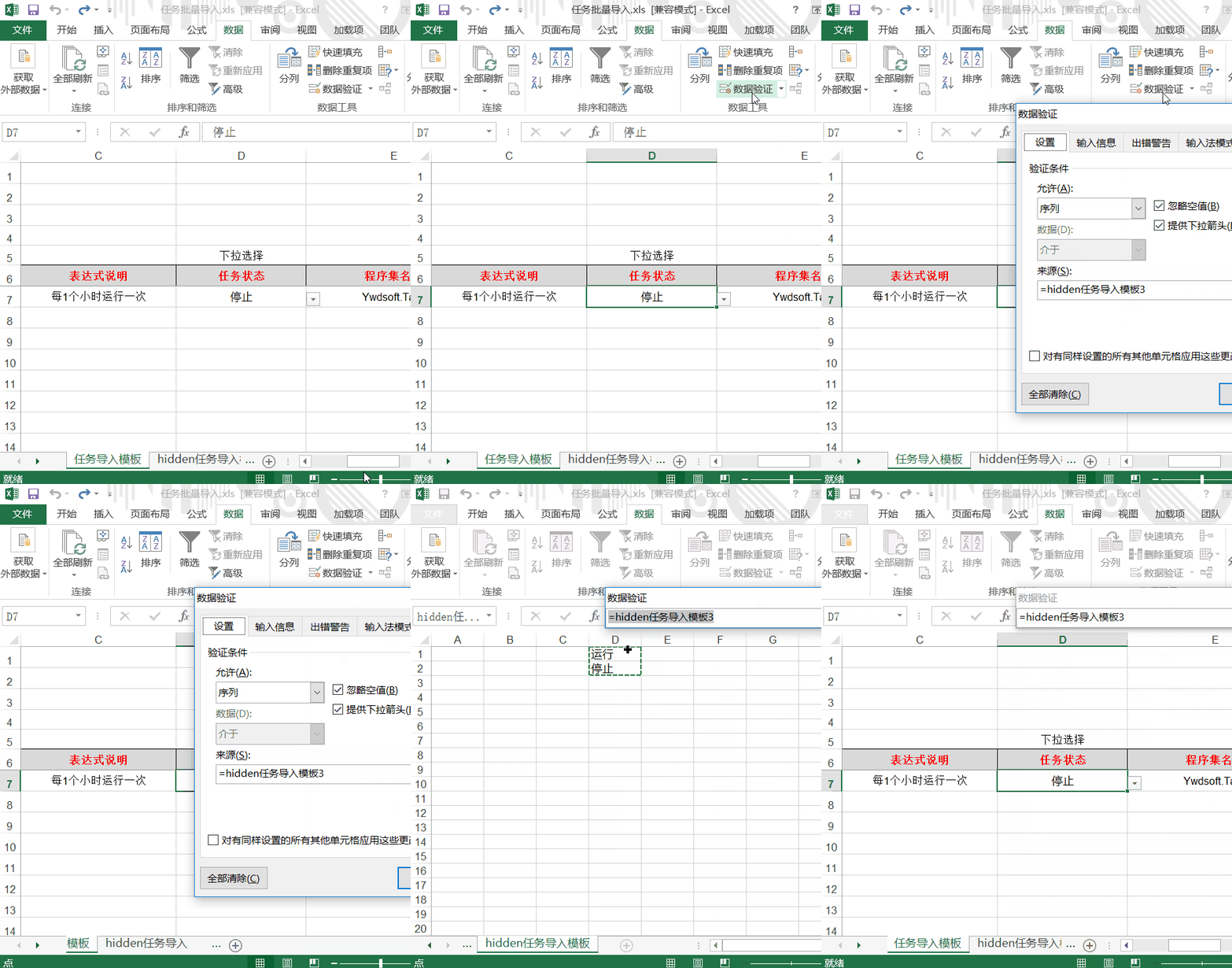
該方式不存在上限限制,方便在Excel裡面查看下拉選項,更加通用。
回到頂部至此實現npoi實現通用導入功能已經完成,後續具體導入業務實現也很簡單了,有需要的朋友可以直接拿去使用。
本篇所使用示例代碼下載地址:
SVN地址:http://code.taobao.org/svn/TaskManagerPub/Branch 使用svn checkout指令進行下載。
GitHub地址:https://github.com/CrazyJson/TaskManager
體驗工具下載地址:任務管理框架 V2.0
如果,您認為閱讀這篇博客讓您有些收獲,不妨點擊一下右下角的【推薦】按鈕。
如果,您希望更容易地發現我的新博客,不妨點擊一下綠。色通道的【關注我】。
因為,我的寫作熱情也離不開您的肯定支持。
感謝您的閱讀,如果您對我的博客所講述的內容有興趣,請繼續關注我的後續博客,我是焰尾迭 。