一、#!usr/bin/env python
腳本語言的第一行,指定執行腳本的解釋器。
#!/usr/bin/python 是告訴操作系統執行這個腳本的時候,調用/usr/bin下的python解釋器;
#!/usr/bin/env python 這種用法是為了防止操作系統用戶沒有將python裝在默認的/usr/bin路徑裡。當系統看到這一行的時候,首先會到env設置裡查找python的安裝路徑,再調用對應路徑下的解釋器程序完成操作。
其語法規則是:
1、必須是文件的第一行
2、必須以#!開頭
3、/path/to/script/interpreter是腳本解釋器的全路徑名。
 例如:
  #!/bin/sh           shell腳本
  #!/usr/bin/perl     perl腳本
  #!/usr/bin/python   python腳本
  #!/usr/bin/python3  python3腳本
  #!/usr/bin/python2  python2腳本

  另外,在指定解釋器後,可以用#!coding = usf-8 來指定編碼格式,這樣在py文件中就可以寫入中文注釋或字符串。
二、__file__, __name__, __doc__屬性
1、__file__
用來獲得模塊所在路徑,得到的可能是相對路徑或絕對路徑。
為了得到絕對路徑,可以通過os.path.realpath(__file__)
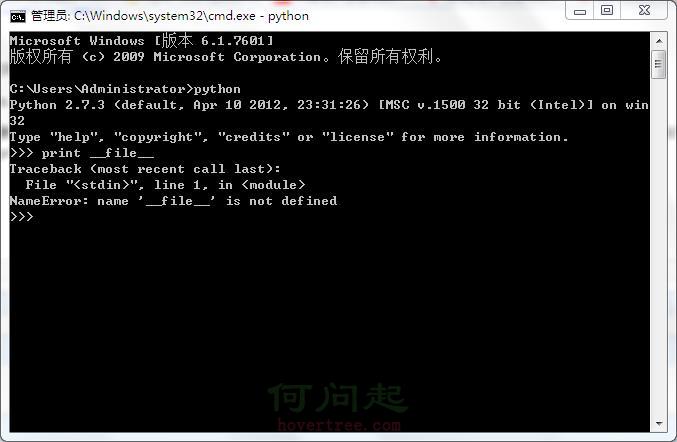
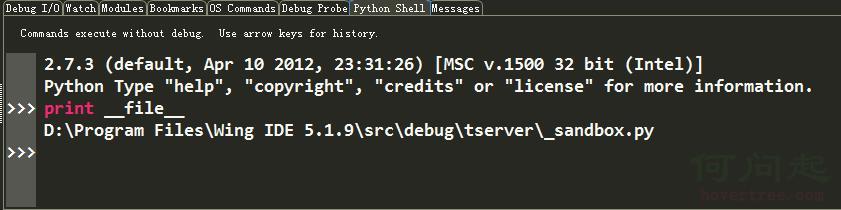
但是,在Python控制台下,直接使用print __file__是會導致 name ‘__file__’ is not defined錯誤的,因為這時沒有在任何一個腳本下執行,自然沒有 __file__的定義了。不過,在wing下的python shell中print __file__ ,會得到_sandbox.py的路徑。如下圖所示:
sys.argv[0]是獲取文件路徑的另一種方式。


 import os, sys
 dirname, filename = os.path.split(os.path.abspath(sys.argv[0]))
 print "running from", dirname
 print "file is", filename
View Code
不過,__file__與sys.argv[0]的區別在於:當一個文件訪問另一個文件時,__file__顯示的路徑不同,sys.argv[0]顯示的路徑相同。表述的不是很清楚,見例子:
 #f:\Python\Wing\Pygame\Bunny and Badgers\test.py
 import sys, os
 print "test: sys.argv[0] is", repr(sys.argv[0])
 print "test: __file__ is", repr(__file__)
 print "test: cwd is", repr(os.getcwd())
 import pathutils
 pathutils.show_path()

 #D:\Program Files\Python27\pathutils.py
 import os, sys
 def show_path():
     print "show_path: sys.argv[0] is", repr(sys.argv[0])
     print "show_path: __file__ is", repr(__file__)
     print "show_path: cwd is", repr(os.getcwd())

 #the output
 test: sys.argv[0] is 'f:\\Python\\Wing\\Pygame\\Bunny and Badgers\\test.py'
 test: __file__ is 'f:\\Python\\Wing\\Pygame\\Bunny and Badgers\\test.py'
 test: cwd is 'f:\\Python\\Wing\\Pygame\\Bunny and Badgers'
 show_path: sys.argv[0] is 'f:\\Python\\Wing\\Pygame\\Bunny and Badgers\\test.py'
 show_path: __file__ is 'D:\\Program Files\\Python27\\pathutils.py'
 show_path: cwd is 'f:\\Python\\Wing\\Pygame\\Bunny and Badgers'
View Code
2、__name__
用於判斷當前模塊是不是程序入口,如果當前程序正在使用,__name__的值為__main__。在編寫程序時,通常需要給每個模塊添加條件語句,用於單獨測試該模塊的功能。
3、__doc__
每個對象都有一個__doc__屬性。
 class Person:
     '''print __doc__ will be displaied ....
        hahah
        heheh
     '''
     def __init__(self, name, age):
         self.name = name
         self.age = age
 bob = Person('bob', 18)
 print Person.__doc__
 print bob.__doc__


 '''
 print __doc__ will be displaied ....
        hahah
        heheh

 print __doc__ will be displaied ....
        hahah
        heheh
 '''
View Code
三、隱含參數*args,**kwargs
直接用代碼體現吧
 def foo(*args,**kwargs):
   print 'args=',args
   print 'kwargs=',kwargs
   print '**********************'
 #if __name__=='__main__':
 foo(1,2,3)
 foo(a=1,b=2,c=3)
 foo(1,2,3,a=1,b=2,c=3)
 foo(1,'b','c',a=1,b='b',c='c')

 def foo2(**kwargs):
   for item in kwargs.items():
     print item,
 my_dict = {'name': 'yy', 'age': 18}
 foo2(**my_dict)  # '**' is must added
View Code
四、yield
感覺yield是python特有的一個特性吧,用在生成器函數中。在python documention中有這樣的描述,The yield expression is only used when defining a generator function, and can only be used in the body of a function definition. Using a yield expression in a function definition is sufficient to cause that definition to create a generator function instead of a normal function.
而且,官方給出的例子很好的說明了yield的用法。
 def echo(value=None):
     print "Excution starts when 'next()' is called for the first time"
     try:
         while True:
             try:
                 value = (yield value)
             except Exception, e:
                 value = e
     finally:
         print "Don't forget to clean up when 'close() is called.'"

 generator = echo(1)
 print type(generator)
 print generator.next()
 print generator.next()
 print generator.send(2)
 print generator.throw(TypeError, "spam")
 print generator.send("Does this work?")
 generator.close()
View Code
 def myReadlines():
   seek = 0
   while True:
     with open('C:\Users\Administrator\Desktop\interface.txt', 'r' ) as f:
       f.seek(seek)
       data = f.readline()
       if data:
         yield data
         seek = f.tell()
       else:
         return

 for item in myReadlines():
   print item
View Code
五、lambda表達式
lambda表達式相當於一個沒有函數名的函數。當函數功能較簡單,而不想聲明一個函數時,可以用lambda表達式代替。上代碼吧。
 #example1
 value = lambda x, y:x > y
 print value(4, 6)

 #example2
 map( lambda x: x*x, [y for y in range(10)] )
View Code
六、反射
簡單的說,就是以字符創的形式導入模塊。__import__, getattr().
第一次寫博客,感覺挺好,以後就以這樣的形式督促自己學習。反射機制下次再總結了,回去跑步。
2016-03-26 21:07:00