在上次的內容裡,我們給購物車添加了錯誤處理,這次來實現清空購物車和金額的格式化處理。
到現在我們還沒有給顯示購物信息列表頁面的“empty cart”鏈接添加任何處理。我們首先來實現這個功能:
1.在Store_Control.rb文件中添加empty_cart方法:
def empty_cart
find_cart.empty!
flash[:notice] = 'Your cart is now empty'
redirect_to(:action => 'index')
end
2.接下來是cart.rb文件,添加下面的代碼:
def empty!
   @items = []
   @total_price = 0.0
end
好了,就是這麼簡單,現在點擊empty cart鏈接,會重新定位到index頁面,並且顯示一個消息,如圖:
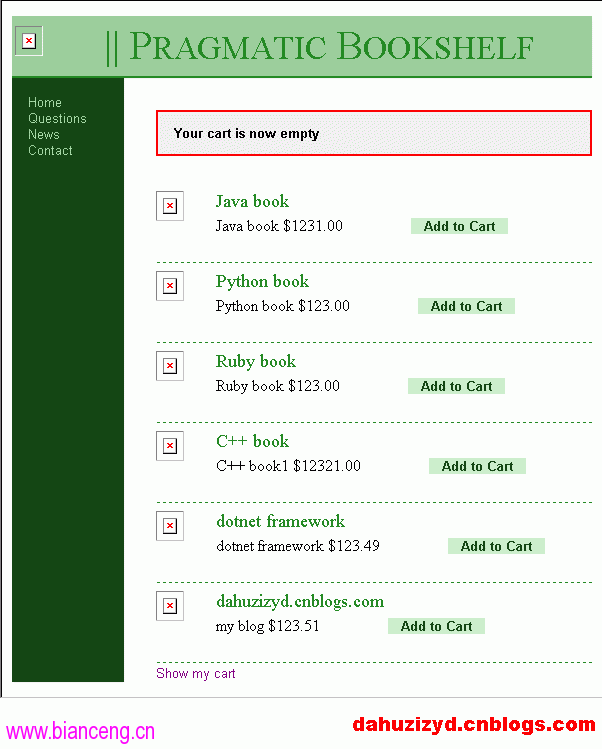
嗯,到這裡你肯定看到store_controller中關於顯示異常信息的flash的操作部分有重復代碼,這是代碼的壞味道,現在我們使用Extract Method,將這些代碼提取到一個方法中,下面是修改後的代碼,我們修改了add_to_cart,display_cart,empty_cart三個方法,並且添加了一個redirect_to_index方法:
def add_to_cart
product = Product.find(params[:id])
@cart = find_cart
@cart.add_product(product)
redirect_to(:action => 'display_cart')
rescue
logger.error("Attempt to access invalid product #{params[:id]}")
flash[:notice] = 'Invalid product'
redirect_to_index('Invalid product')
end

def display_cart
@cart = find_cart
@items = @cart.items
if @items.empty?
redirect_to_index("Your cart is currently empty")
end
end

def empty_cart
find_cart.empty!
redirect_to_index('Your cart is now empty')
end

def redirect_to_index(msg = null)
flash[:notice] = msg
redirect_to(:action => 'index')
end
另外,cart.rb裡也有重復的代碼,我們重構一下:
def empty!
@items = []
@total_price = 0.0
end

def initialize
empty!
end
整理完了代碼,再來看看另一個小功能,格式化金額:
1.在rails_apps\depot\app\helpers目錄下的application_helper.rb中添加代碼:
def fmt_dollars(amt)
sprintf("$%0.2f", amt)
end
2.修改rails_apps\depot\app\views\store目錄下的display_cart.rhtml文件中的兩行:
<td align="right"><%= item.unit_price %></td>
<td align="right"><%= item.unit_price * item.quantity %></td>
和
<td id="totalcell"><%= (@cart.total_price)%></td>
變為
<td align="right"><%= fmt_dollars(item.unit_price) %></td>
<td align="right"><%= fmt_dollars(item.unit_price * item.quantity) %></td>
和
<td id="totalcell"><%= fmt_dollars(@cart.total_price)%></td>
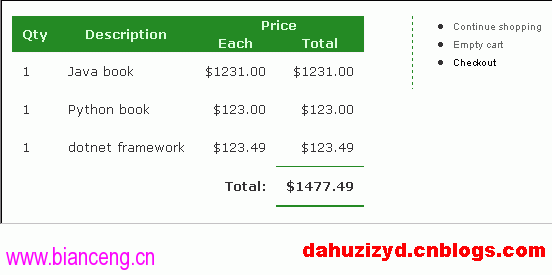
現在可以看看最後的結果了,如圖: