Java.io包幾乎包含了所有操作輸入、輸出需要的類。所有這些流類代表了輸入源和輸出目標。
Java.io包中的流支持很多種格式,比如:基本類型、對象、本地化字符集等等。
一個流可以理解為一個數據的序列。輸入流表示從一個源讀取數據,輸出流表示向一個目標寫數據。
Java為I/O提供了強大的而靈活的支持,使其更廣泛地應用到文件傳輸和網絡編程中。
但本文講述最基本的和流與I/O相關的功能。我們將通過一個個例子來學習這些功能。
Java的控制台輸入由System.in完成。
為了獲得一個綁定到控制台的字符流,你可以把System.in包裝在一個BufferedReader 對象中來創建一個字符流。
下面是創建BufferedReader的基本語法:
BufferedReader br = new BufferedReader(new
                      InputStreamReader(System.in));
BufferedReader對象創建後,我們便可以使用read()方法從控制台讀取一個字符,或者用readLine()方法讀取一個字符串。
從BufferedReader對象讀取一個字符要使用read()方法,它的語法如下:
int read( ) throws IOException
每次調用read()方法,它從輸入流讀取一個字符並把該字符作為整數值返回。 當流結束的時候返回-1。該方法拋出IOException。
下面的程序示范了用read()方法從控制台不斷讀取字符直到用戶輸入"q"。
// 使用 BufferedReader 在控制台讀取字符

import java.io.*;

public class BRRead {
   public static void main(String args[]) throws IOException
   {
      char c;
      // 使用 System.in 創建 BufferedReader
      BufferedReader br = new BufferedReader(new
                         InputStreamReader(System.in));
      System.out.println("Enter characters, 'q' to quit.");
      // 讀取字符
      do {
         c = (char) br.read();
         System.out.println(c);
      } while(c != 'q');
   }
}
以上實例編譯運行結果如下:
Enter characters, 'q' to quit.
123abcq
1
2
3
a
b
c
q
從標准輸入讀取一個字符串需要使用BufferedReader的readLine()方法。
它的一般格式是:
String readLine( ) throws IOException
下面的程序讀取和顯示字符行直到你輸入了單詞"end"。
// 使用 BufferedReader 在控制台讀取字符
import java.io.*;
public class BRReadLines {
   public static void main(String args[]) throws IOException
   {
      // 使用 System.in 創建 BufferedReader
      BufferedReader br = new BufferedReader(new
                              InputStreamReader(System.in));
      String str;
      System.out.println("Enter lines of text.");
      System.out.println("Enter 'end' to quit.");
      do {
         str = br.readLine();
         System.out.println(str);
      } while(!str.equals("end"));
   }
}
以上實例編譯運行結果如下:
Enter lines of text.
Enter 'end' to quit.
This is line one
This is line one
This is line two
This is line two
end
end
在此前已經介紹過,控制台的輸出由 print( ) 和println( )完成。這些方法都由類PrintStream 定義,System.out是該類對象的一個引用。
PrintStream 繼承了OutputStream類,並且實現了方法write()。這樣,write()也可以用來往控制台寫操作。
PrintStream 定義write()的最簡單格式如下所示:
void write(int byteval)
該方法將byteval的低八位字節寫到流中。
下面的例子用write()把字符"A"和緊跟著的換行符輸出到屏幕:
import java.io.*;

// 演示 System.out.write().
public class WriteDemo {
   public static void main(String args[]) {
      int b;
      b = 'A';
      System.out.write(b);
      System.out.write('\n');
   }
}
運行以上實例在輸出窗口輸出"A"字符
A
注意:write()方法不經常使用,因為print()和println()方法用起來更為方便。
如前所述,一個流被定義為一個數據序列。輸入流用於從源讀取數據,輸出流用於向目標寫數據。
下圖是一個描述輸入流和輸出流的類層次圖。
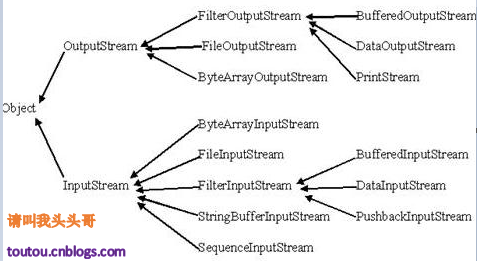
下面將要討論的兩個重要的流是FileInputStream 和FileOutputStream:
該流用於從文件讀取數據,它的對象可以用關鍵字new來創建。
有多種構造方法可用來創建對象。
可以使用字符串類型的文件名來創建一個輸入流對象來讀取文件:
InputStream f = new FileInputStream("C:/java/hello");
也可以使用一個文件對象來創建一個輸入流對象來讀取文件。我們首先得使用File()方法來創建一個文件對象:
File f = new File("C:/java/hello");
InputStream f = new FileInputStream(f);
創建了InputStream對象,就可以使用下面的方法來讀取流或者進行其他的流操作。
除了InputStream外,還有一些其他的輸入流,更多的細節參考下面鏈接:
該類用來創建一個文件並向文件中寫數據。
如果該流在打開文件進行輸出前,目標文件不存在,那麼該流會創建該文件。
有兩個構造方法可以用來創建FileOutputStream 對象。
使用字符串類型的文件名來創建一個輸出流對象:
OutputStream f = new FileOutputStream("C:/java/hello")
也可以使用一個文件對象來創建一個輸出流來寫文件。我們首先得使用File()方法來創建一個文件對象:
File f = new File("C:/java/hello");
OutputStream f = new FileOutputStream(f);
創建OutputStream 對象完成後,就可以使用下面的方法來寫入流或者進行其他的流操作。
除了OutputStream外,還有一些其他的輸出流,更多的細節參考下面鏈接:
下面是一個演示InputStream和OutputStream用法的例子:
import java.io.*;

public class fileStreamTest{

   public static void main(String args[]){

   try{
      byte bWrite [] = {11,21,3,40,5};
      OutputStream os = new FileOutputStream("test.txt");
      for(int x=0; x < bWrite.length ; x++){
         os.write( bWrite[x] ); // writes the bytes
      }
      os.close();

      InputStream is = new FileInputStream("test.txt");
      int size = is.available();

      for(int i=0; i< size; i++){
         System.out.print((char)is.read() + "  ");
      }
      is.close();
   }catch(IOException e){
      System.out.print("Exception");
   }
   }
}
上面的程序首先創建文件test.txt,並把給定的數字以二進制形式寫進該文件,同時輸出到控制台上。
以上代碼由於是二進制寫入,可能存在亂碼,你可以使用以下代碼實例來解決亂碼問題:
//文件名 :fileStreamTest2.java
import java.io.*;

public class fileStreamTest2{
    public static void main(String[] args) throws IOException {

        File f = new File("a.txt");
        FileOutputStream fop = new FileOutputStream(f);
        // 構建FileOutputStream對象,文件不存在會自動新建

        OutputStreamWriter writer = new OutputStreamWriter(fop, "UTF-8");
        // 構建OutputStreamWriter對象,參數可以指定編碼,默認為操作系統默認編碼,windows上是gbk

        writer.append("中文輸入");
        // 寫入到緩沖區

        writer.append("\r\n");
        //換行

        writer.append("English");
        // 刷新緩存沖,寫入到文件,如果下面已經沒有寫入的內容了,直接close也會寫入

        writer.close();
        //關閉寫入流,同時會把緩沖區內容寫入文件,所以上面的注釋掉

        fop.close();
        // 關閉輸出流,釋放系統資源

        FileInputStream fip = new FileInputStream(f);
        // 構建FileInputStream對象

        InputStreamReader reader = new InputStreamReader(fip, "UTF-8");
        // 構建InputStreamReader對象,編碼與寫入相同

        StringBuffer sb = new StringBuffer();
        while (reader.ready()) {
            sb.append((char) reader.read());
            // 轉成char加到StringBuffer對象中
        }
        System.out.println(sb.toString());
        reader.close();
        // 關閉讀取流

        fip.close();
        // 關閉輸入流,釋放系統資源

    }
}
還有一些關於文件和I/O的類,我們也需要知道:
File類中有兩個方法可以用來創建文件夾:
下面的例子創建 "/tmp/user/java/bin"文件夾:
import java.io.File;

public class CreateDir {
   public static void main(String args[]) {
      String dirname = "/tmp/user/java/bin";
      File d = new File(dirname);
      // 現在創建目錄
      d.mkdirs();
  }
}
編譯並執行上面代碼來創建目錄"/tmp/user/java/bin"。
注意:Java在UNIX和Windows自動按約定分辨文件路徑分隔符。如果你在Windows版本的Java中使用分隔符(/) ,路徑依然能夠被正確解析。
一個目錄其實就是一個File對象,它包含其他文件和文件夾。
如果創建一個File對象並且它是一個目錄,那麼調用isDirectory( )方法會返回true。
可以通過調用該對象上的list()方法,來提取它包含的文件和文件夾的列表。
下面展示的例子說明如何使用list()方法來檢查一個文件夾中包含的內容:
import java.io.File;

public class DirList {
   public static void main(String args[]) {
      String dirname = "/tmp";
      File f1 = new File(dirname);
      if (f1.isDirectory()) {
         System.out.println( "Directory of " + dirname);
         String s[] = f1.list();
         for (int i=0; i < s.length; i++) {
            File f = new File(dirname + "/" + s[i]);
            if (f.isDirectory()) {
               System.out.println(s[i] + " is a directory");
            } else {
               System.out.println(s[i] + " is a file");
            }
         }
      } else {
         System.out.println(dirname + " is not a directory");
    }
  }
}
以上實例編譯運行結果如下:
Directory of /tmp
bin is a directory
lib is a directory
demo is a directory
test.txt is a file
README is a file
index.html is a file
include is a directory