為什麼需要測試?
2. 測什麼?
3. 需要注意
[測試的方法]_[測試的條件]_[符合預期的結果]。private的方法,將private方法當做黑盒內部組件,測試對其引用的public方法即可;不考慮測試瑣碎的代碼,如getter或者setter。4. 創建測試
ALT + ENTERCreate Test
control + shift + R (Android Studio 默認執行單元測試快捷鍵)。
1. 本地單元測試
直接在開發機上面進行運行測試。
在沒有依賴或者僅僅只需要簡單的Android庫依賴的情況下,有限考慮使用該類單元測試。
./gradlew check(1)代碼存儲
如果是對應不同的flavor或者是build type,直接在test後面加上對應後綴(如對應名為myFlavor的單元測試代碼,應該放在src/testMyFlavor/java下面)。
src/test/javadependencies {
// Required -- JUnit 4 framework,用於單元測試,google官方推薦
testCompile 'junit:junit:4.12'
// Optional -- Mockito framework,用於模擬架構,google官方推薦
// http://www.manongjc.com/article/1546.html
testCompile 'org.mockito:mockito-core:1.10.19'
}
(3)JUnit
@Test public void method()
定義所在方法為單元測試方法
@Test (expected = Exception.class)
如果所在方法沒有拋出Annotation中的Exception.class->失敗
@Test(timeout=100)
如果方法耗時超過100毫秒->失敗
@Test(expected=Exception.class)
如果方法拋了Exception.class類型的異常->通過
@Before public void method()
這個方法在每個測試之前執行,用於准備測試環境(如: 初始化類,讀輸入流等)
@After public void method()
這個方法在每個測試之後執行,用於清理測試環境數據
BeforeClass public static void method()
這個方法在所有測試開始之前執行一次,用於做一些耗時的初始化工作(如: 連接數據庫)
AfterClass public static void method()
這個方法在所有測試結束之後執行一次,用於清理數據(如: 斷開數據連接)
@Ignore或者@Ignore("Why disabled")
忽略當前測試方法,一般用於測試方法還沒有准備好,或者太耗時之類的
@FixMethodOrder(MethodSorters.NAME_ASCENDING) public class TestClass{}
使得該測試方法中的所有測試都按照方法中的字母順序測試
Assume.assumeFalse(boolean condition)
如果滿足condition,就不執行對應方法
2. 模擬測試
需要運行在Android設備或者虛擬機上的測試。
主要用於測試: 單元(Android SDK層引用關系的相關的單元測試)、UI、應用組件集成測試(Service、Content Provider等)。
./gradlew connectedAndroidTest(1)代碼存儲:
src/androidTest/java(2)Google官方推薦引用
dependencies {
    androidTestCompile 'com.android.support:support-annotations:23.0.1'
    androidTestCompile 'com.android.support.test:runner:0.4.1'
    androidTestCompile 'com.android.support.test:rules:0.4.1'
    // Optional -- Hamcrest library
    androidTestCompile 'org.hamcrest:hamcrest-library:1.3'
    // Optional -- UI testing with Espresso
    //  http://www.manongjc.com/article/1546.html
    androidTestCompile 'com.android.support.test.espresso:espresso-core:2.2.1'
    // Optional -- UI testing with UI Automator
    androidTestCompile 'com.android.support.test.uiautomator:uiautomator-v18:2.1.1'
}
(3)常見的UI測試
需要模擬Android系統環境。
(4)Espresso
谷歌官方提供用於UI交互測試
import static android.support.test.espresso.Espresso.onView;
import static android.support.test.espresso.action.ViewActions.click;
import static android.support.test.espresso.assertion.ViewAssertions.matches;
import static android.support.test.espresso.matcher.ViewMatchers.isDisplayed;
import static android.support.test.espresso.matcher.ViewMatchers.withId;

// 對於Id為R.id.my_view的View: 觸發點擊,檢測是否顯示
onView(withId(R.id.my_view)).perform(click())
                            .check(matches(isDisplayed()));
// 對於文本打頭是"ABC"的View: 檢測是否沒有Enable
onView(withText(startsWith("ABC"))).check(matches(not(isEnabled()));
// 按返回鍵
pressBack();
// 對於Id為R.id.button的View: 檢測內容是否是"Start new activity"
// http://www.manongjc.com/article/1537.html
onView(withId(R.id.button)).check(matches(withText(("Start new activity"))));
// 對於Id為R.id.viewId的View: 檢測內容是否不包含"YYZZ"
onView(withId(R.id.viewId)).check(matches(withText(not(containsString("YYZZ")))));
// 對於Id為R.id.inputField的View: 輸入"NewText",然後關閉軟鍵盤
onView(withId(R.id.inputField)).perform(typeText("NewText"), closeSoftKeyboard());
// 對於Id為R.id.inputField的View: 清除內容
onView(withId(R.id.inputField)).perform(clearText());
Activity的Intent@RunWith(AndroidJUnit4.class)
public class SecondActivityTest {
@Rule
public ActivityTestRule<SecondActivity> rule =
new ActivityTestRule(SecondActivity.class, true,
// 這個參數為false,不讓SecondActivity自動啟動
// 如果為true,將會在所有@Before之前啟動,在最後一個@After之後關閉
false);
@Test
public void demonstrateIntentPrep() {
Intent intent = new Intent();
intent.putExtra("EXTRA", "Test");
// 啟動SecondActivity並傳入intent
rule.launchActivity(intent);
// 對於Id為R.id.display的View: 檢測內容是否是"Text"
// http://www.manongjc.com/article/1532.html
onView(withId(R.id.display)).check(matches(withText("Test")));
}
}
(5)異步交互
建議關閉設備中”設置->開發者選項中”的動畫,因為這些動畫可能會是的Espresso在檢測異步任務的時候產生混淆: 窗口動畫縮放(Window animation scale)、過渡動畫縮放(Transition animation scale)、動畫程序時長縮放(Animator duration scale)。
針對AsyncTask,在測試的時候,如觸發點擊事件以後拋了一個AsyncTask任務,在測試的時候直接onView(withId(R.id.update)).perform(click()),然後直接進行檢測,此時的檢測就是在AsyncTask#onPostExecute之後。
// 通過實現IdlingResource,block住當非空閒的時候,當空閒時進行檢測,非空閒的這段時間處理異步事情
public class IntentServiceIdlingResource implements IdlingResource {
    ResourceCallback resourceCallback;
    private Context context;

    public IntentServiceIdlingResource(Context context) { this.context = context; }

    @Override public String getName() { return IntentServiceIdlingResource.class.getName(); }

    @Override public void registerIdleTransitionCallback( ResourceCallback resourceCallback) { this.resourceCallback = resourceCallback; }

    @Override public boolean isIdleNow() {
      // 是否是空閒
      // 如果IntentService 沒有在運行,就說明異步任務結束,IntentService特質就是啟動以後處理完Intent中的事務,理解關閉自己
      // http://www.manongjc.com/article/1531.html
        boolean idle = !isIntentServiceRunning();
        if (idle && resourceCallback != null) {
          // 回調告知異步任務結束
            resourceCallback.onTransitionToIdle();
        }
        return idle;
    }

    private boolean isIntentServiceRunning() {
        ActivityManager manager = (ActivityManager) context.getSystemService(Context.ACTIVITY_SERVICE);
        // Get all running services
        List<ActivityManager.RunningServiceInfo> runningServices = manager.getRunningServices(Integer.MAX_VALUE);
        // check if our is running
        for (ActivityManager.RunningServiceInfo info : runningServices) {
            if (MyIntentService.class.getName().equals(info.service.getClassName())) {
                return true;
            }
        }
        return false;
    }
}

// 使用IntentServiceIdlingResource來測試,MyIntentService服務啟動結束這個異步事務,之後的結果。
@RunWith(AndroidJUnit4.class)
public class IntegrationTest {

    @Rule
    public ActivityTestRule rule = new ActivityTestRule(MainActivity.class);
    IntentServiceIdlingResource idlingResource;

    @Before
    public void before() {
        Instrumentation instrumentation = InstrumentationRegistry.getInstrumentation();
        Context ctx = instrumentation.getTargetContext();
        idlingResource = new IntentServiceIdlingResource(ctx);
        // 注冊這個異步監聽
        Espresso.registerIdlingResources(idlingResource);

    }
    @After
    public void after() {
        // 取消注冊這個異步監聽
        Espresso.unregisterIdlingResources(idlingResource);

    }

    @Test
    public void runSequence() {
        // MainActivity中點擊R.id.action_settings這個View的時候,會啟動MyIntentService
        onView(withId(R.id.action_settings)).perform(click());
        // 這時候IntentServiceIdlingResource#isIdleNow會返回false,因為MyIntentService服務啟動了
        // 這個情況下,這裡會block住.............
        // 直到IntentServiceIdlingResource#isIdleNow返回true,並且回調了IntentServiceIdlingResource#onTransitionToIdle
        // 這個情況下,繼續執行,這時我們就可以測試異步結束以後的情況了。
        onView(withText("Broadcast")).check(matches(notNullValue()));
    }
}
// 定義
public static Matcher<View> withItemHint(String itemHintText) {
  checkArgument(!(itemHintText.equals(null)));
  return withItemHint(is(itemHintText));
}

public static Matcher<View> withItemHint(final Matcher<String> matcherText) {
  checkNotNull(matcherText);
  return new BoundedMatcher<View, EditText>(EditText.class) {

    @Override
    public void describeTo(Description description) {
      description.appendText("with item hint: " + matcherText);
    }

    @Override
    protected boolean matchesSafely(EditText editTextField) {
      // 取出hint,然後比對下是否相同
      // http://www.manongjc.com/article/1524.html
      return matcherText.matches(editTextField.getHint().toString());
    }
  };
}

// 使用
onView(withItemHint("test")).check(matches(isDisplayed()));
1. AssertJ Android
square/assertj-android
極大的提高可讀性。
import static org.assertj.core.api.Assertions.*;

// 斷言: view是GONE的
assertThat(view).isGone();

MyClass test = new MyClass("Frodo");
MyClass test1 = new MyClass("Sauron");
MyClass test2 = new MyClass("Jacks");

List<MyClass> testList = new ArrayList<>();
testList.add(test);
testList.add(test1);

// 斷言: test.getName()等於"Frodo"
assertThat(test.getName()).isEqualTo("Frodo");
// 斷言: test不等於test1並且在testList中
// http://www.manongjc.com/article/1519.html
assertThat(test).isNotEqualTo(test1)
                 .isIn(testList);
// 斷言: test.getName()的字符串,是由"Fro"打頭,以"do"結尾,忽略大小寫會等於"frodo"
assertThat(test.getName()).startsWith("Fro")
                            .endsWith("do")
                            .isEqualToIgnoringCase("frodo");
// 斷言: testList有2個數據,包含test,test1,不包含test2
assertThat(list).hasSize(2)
                .contains(test, test1)
                .doesNotContain(test2);

// 斷言: 提取testList隊列中所有數據中的成員變量名為name的變量,並且包含name為"Frodo"與"Sauron"
//      並且不包含name為"Jacks"
assertThat(testList).extracting("name")
                    .contains("Frodo", "Sauron")
                    .doesNotContain("Jacks");
2. Hamcrest
JavaHamcrest
通過已有的通配方法,快速的對代碼條件進行測試
org.hamcrest:hamcrest-junit:(version)
import static org.hamcrest.MatcherAssert.assertThat;
import static org.hamcrest.Matchers.is;
import static org.hamcrest.Matchers.equalTo;

// 斷言: a等於b
assertThat(a, equalTo(b));
assertThat(a, is(equalTo(b)));
assertThat(a, is(b));
// 斷言: a不等於b
assertThat(actual, is(not(equalTo(b))));

List<Integer> list = Arrays.asList(5, 2, 4);
// 斷言: list有3個數據
assertThat(list, hasSize(3));
// 斷言: list中有5,2,4,並且順序也一致
assertThat(list, contains(5, 2, 4));
// 斷言: list中包含5,2,4
assertThat(list, containsInAnyOrder(2, 4, 5));
// 斷言: list中的每一個數據都大於1
// http://www.manongjc.com/article/1507.html
assertThat(list, everyItem(greaterThan(1)));
// 斷言: fellowship中包含有成員變量"race",並且其值不是ORC
assertThat(fellowship, everyItem(hasProperty("race", is(not((ORC))))));
// 斷言: object1中與object2相同的成員變量都是相同的值
assertThat(object1, samePropertyValuesAs(object2));

Integer[] ints = new Integer[] { 7, 5, 12, 16 };
// 斷言: 數組中包含7,5,12,16
assertThat(ints, arrayContaining(7, 5, 12, 16));
allOf
所有都匹配
anyOf
任意一個匹配
not
不是
equalTo
對象等於
is
是
hasToString
包含toString
instanceOf,isCompatibleType
類的類型是否匹配
notNullValue,nullValue
測試null
sameInstance
相同實例
hasEntry,hasKey,hasValue
測試Map中的Entry、Key、Value
hasItem,hasItems
測試集合(collection)中包含元素
hasItemInArray
測試數組中包含元素
closeTo
測試浮點數是否接近指定值
greaterThan,greaterThanOrEqualTo,lessThan,lessThanOrEqualTo
數據對比
equalToIgnoringCase
忽略大小寫字符串對比
equalToIgnoringWhiteSpace
忽略空格字符串對比
containsString,endsWith,startsWith,isEmptyString,isEmptyOrNullString
字符串匹配
(2)自定義匹配器
// 自定義
import org.hamcrest.Description;
import org.hamcrest.TypeSafeMatcher;

public class RegexMatcher extends TypeSafeMatcher<String> {
    private final String regex;

    public RegexMatcher(final String regex) { this.regex = regex; }
    @Override
    public void describeTo(final Description description) { description.appendText("matches regular expression=`" + regex + "`"); }

    @Override
    public boolean matchesSafely(final String string) { return string.matches(regex); }

    // 上層調用的入口
    public static RegexMatcher matchesRegex(final String regex) {
        return new RegexMatcher(regex);
    }
}

// 使用
String s = "aaabbbaaa";
assertThat(s, RegexMatcher.matchesRegex("a*b*a"));
3. Mockito
Mockito
Mock對象,控制其返回值,監控其方法的調用。
org.mockito:mockito-all:(version)
// import如相關類
import static org.mockito.Mockito.mock;
import static org.mockito.Mockito.verify;

// 創建一個Mock的對象
 MyClass test = mock(MyClass.class);

// 當調用test.getUniqueId()的時候返回43
when(test.getUniqueId()).thenReturn(43);
// 當調用test.compareTo()傳入任意的Int值都返回43
when(test.compareTo(anyInt())).thenReturn(43);
// 當調用test.compareTo()傳入的是Target.class類型對象時返回43
when(test.compareTo(isA(Target.class))).thenReturn(43);
// 當調用test.close()的時候,拋IOException異常
doThrow(new IOException()).when(test).close();
// 當調用test.execute()的時候,什麼都不做
doNothing().when(test).execute();

// 驗證是否調用了兩次test.getUniqueId()
// http://www.manongjc.com/article/1503.html
verify(test, times(2)).getUniqueId();
// 驗證是否沒有調用過test.getUniqueId()
verify(test, never()).getUniqueId();
// 驗證是否至少調用過兩次test.getUniqueId()
verify(test, atLeast(2)).getUniqueId();
// 驗證是否最多調用過三次test.getUniqueId()
verify(test, atMost(3)).getUniqueId();
// 驗證是否這樣調用過:test.query("test string")
verify(test).query("test string");

// 通過Mockito.spy() 封裝List對象並返回將其mock的spy對象
List list = new LinkedList();
List spy = spy(list);

// 指定spy.get(0)返回"foo"
doReturn("foo").when(spy).get(0);

assertEquals("foo", spy.get(0));
對訪問方法時,傳入參數進行快照
import org.mockito.ArgumentCaptor;
import org.mockito.Captor;
import static org.junit.Assert.assertEquals;

@Captor
private ArgumentCaptor<Integer> captor;

@Test
public void testCapture(){
  MyClass test = mock(MyClass.class);

  test.compareTo(3, 4);
  verify(test).compareTo(captor.capture(), eq(4));

  assertEquals(3, (int)captor.getValue());

  // 需要特別注意,如果是可變數組(vargars)參數,如方法 test.doSomething(String... params)
  // 此時是使用ArgumentCaptor<String>,而非ArgumentCaptor<String[]>
  ArgumentCaptor<String> varArgs = ArgumentCaptor.forClass(String.class);
  test.doSomething("param-1", "param-2");
  verify(test).doSomething(varArgs.capture());

  // 這裡直接使用getAllValues()而非getValue(),來獲取可變數組參數的所有傳入參數
  assertThat(varArgs.getAllValues()).contains("param-1", "param-2");
}
(1)對於靜態的方法的Mock:
可以使用 PowerMock:
org.powermock:powermock-api-mockito:(version) & org.powermock:powermock-module-junit4:(version)(For PowerMockRunner.class)@RunWith(PowerMockRunner.class)
@PrepareForTest({StaticClass1.class, StaticClass2.class})
public class MyTest {
@Test
public void testSomething() {
// mock完靜態類以後,默認所有的方法都不做任何事情
mockStatic(StaticClass1.class);
when(StaticClass1.getStaticMethod()).andReturn("anything");
// 驗證是否StaticClass1.getStaticMethod()這個方法被調用了一次
verifyStatic(time(1));
StaticClass1.getStaticMethod();
when(StaticClass1.getStaticMethod()).andReturn("what ever");
// 驗證是否StaticClass2.getStaticMethod()這個方法被至少調用了一次
verifyStatic(atLeastOnce());
StaticClass2.getStaticMethod();
// 通過任何參數創建File的實力,都直接返回fileInstance對象
whenNew(File.class).withAnyArguments().thenReturn(fileInstance);
}
}
或者是封裝為非靜態,然後用Mockito:
class FooWraper{
  void someMethod() {
    Foo.someStaticMethod();
  }
}
4. Robolectric
Robolectric
讓模擬測試直接在開發機上完成,而不需要在Android系統上。所有需要使用到系統架構庫的,如(Handler、HandlerThread)都需要使用Robolectric,或者進行模擬測試。
主要是解決模擬測試中耗時的缺陷,模擬測試需要安裝以及跑在Android系統上,也就是需要在Android虛擬機或者設備上面,所以十分的耗時。基本上每次來來回回都需要幾分鐘時間。針對這類問題,業界其實已經有了一個現成的解決方案: Pivotal實驗室推出的Robolectric。通過使用Robolectrict模擬Android系統核心庫的Shadow Classes的方式,我們可以像寫本地測試一樣寫這類測試,並且直接運行在工作環境的JVM上,十分方便。
5. Robotium
RobotiumTech/robotium
(Integration Tests)模擬用戶操作,事件流測試。
@RunWith(RobolectricTestRunner.class)
@Config(constants = BuildConfig.class)
public class MyActivityTest{
@Test
public void doSomethingTests(){
// 獲取Application對象
Application application = RuntimeEnvironment.application;
// 啟動WelcomeActivity
WelcomeActivity activity = Robolectric.setupActivity(WelcomeActivity.class);
// 觸發activity中Id為R.id.login的View的click事件
// http://www.manongjc.com/article/1502.html
activity.findViewById(R.id.login).performClick();
Intent expectedIntent = new Intent(activity, LoginActivity.class);
// 在activity之後,啟動的Activity是否是LoginActivity
assertThat(shadowOf(activity).getNextStartedActivity()).isEqualTo(expectedIntent);
}
}
通過模擬用戶的操作的行為事件流進行測試,這類測試無法避免需要在虛擬機或者設備上面運行的。是一些用戶操作流程與視覺顯示強相關的很好的選擇。
6. Test Butler
linkedin/test-butler
避免設備/模擬器系統或者環境的錯誤,導致測試的失敗。
通常我們在進行UI測試的時候,會遇到由於模擬器或者設備的錯誤,如系統的crash、ANR、或是未預期的Wifi、CPU罷工,或者是鎖屏,這些外再環境因素導致測試不過。Test-Butler引入就是避免這些環境因素導致UI測試不過。
該庫被谷歌官方推薦過,並且收到谷歌工程師的Review。
1. Android Robots
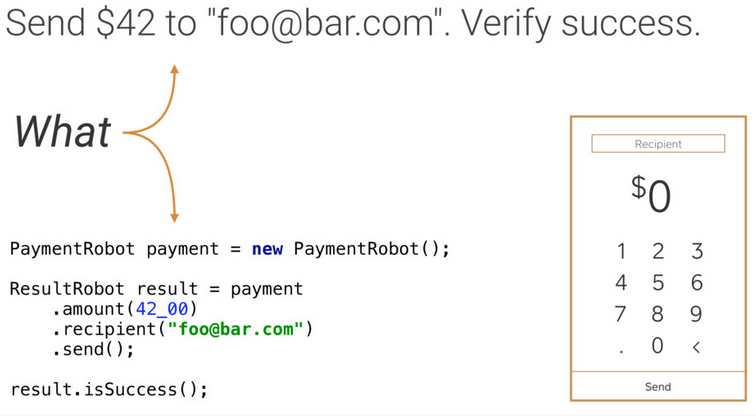
Instrumentation Testing Robots – Jake Wharton假如我們需要測試: 發送 $42 到 “foo@bar.com”,然後驗證是否成功。
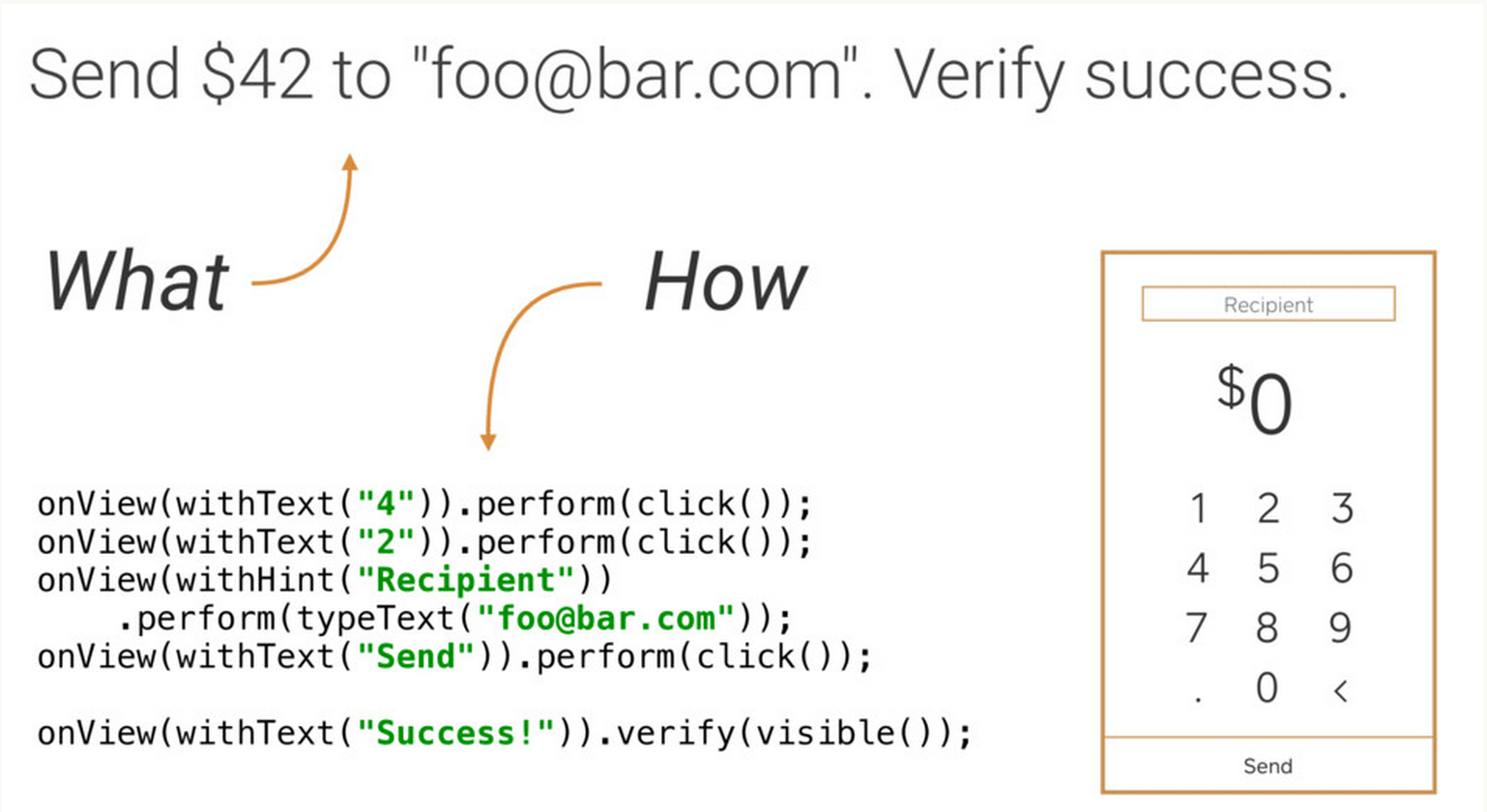
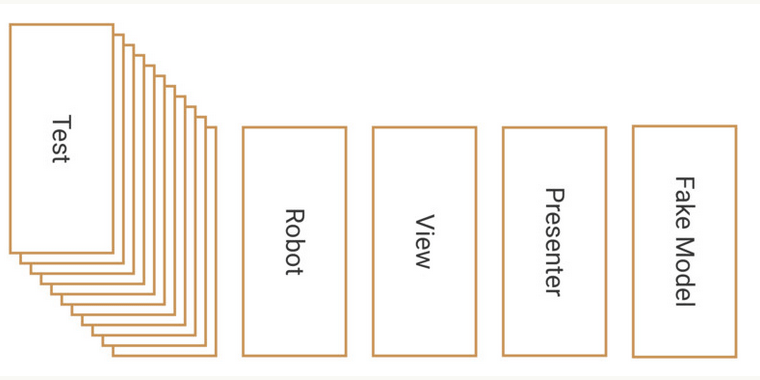
(2)Robot思想
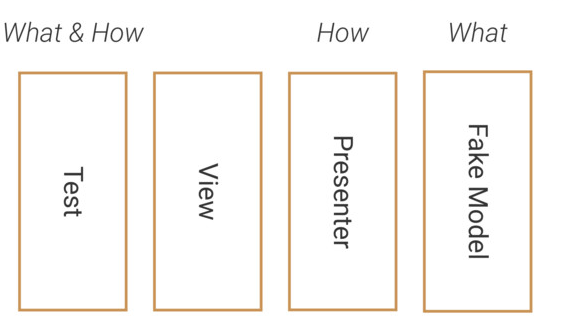
在寫真正的UI測試的時候,只需要關注要測試什麼,而不需要關注需要怎麼測試,換句話說就是讓測試邏輯與View或Presenter解耦,而與數據產生關系。
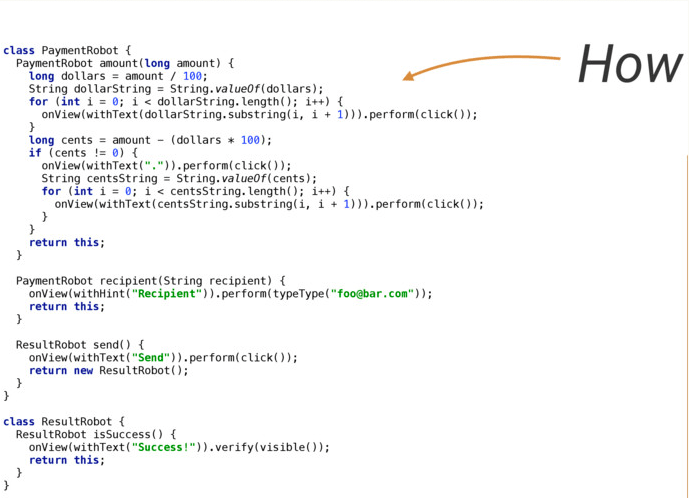
首先通過封裝一個Robot去處理How的部分:
然後在寫測試的時候,只關注需要測試什麼:
最終的思想原理