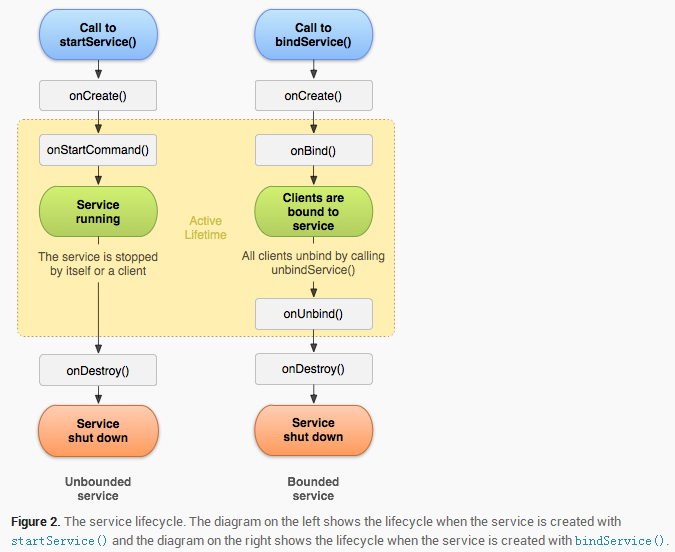
Service 分為兩類
被開啟的service通過其他組件調用 startService()被創建。
這種service可以無限地運行下去,必須調用stopSelf()方法或者其他組件調用stopService()方法來停止它。
當service被停止時,系統會銷毀它。
被綁定的service是當其他組件(一個客戶)調用bindService()來創建的。
客戶可以通過一個IBinder接口和service進行通信。
客戶可以通過 unbindService()方法來關閉這種連接。
一個service可以同時和多個客戶綁定,當多個客戶都解除綁定之後,系統會銷毀service。(簡單來說就是依附於被綁定的Activity)
下面貼代碼:
package com.jredu.helloworld.activity;

import android.content.ComponentName;
import android.content.Context;
import android.content.Intent;
import android.content.ServiceConnection;
import android.os.Bundle;
import android.os.IBinder;
import android.support.v7.app.AppCompatActivity;
import android.view.View;
import android.widget.Button;

import com.jredu.helloworld.R;
import com.jredu.helloworld.service.MyService;

public class ServiceActivity extends AppCompatActivity {
    Button bind;
    Button unbind;
    Button start;
    Button stop;
    MyService myService;

    @Override
    protected void onCreate(Bundle savedInstanceState) {
        super.onCreate(savedInstanceState);
        setContentView(R.layout.activity_service);
        bind = (Button) findViewById(R.id.bind);
        unbind = (Button) findViewById(R.id.unbind);
        start = (Button) findViewById(R.id.start);
        stop = (Button) findViewById(R.id.stop);
        bind.setOnClickListener(new View.OnClickListener() {
            @Override
            public void onClick(View v) {
                Intent intent = new Intent(ServiceActivity.this, MyService.class);
                bindService(intent, connection, Context.BIND_AUTO_CREATE);// 第一個參數為意圖,第二個參數判斷連接狀態,第三個參數綁定的一種方式
            }
        });
        unbind.setOnClickListener(new View.OnClickListener() {
            @Override
            public void onClick(View v) {
                if (myService != null) {
                    unbindService(connection);    //接觸綁定
                    myService = null;
                }
            }
        });
        start.setOnClickListener(new View.OnClickListener() {
            @Override
            public void onClick(View v) {
                Intent intent = new Intent(ServiceActivity.this, MyService.class);
                startService(intent);    //開始服務
            }
        });
        stop.setOnClickListener(new View.OnClickListener() {
            @Override
            public void onClick(View v) {
                Intent intent = new Intent(ServiceActivity.this, MyService.class);
                stopService(intent);    //關閉服務
            }
        });
    }


    /*ServiceConnection是一個接口,該接口用於監聽服務與啟動源之間的鏈接與斷開狀態*/
    ServiceConnection connection = new ServiceConnection() {
         /*當服務與啟動源綁定時調用*/

        /**
         * 在這裡還涉及到IBinder,當啟動源和服務成功鏈接後,可以獲取到IBinder對象,
         * 通過IBinder對象,啟動源與服務可以完成通信。
         * 在實際開發中通常采用繼承Binder(實現了IBinder接口)來實現自己IBinder對象。
         */
        @Override
        public void onServiceConnected(ComponentName name, IBinder service) {
            myService = ((MyService.MyBinder) service).getService();
        }

        /*當程序因異常而斷開服務與啟動源之間鏈接時調用*/
        @Override
        public void onServiceDisconnected(ComponentName name) {

        }
    };
}
//自定義的一個服務類
package com.jredu.helloworld.service;

import android.app.Service;
import android.content.Intent;
import android.media.MediaPlayer;
import android.os.Binder;
import android.os.IBinder;

import com.jredu.helloworld.R;

public class MyService extends Service {
        MediaPlayer mediaPlayer;
    public MyService() {

    }
    //自定義類
    public class MyBinder extends Binder {
        public MyService getService() {
            return MyService.this;
        }
    }

    @Override
    public void onCreate() {
        super.onCreate();
        mediaPlayer = MediaPlayer.create(this, R.raw.bieli); //在創建方法裡創建對象,拿到資源,這裡放了一首歌曲資源,注意要改成英文
    }

    @Override
    public IBinder onBind(Intent intent) {
       mediaPlayer.start();
        return new MyBinder();//綁定成功後,返回了自定義的對象

    }

    @Override
    public boolean onUnbind(Intent intent) {
        mediaPlayer.stop();
        return super.onUnbind(intent);
    }

    @Override
    public int onStartCommand(Intent intent, int flags, int startId) { // a started service 這種服務一定要寫該方法,否則沒效果
        mediaPlayer.start();
        return super.onStartCommand(intent, flags, startId);
    }

    @Override
    public void onDestroy() {
        super.onDestroy();
        mediaPlayer.stop();  // a started service 必須在Activity關閉前調用stop方法,不然會報錯。
    }
}