平時在做spring mvc web新項目時,都需要自己去搭建spring mvc的項目框架,包括基本pom 依賴引入,基本配置文件(web.xml,spring-mvc.xml,數據庫配置文件等等),基礎工具類引入。實際上對於所有spring mvc web項目,這些基礎的配置和基礎類都是通用的,都是可以復用,真正需要改變的無非是我們具體的業務邏輯。所以我們可以把這些通用的東西都做成基礎模板,通過指定項目的groupId、artifactId、version就可以通過代碼自動生成spring mvc 的項目框架,這個項目框架可以直接運行,我們要做的就是直接往項目框架裡面添加具體的業務邏輯,在做新項目時可以大大的提高項目的開發效率。
以下是代碼實現,主要就是通過代碼讀取已經寫好的模板文件,根據指定的groupId、artifactId去替換模板文件中的${groupId}、${artifactId}占位符,將替換後的文件寫入生成的目錄路徑下(spring mvc java web項目目錄路徑都是固定的),並生成spring mvc項目框架,模板文件將項目分為多個模塊,web、service、rpc(遠程調用模塊)、dao(數據庫調用模塊)、common(基礎工具類模塊)、cache(緩存模塊)、domain(model對象模塊):
package com.project.maven.generator;

import java.io.BufferedReader;
import java.io.File;
import java.io.FileInputStream;
import java.io.FileNotFoundException;
import java.io.FileReader;
import java.io.FileWriter;
import java.io.IOException;
import java.io.UnsupportedEncodingException;
import java.util.Map.Entry;
import java.util.Set;
import java.util.regex.Matcher;
import java.util.regex.Pattern;

import org.apache.commons.logging.Log;
import org.apache.commons.logging.LogFactory;

/**
 * 多模塊maven項目自動生成
 * @author liujinfeng
 *
 */
public class MavenProjectGenerate {

    private static final Log log = LogFactory.getLog(MavenProjectGenerate.class);

    /**使用的模板文件夾名稱*/
    private static final String sourceTemplate = "sourceTemplate";

    private static final String groupId = "com.zhaogang.mpay";

    private static final String artifactId = "mpay";

    /**在創建hessian調用客戶端應用的時候才會使用*/
//    private static final String serverGroupId = "com.zhaogang.pricesoa";
//    private static final String serverArtifactId = "price-soa";

    /**電腦盤符,文件路徑*/
    private static final String disk = "E";

    /**源模板文件基礎路徑*/
    private static final String sourceBasePath = disk + ":\\generateProject\\" + sourceTemplate;

    private static final String sourceBasePath1 = disk + ":\\\\generateProject\\\\" + sourceTemplate;
    /**目標文件基礎路徑*/
    private static final String targetBasePath = disk + ":\\generateProject\\targetProject" + "\\" + artifactId;

    public static void main(String[] args) {
        MavenProjectGenerate mpg = new MavenProjectGenerate();
        mpg.createProject();
    }

    /**
     * 根據模板創建maven工程
     */
    public void createProject(){
        makeDirectoryAndFileByRecursion(sourceBasePath);
    }

    /**
     * 遞歸方式根據源目錄和文件創建目標目錄和文件
     * @param path
     */
    private void makeDirectoryAndFileByRecursion (String path){
        File[] fileAndDirs = getFileAndDirListFromSourceDir(path);
        if (null == fileAndDirs) {
            return;
        }
        for(File file : fileAndDirs){
            if (file.isDirectory()) {
                String sourceAbsolutePath = file.getAbsolutePath();
                String sourceFileName = null;
                String sourceDirPath = getReplacedSourceDirPath(sourceAbsolutePath, false, sourceFileName);
                String targetDirPath = getReplacedTargetDirPath(sourceAbsolutePath, sourceDirPath, sourceFileName, false);
                makeTargetDirectory(targetDirPath);
                makeDirectoryAndFileByRecursion(sourceDirPath);
            }else if(file.isFile()){
                String sourceAbsolutePath = file.getAbsolutePath();
                String sourceFileName = file.getName();
                String sourceDirPath = getReplacedSourceDirPath(sourceAbsolutePath, true, sourceFileName);
                String targetDirPath = getReplacedTargetDirPath(sourceAbsolutePath, sourceDirPath, sourceFileName, true);
                String targetFileName = sourceFileName;
                makeDirectoryAndFile(sourceDirPath, sourceFileName, targetDirPath, targetFileName);
            }
        }
    }

    /**
     * 獲取目標目錄路徑
     * @param sourceAbsolutePath
     * @param sourceDirPath
     * @param sourceFileName
     * @param isFile
     * @return
     */
    private String getReplacedTargetDirPath(String sourceAbsolutePath, String sourceDirPath, String sourceFileName, boolean isFile){
        String targetDriPath = null;
        /**如果是文件*/
        if (isFile) {
            /**如果是讀取的是java文件,由於需要根據java文件第一行的包路徑來得到最終路徑,所以需要單獨處理*/
            if (isJavaFileDir(sourceDirPath)) {
                targetDriPath = replacedSourceDirPath(sourceDirPath) + "\\" + getPackageDir(sourceDirPath, sourceFileName);

            }else{/**如果是非java文件,則直接根據源路徑進行替換後得到目標路徑*/
                targetDriPath = replacedSourceDirPath(sourceDirPath);
            }
        }else{/**如果是目錄*/
            targetDriPath = replacedSourceDirPath(sourceDirPath);
        }
        return targetDriPath;
    }

    /**
     * 判斷此目錄路徑是否是java文件目錄路徑
     * 引用注意:在正則表達式中的“\\”表示和後面緊跟著的那個字符構成一個轉義字符(姑且先這樣命名),代表著特殊的意義;所以如果你要在正則表達式中表示一個反斜槓\,應當寫成“\\\\”
     * @param sourceDirPath
     * @return
     */
    private  boolean isJavaFileDir(String sourceDirPath){
        String regex = sourceBasePath1 + "\\\\(web|service|dao|rpc|domain|common|client|cache)\\\\src\\\\main\\\\java";
        Pattern p = Pattern.compile(regex);
        Matcher m = p.matcher(sourceDirPath);
        if (m.find()) {
            return true;
        }
        return false;
    }

    private String replacedSourceDirPath(String sourceDirPath){
        String result = sourceDirPath
        .replace(sourceBasePath  + "\\web", targetBasePath + "\\" + artifactId + "-web")
        .replace(sourceBasePath  + "\\service", targetBasePath + "\\" + artifactId + "-service")
        .replace(sourceBasePath  + "\\dao", targetBasePath + "\\" + artifactId + "-dao")
        .replace(sourceBasePath  + "\\rpc", targetBasePath + "\\" + artifactId + "-rpc")
        .replace(sourceBasePath  + "\\domain", targetBasePath + "\\" + artifactId + "-domain")
        .replace(sourceBasePath  + "\\common", targetBasePath + "\\" + artifactId + "-common")
        .replace(sourceBasePath  + "\\client", targetBasePath + "\\" + artifactId + "-client")
        .replace(sourceBasePath  + "\\cache", targetBasePath + "\\" + artifactId + "-cache")
        .replace(sourceBasePath, targetBasePath);
        return result;
    }

    /**
     * 獲取源目錄路徑
     * @param sourceAbsolutePath
     * @param isFile
     * @param sourceFileName
     * @return
     */
    private String getReplacedSourceDirPath(String sourceAbsolutePath, boolean isFile, String sourceFileName){
        String sourceDirPath = null;
        if (isFile) {
            sourceDirPath = sourceAbsolutePath.replace("\\" + sourceFileName, "");
        }else{
            sourceDirPath = sourceAbsolutePath;
        }
        return sourceDirPath;
    }

    /**
     * 創建目錄及文件
     * @param sourceDirPath
     * @param sourceFileName
     * @param targetDirPath
     * @param targetFileName
     */
    private void makeDirectoryAndFile(String sourceDirPath, String sourceFileName, String targetDirPath, String targetFileName){
        String sourceContent = readContentFromSourceFile(sourceDirPath, sourceFileName);
        String newContent = getReplacedContent(sourceContent);
        if ("pom.xml".equals(sourceFileName)) {
            newContent = getReplacedJarVersion(newContent);
        }
        if (makeTargetDirectory(targetDirPath)) {
            if (makeTargetFile(targetDirPath, targetFileName)) {
                writeNewContentToTargetFile(targetDirPath, targetFileName, newContent);
            }
        }
    }

    /**
     * 根據java文件的第一行獲取包路徑
     * @param sourceDirPath
     * @param sourceFileName
     * @return
     */
    private String getPackageDir(String sourceDirPath, String sourceFileName){
        String packageDir = null;
        File file = new File(sourceDirPath + "\\" + sourceFileName);
        BufferedReader br = null;
        try {
            br = new BufferedReader(new FileReader(file));
            String firstLine = br.readLine();
            packageDir = getReplacedContent(firstLine).replace(".", "\\").replace("package ", "").replace(";", "");
        } catch (Exception e) {
            e.printStackTrace();
        }finally{
            try {
                br.close();
            } catch (IOException e) {
                e.printStackTrace();
            }
        }
        return packageDir;
    }


    /**
     * 獲取文件和目錄列表
     * @param sourceDirPath
     * @return
     */
    private File[] getFileAndDirListFromSourceDir(String sourceDirPath){
        File file = new File(sourceDirPath);
        File[] fileList = file.listFiles();
        return fileList;
    }

    /**
     * 創建目錄
     * @param dirPath
     */
    private boolean makeTargetDirectory(String dirPath){
        try {
            File file =new File(dirPath);
            if  (!file .exists()  && !file.isDirectory()){
                file .mkdirs();
                System.out.println(dirPath);
            }
        } catch (Exception e) {
            log.error("dirPath:" + dirPath, e);
            return false;
        }
        return true;
    }

    /**
     * 創建文件
     * @param dirPath
     * @param fileName
     */
    private boolean makeTargetFile(String targetDirPath, String targetFileName){
        try {
            File file = new File(targetDirPath + "\\" + targetFileName);
            if (!file.exists()) {
                file.createNewFile();
            }
        } catch (IOException e) {
            log.error("targetDirPath:" + targetDirPath + ", targetFileName:" + targetFileName, e);
            return false;
        }
        return true;
    }

    private void writeNewContentToTargetFile(String targetDirPath, String targetFileName, String newContent){
        FileWriter fw = null;
        try {
            fw = new FileWriter(targetDirPath + "\\" + targetFileName);
            fw.write(newContent);
            System.out.println(targetDirPath + "\\" + targetFileName);
        } catch (IOException e) {
            e.printStackTrace();
        } finally{
            try {
                fw.close();
            } catch (IOException e) {
                e.printStackTrace();
            }
        }
    }

    /**
     * 將文件中的占位符替換為需要的格式
     * @param sourceContent
     * @return
     */
    private String getReplacedContent(String sourceContent){
        String result = sourceContent.replace("${groupId}", groupId).replace("${artifactId}", artifactId);
//        if ("sourceTemplate-client".equals(sourceTemplate)) {
//            result = result.replace("${server-groupId}", serverGroupId).replace("${server-artifactId}", serverArtifactId);
//        }
        return result;
    }

    /**
     * 如果是pom.xml文件的話就需要替換裡面的jar版本號
     * @param sourceContent
     * @return
     */
    private String getReplacedJarVersion(String sourceContent){
        String result = sourceContent;
        Set<Entry<String, String>> set = JarDependencyVersion.jarVersionMap.entrySet();
        for(Entry<String, String> entry : set){
            result =  result.replace(entry.getKey(), entry.getValue());
        }
        return result;
    }

    /**
     * 一次性讀出文件中所有內容
     * @param sourceDirPath
     * @param sourceFileName
     * @return
     */
    private String readContentFromSourceFile(String sourceDirPath, String sourceFileName){
        String encoding = "utf-8";
        File file = new File(sourceDirPath + "\\" + sourceFileName);
        Long filelength = file.length();
        byte[] filecontent = new byte[filelength.intValue()];
        try {
            FileInputStream in = new FileInputStream(file);
            in.read(filecontent);
            in.close();
        } catch (FileNotFoundException e) {
            e.printStackTrace();
        } catch (IOException e) {
            e.printStackTrace();
        }
        try {
            return new String(filecontent, encoding);
        } catch (UnsupportedEncodingException e) {
            System.err.println("The OS does not support " + encoding);
            e.printStackTrace();
            return null;
        }
    }

}
package com.project.maven.generator;

import java.util.HashMap;
import java.util.Map;

/**
 * 依賴jar包版本號管理類
 * @author liujinfeng
 *
 */
public class JarDependencyVersion {
    public static Map<String, String> jarVersionMap = new HashMap<String, String>();
    static{
        jarVersionMap.put("${spring-webmvc}", "4.0.4.RELEASE");
        jarVersionMap.put("${spring-jdbc}", "4.0.4.RELEASE");
        jarVersionMap.put("${spring-context-support}", "4.0.4.RELEASE");
        jarVersionMap.put("${spring-tx}", "4.0.4.RELEASE");
        jarVersionMap.put("${mybatis-spring}", "1.2.0");
        jarVersionMap.put("${mybatis}", "3.2.2");
        jarVersionMap.put("${mysql-connector-java}", "5.0.8");
        jarVersionMap.put("${commons-dbcp}", "1.4");
        jarVersionMap.put("${cglib-nodep}", "2.1_3");
        jarVersionMap.put("${javax.servlet-api}", "3.1.0");
        jarVersionMap.put("${velocity}", "1.7");
        jarVersionMap.put("${log4j}", "1.2.16");
        jarVersionMap.put("${velocity-tools}", "2.0");
        jarVersionMap.put("${org.codehaus.jackson}", "1.4.3");
        jarVersionMap.put("${commons-pool}", "1.6");

        jarVersionMap.put("${artifactId-parent}", "0.0.1-SNAPSHOT");
        jarVersionMap.put("${artifactId-web}", "0.0.1.0-SNAPSHOT");
        jarVersionMap.put("${artifactId-service}", "0.0.1.0-SNAPSHOT");
        jarVersionMap.put("${artifactId-dao}", "0.0.1.0-SNAPSHOT");
        jarVersionMap.put("${artifactId-rpc}", "0.0.1.0-SNAPSHOT");
        jarVersionMap.put("${artifactId-common}", "0.0.1.0-SNAPSHOT");
        jarVersionMap.put("${artifactId-domain}", "0.0.1.0-SNAPSHOT");
    }
}
模板文件及詳細代碼見:https://github.com/worldwalker77/studydemo.git
使用的時候將代碼拷貝至E盤目錄下,指定groupId 、artifactId 兩個參數
 private static final String groupId = "com.zhaogang.mpay";

 private static final String artifactId = "mpay";
/**電腦盤符,文件路徑*/
    private static final String disk = "E";
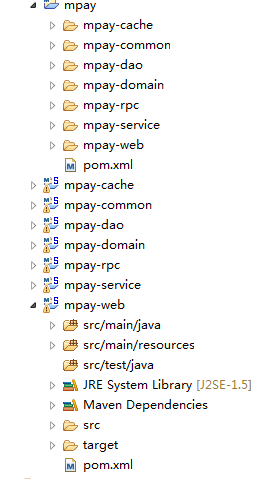
下圖是生成的項目框架結構,可以直接運行。