1.概述
主要原理
1.通過第三方工具openoffice,將word、excel、ppt、txt等文件轉換為pdf文件
2.通過swfTools將pdf文件轉換成swf格式的文件
3.通過FlexPaper文檔組件在頁面上進行展示
2.安裝包下載
1.openoffice是Apache下的一個開放免費的文字處理軟件
下載地址:Apache oppenoffice 官網下載 版本-3.4.1
2.SWFTools是一組用來處理Flash的swf文件的工具包,我們使用它將pdf文件轉成swf文件!
下載地址:鏈接: http://pan.baidu.com/s/1pLL8oL9 密碼d2bf
3.FlexPaper是一個開源輕量級的在浏覽器上顯示各種文檔的組件
下載地址:鏈接: http://pan.baidu.com/s/1kUONYBH 密碼: ueqi
4.JODConverter一個Java的OpenDocument 文件轉換器,在此我們只用到它的jar包
下載地址:鏈接: http://pan.baidu.com/s/1bZpGkQ 密碼: iiyw
3.安裝文件
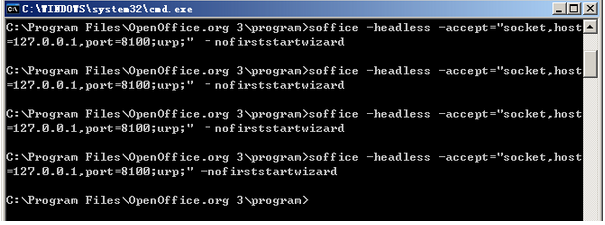
1.將所下載的文件(JODConverter除外)進行安裝,盤符可隨自己設定!需要注意的是在openoffice安裝完成後,當我們使用它時,需將它的服務打開。在次我們需要以命令的方式打開:
打開dos窗口,進入openoffice安裝盤符,輸入以下代碼來啟動服務:
soffice -headless -accept="socket,host=127.0.0.1,port=8100;urp;" -nofirststartwizard
注意最後一個命令前邊的‘—’,可不要寫錯!服務起不來,項目可是繼續不下去的哦.
3.開發過程
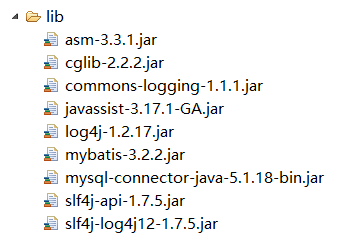
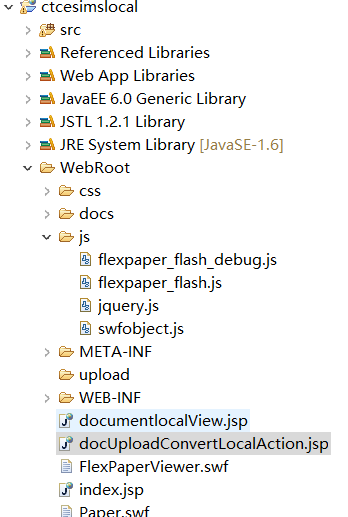
1.新建項目,將flexpaper文件中的js文件夾(包含了flexpaper_flash_debug.js,flexpaper_flash.js,jquery.js,這三個js文件主要是預覽swf文件的插件)拷貝至網站根目錄;將FlexPaperViewer.swf拷貝至網站根目錄下(該文件主要是用在網頁中播放swf文件的播放器),目錄結構如下圖:
2.創建docUploadConvertLocalAction.jsp
<%@ page language="java" contentType="text/html; charset=UTF-8"
    pageEncoding="UTF-8"%>

<%@page import="java.io.*"%>
<%@page import="java.util.Enumeration"%>
<%@page import="com.oreilly.servlet.MultipartRequest"%>
<%@page import="com.oreilly.servlet.multipart.DefaultFileRenamePolicy"%>
<%@page import="com.estone.test.DocConverterLocal"%>
<!DOCTYPE html PUBLIC "-//W3C//DTD HTML 4.01 Transitional//EN" "http://www.w3.org/TR/html4/loose.dtd">
<html>
<head>
<meta http-equiv="Content-Type" content="text/html; charset=UTF-8">
<title>Insert title here</title>
<style>
	body {margin-top:100px;background:#fff;font-family: Verdana, Tahoma;}
    a {color:#CE4614;}
    #msg-box {color: #CE4614; font-size:0.9em;text-align:center;}
    #msg-box .logo {border-bottom:5px solid #ECE5D9;margin-bottom:20px;padding-bottom:10px;}
    #msg-box .title {font-size:1.4em;font-weight:bold;margin:0 0 30px 0;}
    #msg-box .nav {margin-top:20px;}
</style>
</head>
<body>
<div class="title">
	    	查看本地文件
	    </div>
	<div>
		<form name="viewForm" id="form_swf" action="documentlocalView.jsp" method="POST"><%@ page language="java" contentType="text/html; charset=UTF-8"
	pageEncoding="UTF-8"%>
<%@page import="java.io.*"%>
<%@page import="java.util.Enumeration"%>
<%@page import="com.oreilly.servlet.MultipartRequest"%>
<%@page import="com.oreilly.servlet.multipart.DefaultFileRenamePolicy"%>
<%@page import="com.estone.test.DocConverterLocal"%>

<%@page import="com.estone.test.DocConverter"%>

<%
	//本地文件地址
	String filenames = "D:\\SC\\Tool\\dizhi\\sql.txt"; //文件地址

	String converfilename = filenames.replaceAll("\\\\", "/");
	System.out.println(converfilename);

	DocConverter d = new DocConverter(converfilename);
	//調用conver方法開始轉換,先執行doc2pdf()將office文件轉換為pdf;再執行pdf2swf()將pdf轉換為swf;
	d.conver();
	//調用getswfPath()方法,打印轉換後的swf文件路徑         FlexPaper+OpenOffice+SWFTools
	System.out.println(d.getswfPath());

	String ss = "dizhi";
	String swfpath = "upload" + "/" + ss
			+ d.getswfPath().substring(d.getswfPath().lastIndexOf("/"));

	String swfFilePath = swfpath;//獲取swf存放的地址
%>
<!DOCTYPE html PUBLIC "-//W3C//DTD HTML 4.01 Transitional//EN" "http://www.w3.org/TR/html4/loose.dtd">
<html>
<head>
<meta http-equiv="Content-Type" content="text/html; charset=UTF-8">
<script type="text/javascript" src="js/jquery.js"></script>
<script type="text/javascript" src="js/flexpaper_flash.js"></script>
<script type="text/javascript" src="js/flexpaper_flash_debug.js"></script>
<style type="text/css" media="screen">
html,body {
	height: 100%;
}

body {
	margin: 0;
	padding: 0;
	overflow: auto;
}

#flashContent {
	display: none;
}
</style>
<title>文檔在線預覽</title>
</head>
<body>
	<div>package com.estone.test;

import java.io.BufferedInputStream;
import java.io.BufferedOutputStream;
import java.io.BufferedReader;
import java.io.File;
import java.io.FileInputStream;
import java.io.FileOutputStream;
import java.io.IOException;
import java.io.InputStream;
import java.io.InputStreamReader;

import com.artofsolving.jodconverter.DocumentConverter;
import com.artofsolving.jodconverter.openoffice.connection.OpenOfficeConnection;
import com.artofsolving.jodconverter.openoffice.connection.SocketOpenOfficeConnection;
import com.artofsolving.jodconverter.openoffice.converter.OpenOfficeDocumentConverter;

public class DocConverterLocal {

	/*
	 * 通過第三方工具openoffice,將word、excel、ppt、txt等文件轉換為pdf文件
	 * 通過swfTools將pdf文件轉換成swf格式的文件 通過FlexPaper文檔組件在頁面上進行展示
	 */

	private String SWFTools_Windows = "D:/D/D2/FZ/SwfTools(swf轉換工具)/pdf2swf.exe ";

	private String fileString = "";
	private String outputPath = "";// 輸入路徑,如果不設置就輸出在默認位置
	private String fileName;
	private File pdfFile;
	private File swfFile;
	private File docFile;
	private File odtFile;

	/*
	 * 初始化 @param fileString
	 */
	private void ini(String fileString) {
		try {
			this.fileString = fileString;
			fileName = fileString.substring(0, fileString.lastIndexOf("/"));
			docFile = new File(fileString);
			String s = fileString.substring(fileString.lastIndexOf("/") + 1,
					fileString.lastIndexOf("."));
			fileName = fileName + "/" + s; // fileName 文件地址+文件名,沒有格式
			// 用於處理TXT文檔轉化為PDF格式亂碼,獲取上傳文件的名稱(不需要後面的格式)
			String txtName = fileString.substring(fileString.lastIndexOf("."));
			// 判斷上傳的文件是否是TXT文件
			if (txtName.equalsIgnoreCase(".txt")) {
				// 定義相應的ODT格式文件名稱
				odtFile = new File(fileName + ".odt");
				// 將上傳的文檔重新copy一份,並且修改為ODT格式,然後有ODT格式轉化為PDF格式
				this.copyFile(docFile, odtFile);
				pdfFile = new File(fileName + ".pdf"); // 用於處理PDF文檔
			} else if (txtName.equals(".pdf") || txtName.equals(".PDF")) {
				pdfFile = new File(fileName + ".pdf");
				this.copyFile(docFile, pdfFile);
			} else {
				pdfFile = new File(fileName + ".pdf");
			}
			swfFile = new File(fileName + ".swf");
		} catch (Exception e) {
			e.printStackTrace();
		}
	}

	/**
	 * @Title: copyFile
	 * @Description: TODO
	 * @param: @param docFile2
	 * @param: @param odtFile2
	 * @return: void
	 * @throws
	 */
	private void copyFile(File sourceFile, File targetFile) throws Exception {
		// 新建文件輸入流並對它進行緩沖
		FileInputStream input = new FileInputStream(sourceFile);
		BufferedInputStream inBuff = new BufferedInputStream(input);
		//  新建文件輸出流並對它進行緩沖
		FileOutputStream output = new FileOutputStream(targetFile);
		BufferedOutputStream outBuff = new BufferedOutputStream(output);
		//  緩沖數組
		byte[] b = new byte[1024 * 5];
		int len;
		while ((len = inBuff.read(b)) != -1) {
			outBuff.write(b, 0, len);
		}
		//  刷新此緩沖的輸出流
		outBuff.flush();
		//  關閉流
		inBuff.close();
		outBuff.close();
		output.close();
		input.close();
	}

	/*
	 * 轉為PDF @param file
	 */
	private void doc2pdf() throws Exception {
		if (docFile.exists()) {
			if (!pdfFile.exists()) {
				OpenOfficeConnection connection = new SocketOpenOfficeConnection(
						8100);
				try {
					connection.connect();
					DocumentConverter converter = new OpenOfficeDocumentConverter(
							connection);
					converter.convert(docFile, pdfFile);
					// close the connection
					connection.disconnect();
					System.out.println("****pdf轉換成功,PDF輸出:" + pdfFile.getPath()
							+ "****");
				} catch (java.net.ConnectException e) {
					// ToDo Auto-generated catch block
					e.printStackTrace();
					System.out.println("****swf轉換異常,openoffice服務未啟動!****");
					throw e;
				} catch (com.artofsolving.jodconverter.openoffice.connection.OpenOfficeException e) {
					e.printStackTrace();
					System.out.println("****swf轉換器異常,讀取轉換文件失敗****");
					throw e;
				} catch (Exception e) {
					e.printStackTrace();
					throw e;
				}
			} else {
				System.out.println("****已經轉換為pdf,不需要再進行轉化****");
			}
		} else {
			System.out.println("****swf轉換器異常,需要轉換的文檔不存在,無法轉換****");
		}
	}

	/*
	 * 轉換成swf
	 */
	@SuppressWarnings("unused")
	private void pdf2swf() throws Exception {
		Runtime r = Runtime.getRuntime();
		if (!swfFile.exists()) {
			if (pdfFile.exists()) {
				try {
					// 這裡根據SWFTools安裝路徑需要進行相應更改
					Process p = r.exec(SWFTools_Windows + pdfFile.getPath()
							+ " -o " + swfFile.getPath() + " -T 9");
					System.out.print(loadStream(p.getInputStream()));
					System.err.print(loadStream(p.getErrorStream()));
					System.out.print(loadStream(p.getInputStream()));
					System.err.println("****swf轉換成功,文件輸出:" + swfFile.getPath()
							+ "****");
					if (pdfFile.exists()) {
						pdfFile.delete();
					}
				} catch (Exception e) {
					e.printStackTrace();
					throw e;
				}
			} else {
				System.out.println("****pdf不存在,無法轉換****");
			}
		} else {
			System.out.println("****swf已存在不需要轉換****");
		}
	}

	static String loadStream(InputStream in) throws IOException {
		int ptr = 0;
		// 把InputStream字節流 替換為BufferedReader字符流 2013-07-17修改
		BufferedReader reader = new BufferedReader(new InputStreamReader(in));
		StringBuilder buffer = new StringBuilder();
		while ((ptr = reader.read()) != -1) {
			buffer.append((char) ptr);
		}
		return buffer.toString();
	}

	/*
	 * 轉換主方法
	 */
	public boolean conver() {
		if (swfFile.exists()) {
			System.out.println("****swf轉換器開始工作,該文件已經轉換為swf****");
			return true;
		}

		try {
			doc2pdf();
			pdf2swf();
		} catch (Exception e) {
			// TODO: Auto-generated catch block
			e.printStackTrace();
			return false;
		}

		if (swfFile.exists()) {
			return true;
		} else {
			return false;
		}
	}

	/*
	 * 返回文件路徑 @param s
	 */
	public String getswfPath() {
		if (swfFile.exists()) {
			String tempString = swfFile.getPath();
			tempString = tempString.replaceAll("\\\\", "/");
			return tempString;
		} else {
			return "";
		}
	}

	/*
	 * 設置輸出路徑
	 */
	public void setOutputPath(String outputPath) {
		this.outputPath = outputPath;
		if (!outputPath.equals("")) {
			String realName = fileName.substring(fileName.lastIndexOf("/"),
					fileName.lastIndexOf("."));
			if (outputPath.charAt(outputPath.length()) == '/') {
				swfFile = new File(outputPath + realName + ".swf");
			} else {
				swfFile = new File(outputPath + realName + ".swf");
			}
		}
	}

}
4.部署發布
啟動tomcat,部署當前web應用
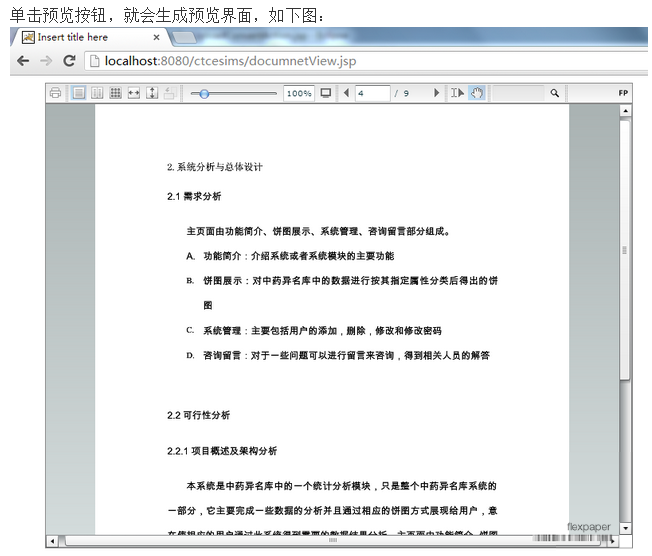
地址欄輸入http://localhost:8080/ctcesimslocal/docUploadConvertLocalAction.jsp如下圖:

源碼下載 鏈接: http://pan.baidu.com/s/1pKLsa0b 密碼: 3v3q