事務處理流程
1、屏蔽自動提交功能
2、處理事務
3、恢復自動提交功能
代碼實例
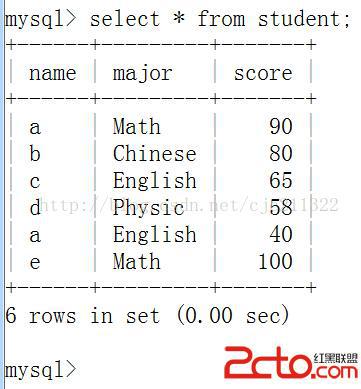
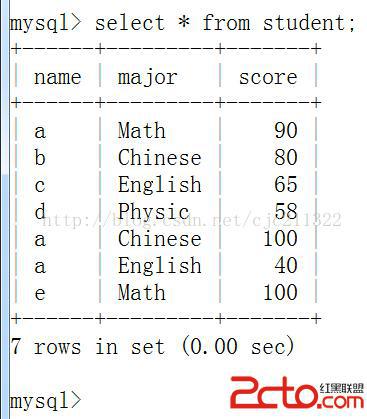
執行程序之前數據表的樣子
public class GetConnection{
	public static void main(String[] args){
		Access2Database adb=new Access2Database();
		Connection conn=adb.getConn();

		//transaction dealing
		PreparedStatement pstam=null;
		try{
			conn.setAutoCommit(false);
			String sql="delete from student where name='a' and major=?";
			pstam=conn.prepareStatement(sql);
			pstam.setString(1, "Chinese");
			pstam.executeUpdate();

			conn.rollback();
			conn.commit();
		}catch(SQLException e){
			try {
				conn.rollback();
			} catch (SQLException e1) {
				// TODO Auto-generated catch block
				e1.printStackTrace();
			}
			e.printStackTrace();
		}finally{
			try {
				conn.setAutoCommit(true);
			} catch (SQLException e) {
				// TODO Auto-generated catch block
				e.printStackTrace();
			}
		}

		//release the resource of the program
		try{
			pstam.close();
			conn.close();
		}catch(SQLException e){
			e.printStackTrace();
		}
	}
}
之後的樣子
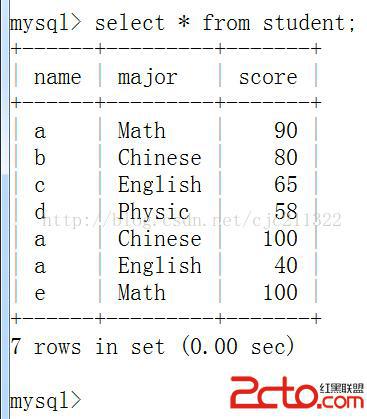
可見沒有發生改變,事務回滾成功
======================================================================
除此應用外,還可以保存事務處理的中間態,最後可以恢復到此中間保存狀態
數據表之前的狀態
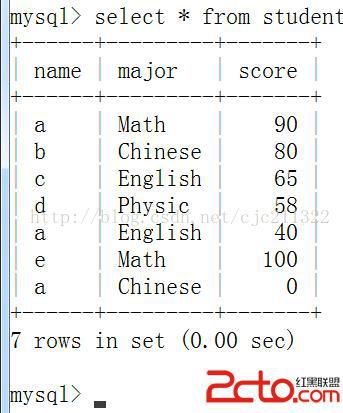
看代碼
import java.sql.*;

public class GetConnection{
	public static void main(String[] args){
		Access2Database adb=new Access2Database();
		Connection conn=adb.getConn();

		//transaction dealing
		PreparedStatement pstam=null;
		try{
			conn.setAutoCommit(false);
			String sql="delete from student where name='a' and major=?";
			pstam=conn.prepareStatement(sql);
			pstam.setString(1, "Chinese");
			pstam.executeUpdate();
			//conn.commit();

			Savepoint sp=conn.setSavepoint();
			sql="insert into student(name,major,score) values('g','Math','99');";
			pstam=conn.prepareStatement(sql);
			pstam.executeUpdate();
			conn.rollback(sp);
			conn.commit();
		}catch(SQLException e){
			try {
				conn.rollback();
			} catch (SQLException e1) {
				// TODO Auto-generated catch block
				e1.printStackTrace();
			}
			e.printStackTrace();
		}finally{
			try {
				conn.setAutoCommit(true);
			} catch (SQLException e) {
				// TODO Auto-generated catch block
				e.printStackTrace();
			}
		}

		//release the resource of the program
		try{
			pstam.close();
			conn.close();
		}catch(SQLException e){
			e.printStackTrace();
		}
	}
}