一、簡介
在oracle中start with connect by (prior) 用來對樹形結構的數據進行查詢。其中start with conditon 給出的是數據搜索范圍, connect by後面給出了遞歸查詢的條件,prior 關鍵字表示父數據,prior 條件表示子數據需要滿足父數據的什麼條件。如下
start with id= '10001' connect by prior parent_id= id and prior num = 5
表示查詢id為10001,並且遞歸查詢parent_id=id,為5的記錄。
二、實例
1、構造數據
 1 -- 表結構
 2 create table menu(
 3  id varchar2(64) not null,
 4  parent_id varchar2(64) not null,
 5  name varchar2(100) not null,
 6  depth number(2) not null,
 7  primary key (id)
 8 )
 9
10 -- 初始化數據
11 -- 頂級菜單
12 insert into menu values ('100000', '0', '頂級菜單1', 1);
13 insert into menu values ('200000', '0', '頂級菜單2', 1);
14 insert into menu values ('300000', '0', '頂級菜單3', 1);
15
16 -- 父級菜單
17 -- 頂級菜單1 直接子菜單
18 insert into menu values ('110000', '100000', '菜單11', 2);
19 insert into menu values ('120000', '100000', '菜單12', 2);
20 insert into menu values ('130000', '100000', '菜單13', 2);
21 insert into menu values ('140000', '100000', '菜單14', 2);
22 -- 頂級菜單2 直接子菜單
23 insert into menu values ('210000', '200000', '菜單21', 2);
24 insert into menu values ('220000', '200000', '菜單22', 2);
25 insert into menu values ('230000', '200000', '菜單23', 2);
26 -- 頂級菜單3 直接子菜單
27 insert into menu values ('310000', '300000', '菜單31', 2);
28
29 -- 菜單13 直接子菜單
30 insert into menu values ('131000', '130000', '菜單131', 3);
31 insert into menu values ('132000', '130000', '菜單132', 3);
32 insert into menu values ('133000', '130000', '菜單133', 3);
33
34 -- 菜單132 直接子菜單
35 insert into menu values ('132100', '132000', '菜單1321', 4);
36 insert into menu values ('132200', '132000', '菜單1332', 4);
37
生成的菜單層次結構如下:
頂級菜單1
菜單11
菜單12
菜單13
菜單131
菜單132
菜單1321
菜單1322
菜單133
菜單14
頂級菜單2
菜單21
菜單22
菜單23
頂級菜單3
菜單31
2、SQL查詢
--prior放的左右位置決定了檢索是自底向上還是自頂向下. 左邊是自上而下(找子節點),右邊是自下而上(找父節點)
--找父節點
select * from menu start with id='130000' connect by id = prior parent_id;

--找子節點節點
-- (子節點)id為130000的菜單,以及130000菜單下的所有直接或間接子菜單(prior 在左邊, prior、parent_id(等號右邊)在右邊)
select * from menu start with id='130000' connect by prior id =  parent_id  ;
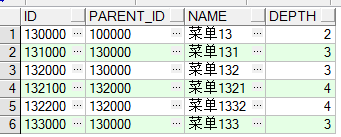
-- (父節點)id為1321的菜單,以及1321菜單下的所有直接或間接父菜單(prior、parent_id(等號左邊) 都在左邊)
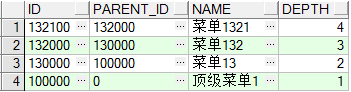
select * from menu start with id='132100' connect by prior parent_id = id;
-- prior 後面跟的是(parent_id) 則是查找父節點,prior後面跟的是(id)則是查找子節點
-- 查詢所有的葉子節點
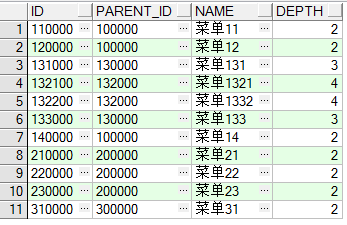
select t2.* from menu t2 where id not in(select t.parent_id from menu t) order by id;
三、性能問題
對於 start with connect by語句的執行,oracle會進行遞歸查詢,當數據量大的時候會產生性能相關問題。
--生成執行計劃
explain plan for select * from menu start with id='132100' connect by prior parent_id = id;

-- 查詢執行計劃
select *  from  table( dbms_xplan.display);
語句執行計劃結果如下:
Plan hash value: 3563250490

----------------------------------------------------------------------------------------------
| Id  | Operation                     | Name         | Rows  | Bytes | Cost (%CPU)| Time     |
----------------------------------------------------------------------------------------------
|   0 | SELECT STATEMENT              |              |     1 |   133 |     1   (0)| 00:00:01 |
|*  1 |  CONNECT BY WITH FILTERING    |              |       |       |            |          |
|   2 |   TABLE ACCESS BY INDEX ROWID | MENU         |     1 |   133 |     1   (0)| 00:00:01 |
|*  3 |    INDEX UNIQUE SCAN          | SYS_C0018586 |     1 |       |     1   (0)| 00:00:01 |
|   4 |   NESTED LOOPS                |              |       |       |            |          |
|   5 |    CONNECT BY PUMP            |              |       |       |            |          |
|   6 |    TABLE ACCESS BY INDEX ROWID| MENU         |     1 |   133 |     1   (0)| 00:00:01 |
|*  7 |     INDEX UNIQUE SCAN         | SYS_C0018586 |     1 |       |     1   (0)| 00:00:01 |
----------------------------------------------------------------------------------------------

Predicate Information (identified by operation id):
---------------------------------------------------

   1 - access("ID"=PRIOR "PARENT_ID")
   3 - access("ID"='132100')
   7 - access("ID"=PRIOR "PARENT_ID")

Note
-----
   - dynamic sampling used for this statement
通過該執行計劃得知,改語句執行了7步操作,才將結果集查詢並返回。當需要查詢條件進行過濾的時候,我們可以通過查看執行計劃從而對sql進行優化。