oracle程序包的原理和使用
程序包
程序包的定義:
程序包是對相關過程、函數、變量、游標和異常等對象的封裝 程序包由規范和主體兩部分組成
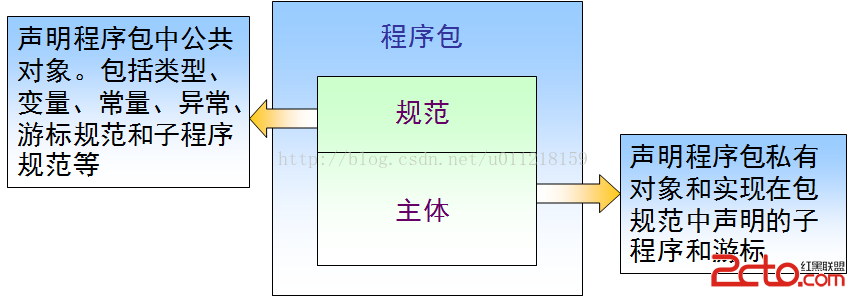 優點:
優點:
模塊化、更輕松的應用程序設計、信息隱藏、新增功能、性能更佳。
創建包頭包體的基本操作如下:
create or replace package pack1 --創建包頭/規范
is
aa number := 1 ; --在包頭聲明的為公有變量
procedure update_student (update_row in student %rowtype ); --聲明一個更新過程
procedure insert_student (insert_row in student %rowtype ); --聲明一個插入過程
end pack1 ; --結束包頭

--Package created

create or replace package body pack1 --創建包體/主體
is
bb number := 2 ; --在包體聲明的變量類私有變量
procedure insert_student (insert_row in student %rowtype ) --創建過程主體
  as
begin
  insert into student( id, name, age) values (insert_row.id ,insert_row.name ,insert_row.age );
  dbms_output.put_line ('bb = ' ||bb ||'aa = ' || aa );
  end insert_student; --結束過程主體

  procedure update_student( update_row in student% rowtype) --創建過程主體
    as
    begin
      update student s set s.name = '趙北' where s.id = update_row.id ;
      end update_student ;--結束過程主體
      end pack1 ;--結束主體/包體

--Warning: Package body created with compilation errors

SQL > show error; --查詢錯誤
Errors for PACKAGE BODY HR.PACK1 :
LINE/ COL ERROR
----------------------------------------------------------------------------
5 /1       PLS -00103 : 出現符號 "BEGIN"在需要下列之一時:   ; is with authid as
  cluster order using external deterministic parallel_enable
    pipelined result_cache  符號 ";" 被替換為 "BEGIN" 後繼續。
10 /3      PLS -00103 : 出現符號 "PROCEDURE"
11 /5      PLS -00103 : 出現符號 "BEGIN"在需要下列之一時:   ; is with authid as
  cluster order using external deterministic parallel_enable
   pipelined result_cache  符號 ";" 被替換為 "BEGIN" 後繼續。

SQL >
SQL > ed --修改上次執行的代碼塊
SQL > /--執行修改的代碼塊

--Package body created

SQL > set serverout on; --打開輸出開關
SQL > execute dbms_output.put_line (pack1.aa ); --包中的公共變量被輸出
1
PL /SQL procedure successfully completed

SQL > execute dbms_output.put_line (pack1.bb ); --包中的私有變量不被輸出
begin dbms_output.put_line (pack1.bb ); end;
--ORA-06550: 第 1 行, 第 34 列:
--PLS-00302: 必須聲明 'BB' 組件
--ORA-06550: 第 1 行, 第 7 列:
--PL/SQL: Statement ignored

  declare
  row_student student %rowtype ; --聲明行級變量
  begin
    row_student.id := 5;
    row_student.name := '張飛';
    row_student.age := 60;
    pack1.insert_student (row_student );--調用包中的過程
   end;
   /

   bb = 2aa = 1
PL /SQL procedure successfully completed

SQL > select * from student ;
         ID NAME                    AGE
----------- -------------------- -----------
          1 張三                        20
          2 李四                        25
          3 王五                        30
          4 麻子                        30
          5 張飛                        60

SQL >

   declare
    row_student student %rowtype ; --聲明行級變量
  begin
    row_student.id := 5;
    row_student.name := '關羽';
    row_student.age := 60;
    pack1.update_student (row_student );--調用包中的過程
end ;
/
PL /SQL procedure successfully completed

SQL > select * from student ;
         ID NAME                    AGE
----------- -------------------- -----------
          1 張三                        20
          2 李四                        25
          3 王五                        30
          4 麻子                        30
          5 趙北                        60
程序包中的游標:
q游標的定義分為游標規范和游標主體兩部分 q在包規范中聲明游標規范時必須使用 RETURN 子句指定游標的返回類型 qRETURN子句指定的數據類型可以是: q用 %ROWTYPE 屬性引用表定義的記錄類型 q程序員定義的記錄類型,例如 TYPE EMPRECTYP IS RECORD(emp_id INTEGER,salaryREAL)來定義的。 q不可以是number, varchar2, %TYPE等類型。
-----------------------------在程序包中創建顯示游標---------------
create or replace package pack2 --創建包頭
is
cursor student_cursor return student %rowtype ; --聲明顯示游標,但是不能跟is select子句
procedure student_pro ; --聲明過程
end pack2 ;

create or replace package body pack2 --創建包體
is
cursor student_cursor return student %rowtype is select *   from student ; --指定游標所關聯的select
procedure student_pro
  is
  student_row student %rowtype ;
  begin
    open student_cursor ;
    fetch student_cursor into student_row ;
    while student_cursor %found
      loop
        dbms_output.put_line ('學號 = ' || student_row.id || '姓名 = ' || student_row.name);
        fetch student_cursor into student_row ;
        end loop;
        close student_cursor ;
        end student_pro ;
        end pack2 ;
/

SQL > execute pack2.student_pro ;
學號 = 1姓名 = 張三
學號 = 2姓名 = 李四
學號 = 3姓名 = 王五
學號 = 4姓名 = 麻子
學號 = 5姓名 = 趙北
PL /SQL procedure successfully completed

SQL >

-----------------------------在程序包中創建ref游標---------------
create or replace package pack3
is
type ref_cursor is ref cursor; --聲明一個ref游標類型
procedure ref_student_pro ;
end pack3 ;
--Package created

create or replace package body pack3
is
procedure ref_student_pro
  is
  student_row student %rowtype ;
  student_ref_cursor ref_cursor ;--聲明一個ref游標類型的變量
  begin
    open student_ref_cursor for select * from student ;
    fetch student_ref_cursor into student_row ;
    while student_ref_cursor %found
      loop
        dbms_output.put_line ('學號 = ' || student_row.id || '姓名 = ' || student_row.name);
        fetch student_ref_cursor into student_row ;
        end loop;
        close student_ref_cursor ;
        end ref_student_pro ;
        end pack3 ;

--Package body created

SQL > execute pack3.ref_student_pro ;
學號 = 1姓名 = 張三
學號 = 2姓名 = 李四
學號 = 3姓名 = 王五
學號 = 4姓名 = 麻子
學號 = 5姓名 = 趙北
PL /SQL procedure successfully completed

SQL >
系統內置程序包:
--------------------------------DBMS_job包的使用方法:------------------------------------
create table test_job (date_sign date);

create or replace procedure pro_test
is
begin
  insert into test_job values (sysdate );
  end ;

SQL >   variable job1 number;
SQL >
SQL >  begin
  2     dbms_job.submit (:job1 ,'pro_test;' ,sysdate ,'sysdate + 1/1440'); --Submit()過程,工作被正常地計劃好。
  3     end ;
  4   /
PL /SQL procedure successfully completed
job1
---------
23

SQL >
SQL > begin
  2     dbms_job.run (:job1 );--    Run()過程用來立即執行一個指定的工作。這個過
程只接收一個參數。

  3     end ;
  4   /
PL /SQL procedure successfully completed
job1
---------
23

SQL > select * from test_job ;
DATE_SIGN
-----------
19 -1 月- 15 23

SQL > select * from test_job ;
DATE_SIGN
-----------
19 -1 月- 15 23

SQL >
SQL > begin
  2     dbms_job.remove (:job1 );--過程來刪除一個已計劃運行的工作。這個過程接收一個參數。

  3     end ;
  4   /
PL /SQL procedure successfully completed
job1
---------
23

SQL >


--------------------------------UTL_FILE包的使用方法:------------------------------------

create directory dir_utl_file  as '/u01/app/oracle/pl_sql_pacakge/test_utl_file' ; --創建目錄
grant read, write on directory dir_utl_file to hr ; --給用戶賦予權限

create or replace procedure pro_utl_file (path_file in varchar2, name_file in varchar2 )
is
utl_file_contents varchar2( 2000); --定義內存變量
utl_file_type utl_file.file_type ;--定義文件類型變量
begin
   utl_file_type := utl_file.fopen (path_file ,name_file ,'r' ,2000 );--打開文件
   loop
    utl_file.get_line (utl_file_type ,utl_file_contents );--讀取文件內容到內存變量中
    dbms_output.put_line (utl_file_contents );--,並打印
    end loop;
     exception--異常處理部分
       when no_data_found
         then
             utl_file.fclose (utl_file_type );
  end ;

Procedure created

SQL > set serverout on
SQL > execute pro_utl_file ('DIR_UTL_FILE' ,'utl_file' );
DECLARE
  V1 VARCHAR2 (32767 );
  F1 UTL_FILE.FILE_TYPE ;
BEGIN
  -- In this example MAX_LINESIZE is less than GET_LINE's length request
  -- so the number of bytes returned will be 256 or less if a line terminator is seen.
  F1 := UTL_FILE.FOPEN( 'MYDIR', 'MYFILE', 'R', 256);
  UTL_FILE.GET_LINE (F1 ,V1 ,32767 );
  UTL_FILE.FCLOSE (F1 );

  -- In this example, FOPEN's MAX_LINESIZE is NULL and defaults to 1024,
  -- so the number of bytes returned will be 1024 or less if a line terminator is seen.
  F1 := UTL_FILE.FOPEN( 'MYDIR', 'MYFILE', 'R');
  UTL_FILE.GET_LINE (F1 ,V1 ,32767 );
  UTL_FILE.FCLOSE (F1 );

  -- In this example, GET_LINE doesn't specify a number of bytes, so it defaults to
  -- the same value as FOPEN's MAX_LINESIZE which is NULL in this case and defaults to 1024.
  -- So the number of bytes returned will be 1024 or less if a line terminator is seen.
  F1 := UTL_FILE.FOPEN( 'MYDIR', 'MYFILE', 'R');
  UTL_FILE.GET_LINE (F1 ,V1 );
  UTL_FILE.FCLOSE (F1 );
END ;

PL /SQL procedure successfully completed

SQL >

dbms_random的使用:
   返回某年內的隨機日期,分兩步:
          1,    SELECT TO_CHAR( TO_DATE( '01/01/03', 'mm/dd/yy'), 'J') FROM DUAL;
          2,   SELECT TO_DATE( TRUNC( DBMS_RANDOM.VALUE( 2452641, 2452641+ 364)), 'J')      FROM DUAL ;