既然裝上了Visual Studio 2010 Beta 1,正好可以試試.NET Framework 4.0裡的一些新東西。我比較關注的是Expression Tree的部分,到底哪些功能進到了.NET 4,哪些還得到CodePlex的DLR站上去找呢?試用一下找找感覺。
我暫時沒試這個beta裡的C#對dynamic的支持,是因為暫時還沒想到啥有趣的場景能寫點簡單的代碼來玩的。對.NET類型故意使用dynamic的玩法在之前CTP的時候就玩過了,不過瘾了。回頭針對.NET 4來編譯一個IronPython來看看,到時就能好好把玩一番dynamic了。
回到Expression Tree。在.NET Framework 4.0裡它叫Expression Tree v2,簡稱ETv2。它兼容於.NET Framework 3.5裡LINQ的Expression Tree,但實際上是從DLR的DLR tree發展而來的。時至今日DLR的代碼仍在快速變化中,而ETv2作為LINQ與DLR的公共部分要放到標准庫裡,等不到DLR穩定下來。折中的解決方案就是在標准庫裡的版本砍掉一些DLR裡還沒定下來的東西和低優先級的東西。像是LoopExpression進入了標准庫,但特化版本的ForEach、While等就只有CodePlex上的版本才有。
.NET Framework 4.0中,ETv2位於System.Core.dll程序集中,在System.Linq.Expressions命名空間下。CodePlex的DLR的ETv2則位於Microsoft.Scripting.Core.dll程序集中,Microsoft.Linq.Expressions命名空間下。CodePlex的DLR之所以要用不同的命名空間是為了避免與標准庫沖突,但這樣一來由編譯器生成的ET就與CodePlex的DLR中的ET不兼容了。所以我才那麼期待.NET 4.0趕緊出……為了能用上標准庫裡的ETv2。
昨天裝好VS2010 Beta後寫的代碼如下。
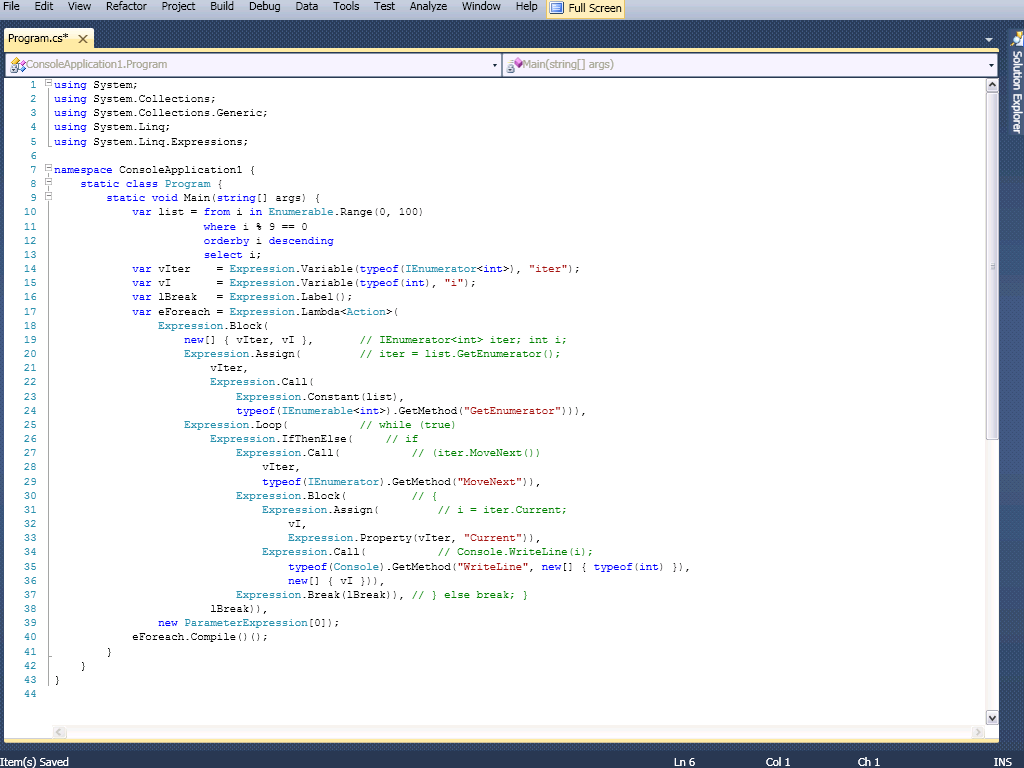
就是先做了個簡單的in-memory LINQ查詢,然後用ETv2來構造出一個遍歷並輸出查詢結果的函數,並調用之。
C#代碼
using System;
using System.Collections;
using System.Collections.Generic;
using System.Linq;
using System.Linq.Expressions;

namespace ConsoleApplication1 {
    static class Program {
        static void Main(string[] args) {
            var list = from i in Enumerable.Range(0, 100)
                       where i % 9 == 0
                       orderby i descending
                       select i;
            var vIter    = Expression.Variable(typeof(IEnumerator<int>), "iter");
            var vI       = Expression.Variable(typeof(int), "i");
            var lBreak   = Expression.Label();
            var eForeach = Expression.Lambda<Action>(
                Expression.Block(
                    new[] { vIter, vI },       // IEnumerator<int> iter; int i;
                    Expression.Assign(         // iter = list.GetEnumerator();
                        vIter,
                        Expression.Call(
                            Expression.Constant(list),
                            typeof(IEnumerable<int>).GetMethod("GetEnumerator"))),
                    Expression.Loop(           // while (true)
                        Expression.IfThenElse(     // if
                            Expression.Call(           // (iter.MoveNext())
                                vIter,
                                typeof(IEnumerator).GetMethod("MoveNext")),
                            Expression.Block(          // {
                                Expression.Assign(         // i = iter.Current;
                                    vI,
                                    Expression.Property(vIter, "Current")),
                                Expression.Call(           // Console.WriteLine(i);
                                    typeof(Console).GetMethod("WriteLine", new[] { typeof(int) }),
                                    new[] { vI })),
                            Expression.Break(lBreak)), // } else break; }
                        lBreak)),
                new ParameterExpression[0]);
            eForeach.Compile()();
        }
    }
}