最近項目使用中要改造redis客戶端。就看了下文檔,總結分享一下。
一:協議規范
二:基礎通信
三:狀態命令
四:set、get命令
五:管道、事務
六:總結
redis允許客戶端以TCP方式連接,默認6379端口。傳輸數據都以\r\n結尾。
*<number of arguments>\r\n$<number of bytes of argument 1>\r\n<argument data>\r\n
例:*1\r\n$4\r\nINFO\r\n
1:簡單字符串,非二進制安全字符串,一般是狀態回復。 +開頭,例:+OK\r\n
2: 錯誤信息。 -開頭, 例:-ERR unknown command 'mush'\r\n
3: 整型數字。 :開頭, 例::1\r\n
4:大塊回復值,最大512M。 $開頭+數據長度。 例:$4\r\mush\r\n
5:多條回復。 *開頭, 例:*2\r\n$3\r\nfoo\r\n$3\r\nbar\r\n
定義配置類:
public class Configuration
    {
        public string Host { get; set; }
        public int Port { get; set; }
        /// <summary>
        /// Socket 是否正在使用 Nagle 算法。
        /// </summary>
        public bool NoDelaySocket { get; set; }

        public Configuration()
        {
            Host = "localhost";
            Port = 6379;
            NoDelaySocket = false;
        }
    }
實現socket連接:
 public class RedisBaseClient
    {
        //配置文件
        private Configuration configuration;
        //通信socket
        private Socket socket;
        //接收字節數組
        private byte[] ReceiveBuffer = new byte[100000];

        public RedisBaseClient(Configuration config)
        {
            configuration = config;
        }

        public RedisBaseClient()
            : this(new Configuration())
        {
        }

        public void Connect()
        {
            if (socket != null && socket.Connected)
                return;
            socket = new Socket(AddressFamily.InterNetwork, SocketType.Stream, ProtocolType.Tcp)
            {
                NoDelay = configuration.NoDelaySocket
            };
            socket.Connect(configuration.Host, configuration.Port);
            if (socket.Connected)
                return;
            Close();
        }

        /// <summary>
        /// 關閉client
        /// </summary>
        public void Close()
        {
            socket.Disconnect(false);
            socket.Close();
        }
    }
調用:
RedisBaseClient redis = new RedisBaseClient();
redis.Connect();
服務端成功響應:

定義Redis命令枚舉:
public enum RedisCommand
    {
        GET, //獲取一個key的值
        INFO, //Redis信息。
        SET, //添加一個值
        EXPIRE, //設置過期時間
        MULTI, //標記一個事務塊開始
        EXEC, //執行所有 MULTI 之後發的命令
    }
發送命令構建:
  public string SendCommand(RedisCommand command, params string[] args)
        {
            //請求頭部格式, *<number of arguments>\r\n
            const string headstr = "*{0}\r\n";
            //參數信息       $<number of bytes of argument N>\r\n<argument data>\r\n
            const string bulkstr = "${0}\r\n{1}\r\n";

            var sb = new StringBuilder();
            sb.AppendFormat(headstr, args.Length + 1);

            var cmd = command.ToString();
            sb.AppendFormat(bulkstr, cmd.Length, cmd);

            foreach (var arg in args)
            {
                sb.AppendFormat(bulkstr, arg.Length, arg);
            }
            byte[] c = Encoding.UTF8.GetBytes(sb.ToString());
            try
            {
                Connect();
                socket.Send(c);

                socket.Receive(ReceiveBuffer);
                Close();
                return ReadData();
            }
            catch (SocketException e)
            {
                Close();
            }
            return null;
        }
   private string ReadData()
        {
            var data = Encoding.UTF8.GetString(ReceiveBuffer);
            char c = data[0];
            //錯誤消息檢查。
            if (c == '-') //異常處理。
                throw new Exception(data);
            //狀態回復。
            if (c == '+')
                return data;
            return data;
        }
調用:
 private void button1_Click(object sender, EventArgs e)
        {
            RedisBaseClient redis = new RedisBaseClient();
            var result = redis.SendCommand(RedisCommand.INFO);
            richTextBox1.Text = result;
        }
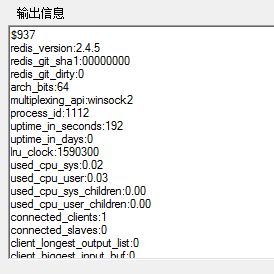
響應輸出。 937是數據長度。
調用:
   private void button2_Click(object sender, EventArgs e)
        {
            RedisBaseClient redis = new RedisBaseClient();
            var result = redis.SendCommand(RedisCommand.SET, "msg", "testvalue");
            richTextBox1.Text = result.ToString();
        }
        private void button3_Click(object sender, EventArgs e)
        {
            RedisBaseClient redis = new RedisBaseClient();
            var result = redis.SendCommand(RedisCommand.GET, "msg");
            richTextBox1.Text = result.ToString();
        }
輸出
MULTI,EXEC命令,原子操作。管道就是發送命令(無需等上次命令回復),進入命令隊列,然後多條命令一次執行,並返回客戶端結果。
我們平常使用ServiceStack.Redis客戶端都直接set了,其實是set、expire 2個命令。 簡單實現如下:
        public void CreatePipeline()
        {
            SendCommand(RedisCommand.MULTI, new string[] {}, true);
        }
        public string EnqueueCommand(RedisCommand command, params string[] args)
        {
            return SendCommand(command, args, true);
        }
        public string FlushPipeline()
        {
            var result = SendCommand(RedisCommand.EXEC, new string[] {}, true);
            Close();
            return result;
        }
        public string SendCommand(RedisCommand command, string[] args, bool isPipeline=false)
        {
            //請求頭部格式, *<number of arguments>\r\n
            const string headstr = "*{0}\r\n";
            //參數信息       $<number of bytes of argument N>\r\n<argument data>\r\n
            const string bulkstr = "${0}\r\n{1}\r\n";

            var sb = new StringBuilder();
            sb.AppendFormat(headstr, args.Length + 1);

            var cmd = command.ToString();
            sb.AppendFormat(bulkstr, cmd.Length, cmd);

            foreach (var arg in args)
            {
                sb.AppendFormat(bulkstr, arg.Length, arg);
            }
            byte[] c = Encoding.UTF8.GetBytes(sb.ToString());
            try
            {
                Connect();
                socket.Send(c);

                socket.Receive(ReceiveBuffer);
                if (!isPipeline)
                {
                    Close();
                }
                return ReadData();
            }
            catch (SocketException e)
            {
                Close();
            }
            return null;
        }
        public string SetByPipeline(string key, string value, int second)
        {
            this.CreatePipeline();
            this.EnqueueCommand(RedisCommand.SET, key, value);
            this.EnqueueCommand(RedisCommand.EXPIRE, key, second.ToString());
            return this.FlushPipeline();
        }
調用:
  private void button4_Click(object sender, EventArgs e)
        {
            RedisBaseClient redis = new RedisBaseClient();
            richTextBox1.Text = redis.SetByPipeline("cnblogs", "mushroom", 1000);
        }
輸出:
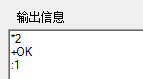 2條回復。
2條回復。
本文只是簡單的實現。有興趣的同學,可以繼續下去。 ps:有點重復造輪子的感覺。
客戶端實現這塊,Socket連接池管理較復雜些。
1:http://redis.io/topics/protocol
2:https://github.com/ServiceStack/ServiceStack.Redis
如有錯誤之處,歡迎指出糾正,對您有幫助的,請推薦下 n(*≧▽≦*)n。
作者:蘑菇先生
出處:http://www.cnblogs.com/mushroom/p/4217541.html