Microsoft.NET 解決方案,項目開發必知必會。
從這篇文章開始我將分享一系列我認為在實際工作中很有必要的一些.NET項目開發的核心技術點,所以我稱為必知必會。盡管這一系列是使用.NET/C#來展現,但是同樣適用於其他類似的OO技術平台,這些技術點可能稱不上完整的技術,但是它是經驗的總結,是掉過多少坑之後的覺醒,所以有必要花幾分鐘時間記住它,在真實的項目開發中你就知道是多麼的有幫助。好了,廢話不說了,進入主題。
我們在開發服務時為了調試方便會在本地進行一個基本的模塊測試,你也可以認為是集成測試,只不過你的測試用例不會覆蓋到80%以上,而是一些我們認為在開發時不是很放心的點才會編寫適當的用例來測試它。
集成測試用例通常有多個執行上下文,對於我們開發人員來說我們的執行上下文通常都在本地,測試人員的上下文在測試環境中。開發人員的測試用來是不能夠連接到其他環境中去的(當然視具體情況而定,有些用例很危險是不能夠亂連接的,本文會講如何解決),開發人員運行的集成測試用例所要訪問的所有資源、服務都是在開發環境中的。這裡依然存在但是,但是為了調試方便,我們還是需要能夠在必要的時候連接到其他環境中去調試問題,為了能夠真實的模擬出問題的環境、可真實的數據,我們需要能有一個這樣的機制,在需要的時候我能夠打開某個設置讓其能夠切換集成測試運行的環境上下文,其實說白了就是你所要連接的環境、數據源的連接地址。
本篇文章我們將通過一個簡單的實例來了解如何簡單的處理這中情況,這其實基於對測試用來不斷重構後的效果。
 1 using System;
 2 using Microsoft.VisualStudio.TestTools.UnitTesting;
 3
 4 namespace OrderManager.Test
 5 {
 6     using ProductService.Contract;
 7
 8     /// <summary>
 9     /// Product service integration tests.
10     /// </summary>
11     [TestClass]
12     public class ProductServiceIntegrationTest
13     {
14         /// <summary>
15         /// service address.
16         /// </summary>
17         public const string ServiceAddress = "http://dev.service.ProductService/";
18
19         /// <summary>
20         /// Product service get product by pid test.
21         /// </summary>
22         [TestMethod]
23         public void ProductService_GetProductByPid_Test()
24         {
25             var serviceInstance = ProductServiceClient.CreateClient(ServiceAddress);
26             var testResult = serviceInstance.GetProductByPid(0393844);
27
28             Assert.AreNotEqual(testResult, null);
29             Assert.AreEqual(testResult.Pid, 0393844);
30         }
31     }
32 }
這是一個實際的集成測試用例代碼,有一個當前測試類共用的服務地址,這個地址是DEV環境的,當然你也可以定義其他幾個環境的服務地址,前提是環境是允許你連接的,那才有實際意義。
我們來看測試用例,它是一個查詢方法測試用例,用來對ProductServiceClient.GetProductByPid服務方法進行測試,由於面向查詢的操作是等幕的,不論我們查詢多少次這個ID的Product,都不會對數據造成影響,但是如果我們測試的是一個更新或者刪除就會帶來問題。
在DEV環境中,測試更新、刪除用例沒有問題,但是如果你的機器是能夠連接到遠程某個生產或者PRD測試上時會帶來一定的危險性,特別是在忙的時候,加班加點的干進度,你很難記住你當前的機器的host配置中是否還連接著遠程的生產機器上,或者根本就不需要配置host就能夠連接到某個你不應該連接的環境上。
這是目前的問題,那麼我們如何解決這個問題呢 ,我們通過對測試代碼進行一個簡單的重構就可以避免由於連接到不該連接的環境中運行危險的測試用例。
其實很多時候,重構真的能夠幫助我們找到出口,就好比俗話說的:"出口就在轉角處“,只有不斷重構才能夠逐漸的保證項目的質量,而這種效果是很難得的。
提取抽象基類,對測試要訪問的環境進行明確的定義。
 1 namespace OrderManager.Test
 2 {
 3     public abstract class ProductServiceIntegrationBase
 4     {
 5         /// <summary>
 6         /// service address.
 7         /// </summary>
 8         protected const string ServiceAddressForDev = "http://dev.service.ProductService/";
 9
10         /// <summary>
11         /// service address.
12         /// </summary>
13         protected const string ServiceAddressForPrd = "http://Prd.service.ProductService/";
14
15         /// <summary>
16         /// service address.
17         /// </summary>
18         protected const string ServiceAddressTest = "http://Test.service.ProductService/";
19     }
20 }
對具體的測試類消除重復代碼,加入統一的構造方法。
 1 using System;
 2 using Microsoft.VisualStudio.TestTools.UnitTesting;
 3
 4 namespace OrderManager.Test
 5 {
 6     using ProductService.Contract;
 7
 8     /// <summary>
 9     /// Product service integration tests.
10     /// </summary>
11     [TestClass]
12     public class ProductServiceIntegrationTest : ProductServiceIntegrationBase
13     {
14         /// <summary>
15         /// product service client.
16         /// </summary>
17         private ProductServiceClient serviceInstance;
18
19         /// <summary>
20         /// Initialization test instance.
21         /// </summary>
22         [TestInitialize]
23         public void InitTestInstance()
24         {
25             serviceInstance = ProductServiceClient.CreateClient(ServiceAddressForDev/*for dev*/);
26         }
27
28         /// <summary>
29         /// Product service get product by pid test.
30         /// </summary>
31         [TestMethod]
32         public void ProductService_GetProductByPid_Test()
33         {
34             var testResult = serviceInstance.GetProductByPid(0393844);
35
36             Assert.AreNotEqual(testResult, null);
37             Assert.AreEqual(testResult.Pid, 0393844);
38         }
39
40         /// <summary>
41         /// Product service delete search index test.
42         /// </summary>
43         [TestMethod]
44         public void ProductService_DeleteProductSearchIndex_Test()
45         {
46             var testResult = serviceInstance.DeleteProductSearchIndex();
47
48             Assert.IsTrue(testResult);
49         }
50     }
51 }
消除重復代碼後,我們需要加入對具體測試用例檢查是否能夠連接到某個環境中去。我加入了一個DeleteProductSearchIndex測試用例,該用例是用來測試刪除搜索索引的,這個測試用例只能夠在本地DEV環境中運行(你可能覺得這個刪除接口不應該放在這個服務裡,這裡只是舉一個例子,無需糾結)。
為了能夠有一個檢查機制能提醒開發人員你目前連接的地址是哪一個,我們需要借助於測試上下文。
重構後,我們看一下現在的測試代碼結構。
 1 using System;
 2 using Microsoft.VisualStudio.TestTools.UnitTesting;
 3
 4 namespace OrderManager.Test
 5 {
 6     using ProductService.Contract;
 7
 8     /// <summary>
 9     /// Product service integration tests.
10     /// </summary>
11     [TestClass]
12     public class ProductServiceIntegrationTest : ProductServiceIntegrationBase
13     {
14         /// <summary>
15         /// product service client.
16         /// </summary>
17         private ProductServiceClient serviceInstance;
18
19         /// <summary>
20         /// Initialization test instance.
21         /// </summary>
22         [TestInitialize]
23         public void InitTestInstance()
24         {
25             serviceInstance = ProductServiceClient.CreateClient(ServiceAddressForPrd/*for dev*/);
26
27             this.CheckCurrentTestCaseIsRun(this.serviceInstance);//check current test case .
28         }
29
30         /// <summary>
31         /// Product service get product by pid test.
32         /// </summary>
33         [TestMethod]
34         public void ProductService_GetProductByPid_Test()
35         {
36             var testResult = serviceInstance.GetProductByPid(0393844);
37
38             Assert.AreNotEqual(testResult, null);
39             Assert.AreEqual(testResult.Pid, 0393844);
40         }
41
42         /// <summary>
43         /// Product service delete search index test.
44         /// </summary>
45         [TestMethod]
46         public void ProductService_DeleteProductSearchIndex_Test()
47         {
48             var testResult = serviceInstance.DeleteProductSearchIndex();
49
50             Assert.IsTrue(testResult);
51         }
52     }
53 }
我們加入了一個很重要的測試實例運行時方法InitTestInstance,該方法會在測試用例每次實例化時先執行,在方法內部有一個用來檢查當前測試用例運行的環境
this.CheckCurrentTestCaseIsRun(this.serviceInstance);//check current test case .,我們轉到基類中。
 1 using System;
 2 using Microsoft.VisualStudio.TestTools.UnitTesting;
 3
 4 namespace OrderManager.Test
 5 {
 6     public abstract class ProductServiceIntegrationBase
 7     {
 8         /// <summary>
 9         /// service address.
10         /// </summary>
11         protected const string ServiceAddressForDev = "http://dev.service.ProductService/";
12
13         /// <summary>
14         /// get service address.
15         /// </summary>
16         protected const string ServiceAddressForPrd = "http://Prd.service.ProductService/";
17
18         /// <summary>
19         /// service address.
20         /// </summary>
21         protected const string ServiceAddressTest = "http://Test.service.ProductService/";
22
23         /// <summary>
24         /// Test context .
25         /// </summary>
26         public TestContext TestContext { get; set; }
27
28         /// <summary>
29         /// is check is run for current test case.
30         /// </summary>
31         protected void CheckCurrentTestCaseIsRun(ProductService.Contract.ProductServiceClient testObject)
32         {
33             if (testObject.ServiceAddress.Equals(ServiceAddressForPrd))// Prd 環境,需要小心檢查
34             {
35                 if (this.TestContext.TestName.Equals("ProductService_DeleteProductSearchIndex_Test"))
36                     Assert.IsTrue(false, "當前測試用例連接的環境為PRD,請停止當前用例的運行。");
37             }
38             else if (testObject.ServiceAddress.Equals(ServiceAddressTest))//Test 環境,檢查約定幾個用例
39             {
40                 if (this.TestContext.TestName.Equals("ProductService_DeleteProductSearchIndex_Test"))
41                     Assert.IsTrue(false, "當前測試用例連接的環境為TEST,為了不破壞TEST環境,請停止用例的運行。");
42             }
43         }
44     }
45 }
在檢查方法中我們使用簡單的判斷某個用例不能夠在PRD、TEST環境下執行,雖然判斷有點簡單,但是在真實的項目中足夠了,簡單有時候是一種設計思想。我們運行所有的測試用例,查看各個狀態。
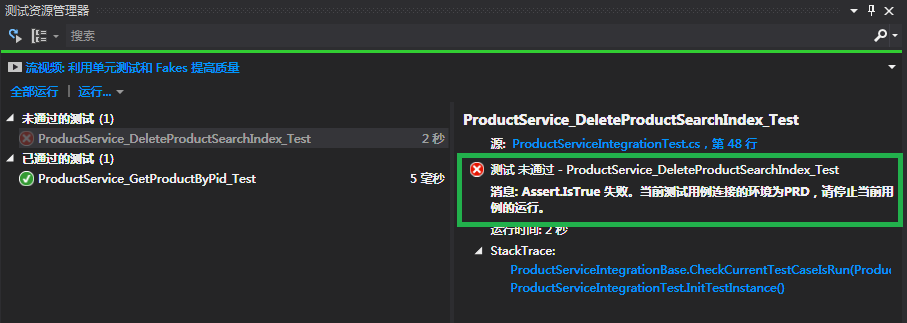
一目了然,更為重要的是它不會影響你對其他用例的執行。當你在深夜12點排查問題的時候,你很難控制自己的眼花、體虛導致的用例執行錯誤帶來的大問題,甚至是無法挽回的的錯誤。
此文獻給那些跟我一樣的.NET程序員們,通過簡單的重構,我們解放了自己。
作者:王清培
出處:http://www.cnblogs.com/wangiqngpei557/
本文版權歸作者和博客園共有,歡迎轉載,但未經作者同意必須保留此段聲明,且在文章頁面