在多線程(線程同步)中,我們將學習多線程中操作共享資源的技術,學習到的知識點如下所示:
一、執行基本的原子操作
在這一小節中,我們將學習如何在沒有阻塞線程(blocking threads)發生的情況下,在一個對象上執行基本的原子操作並能阻止競爭條件(race condition)的發生。操作步驟如下所示:
1、使用Visual Studio 2015創建一個新的控制台應用程序。
2、雙擊打開“Program.cs”文件,編寫代碼如下所示:
 1 using System;
 2 using System.Threading;
 3 using static System.Console;
 4
 5 namespace Recipe01
 6 {
 7     abstract class CounterBase
 8     {
 9         public abstract void Increment();
10
11         public abstract void Decrement();
12     }
13
14     class Counter : CounterBase
15     {
16         private int count;
17
18         public int Count => count;
19
20         public override void Increment()
21         {
22             count++;
23         }
24
25         public override void Decrement()
26         {
27             count--;
28         }
29     }
30
31     class CounterNoLock : CounterBase
32     {
33         private int count;
34
35         public int Count => count;
36
37         public override void Increment()
38         {
39             Interlocked.Increment(ref count);
40         }
41
42         public override void Decrement()
43         {
44             Interlocked.Decrement(ref count);
45         }
46     }
47
48     class Program
49     {
50         static void TestCounter(CounterBase c)
51         {
52             for (int i = 0; i < 100000; i++)
53             {
54                 c.Increment();
55                 c.Decrement();
56             }
57         }
58
59         static void Main(string[] args)
60         {
61             WriteLine("Incorrect counter");
62
63             var c1 = new Counter();
64
65             var t1 = new Thread(() => TestCounter(c1));
66             var t2 = new Thread(() => TestCounter(c1));
67             var t3 = new Thread(() => TestCounter(c1));
68             t1.Start();
69             t2.Start();
70             t3.Start();
71             t1.Join();
72             t2.Join();
73             t3.Join();
74
75             WriteLine($"Total count: {c1.Count}");
76             WriteLine("--------------------------");
77
78             WriteLine("Correct counter");
79
80             var c2 = new CounterNoLock();
81
82             t1 = new Thread(() => TestCounter(c2));
83             t2 = new Thread(() => TestCounter(c2));
84             t3 = new Thread(() => TestCounter(c2));
85             t1.Start();
86             t2.Start();
87             t3.Start();
88             t1.Join();
89             t2.Join();
90             t3.Join();
91
92             WriteLine($"Total count: {c2.Count}");
93         }
94     }
95 }
3、運行該控制台應用程序,運行效果(每次運行效果可能不同)如下圖所示:
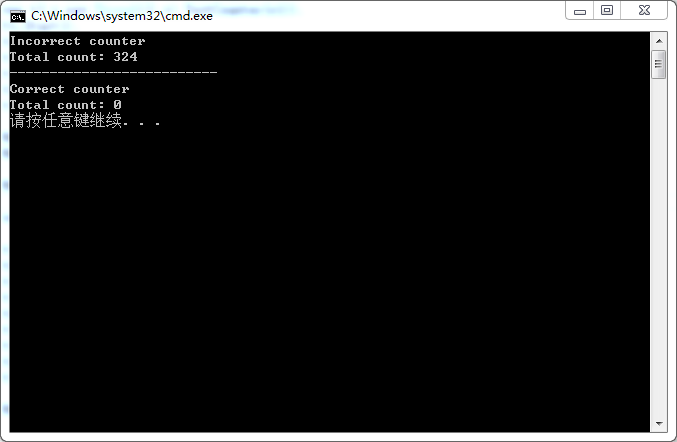
在第63行代碼處,我們創建了一個非線程安全的Counter類的一個對象c1,由於它是非線程安全的,因此會發生競爭條件(race condition)。
在第65~67行代碼處,我們創建了三個線程來運行c1對象的“TestCounter”方法,在該方法中,我們按順序對c1對象的count變量執行自增和自減操作。由於c1不是線程安全的,因此在這種情況下,我們得到的counter值是不確定的,我們可以得到0值,但多運行幾次,多數情況下會得到不是0值得錯誤結果。
在多線程(基礎篇)中,我們使用lock關鍵字鎖定對象來解決這個問題,但是使用lock關鍵字會造成其他線程的阻塞。但是,在本示例中我們沒有使用lock關鍵字,而是使用了Interlocked構造,它對於基本的數學操作提供了自增(Increment)、自減(Decrement)以及其他一些方法。
二、使用Mutex構造
在這一小節中,我們將學習如何使用Mutex構造同步兩個單獨的程序,即進程間的同步。具體步驟如下所示:
1、使用Visual Studio 2015創建一個新的控制台應用程序。
2、雙擊打開“Program.cs”文件,編寫代碼如下所示:
 1 using System;
 2 using System.Threading;
 3 using static System.Console;
 4
 5 namespace Recipe02
 6 {
 7     class Program
 8     {
 9         static void Main(string[] args)
10         {
11             const string MutexName = "Multithreading";
12
13             using (var m = new Mutex(false, MutexName))
14             {
15                 // WaitOne方法的作用是阻止當前線程,直到收到其他實例釋放的處理信號。
16                 // 第一個參數是等待超時時間,第二個是否退出上下文同步域。
17                 if (!m.WaitOne(TimeSpan.FromSeconds(10), false))
18                 {
19                     WriteLine("Second instance is running!");
20                     ReadLine();
21                 }
22                 else
23                 {
24                     WriteLine("Running!");
25                     ReadLine();
26                     // 釋放互斥資源
27                     m.ReleaseMutex();
28                 }
29             }
30
31             ReadLine();
32         }
33     }
34 }
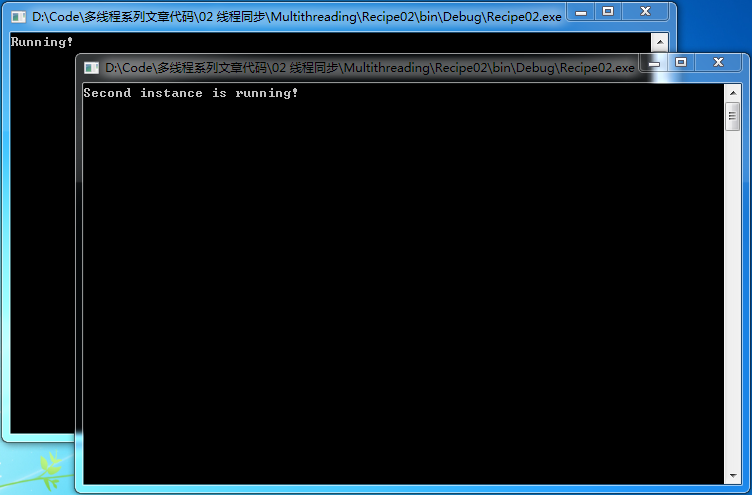
3、編譯代碼,執行兩次該程序,運行效果如下所示:
第一種情況的運行結果:
第二種情況的運行結果:
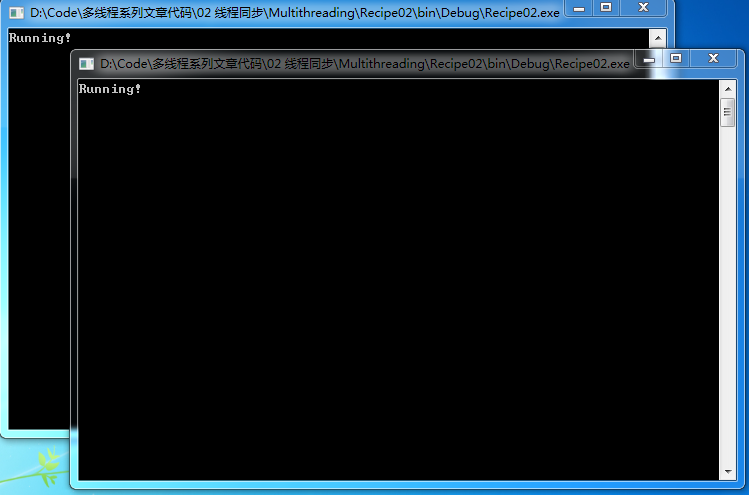
在第11行代碼處,我們定義了一個mutex(互斥量)的名稱為“Multithreading”,並在第13行代碼處將其傳遞給了Mutex類的構造方法,該構造方法的第一個參數initialOwner我們賦值為false,這允許程序獲得一個已經被創建的mutex。如果沒有任何線程鎖定互斥資源,程序只簡單地顯示“Running”,然後等待按下任何鍵以釋放互斥資源。
如果我們啟動該程序的第二個實例,如果在10秒內我們沒有在第一個實例下按下任何按鈕以釋放互斥資源,那麼在第二個實例中就會顯示“Second instance is running!”,如第一種情況的運行結果所示。如果在10內我們在第一個實例中按下任何鍵以釋放互斥資源,那麼在第二個實例中就會顯示“Running”,如第二種情況的運行結果所示。
三、使用SemaphoreSlim構造
在這一小節中,我們將學習如何在SemaphoreSlim構造的幫助下,限制同時訪問資源的線程數量。具體步驟如下所示:
1、使用Visual Studio 2015創建一個新的控制台應用程序。
2、雙擊打開“Program.cs”文件,編寫代碼如下所示:
 1 using System;
 2 using System.Threading;
 3 using static System.Console;
 4 using static System.Threading.Thread;
 5
 6 namespace Recipe03
 7 {
 8     class Program
 9     {
10         static SemaphoreSlim semaphore = new SemaphoreSlim(4);
11
12         static void AccessDatabase(string name, int seconds)
13         {
14             WriteLine($"{name} waits to access a database");
15             semaphore.Wait();
16             WriteLine($"{name} was granted an access to a database");
17             Sleep(TimeSpan.FromSeconds(seconds));
18             WriteLine($"{name} is completed");
19             semaphore.Release();
20         }
21
22         static void Main(string[] args)
23         {
24             for(int i = 1; i <= 6; i++)
25             {
26                 string threadName = "Thread" + i;
27                 int secondsToWait = 2 + 2 * i;
28                 var t = new Thread(() => AccessDatabase(threadName, secondsToWait));
29                 t.Start();
30             }
31         }
32     }
33 }
3、運行該控制台應用程序,運行效果(每次運行效果可能不同)如下圖所示:
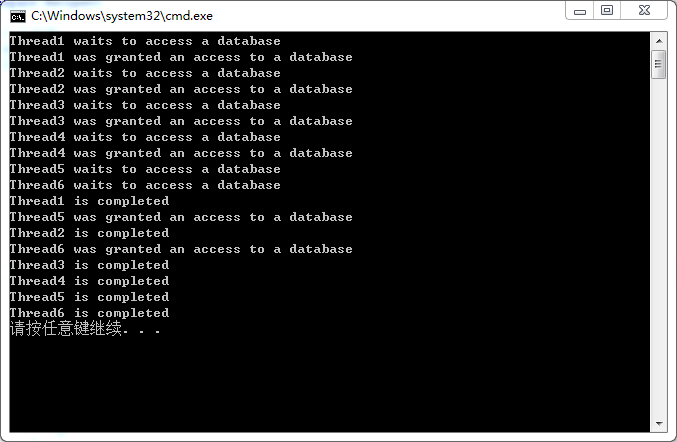
在第10行代碼處,我們創建了一個SemaphoreSlim的實例,並對該構造方法傳遞了參數4,該參數指定了可以有多少個線程同時訪問資源。然後,我們啟動了6個不同名字的線程。每個線程都試著獲取對數據庫的訪問,但是,我們限制了最多只有4個線程可以訪問數據庫,因此,當4個線程訪問數據庫後,其他2個線程必須等待,直到其他線程完成其工作後,調用“Release”方法釋放資源之後才能訪問數據庫。