最近開發微信公眾平台,做下記錄,以前也開發過,這次開發又給忘了,搞了半天,還是做個筆記為好。
注意框架為MVC 開發微信公眾平台。場景為,在模板頁中獲取用戶openid,想要進行驗證的頁面,集成模板頁就可以了。
在_Layout.cshtml中加入如下代碼
<head>
  <meta charset="utf-8" />
  <meta name="viewport" content="width=device-width, initial-scale=1.0">
  <title>@ViewBag.Title - My ASP.NET Application</title>
  @Styles.Render("~/Content/css")
  @Scripts.Render("~/bundles/modernizr")
  @{
    var code = HttpContext.Current.Request["code"];
    Log.logmsg(code);
    string urlpath = HttpContext.Current.Request.Url.AbsoluteUri.ToString();
    ViewBag.at = AdminUtil.GetOpenID(urlpath, code);
  }
</head>
類AdminUtil中加入GetOpenID方法
#region 獲取OpenID
    /// <summary>
    /// 獲取OpenID
    /// </summary>
    public static string GetOpenID(string redirect_url, string code)
    {
      string AppID = WXModel.AppID;
      string AppSecret = WXModel.AppSecret;
      string openid = "";
      openid = WXApi.GetOpenID(AppID, redirect_url, code, AppSecret);
      return openid;
    }
    #endregion
類WXApi中加入GetOpenID方法
 #region 獲取OpenId
    /// <summary>
    /// 獲取OpenId
    /// </summary>
    public static string GetOpenID(string appid, string redirect_url, string code, string screct)
    {
      string strJson = "";
      if (string.IsNullOrEmpty(code))
      {
        redirect_url = HttpUtility.UrlEncode(redirect_url);
        HttpContext.Current.Response.Redirect(string.Format("https://open.weixin.qq.com/connect/oauth2/authorize?appid={0}&redirect_uri={1}&response_type=code&scope=snsapi_base&state={2}#wechat_redirect",
          appid, redirect_url, new Random().Next(1000, 200000).ToString()));
      }
      else
      {
        strJson = HttpRequestUtil.RequestUrl(string.Format("https://api.weixin.qq.com/sns/oauth2/access_token?appid={0}&secret={1}&code={2}&grant_type=authorization_code",
        appid, screct, code));
      }
      return Tools.GetJsonValue(strJson, "openid");
    }
    #endregion
public static class WXModel
  {
    public static string access_token;
    public static string AppID;
    public static string AppSecret;
  }
 /// <summary>
  /// 工具類
  /// </summary>
  public class Tools
  {
    #region 獲取Json字符串某節點的值
    /// <summary>
    /// 獲取Json字符串某節點的值
    /// </summary>
    public static string GetJsonValue(string jsonStr, string key)
    {
      string result = string.Empty;
      if (!string.IsNullOrEmpty(jsonStr))
      {
        key = "\"" + key.Trim('"') + "\"";
        int index = jsonStr.IndexOf(key) + key.Length + 1;
        if (index > key.Length + 1)
        {
          //先截逗號,若是最後一個,截“}”號,取最小值
          int end = jsonStr.IndexOf(',', index);
          if (end == -1)
          {
            end = jsonStr.IndexOf('}', index);
          }

          result = jsonStr.Substring(index, end - index);
          result = result.Trim(new char[] { '"', ' ', '\'' }); //過濾引號或空格
        }
      }
      return result;
    }
    #endregion

  }
public class HttpRequestUtil
  {
    #region 請求Url,不發送數據
    /// <summary>
    /// 請求Url,不發送數據
    /// </summary>
    public static string RequestUrl(string url)
    {
      return RequestUrl(url, "POST");
    }
    #endregion

    #region 請求Url,不發送數據
    /// <summary>
    /// 請求Url,不發送數據
    /// </summary>
    public static string RequestUrl(string url, string method)
    {
      // 設置參數
      HttpWebRequest request = WebRequest.Create(url) as HttpWebRequest;
      CookieContainer cookieContainer = new CookieContainer();
      request.CookieContainer = cookieContainer;
      request.AllowAutoRedirect = true;
      request.Method = method;
      request.ContentType = "text/html";
      request.Headers.Add("charset", "utf-8");

      //發送請求並獲取相應回應數據
      HttpWebResponse response = request.GetResponse() as HttpWebResponse;
      //直到request.GetResponse()程序才開始向目標網頁發送Post請求
      Stream responseStream = response.GetResponseStream();
      StreamReader sr = new StreamReader(responseStream, Encoding.Default);
      //返回結果網頁(html)代碼
      string content = sr.ReadToEnd();
      return content;
    }
    #endregion
  }
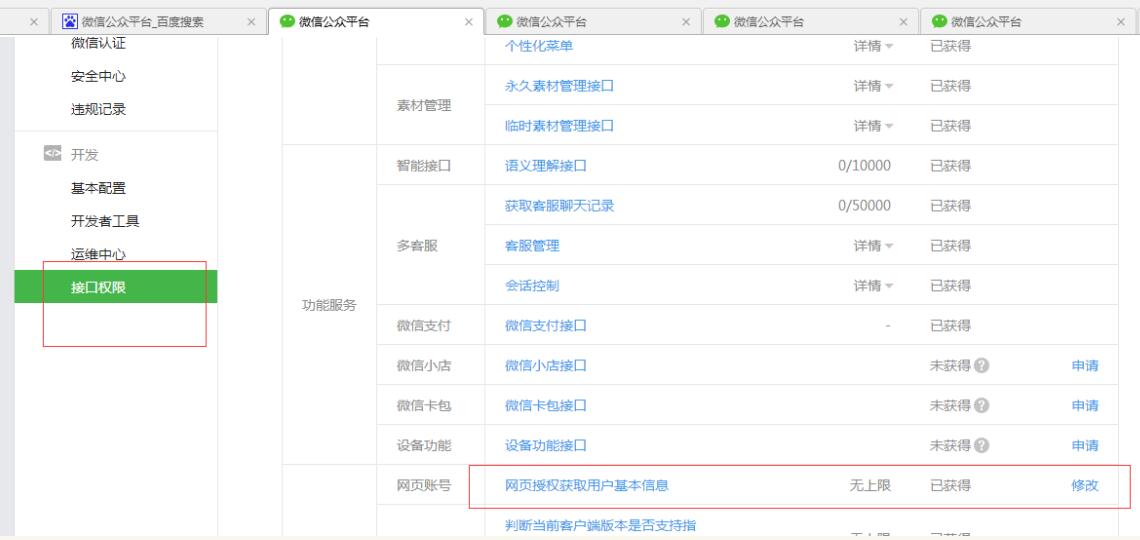
注意:需要在微信公眾平台中設置授權回調域
以上就是本文的全部內容,希望對大家的學習有所幫助,也希望大家多多支持幫客之家。