import win32com.client as win32
from win32com.client import constants
# import originpro as op
import time
# src_opju = op.path('e')+ r'Samples\Map Data.opju'
# op.open(file = src_opju, readonly = True)
word = win32.gencache.EnsureDispatch('Word.Application')
word_doc = word.Documents.Add()
# gp = op.find_graph('Graph9')
# gp.activate()
# 4 refers to OLE Object
# https://www.originlab.com/doc/COM/Classes/Application/CopyPage
# op.po.CopyPage(gp.name,4)
tic = time.perf_counter()
word_doc.ActiveWindow.Selection.InlineShapes.AddOLEObject(
ClassType='Word.Document.12',
FileName="E:\工作相關\客戶需求.doc",
LinkToFile=True,
DisplayAsIcon=True,
IconFileName= r"C:\Windows\Installer\{90160000-0011-0000-1000-0000000FF1CE}\wordicon.exe",
IconIndex =13,
IconLabel="1.docx"
)
toc = time.perf_counter()
print(f"Adding embedded object took {
toc - tic:0.4f} seconds")
word_doc.SaveAs2(r"D:\KKCap\1.docx")
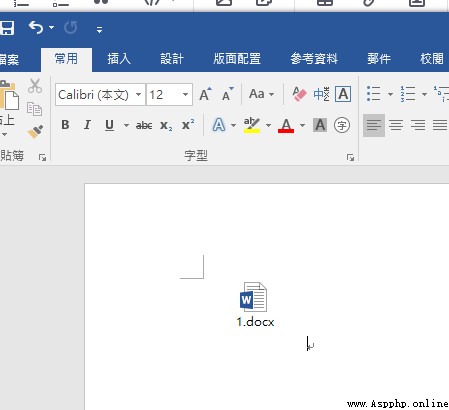
效果圖
VBA參考
Sub エ棟6()
'
' エ棟6 エ棟
'
'
Selection.InlineShapes.AddOLEObject ClassType:="Word.Document.12", _
FileName:="C:\Users\H7113492\Documents\ㄏノ" & ChrW(35828) & " for" & _
ChrW(32418) & ".docx", LinkToFile:=True, DisplayAsIcon:=True, _
IconFileName:= _
"C:\Windows\Installer\{90160000-0011-0000-1000-0000000FF1CE}\wordicon.exe" _
, IconIndex:=13, IconLabel:="ㄏノ" & ChrW(35828) & " for" & ChrW(32418) & _
".docx"
End Sub
參考代碼
shape = self.wordDoc.InlineShapes.AddOLEObject(
ClassType='Excel.Chart',
FileName=filename
)
# set height and width in points
shape.Height = height
shape.Width = width
import win32com.client as win32
from win32com.client import constants
import originpro as op
import time
src_opju = op.path('e')+ r'Samples\Map Data.opju'
op.open(file = src_opju, readonly = True)
word = win32.gencache.EnsureDispatch('Word.Application')
word_doc = word.Documents.Add()
gp = op.find_graph('Graph9')
gp.activate()
# 4 refers to OLE Object
# https://www.originlab.com/doc/COM/Classes/Application/CopyPage
op.po.CopyPage(gp.name,4)
tic = time.perf_counter()
word_doc.ActiveWindow.Selection.PasteSpecial(DataType=constants.wdPasteOLEObject)
toc = time.perf_counter()
print(f"Adding embedded object took {
toc - tic:0.4f} seconds")
word_doc.SaveAs2("C:\\test\\test.docx")
op.exit()
參考
https://my.originlab.com/forum/topic.asp?TOPIC_ID=47379
http://www.icodeguru.com/webserver/Python-Programming-on-Win32/ch10.htm
 Introduction to Python crawler-34-scratch framework, understanding of the function of the scratch architecture module
Scrapy Is applicable to Python
 To learn Python well, you need to do these things well (with mind map)
Programming language leaderboa
 Rewrite get method and source code analysis using djangorestframework serializer
Rewrite the query interface C