I saw a tutorial on the Internet , Call Tencent cloud face recognition api And modify the age api To simulate the faces of people of different ages
But most of the tutorial code is the same , It's estimated that the key to plagiarizing someone is that they can't execute
Jay Chou is just about to release a new album , A little change , Take a picture of Jay , Do an experiment
Here we go
1、 First, register an account on Tencent cloud , open API Key management page (https://console.cloud.tencent.com/cam/capi) Get SecretId and SecretKey, This string of values should be saved , The following script needs to use

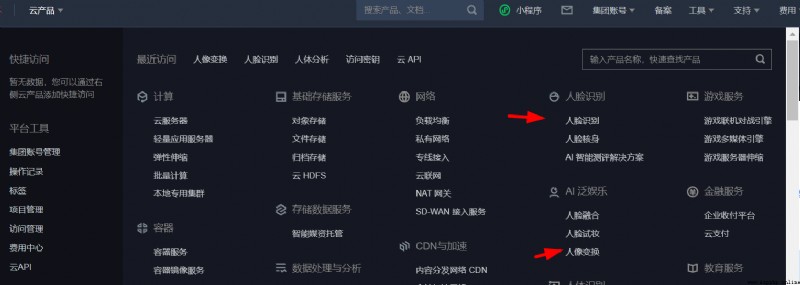
2、 Then create resources , Cloud product entrance in the upper left corner , Choose in turn “ Face recognition ” and “ Face transformation ” Create resources , The current rule is that each account has 1000 A resource can be used , And resources are not immediately available after they are created , So this step should be done well first .
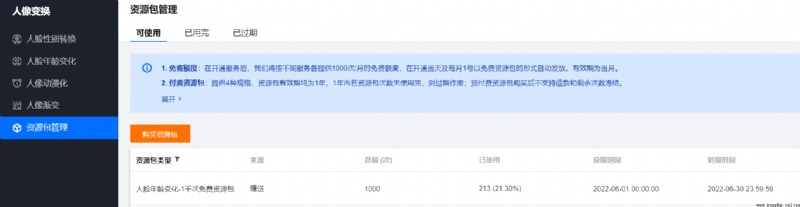
After creation , You can see the current resource status under the resource directory on the left
3、 Install Tencent cloud's SDK,
pip3 install tencentcloud-sdk-python
4、 The next step is the script , To realize face change, you need to call “ Face recognition ” and “ Face transformation ” Two api, The original plan was to combine the two scripts , I'll toss around when I have time .
The first is execution “ Face recognition ” step , Get face attribute values , Go straight to the code
import json
import base64
from tencentcloud.common import credential
from tencentcloud.common.profile.client_profile import ClientProfile
from tencentcloud.common.profile.http_profile import HttpProfile
from tencentcloud.common.exception.tencent_cloud_sdk_exception import TencentCloudSDKException
from tencentcloud.iai.v20200303 import iai_client
from tencentcloud.iai.v20200303 import models as models03
sid = "xxxxx"# Obtained in the first step SecretId
skey = "xxxxxx"# Obtained in the first step SecretKey
try:
filepath = 'test.jpg'# Pictures that need to change face , It's better to take a front view
file = open(filepath, "rb")
base64_data = base64.b64encode(file.read())
cred = credential.Credential(sid, skey)
httpProfile = HttpProfile()
httpProfile.endpoint = "iai.tencentcloudapi.com"
clientProfile = ClientProfile()
clientProfile.httpProfile = httpProfile
client = iai_client.IaiClient(cred, "ap-beijing", clientProfile)
req = models03.DetectFaceAttributesRequest()
params = {
"MaxFaceNum":2,
"Action":"DetectFace",
"Version":"2018-03-01",
"Image": base64_data.decode()
}
req.from_json_string(json.dumps(params))
resp = client.DetectFaceAttributes(req)
faceDetailInfos = resp.FaceDetailInfos
for faceDetailInfo in faceDetailInfos:
faceRect = faceDetailInfo.FaceRect
print(faceRect)
except TencentCloudSDKException as err:
print(err)
After execution , Get the return information , Record the... In the return value x、y equivalence
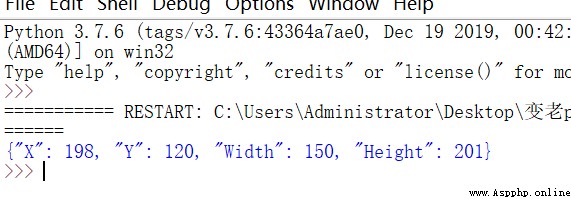
5, Execute the script to modify the age , Get the X、Y、Width Fill in the corresponding content of the script with the same value
import json
import base64
from tencentcloud.common import credential
from tencentcloud.common.profile.client_profile import ClientProfile
from tencentcloud.common.profile.http_profile import HttpProfile
from tencentcloud.common.exception.tencent_cloud_sdk_exception import TencentCloudSDKException
from tencentcloud.ft.v20200304 import ft_client, models
import time
sid = "xxxx"# Obtained in the first step SecretId
skey = "xxxx"# Obtained in the first step SecretKey

cred = credential.Credential(sid, skey)
httpProfile = HttpProfile()
httpProfile.endpoint = "ft.tencentcloudapi.com"
clientProfile = ClientProfile()
clientProfile.httpProfile = httpProfile
client = ft_client.FtClient(cred, "ap-beijing", clientProfile)
filepath = 'test.jpg'
file = open(filepath, "rb")
base64_data = base64.b64encode(file.read())
req = models.ChangeAgePicRequest()
for age in range(10, 80):# Set the age here , such as (10,30) It means generating 10 To the age of 79 Year old pictures , altogether 71 Zhang
params = {
"Image": base64_data.decode(),
"AgeInfos": [{
"Age": age,
"FaceRect": {
"Y": 120, # Notice the first and second X、Y、Width、Height All values need to be modified
"X": 198,
"Width": 150,
"Height": 201
}},
{
"Age": age,
"FaceRect": {
"Y": 120,
"X": 198,
"Width": 150,
"Height": 201
}}],
"RspImgType":
"base64"
}
req.from_json_string(json.dumps(params))
resp = client.ChangeAgePic(req)
image_base64 = resp.ResultImage
image_data = base64.b64decode(image_base64)
file_path = '{}.png'.format(age)
with open(file_path, 'wb') as f:
f.write(image_data)
time.sleep(1)
Execute the script , The script will generate pictures of all ages under the same directory , Dangdangdang , Then you can play freely
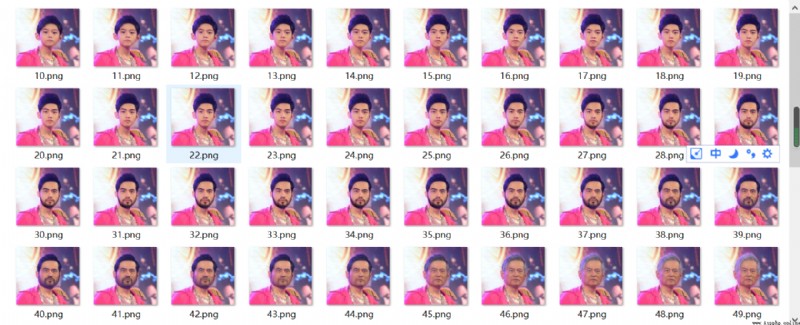
Pay attention to the file directory , Of course , You can change the script , It can be stored differently , It's easy for me
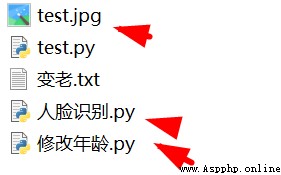
Put... In the previous original picture , Pay tribute to !!!!

 The python regression prediction model always reports index errors below
python Regression model predic
 Computer graduation design Python+djangs freshman enrollment management system (source code + system + mysql database + Lw document)
項目介紹每年都有大量的新生需要報到,但是很多時候因為是第一次