簡單實現添加用戶功能,僅供初學者參考,可自行擴展程序功能(增刪改查)。
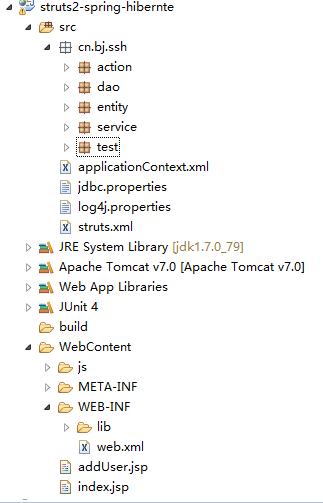
這裡貼下代碼,需要的可以下載看(因為比較懶)。
applicationContext.xml

<?xml version="1.0" encoding="UTF-8"?>
<beans xmlns="http://www.springframework.org/schema/beans" xmlns:context="http://www.springframework.org/schema/context" xmlns:xsi="http://www.w3.org/2001/XMLSchema-instance" xmlns:aop="http://www.springframework.org/schema/aop"
    xmlns:tx="http://www.springframework.org/schema/tx" xmlns:p="http://www.springframework.org/schema/p" xmlns:util="http://www.springframework.org/schema/util" xmlns:jdbc="http://www.springframework.org/schema/jdbc"
    xmlns:cache="http://www.springframework.org/schema/cache"
    xsi:schemaLocation="
    http://www.springframework.org/schema/context
    http://www.springframework.org/schema/context/spring-context.xsd
    http://www.springframework.org/schema/beans
    http://www.springframework.org/schema/beans/spring-beans.xsd
    http://www.springframework.org/schema/tx
    http://www.springframework.org/schema/tx/spring-tx.xsd
    http://www.springframework.org/schema/jdbc
    http://www.springframework.org/schema/jdbc/spring-jdbc-3.1.xsd
    http://www.springframework.org/schema/cache
    http://www.springframework.org/schema/cache/spring-cache-3.1.xsd
    http://www.springframework.org/schema/aop
    http://www.springframework.org/schema/aop/spring-aop.xsd
    http://www.springframework.org/schema/util
    http://www.springframework.org/schema/util/spring-util.xsd">

   <!-- 引入外部配置文件 -->
   <context:property-placeholder location="classpath:jdbc.properties"/>
   <!-- 配置連接池 -->
   <bean id="dataSource"  class="com.mchange.v2.c3p0.ComboPooledDataSource">
           <property name="driverClass" value="${jdbc.driverClass}"/>
           <property name="jdbcUrl" value="${jdbc.url}"/>
           <property name="user" value="${jdbc.username}"/>
           <property name="password" value="${jdbc.password}"/>
   </bean>

   <!-- 配置Hibernate相關屬性 -->
   <bean id="sessionFactory" class="org.springframework.orm.hibernate4.LocalSessionFactoryBean">
           <!-- 注入連接池 -->
           <property name="dataSource" ref="dataSource"/>
           <!-- 配置Hibernate的屬性 -->
           <property name="hibernateProperties">
               <props>
                   <prop key="hibernate.dialect">org.hibernate.dialect.MySQLDialect</prop>
                   <prop key="hibernate.show_sql">true</prop>
                   <prop key="hibernate.format_sql">true</prop>
                   <prop key="hibernate.hbm2ddl.auto">update</prop>
               </props>
           </property>

           <!-- 加載Hibernate中的映射文件 -->
           <property name="mappingResources">
               <list>
                   <value>cn/bj/ssh/entity/User.hbm.xml</value>
               </list>
           </property>

   </bean>
   <!-- 配置Action類 -->
   <bean id="userAction" class="cn.bj.ssh.action.UserAction" scope="prototype">
           <!-- 手動注入service -->
           <property name="userService" ref="userService"/>
   </bean>


   <!-- 配置業務的類 -->
   <bean id="userService" class="cn.bj.ssh.service.UserService">
           <property name="userDao" ref="userDao"/>
   </bean>

   <!-- 配置DAO的類 -->
   <bean id="userDao" class="cn.bj.ssh.dao.UserDao">
           <property name="sessionFactory" ref="sessionFactory"/>
   </bean>

   <!-- 配置事務管理器 -->
   <bean id="transactionManager" class="org.springframework.orm.hibernate4.HibernateTransactionManager">
           <property name="sessionFactory" ref="sessionFactory"/>
   </bean>

   <!-- 開啟注解事物 -->
   <tx:annotation-driven transaction-manager="transactionManager"/>
 </beans>
View Code
連接數據庫配置:jdbc.properties
# JDBC Configuration
jdbc.driverClass=com.mysql.jdbc.Driver
jdbc.url=jdbc:mysql://127.0.0.1:3306/ssh
jdbc.username=root
jdbc.password=root
View Code
struts.xml
<?xml version="1.0" encoding="UTF-8" ?>
<!DOCTYPE struts PUBLIC
    "-//Apache Software Foundation//DTD Struts Configuration 2.3//EN"
    "http://struts.apache.org/dtds/struts-2.3.dtd">

<struts>

    <!-- 交由spring管理  直接寫id即可 -->
    <package name="ssh" extends="struts-default" namespace="/">
        <action name="user_*" class="userAction" method="{1}">
            <result name="loginSuccess">/index.jsp</result>
                <!-- <result name="success_save">/index.jsp</result>-->
        </action>
    </package>

</struts>
View Code
UserAction.java
package cn.bj.ssh.action;

import com.opensymphony.xwork2.ActionSupport;
import com.opensymphony.xwork2.ModelDriven;

import cn.bj.ssh.entity.User;
import cn.bj.ssh.service.UserService;

public class UserAction extends ActionSupport implements ModelDriven<User>{

    private static final long serialVersionUID = 1L;
    //模型驅動使用的類
    private User user = new User();

    //自動注入
    private UserService userService;

    public void setUserService(UserService userService) {
        this.userService = userService;
    }

    @Override
    public User getModel() {
        return user;
    }

    //保存用戶
    public String save(){
        userService.save(user);
        return "loginSuccess";
    }

}
View Code
UserService.java(由於比較簡單,看起來更直觀,service和dao就沒有寫接口)
package cn.bj.ssh.service;

import org.springframework.transaction.annotation.Transactional;

import cn.bj.ssh.dao.UserDao;
import cn.bj.ssh.entity.User;

@Transactional
public class UserService{

    private UserDao userDao;

    public void setUserDao(UserDao userDao) {
        this.userDao = userDao;
    }

    public void save(User user){
        userDao.save(user);
    }

}
View Code
UserDao.java
package cn.bj.ssh.dao;

import org.hibernate.SessionFactory;

import cn.bj.ssh.entity.User;

public class UserDao {

    private SessionFactory sessionFactory;

    public void setSessionFactory(SessionFactory sessionFactory) {
        this.sessionFactory = sessionFactory;
    }

    public String save(User user) {
        this.sessionFactory.getCurrentSession().save(user);
        return "success_save";
    }

}
View Code
實體類User.jsp
package cn.bj.ssh.entity;

public class User {

    private Integer pid;
    private String name;
    private String password;
    private Double height;

    public User(){}

    public User(Integer pid, String name, String password,Double height) {
        super();
        this.pid = pid;
        this.name = name;
        this.password = password;
        this.height = height;
    }

    public Integer getPid() {
        return pid;
    }
    public void setPid(Integer pid) {
        this.pid = pid;
    }
    public String getName() {
        return name;
    }
    public void setName(String name) {
        this.name = name;
    }
    public String getPassword() {
        return password;
    }
    public void setPassword(String password) {
        this.password = password;
    }
    public Double getHeight() {
        return height;
    }
    public void setHeight(Double height) {
        this.height = height;
    }

}
View Code
映射文件:User.hbm.xml
<%@ page language="java" contentType="text/html; charset=UTF-8"
    pageEncoding="UTF-8"%>
<%@ taglib uri="/struts-tags" prefix="s"%>
<!DOCTYPE html PUBLIC "-//W3C//DTD HTML 4.01 Transitional//EN" "http://www.w3.org/TR/html4/loose.dtd">
<html>
<head>
<meta http-equiv="Content-Type" content="text/html; charset=UTF-8">
<title>Insert title here</title>
</head>
<body>
    <h1>保存用戶頁面</h1>
    <s:form action="user_save" method="post" namespace="/" theme="simple">
        <table border="1" width="400">
            <tr>
                <td>用戶名</td>
                <td><s:textfield name="name" /></td>
            </tr>
            <tr>
                <td>用戶密碼</td>
                <td><s:textfield name="password" /></td>
            </tr>
            <tr>
                <td>用戶身高</td>
                <td><s:textfield name="height" /></td>
            </tr>
            <tr>
                <td colspan="2"><input type="submit" value="添加" /></td>
            </tr>
        </table>
    </s:form>
</body>
</html>
View Code
添加用戶頁面:addUser.jsp
<?xml version="1.0" encoding="UTF-8"?>
<!DOCTYPE hibernate-mapping PUBLIC
        "-//Hibernate/Hibernate Mapping DTD 3.0//EN"
        "http://hibernate.sourceforge.net/hibernate-mapping-3.0.dtd">

<hibernate-mapping>
    <class name="cn.bj.ssh.entity.User" table="user">
       <id name="pid" column="pid">
            <generator class="native"/>
       </id>
       <property name="name" column="name" length="20"></property>
       <property name="password" column="password" length="20"/>
        <property name="height" column="height"/>
    </class>
</hibernate-mapping>
View Code
Demo鏈接,有興趣的可以下載看看。
http://share.weiyun.com/b0a8c4fb51feaed92c69af29c5232d81