本文實例講述了PHP實現多圖上傳的方法。分享給大家供大家參考,具體如下:
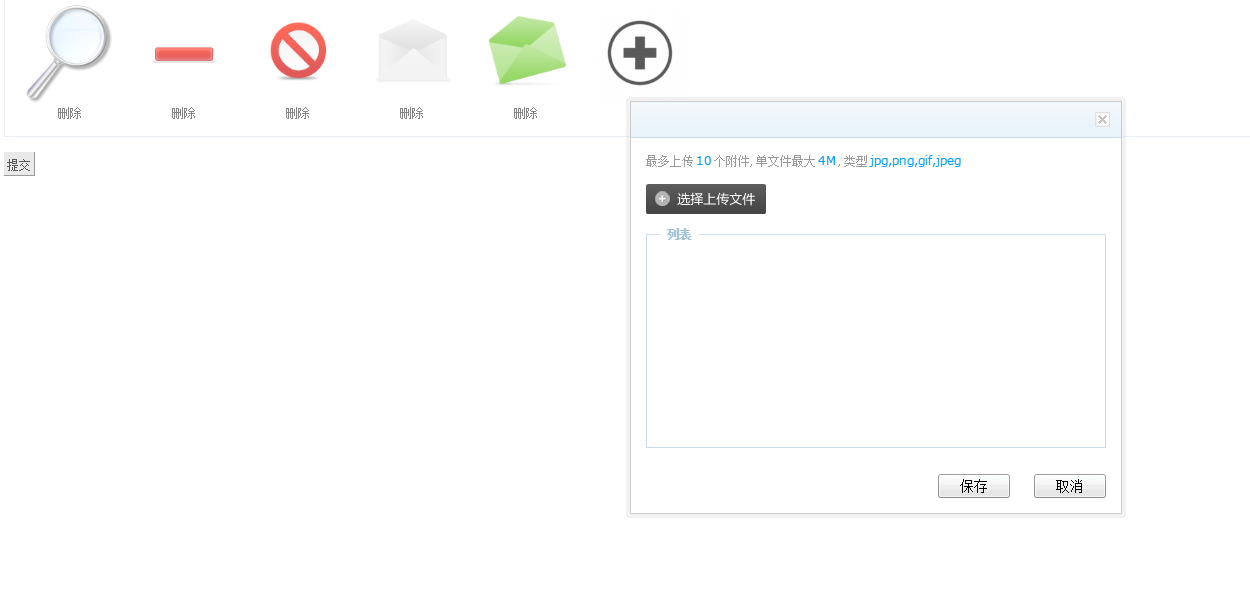
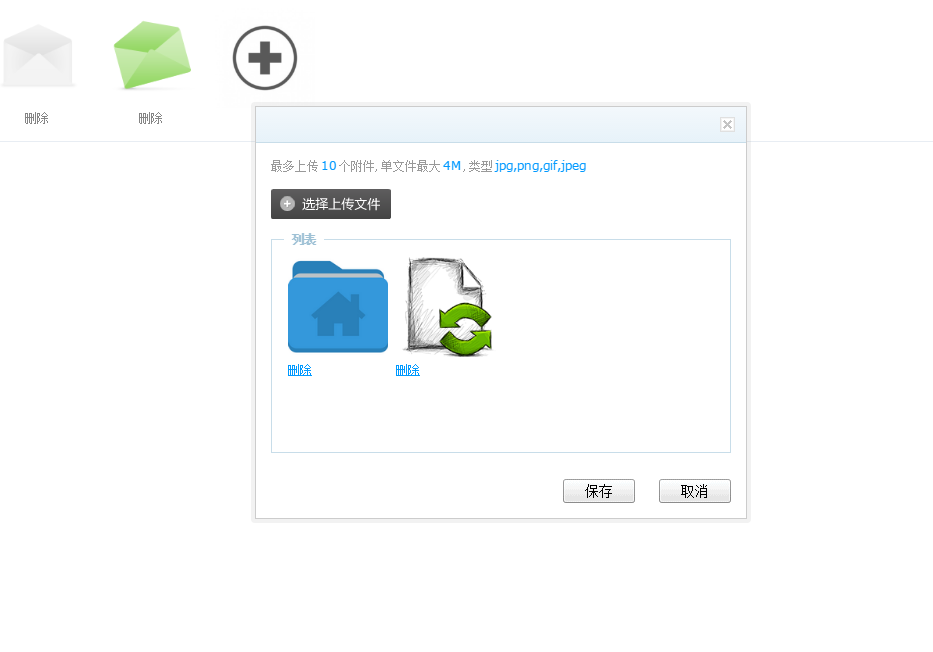
1.已有圖片可以刪除
2.有一個新增的按鈕
3.點擊新增按鈕,跳出frame框
4.在frame框中實現圖片異步上傳與及時效果
5.上傳成功後,調用回調函數
6.彈出框中的圖片可以進行刪除
7.frame彈出框點擊保存,把圖片通過js展示到頁面中
8.頁面點擊保存,把圖片數據保存到數據庫
<?php
foreach($info['product_img'] as $product_img)
{
?>
  <div  class="goods_xc">
    <input type="hidden" value="<?php echo $product_img['img'];?>" name="product_img[]">
    <a onclick="" href="<?php echo $product_img['img'];?>" target="_blank"><img width="100" height="100" src="<?php echo $product_img['img'];?>"></a>
    <br>
    <a href="javascript:void(0)" onclick="ClearPicArr2(this,'<?php echo $product_img['img'];?>')">刪除</a>
  </div>
<?php
}
?>
<div class="goods_xc" >
  <input type="hidden" name="product_img[]" />
  <a href="javascript:void(0);" onclick="GetUploadify(10,'','product','call_back2');"><img src="<?php echo IMG_PATH?>add-button.jpg" width="100" height="100" /></a>
  <br/>
  <a href="javascript:void(0)">  </a>
</div>
點評:點擊的時候,調用GetUploadify方法。
/*
 * 上傳圖片 後台專用
 * @access public
 * @null int 一次上傳圖片張圖
 * @elementid string 上傳成功後返回路徑插入指定ID元素內
 * @path string 指定上傳保存文件夾,默認存在Public/upload/temp/目錄
 * @callback string 回調函數(單張圖片返回保存路徑字符串,多張則為路徑數組 )
 */
function GetUploadify(num,elementid,path,callback)
{
  var pc_hash = $('#pc_hash').val();
  var upurl ='?m=admin&c=upload&a=upload&num='+num+'&input='+elementid+'&path='+path+'&func='+callback+'&pc_hash='+pc_hash;
  var iframe_str='<iframe frameborder="0" ';
  iframe_str=iframe_str+'id=uploadify ';
  iframe_str=iframe_str+' src='+upurl;
  iframe_str=iframe_str+' allowtransparency="true" class="uploadframe" scrolling="no"> ';
  iframe_str=iframe_str+'</iframe>';
  $("body").append(iframe_str);
  $("iframe.uploadframe").css("height",$(document).height()).css("width","100%").css("position","absolute").css("left","0px").css("top","0px").css("z-index","999999").show();
  $(window).resize(function(){
    $("iframe.uploadframe").css("height",$(document).height()).show();
  });
}
點評:生成一個iframe框。
public function upload(){
    $func = $_REQUEST['func'];
    $path = $_REQUEST['path'] ? $_REQUEST['path'] :'temp';
    $info = array(
      'num'=> $_REQUEST['num'],
      'title' => '',
      'upload' =>'?m=admin&c=upload&a=imageUp&savepath='.$path.'&pictitle=banner&dir=images&pc_hash='.$_SESSION['pc_hash'],
      'size' => '4M',
      'type' =>'jpg,png,gif,jpeg',
      'input' => $_REQUEST['input'],
      'func' => empty($func) ? 'undefined' : $func,
    );
    include $this->admin_tpl('upload_upload');
}
<!DOCTYPE html>
<html>
<head>
<meta http-equiv="Content-Type" content="text/html; charset=utf-8">
<title>Uploadify</title>
<link rel="stylesheet" type="text/css" href="<?php echo PLUGIN_STATICS_PATH?>uploadify/uploadify.css" />
</head>
<body>
<div class="W">
  <div class="Bg"></div>
  <div class="Wrap" id="Wrap">
    <div class="Title">
      <h3 class="MainTit" id="MainTit"><?php echo $info['title'];?></h3>
      <a href="javascript:Close();" title="關閉" class="Close"></a>
    </div>
    <div class="Cont">
      <p class="Note">最多上傳<strong><?php echo $info['num'];?></strong>個附件,單文件最大<strong><?php echo $info['size'];?></strong>,類型<strong><?php echo $info['type'];?></strong></p>
      <div class="flashWrap">
        <input name="uploadify" id="uploadify" type="file" multiple="true" />
        <!-- <span><input type="checkbox" name="iswatermark" id="iswatermark" /><label>是否添加水印</label></span>-->
      </div>
      <div class="fileWarp">
        <fieldset>
          <legend>列表</legend>
          <ul>
          </ul>
          <div id="fileQueue">
          </div>
        </fieldset>
      </div>
      <div class="btnBox">
        <button class="btn" id="SaveBtn">保存</button>

        <button class="btn" id="CancelBtn">取消</button>
      </div>
    </div>
    <!--[if IE 6]>
    <iframe frameborder="0" ></iframe>
    <![endif]-->
  </div>
</div>
<script src="<?php echo PLUGIN_STATICS_PATH?>uploadify/jquery.min.js" type="text/javascript"></script>
<!--防止客戶端緩存文件,造成uploadify.js不更新,而引起的“喔唷,崩潰啦”-->
<script>
document.write("<script type='text/javascript' "+ "src='<?php echo PLUGIN_STATICS_PATH?>uploadify/jquery.uploadify.js?" + new Date()+ "'></s" + "cript>");
</script>
<script src="<?php echo PLUGIN_STATICS_PATH?>uploadify/uploadify-move.js" type="text/javascript"></script>
<script type="text/javascript">
function Close(){
  $("iframe.uploadframe", window.parent.document).remove();
}
$("#CancelBtn").click(function(){
  $("iframe.uploadframe", window.parent.document).remove();
  //$('#uploadify').uploadifyClearQueue();
  //$(".fileWarp ul li").remove();
});
$(function() {
  $('#uploadify').uploadify({
      'auto'      : true,
      'method'     : 'post',
      'multi'      : true,
      'swf'       : '<?php echo PLUGIN_STATICS_PATH?>uploadify/uploadify.swf',
      'uploader'    : '<?php echo $info["upload"];?>',
      'progressData'  : 'all',
      'queueSizeLimit' : '<?php echo $info["num"];?>',
      'uploadLimit'   : 5,
      'fileSizeLimit'  : '20000KB',
      'fileTypeDesc'  : 'Image Files',
      'fileTypeExts'  : '*.jpeg; *.jpg; *.png; *.gif',
      'buttonImage'   : '<?php echo PLUGIN_STATICS_PATH?>uploadify/select.png',
      'queueID'     : 'fileQueue',
      'onUploadStart'  : function(file){
        $('#uploadify').uploadify('settings', 'formData', {'iswatermark':$("#iswatermark").is(':checked')});
      },
      'onUploadSuccess' : function(file, data, response){
        $(".fileWarp ul").append(SetImgContent(data));
        SetUploadFile();
      }
    });
});
function SetImgContent(data){
  var obj=eval('('+data+')');
  if(obj.state == 'SUCCESS'){
    var sLi = "";
    sLi += '<li class="img">';
    sLi += '<img src="' + obj.url + '" width="100" height="100" onerror="this.src=\'<?php echo PLUGIN_STATICS_PATH?>uploadify/nopic.png\'">';
    sLi += '<input type="hidden" name="fileurl_tmp[]" value="' + obj.url + '">';
    sLi += '<a href="javascript:void(0);">刪除</a>';
    sLi += '</li>';
    return sLi;
  }else{
    //window.parent.message(obj.text,8,2);
    alert(obj.msg);
    return;
  }
}
function SetUploadFile(){
  $("ul li").each(function(l_i){
    $(this).attr("id", "li_" + l_i);
  })
  $("ul li a").each(function(a_i){
    $(this).attr("rel", "li_" + a_i);
  }).click(function(){
    $.get(
      '?m=admin&c=upload&a=delupload&pc_hash=<?php echo $_SESSION["pc_hash"];?>',{action:"del", filename:$(this).prev().val()},function(){}
    );
    $("#" + this.rel).remove();
  })
}
/*點擊保存按鈕時
 *判斷允許上傳數,檢測是單一文件上傳還是組文件上傳
 *如果是單一文件,上傳結束後將地址存入$input元素
 *如果是組文件上傳,則創建input樣式,添加到$input後面
 *隱藏父框架,清空列隊,移除已上傳文件樣式*/
$("#SaveBtn").click(function(){
  var callback = "<?php echo $info['func'];?>";
  var num = "<?php echo $info['num'];?>";
  var fileurl_tmp = [];
  if(callback != "undefined"){
    if(num > 1){
       $("input[name^='fileurl_tmp']").each(function(index,dom){
        fileurl_tmp[index] = dom.value;
       });
    }else{
      fileurl_tmp = $("input[name^='fileurl_tmp']").val();
    }
    eval('window.parent.'+callback+'(fileurl_tmp)');
    $(window.parent.document).find("iframe.uploadframe").remove();
    return;
  }
  if(num > 1){
      var fileurl_tmp = "";
      $("input[name^='fileurl_tmp']").each(function(){
        fileurl_tmp += '<li rel="'+ this.value +'"><input class="input-text" type="text" name="{$info.input}[]" value="'+ this.value +'" /><a href="javascript:void(0);" onclick="ClearPicArr(\''+ this.value +'\',\'\')">刪除</a></li>';
      });
      $(window.parent.document).find("#{$info.input}").append(fileurl_tmp);
  }else{
      $(window.parent.document).find("#{$info.input}").val($("input[name^='fileurl_tmp']").val());
  }
  $(window.parent.document).find("iframe.uploadframe").remove();
});
</script>
</body>
</html>
點評:調用uploadify插件
$(function() {
  $('#uploadify').uploadify({
      'auto'      : true,
      'method'     : 'post',
      'multi'      : true,
      'swf'       : '<?php echo PLUGIN_STATICS_PATH?>uploadify/uploadify.swf',
      'uploader'    : '<?php echo $info["upload"];?>',
      'progressData'  : 'all',
      'queueSizeLimit' : '<?php echo $info["num"];?>',
      'uploadLimit'   : 5,
      'fileSizeLimit'  : '20000KB',
      'fileTypeDesc'  : 'Image Files',
      'fileTypeExts'  : '*.jpeg; *.jpg; *.png; *.gif',
      'buttonImage'   : '<?php echo PLUGIN_STATICS_PATH?>uploadify/select.png',
      'queueID'     : 'fileQueue',
      'onUploadStart'  : function(file){
        $('#uploadify').uploadify('settings', 'formData', {'iswatermark':$("#iswatermark").is(':checked')});
      },
      'onUploadSuccess' : function(file, data, response){
        $(".fileWarp ul").append(SetImgContent(data));
        SetUploadFile();
      }
    });
});
點評:表單提交圖片文件到服務器,成功後調用回調函數。
/**
* @function imageUp
*/
public function imageUp()
{
    // 有文件傳入,現在要做的就是把它保存起來
    // 處理上傳並返回數據
    // 上傳圖片框中的描述表單名稱,
    $title = htmlspecialchars($_REQUEST['pictitle'], ENT_QUOTES);
    // $path = htmlspecialchars($_REQUEST['dir'], ENT_QUOTES);
    $savepath = htmlspecialchars($_REQUEST['savepath'], ENT_QUOTES);
    $up = new think_upload();
    $path = './uploadfile/'.$savepath;
    //設置屬性(上傳的位置, 大小, 類型, 名是是否要隨機生成)
    $up -> set("path", $path);
    $up -> set("maxsize", 2000000);
    $up -> set("allowtype", array("gif", "png", "jpg","jpeg"));
    $up -> set("israndname", true);
    //使用對象中的upload方法, 就可以上傳文件, 方法需要傳一個上傳表單的名子 pic, 如果成功返回true, 失敗返回false
    if($up -> upload("Filedata")) {
      $name = $up->getFileName();
      $return_data['url'] = $path.'/'.$name;
      $return_data['title'] = $title;
      $return_data['state'] = 'SUCCESS';
      exit(json_encode($return_data));
    } else {
      $return_data['state'] = 'FAILURE';
      $return_data['msg']  = $up->getErrorMsg();
      exit(json_encode($return_data));
    }
}
點評:後台處理圖片上傳表單請求,返回圖片路徑
<?php
 /**
  * file: fileupload.class.php 文件上傳類FileUpload
  * 本類的實例對象用於處理上傳文件,可以上傳一個文件,也可同時處理多個文件上傳
  */
 class think_upload {
  private $path = "./uploadfile";     //上傳文件保存的路徑
  private $allowtype = array('jpg','gif','png'); //設置限制上傳文件的類型
  private $maxsize = 1000000;      //限制文件上傳大小(字節)
  private $israndname = true;      //設置是否隨機重命名文件, false不隨機
  private $originName;       //源文件名
  private $tmpFileName;       //臨時文件名
  private $fileType;        //文件類型(文件後綴)
  private $fileSize;        //文件大小
  private $newFileName;       //新文件名
  private $errorNum = 0;       //錯誤號
  private $errorMess="";       //錯誤報告消息
  /**
   * 用於設置成員屬性($path, $allowtype,$maxsize, $israndname)
   * 可以通過連貫操作一次設置多個屬性值
   *@param string $key 成員屬性名(不區分大小寫)
   *@param mixed $val 為成員屬性設置的值
   *@return object   返回自己對象$this,可以用於連貫操作
   */
  function set($key, $val){
   $key = strtolower($key);
   if( array_key_exists( $key, get_class_vars(get_class($this) ) ) ){
    $this->setOption($key, $val);
   }
   return $this;
  }
  /**
   * 調用該方法上傳文件
   * @param string $fileFile 上傳文件的表單名稱
   * @return bool    如果上傳成功返回數true
   */
  function upload($fileField) {
   $return = true;
   /* 檢查文件路徑是滯合法 */
   if( !$this->checkFilePath() ) {
    $this->errorMess = $this->getError();
    return false;
   }
   /* 將文件上傳的信息取出賦給變量 */
   $name = $_FILES[$fileField]['name'];
   $tmp_name = $_FILES[$fileField]['tmp_name'];
   $size = $_FILES[$fileField]['size'];
   $error = $_FILES[$fileField]['error'];
   /* 如果是多個文件上傳則$file["name"]會是一個數組 */
   if(is_Array($name)){
    $errors=array();
    /*多個文件上傳則循環處理 , 這個循環只有檢查上傳文件的作用,並沒有真正上傳 */
    for($i = 0; $i < count($name); $i++){
     /*設置文件信息 */
     if($this->setFiles($name[$i],$tmp_name[$i],$size[$i],$error[$i] )) {
      if(!$this->checkFileSize() || !$this->checkFileType()){
       $errors[] = $this->getError();
       $return=false;
      }
     }else{
      $errors[] = $this->getError();
      $return=false;
     }
     /* 如果有問題,則重新初使化屬性 */
     if(!$return)
      $this->setFiles();
    }
    if($return){
     /* 存放所有上傳後文件名的變量數組 */
     $fileNames = array();
     /* 如果上傳的多個文件都是合法的,則通過銷魂循環向服務器上傳文件 */
     for($i = 0; $i < count($name); $i++){
      if($this->setFiles($name[$i], $tmp_name[$i], $size[$i], $error[$i] )) {
       $this->setNewFileName();
       if(!$this->copyFile()){
        $errors[] = $this->getError();
        $return = false;
       }
       $fileNames[] = $this->newFileName;
      }
     }
     $this->newFileName = $fileNames;
    }
    $this->errorMess = $errors;
    return $return;
   /*上傳單個文件處理方法*/
   } else {
    /* 設置文件信息 */
    if($this->setFiles($name,$tmp_name,$size,$error)) {
     /* 上傳之前先檢查一下大小和類型 */
     if($this->checkFileSize() && $this->checkFileType()){
      /* 為上傳文件設置新文件名 */
      $this->setNewFileName();
      /* 上傳文件 返回0為成功, 小於0都為錯誤 */
      if($this->copyFile()){
       return true;
      }else{
       $return=false;
      }
     }else{
      $return=false;
     }
    } else {
     $return=false;
    }
    //如果$return為false, 則出錯,將錯誤信息保存在屬性errorMess中
    if(!$return)
     $this->errorMess=$this->getError();
    return $return;
   }
  }
  /**
   * 獲取上傳後的文件名稱
   * @param void  沒有參數
   * @return string 上傳後,新文件的名稱, 如果是多文件上傳返回數組
   */
  public function getFileName(){
   return $this->newFileName;
  }
  /**
   * 上傳失敗後,調用該方法則返回,上傳出錯信息
   * @param void  沒有參數
   * @return string 返回上傳文件出錯的信息報告,如果是多文件上傳返回數組
   */
  public function getErrorMsg(){
   return $this->errorMess;
  }
  /* 設置上傳出錯信息 */
  private function getError() {
   $str = "上傳文件<font color='red'>{$this->originName}</font>時出錯 : ";
   switch ($this->errorNum) {
    case 4: $str .= "沒有文件被上傳"; break;
    case 3: $str .= "文件只有部分被上傳"; break;
    case 2: $str .= "上傳文件的大小超過了HTML表單中MAX_FILE_SIZE選項指定的值"; break;
    case 1: $str .= "上傳的文件超過了php.ini中upload_max_filesize選項限制的值"; break;
    case -1: $str .= "未允許類型"; break;
    case -2: $str .= "文件過大,上傳的文件不能超過{$this->maxsize}個字節"; break;
    case -3: $str .= "上傳失敗"; break;
    case -4: $str .= "建立存放上傳文件目錄失敗,請重新指定上傳目錄"; break;
    case -5: $str .= "必須指定上傳文件的路徑"; break;
    default: $str .= "未知錯誤";
   }
   return $str.'<br>';
  }
  /* 設置和$_FILES有關的內容 */
  private function setFiles($name="", $tmp_name="", $size=0, $error=0) {
   $this->setOption('errorNum', $error);
   if($error)
    return false;
   $this->setOption('originName', $name);
   $this->setOption('tmpFileName',$tmp_name);
   $aryStr = explode(".", $name);
   $this->setOption('fileType', strtolower($aryStr[count($aryStr)-1]));
   $this->setOption('fileSize', $size);
   return true;
  }
  /* 為單個成員屬性設置值 */
  private function setOption($key, $val) {
   $this->$key = $val;
  }
  /* 設置上傳後的文件名稱 */
  private function setNewFileName() {
   if ($this->israndname) {
    $this->setOption('newFileName', $this->proRandName());
   } else{
    $this->setOption('newFileName', $this->originName);
   }
  }
  /* 檢查上傳的文件是否是合法的類型 */
  private function checkFileType() {
   if (in_array(strtolower($this->fileType), $this->allowtype)) {
    return true;
   }else {
    $this->setOption('errorNum', -1);
    return false;
   }
  }
  /* 檢查上傳的文件是否是允許的大小 */
  private function checkFileSize() {
   if ($this->fileSize > $this->maxsize) {
    $this->setOption('errorNum', -2);
    return false;
   }else{
    return true;
   }
  }
  /* 檢查是否有存放上傳文件的目錄 */
  private function checkFilePath() {
   if(empty($this->path)){
    $this->setOption('errorNum', -5);
    return false;
   }
   if (!file_exists($this->path) || !is_writable($this->path)) {
    if (!@mkdir($this->path, 0755)) {
     $this->setOption('errorNum', -4);
     return false;
    }
   }
   return true;
  }
  /* 設置隨機文件名 */
  private function proRandName() {
   $fileName = date('YmdHis')."_".rand(100,999);
   return $fileName.'.'.$this->fileType;
  }
  /* 復制上傳文件到指定的位置 */
  private function copyFile() {
   if(!$this->errorNum) {
    $path = rtrim($this->path, '/').'/';
    $path .= $this->newFileName;
    if (@move_uploaded_file($this->tmpFileName, $path)) {
     return true;
    }else{
     $this->setOption('errorNum', -3);
     return false;
    }
   } else {
    return false;
   }
  }
}
點評:php文件上傳類。
然後處理好,圖片數據刪除對應的文件上傳,減輕服務器空間壓力。
public function delete() {
    $id = intval($_GET['id']);
    $this->db->delete(array('id'=>$id));
    // 遍歷刪除原圖片
    $product_img = $this->product_img_db->select(array('product_id'=>$id));
    foreach ($product_img as $k => $v) {
      unlink($v['img']);
    }
    // 刪除表數據
    $this->product_img_db->delete(array('product_id'=>$id));
    exit("1");
}
更多關於PHP相關內容感興趣的讀者可查看本站專題:《PHP圖形與圖片操作技巧匯總》、《php文件操作總結》、《PHP數組(Array)操作技巧大全》、《PHP基本語法入門教程》、《PHP運算與運算符用法總結》、《php面向對象程序設計入門教程》、《PHP網絡編程技巧總結》、《php字符串(string)用法總結》、《php+mysql數據庫操作入門教程》及《php常見數據庫操作技巧匯總》
希望本文所述對大家PHP程序設計有所幫助。