本文實例講述了Yii針對添加行的增刪改查操作。分享給大家供大家參考,具體如下:
效果圖:
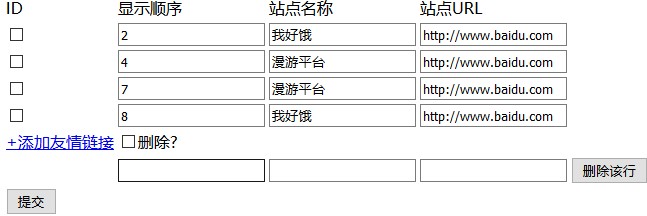
控制器:
<?php
namespace backend\controllers;
use Yii;
use yii\web\Controller;
use backend\models\Zhan;
class IndexController extends Controller
{
  //顯示頁面
  public function actionIndex()
  {
    $index=new Zhan();
    //接受值
     if($_POST)
     {
      $a=Yii::$app->db;
      //判斷是否有刪除ids
      if(Yii::$app->request->post('ids'))
      {
        $ids=Yii::$app->request->post('ids');
        $str='';
        for($i=0;$i<count($ids);$i++)
        {
         if($a->createCommand()->delete('zhan',['id'=>$ids[$i]])->execute())
         {
           $str++;
         }
        }
        if($str!='')
        {
          echo '<script>alert("刪除成功");location.href="index.php?r=index/index"</script>';
        }
      }
      else
      {
         //判斷是否有id傳值
         $cid=Yii::$app->request->post('cid');
         $xu_ids=Yii::$app->request->post('xu_id');
         //print_r($id);die;
         //添加行的數據
         $names=Yii::$app->request->post('zhan_name');
         $ulrs=Yii::$app->request->post('url');
         //遍歷數組
         foreach($names as $k=>$v)
         {
           if(!empty($cid[$k]))
           {
            $c_id=$cid[$k];
            //echo $c_id;die;
            $url=$ulrs[$k];
            $xu_id=$xu_ids[$k];
            $name=$v;
            $res=$a->createCommand()->update("zhan",['zhan_name'=>$name,'url'=>$url,'xu_id'=>$xu_id],"id=$c_id")->execute();
            //數據可能沒被修改,只有成功一條就改變標記的值
            if($res)
            {
             echo '<script>alert("修改成功");location.href="index.php?r=index/index"</script>';
            }
           }
           else
           {
            $url=$ulrs[$k];
            $xu_id=$xu_ids[$k];
            $name=$v;
            $res=$a->createCommand()->insert("zhan",['xu_id'=>$xu_id,'zhan_name'=>$name,'url'=>$url])->execute();
            //數據可能沒被修改,只有成功一條就改變v標記的值
            if($res)
            {
              echo '<script>alert("添加成功");location.href="index.php?r=index/index"</script>';
            }
           }
         }
      }
     }
     else
     {
      //查詢數據
      $models=Zhan::find()->orderBy(['xu_id'=>'asc'])->asArray()->all();
      //var_dump($models);
      return $this->renderPartial("show",['models'=>$models]);
     }
  }
}
?>
視圖層:
<center>
<form action="index.php?r=index/index" method="post">
<input name="_csrf" type="hidden" id="_csrf" value="<?= Yii::$app->request->csrfToken ?>">
<table>
<tr>
<td>ID</td>
  <td>顯示順序</td>
  <td>站點名稱</td>
  <td>站點URL</td>
</tr>
<?php foreach ($models as $key => $v) {?>
<tr>
<input type="hidden" name="cid[]" value="<?php echo $v['id']; ?>" />
<td><input type="checkbox" name="ids[]" class='ids' value="<?= $v['id'] ?>"></td>
<td><input type="text" name="xu_id[]" value="<?= $v['xu_id'];?>"></td>
<td><input type="text" name ='zhan_name[]'value="<?= $v['zhan_name'];?>"></td>
<td><input type="text" name="url[]" value="<?= $v['url'];?>"></td>
</tr>
<?php }?>
<tr>
 <td><a href="javascript:void(0)" onclick="add(this);">+添加友情鏈接</a></td>
 <td><input type="checkbox" onclick="jian(this);">刪除?</td>
</tr>
 <tr>
  <td><input type="submit" value="提交" ></td>
 </tr>
</table>
</form>
</center>
<script src="style/jquery.js"></script>
<script>
//添加一行
function add(ts)
{
  var tr=$(ts).parent().parent();
  var newtr='<tr><td></td><td><input type="text" name="xu_id[]"></td><td><input type="text" name="zhan_name[]"></td><td><input type="text" name="url[]"></td><td><input type="button" value="刪除該行" onclick="del(this);"></td></td></tr><br />';
  tr.after(newtr);
}
//刪除當前行
function del(ts)
{
  $(ts).parent().parent().remove();
}
//刪除所有
function jian(ts)
{
  var ids=$('.ids');
  //alert(ids.length);
  for(var i=0;i<ids.length;i++)
  {
    if(ts.checked==true)
    {
     ids[i].checked=true;
    }
    else
    {
     ids[i].checked=false;
    }
  }
}
</script>
</head>
更多關於Yii相關內容感興趣的讀者可查看本站專題:《Yii框架入門及常用技巧總結》、《php優秀開發框架總結》、《smarty模板入門基礎教程》、《php面向對象程序設計入門教程》、《php字符串(string)用法總結》、《php+mysql數據庫操作入門教程》及《php常見數據庫操作技巧匯總》
希望本文所述對大家基於Yii框架的PHP程序設計有所幫助。