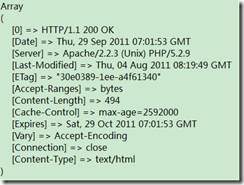
環境
開發包:appserv-win32-2.5.10
服務器:Apache2.2
數據庫:phpMyAdmin
語言:php5,java
平台:windows 10
java驅動:mysql-connector-java-5.1.37
需求
編寫一個PHP腳本語言,連接到phpMyAdmin數據庫的test庫
編寫一個java web服務端,連接到phpMyAdmin數據庫的test庫
代碼
php連接方式
mysql.php
<?php
/*****************************
*數據庫連接
*****************************/
$conn = @mysql_connect("localhost","root","123");
if (!$conn){
  die("連接數據庫失敗:" . mysql_error());
}
mysql_select_db("test", $conn);
//字符轉換,讀庫
mysql_query("set character set utf8");
mysql_query("set names utf8");
?>
test.php測試
<?php
  error_reporting(0);     //防止報錯
  include('mysql.php');
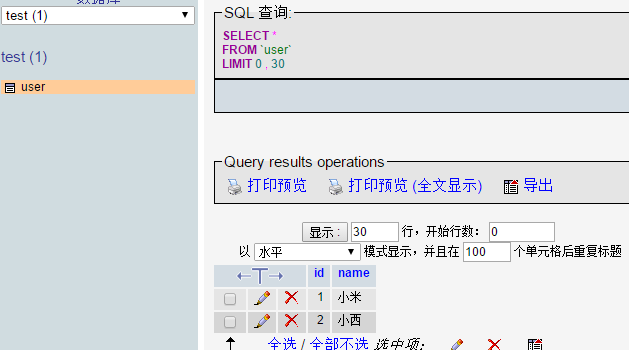
  $result=mysql_query("select * from user"); //根據前面的計算出開始的記錄和記錄數
  // 循環取出記錄
  $six;
  while($row=mysql_fetch_row($result))
  {
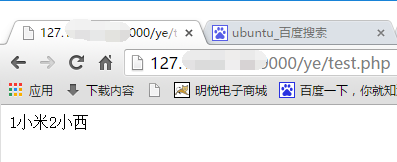
  echo $row[0];
  echo $row[1];
  }
?>
運行截圖 :
java 連接方式
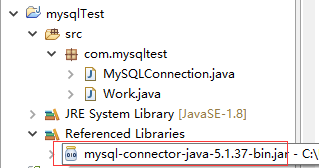
1.新建一個java project為mysqlTest
2.加載JDBC驅動,mysql-connector-java-5.1.37
MySQLConnection.java
package com.mysqltest;
import java.sql.Connection;
import java.sql.DriverManager;
import java.sql.SQLException;
/*
 * **Mysql連接**
 *
 * 參數:
 * conn 連接
 * url mysql數據庫連接地址
 * user 數據庫登陸賬號
 * password 數據庫登陸密碼
 * 方法:
 * conn 獲取連接
 */
public class MySQLConnection {
  public static Connection conn = null;
  public static String driver = "com.mysql.jdbc.Driver";
  public static String url = "jdbc:mysql://127.0.0.1:3306/post";
  public static String user = "root";
  public static String password = "123";
  /*
   * 創建Mysql數據連接 第一步:加載驅動 Class.forName(Driver) 第二步:創建連接
   * DriverManager.getConnection(url, user, password);
   */
  public Connection conn() {
    try {
      Class.forName(driver);
    } catch (ClassNotFoundException e) {
      System.out.println("驅動加載錯誤");
      e.printStackTrace();
    }
    try {
      conn = DriverManager.getConnection(url, user, password);
    } catch (SQLException e) {
      System.out.println("數據庫鏈接錯誤");
      e.printStackTrace();
    }
    return conn;
  }
}
Work.java
package com.mysqltest;
import java.sql.Connection;
import java.sql.PreparedStatement;
import java.sql.ResultSet;
import java.sql.SQLException;
/*
 * mysql增刪改查
 */
public class Work {
  /*
   * insert 增加
   */
  public static int insert() {
    MySQLConnection connection = new MySQLConnection();
    Connection conns; // 獲取連接
    PreparedStatement pst; // 執行Sql語句
    int i = 0;
    String sql = "insert into user (username,password) values(?,?)";
    try {
      conns = connection.conn();
      pst = conns.prepareStatement(sql);
      pst.setString(1, "lizi");
      pst.setString(2, "123");
      i = pst.executeUpdate();
      pst.close();
      conns.close();
    } catch (SQLException e) {
      System.out.println("數據寫入失敗");
      e.printStackTrace();
    }
    return i;
  }
  /*
   * select 寫入
   */
  public static void select() {
    MySQLConnection connection = new MySQLConnection();
    Connection conns; // 獲取連接
    PreparedStatement pst; // 執行Sql語句(Statement)
    ResultSet rs; // 獲取返回結果
    String sql = "select * from user";
    try {
      conns = connection.conn();
      pst = conns.prepareStatement(sql);
      rs = pst.executeQuery(sql);// 執行sql語句
      System.out.println("---------------------------------------");
      System.out.println("名字    |    密碼");
      while (rs.next()) {
        System.out.println(rs.getString("username") + "    |    " + rs.getString("password"));
      }
      System.out.println("---------------------------------------");
      conns.close();
      pst.close();
      rs.close();
    } catch (SQLException e) {
      System.out.println("數據查詢失敗");
      e.printStackTrace();
    }
  }
  /*
   * update 修改
   */
  public static int update() {
    MySQLConnection connection = new MySQLConnection();
    Connection conns; // 獲取連接
    PreparedStatement pst; // 執行Sql語句(Statement)
    int i = 0;
    String sql = "update user set password = ? where username = ?";
    try {
      conns = connection.conn();
      pst = conns.prepareStatement(sql);
      pst.setString(1, "123");
      pst.setString(2, "lizi");
      i = pst.executeUpdate();
      pst.close();
      conns.close();
    } catch (SQLException e) {
      System.out.println("數據修改失敗");
      e.printStackTrace();
    }
    return i;
  }
  /*
   * delete 刪除
   */
  public static int delete() {
    MySQLConnection connection = new MySQLConnection();
    Connection conns; // 獲取連接
    PreparedStatement pst; // 執行Sql語句(Statement)
    int i = 0;
    String sql = "delete from user where username = ?";
    try {
      conns = connection.conn();
      pst = conns.prepareStatement(sql);
      pst.setString(1, "lizi");
      i = pst.executeUpdate();
      pst.close();
      conns.close();
    } catch (SQLException e) {
      System.out.println("數據刪除失敗");
      e.printStackTrace();
    }
    return i;
  }
  /*
   * test
   */
  public static void main(String[] args) {
    // System.out.println(insert());
     select();
    // System.out.println(update());
    // System.out.println(delete());
  }
}
test截圖
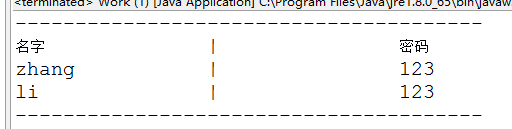
ps:php操作MySQL數據庫中語句
我們常常用conn.php文件來建立與數據庫的鏈接,然後在所需的文件中利用include 進行調用。這樣有效防止對數據庫屬性的改動 而引起其他有關文件對數據調用的錯誤。
現在來看一個conn.php文件,代碼如下:
<?php
 $conn=@mysql_connect("localhost","root","")or die("數據庫連接錯誤");//鏈接數據庫服務器
 mysql_select_db("messageboard",$conn);//選擇數據庫名為messageboard
 mysql_query("set names 'utf'");//使用utf編碼,這裡不能寫成utf-否則將顯示亂碼,但UTF不區分大小寫
 ?>
學習積累,收集了PHP操作MYSQL的幾個基礎函數:
.使用mysql_connect()函數連接MySQL服務器:mysql_connect("hostname", "username","password");
如,$link = mysql_connect("localhost", "root", "") or die("不能連接到數據庫服務器!可能是數據庫服務器沒有啟動,或者用戶名密碼有誤!".mysql_error());
.使用mysql_select_db()函數選擇數據庫文件:mysql_query("use 數據庫名",$link);
如,$db_selected=mysql_query("use example",$link);
.使用mysql_query()函數執行SQL語句:mysql_query(string query(SQL語句),$link);
如:
添加會員:$result=mysql_query("insert into tb_member values('a','')",$link);
修改會員:$result=mysql_query("update tb_member setuser='b',pwd=''where user='a'",$link);
刪除會員:$result=mysql_query("delecte from tb_member where user='b'",$link);
查詢會員:$sql=mysql_query("select * from tb_book");
模糊查詢:$sql=mysql_query("select * from tb_book where bookname like '%".trim($txt_book)."%'");
//通用符%表示零個或任意多個字符。
顯示表結構:$result=mysql_query("DESC tb_member");
.使用mysql_fetch_array()函數從數組結果集中獲得信息:
語法結構:array mysql_fetch_array(resource result[,int result_type])
參數result資源類型的參數,整形型參數,要傳入的是由mysql_fetch_array()函數返回的數據指針;
參數result_type:可選項,php操作MySQL數據庫語句基礎整數型參數,要傳入的是MYSQL_ASSOC(關聯索引)、MYSQL_NUM(數字索引) MYSQL_BOTH(包括前兩者,默認值)
如:
<>$sql=mysql_query("select * from tb_book");
$info=mysql_fetch_object($sql);
<>$sql=mysql_query("select * from tb_book where bookname like '%".trim($txt_book)."%'");
$info=mysql_fetch_object($sql);
.使用mysql_fetch_object()函數從結果集中獲取一行作為對象:
語法結構:object mysql_fetch_object(resource result);
如:
<>$sql=mysql_query("select * from tb_book");
$info=mysql_fetch_object($sql);
<>$sql=mysql_query("select * from tb_book where bookname like '%".trim($txt_book)."%'");
$info=mysql_fetch_object($sql);
mysql_fetch_object()函數與mysql_fetch_array()函數類似,只有一點區別,即返回一個對象而不是數組,該函數只能通過字段名來訪問數組。訪問結果集中行的元素的語法結構:$row->col_name(列名)
.使用mysql_fetch_row()函數逐行獲得結果集中的每條記錄:
語法結構:array mysql_fetch_row(resource result)
如:
<>$sql=mysql_query("select * from tb_book");
$row=mysql_fetch_row($sql);
<>$sql=mysql_query("select * from tb_book where bookname like '%".trim($txt_book)."%'");
$row=mysql_fetch_row($sql);
.使用mysql_num_rows()函數獲取結果集中地記錄數:
語法結構:int mysql_num_rows(resource result)
如:
$sql=mysql_query("select * from tb_book");
......
<?php $nums=mysql_num_rows($sql);echo $nums;?>
注:若要獲得insert、update、delete語句的所影響到的數據,則必須使用mysql_affected_rows()函數來實現。
.mysql_query("set names gb");//設置MySQL的編碼格式為 gb類型,以屏蔽亂碼。
.關閉記錄集:mysql_free_result($sql);
.關閉MySQL數據庫服務器:mysql_close($conn);