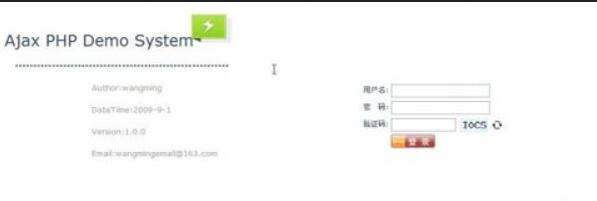
PHP是一門很好的語言,可以很方便的開發web應用程序,下面介紹一下PHP如何通過AJAX方式實現登錄功能:
登錄界面中,javascript腳本用ajax方式異步請求dologin.php,dologin.php負責用戶信息驗證(包括驗證碼,php生成驗證碼可以自行搜索).登錄界面的代碼如下:
1 <?php session_start();?>
2 <!DOCTYPE html PUBLIC "-//W3C//DTD XHTML 1.0 Transitional//EN" "http://www.w3.org/TR/xhtml1/DTD/xhtml1-transitional.dtd">
3 <html xmlns="http://www.w3.org/1999/xhtml">
4 <head>
5 <meta http-equiv="Content-Type" content="text/html; charset=gb2312" />
6 <title>login</title>
7 <link rel="stylesheet" type="text/css" href="CSS/login.css" />
8 <script src="JS/ajaxhelper.js" type="text/javascript"></script>
9 <script src="JS/jquery-1.3.2.min.js" type="text/javascript"></script>
10 <script type="text/javascript">
11 function chkForm() {
12 if (m$('username').value == "") {
13
14 alert('用戶名不能為空.');
15 m$('username').focus();
16 return false;
17
18 }
19 if (m$('password').value == "") {
20
21 alert('密碼不能為空.');
22 m$('password').focus();
23 return false;
24
25 }
26 if (m$('password').value != "" && m$('username').value != "") {
27
28 var xmlhttp = createRequest();
29 if (xmlhttp) {
30 m$('loading').innerHTML = "<font color='red'>loading...</font>";
31 var username = m$('username').value;
32 var pwd = m$('password').value;
33 var code = m$('txtCode').value;
34 var url = "dologin.php";
35 xmlhttp.open("POST", url, true);
36 xmlhttp.onreadystatechange = ValidateResult;
37 xmlhttp.setRequestHeader("Content-Type", "application/x-www-form-urlencoded");
38 xmlhttp.send("username=" + escape(username) + "&password=" + escape(pwd) + "&code=" + escape(code));
39
40 } else {
41 alert('xmlHttp創建失敗.');
42
43 }
44
45 function ValidateResult() {
46 if (xmlhttp.readyState == 4) {
47 if (xmlhttp.status == 200) {
48 if (xmlhttp.responseText != "") {
49
50 //window.alert(xmlhttp.responseText);
51 var obj = eval("(" + xmlhttp.responseText + ")");
52 if (obj.result == true) {
53 alert("提示:" + obj.info);
54 window.location = 'index.php';
55
56 } else {
57 alert("錯誤:" + obj.info);
58
59 }
60 } else {
61 window.alert("從服務器獲取失敗");
62
63 window.location.reload();
64 }
65 m$('loading').innerHTML = "";
66 }
67 }
68
69 }
70
71
72 }
73
74 }
75
76 function m$(id) {
77 return document.getElementById(id);
78 }
79
80 function changeCode() {
81 var xmlhttp = createRequest();
82 if (xmlhttp) {
83 m$('loading').innerHTML = "<font color='red'>loading...</font>";
84 var dt = new Date().getTime();
85 // alert(dt);
86 var url = "function/imagecode.php?dummay" + escape(dt);
87 xmlhttp.open("GET", url, true);
88 xmlhttp.onreadystatechange = ValidateResult;
89 xmlhttp.send(null);
90
91 } else {
92 alert('xmlHttp創建失敗.');
93
94 }
95
96 function ValidateResult() {
97 if (xmlhttp.readyState == 4) {
98 if (xmlhttp.status == 200) {
99 var dt = new Date().getTime();
100 var url = "function/imagecode.php?dummay" + escape(dt);
101 m$('imgCode').src = "function/imagecode.php?dummay" + escape(dt);
102 m$('loading').innerHTML = "";
103 }
104 }
105
106 }
107 }
108
109 function showTool() {
110 $('#divToolTip').css("display", "block");
111 }
112
113 function hideTool() {
114 $('#divToolTip').css("display", "none");
115 }
116 window.onload = initPage;
117
118 function initPage() {
119 $('#divToolTip').css("display", "none");
120 }
121 </script>
122 </head>
123 <body>
124 <div >
125
126 </div>
127 <div >
128
129 <div class="left">
130
131 <div >
132 <div >Ajax PHP Demo System
133 <img src="Images/appstorm-icon.png" alt="appcation storm image" />
134 </div>
135 <br/>
136 <hr />
137 <div >
138 Author:<a href="#" onmousemove="showTool();" onmouseout="hideTool();">wangming</a>
139 </div>
140 <div >DateTime:2009-9-1</div>
141 <div >Version:1.0.0</div>
142 <div >Email:wangmingemail@163.com </div>
143 <div id="divToolTip">
144 <img src="Images/ming.jpg" height="86px;"/>
145 <span class="authordes">
146 <br/>
147 姓名:wangming<br/>
148 電商06-2<br/>
149 </span>
150
151 </div>
152
153 </div>
154
155 </div>
156
157 <div class="right">
158
159 <form>
160 <br/>
161 <table class="flogin">
162 <tr>
163 <td>用戶名:</td>
164 <td><input type="text" name="username" id="username"/></td>
165 <td></td>
166 </tr>
167 <tr>
168 <td>密 碼:</td>
169 <td><input type="password" name="password" id="password" /></td>
170 <td></td>
171 </tr>
172 <tr>
173 <td>驗證碼:</td>
174 <td>
175 <input type="text" name="txtCode" id="txtCode" size="12" />
176 <img src="function/imagecode.php" id="imgCode" alt="image code" height="22px;" />
177 </td>
178 <td><input type="button" class="btnrefresh" onclick="changeCode();" /></td>
179 </tr>
180 <tr>
181 <td></td>
182 <td><input type="button" class="btnlogin" onclick="chkForm();" /></td>
183 <td></td>
184 </tr>
185 <tr>
186 <td></td>
187 <td><span id="loading"></span></td>
188 <td><span id="code"></span></td>
189 </tr>
190
191 </table>
192 </form>
193 </div>
194
195 </div>
196 <div >
197 ©Copyright 2015.
198 </div>
199 </body>
200 </html>
 1 function createRequest() {
 2     try {
 3         request = new XMLHttpRequest();
 4     } catch (tryMS) {
 5         try {
 6             request = new ActiveXObject("Msxml2.XMLHTTP");
 7         } catch (otherMS) {
 8             try {
 9                 request = new ActiveXObject("Microsoft.XMLHTTP");
10             } catch (failed) {
11                 request = null;
12             }
13         }
14     }
15     return request;
16 }
17
18 function getActivatedObject(e) {
19     var obj;
20     if (!e) {
21         // early version of IE
22         obj = window.event.srcElement;
23     } else if (e.srcElement) {
24         // IE 7 or later
25         obj = e.srcElement;
26     } else {
27         // DOM Level 2 browser
28         obj = e.target;
29     }
30     return obj;
31 }
32
33 function addEventHandler(obj, eventName, handler) {
34     if (document.attachEvent) {
35         obj.attachEvent("on" + eventName, handler);
36     } else if (document.addEventListener) {
37         obj.addEventListener(eventName, handler, false);
38     }
39 }
 1 <?php
 2     session_start();
 3     header("Content-type:text/html;charset=gb2312");//防止返回的中文亂碼
 4     $name=$_POST['username'];
 5     $pwd=$_POST['password'];
 6     $imagecode=$_POST['code'];
 7     if(strtoupper($imagecode)==$_SESSION["code"])
 8     {
 9        include("conn/conn.php");
10        $sql="select studentName,studentPwd from tbstudent where studentId='".$name."'";
11        $result=mysql_query($sql,$conn);
12        if($row=mysql_fetch_assoc($result))
13        {
14          if($pwd==$row['studentPwd'])
15          {
16           $_SESSION['username']=$row['studentName'];
17             //echo "{'result':true,'info':'登陸成功!','code':'".$_SESSION["code"]."'}";
18             echo "{'result':true,'info':'登陸成功!'}";
19
20          }
21          else
22          {
23             echo "{'result':false,'info':'密碼錯誤!'}";
24          }
25        }
26       else
27       {
28           echo "{'result':false,'info':'該用戶不存在!'}";
29       }
30    }
31    else
32    {
33        echo "{'result':false,'info':'驗證碼錯誤!'}";
34    }
35 ?>
1 <?php
2  $conn=$mysql_connect("localhost","root", "");
3  mysql_select_db("bbs",$conn);
4  mysql_query("SET NAMES GB2312");
5 ?>

與登錄無關,只為了記錄一下PHP如何在數據庫MYSQL上實現CURD操作.