本文將介紹如何通過 PHP 函數處理,輕松生成制作各種第三方下載工具(比如迅雷,快車,QQ旋風)的下載鏈接數據,並直接輸出到前台上,同時也可以將轉換過的鏈接還原為原始的下載地址。
該功能所用到的 PHP 函數主要是下面兩個:
1. base64_encode: 用於以 base64 方式加密字符串;
2. base64_decode: 用於解密以 base64 方式加密的字符串。
下面直接通過示例說明,基本都能理解,就不做詳細解釋了。
<html>
<head>
<meta http-equiv="Content-Type" content="text/html;charset=utf-8" />
<title>PHP生成迅雷、快車、QQ旋風下載鏈接的方法</title>
</head>
<body>
<?php
function zhuanhuan($url){
	if(empty($url)) return $result;
	$urlodd=explode('//',$url,2);
	$head=strtolower($urlodd[0]);
	$behind=$urlodd[1];
	if($head=="thunder:"){
		$url=substr(base64_decode($behind),2,-2);
	}else if($head=="flashget:"){
		$url1=explode('&',$behind,2);
		$url=substr(base64_decode($url1[0]),10,-10);
	}else if($head=="qqdl:"){
		$url=base64_decode($behind);
	}else if($head=="http:"||$head=="ftp:"||$head=="mms:"||$head=="rtsp:"||$head=="https:"){
		$url=array(
			'thunder'=>"thunder://".base64_encode("AA".$url."ZZ"),
			'flashget'=>"Flashget://".base64_encode("[FLASHGET]".$url."[FLASHGET]")."&aiyh",
			'qqdl'=>"qqdl://".base64_encode($url)
		);
	}else{
		return '';
	}
	return $url;
}
$url=isset($_GET['url'])?$_GET['url']:'';
$result=zhuanhuan($url);
?>
<form action="" method=GET>
請輸入普通鏈接或者迅雷,快車,旋風鏈地址:<br />
<input type=text name="url" size="80">
<input type=submit value="轉換">
</form>
<?php
if(is_array($result)){//www.phpernote.com
?>
<p>地址:<a href="<?php echo $url;?>" target="_blank"><?php echo $url;?></a>
<p>迅雷鏈:<a href="<?php echo $result['thunder'];?>" target="_blank"><?php echo $result['thunder'];?></a>
<p>快車鏈:<a href="<?php echo $result['flashget'];?>" target="_blank"><?php echo $result['flashget'];?></a>
<p>旋風鏈:<a href="<?php echo $result['qqdl'];?>" target="_blank"><?php echo $result['qqdl'];?></a>
<?php
}else{
?>
<p>實際地址:<a href="<?php echo $result;?>" target="_blank"><?php echo $result;?></a>
<?php
}
?>
</body>
</html>
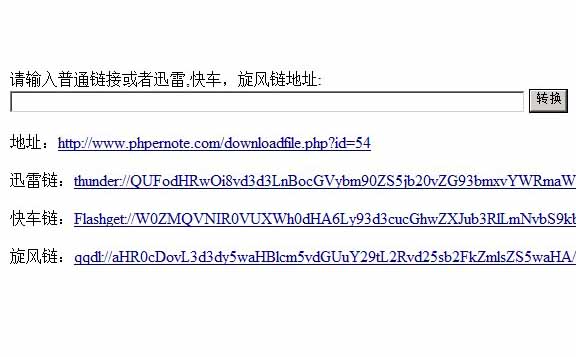
頁面的效果如下圖: