本文實例講述了Yii實現文章列表置頂功能的方法。分享給大家供大家參考,具體如下:
我的理解:首先點擊獲取當前ID,model層查詢所有sort字段,遍歷數據,得到最大值,修改數據,替換數據,即可。
效果圖:
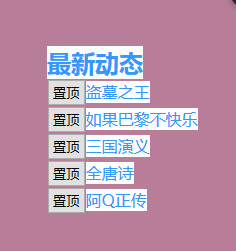
模型層:
//顯示列表
public function lists1()
{
    $arr=Yii::$app->db->createCommand("select * from acticle join type on type.t_id=acticle.t_id order by sort desc")->queryall();
    return $arr;
}
//置頂
public function top(){
    $arr=$this::find()->select("sort")->asArray()->all();
    //print_r($arr);die;
    $rows=array();
    foreach($arr as $key=>$v)
    {
      $rows[]=$v['sort'];
    }
    $max=array_search(max($rows),$rows);
    return intval($rows[$max]+1);
  }
  //修改數據
  public function update1($sort,$acticle_id){
    $arr=Yii::$app->db->createCommand()->update("acticle",['sort'=>$sort],['acticle_id'=>$acticle_id]);
    if($arr->execute()){
      return 1;
    }else{
      return 2;
    }
}
控制器:
//文章置頂
public function actionTopq(){
    $acticle_id=$_GET['id'];
    //echo $acticle_id;die;
    //獲取最大sort
    $model=new Acticle();
    $sort=$model->top();
    //修改數據
    $row=$model->update1($sort,$acticle_id);
    //echo $row;die;
    if($row==1){
      //替換數據,置頂
      $res1=$model->lists1();
      $art=new Articles();
      $res6=$art->get_right($res1,5);
      return $res6;
    }else{
    return false;
    }
}
視圖層:
<!-- 文章列表 -->
<div class="r_230_b ma_b8" style="float:right;right:0;line">
<div class="news_t" ><h2><font color="#d52c99">最新動態</font></h2></div>
<?php echo $res6;?>
</div>
<script>
function topq(ts){
  $.get("index.php?r=index/topq",{id:ts},function(msg){
    $('#sort').html(msg);
    //alert(msg);
  })
}
</script>
更多關於Yii相關內容感興趣的讀者可查看本站專題:《Yii框架入門及常用技巧總結》、《php優秀開發框架總結》、《smarty模板入門基礎教程》、《php面向對象程序設計入門教程》、《php字符串(string)用法總結》、《php+mysql數據庫操作入門教程》及《php常見數據庫操作技巧匯總》
希望本文所述對大家基於Yii框架的PHP程序設計有所幫助。