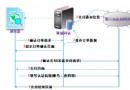
本文實例講述了基於thinkPHP實現的微信自定義分享功能。分享給大家供大家參考,具體如下:
在許多大的網站我們都會看到點擊分享就可以把數據分享到微信或QQ或其它的平台了,下面我們來看一段php版微信自定義分享代碼,代碼參考官方開發的沒有任何問題.
分享需要認證微信訂閱號或者服務號.
php 代碼(thinkphp):
$appid='xxx';
$appsecret='xxxx';
$timestamp = time();
$noncestr = $this->getRandStr(15);
// dump();
$url = 'https://api.weixin.qq.com/cgi-bin/ticket/getticket?access_token='. $this->get_token($appid,$appsecret) .'&type=jsapi';
$ret_json = $this->curl_get_contents($url);
$ret = json_decode($ret_json);
$ticket = $ret-> ticket;
//var_dump($ret);
$strvalue = 'jsapi_ticket='.$ticket.'&noncestr='.$noncestr.'×tamp='.$timestamp.'&url=http://'.$_SERVER['HTTP_HOST'].$_SERVER['REQUEST_URI'];
$signature = sha1($strvalue);
$this->assign('timestamp',$timestamp);
$this->assign('nonceStr',$noncestr);
$this->assign('signature',$signature);
function get_token($appid,$appsecret){
 if(S('access_token')) return S('access_token');
 $url = "https://api.weixin.qq.com/cgi-bin/token?grant_type=client_credential&appid=$appid&secret=$appsecret";
 $ret_json = $this->curl_get_contents($url);
 $ret = json_decode($ret_json);
 if($ret -> access_token){
 S('access_token',$ret -> access_token,7200);
 return $ret -> access_token;
 }
}
function is_weixin(){
if (strpos($_SERVER['HTTP_USER_AGENT'], 'MicroMessenger') !== false ) {
return true;
}
return false;
}
function getRandStr($length){
 $str = 'abcdefghijklmnopqrstuvwxyz0123456789ABCDEFGHIJKLMNOPQRSTUVWXYZ';
 $randString = '';
 $len = strlen($str)-1;
 for($i = 0;$i < $length;$i ++){
 $num = mt_rand(0, $len);
 $randString .= $str[$num];
 }
 return $randString;
}
function curl_get_contents($url){
 $ch = curl_init();
 curl_setopt($ch, CURLOPT_URL, $url);
 curl_setopt($ch, CURLOPT_TIMEOUT, 1);
 curl_setopt($ch, CURLOPT_MAXREDIRS, 200);
 curl_setopt($ch, CURLOPT_USERAGENT, _USERAGENT_);
 curl_setopt($ch, CURLOPT_REFERER, _REFERER_);
 @curl_setopt($ch, CURLOPT_FOLLOWLOCATION, 1);
 curl_setopt($ch, CURLOPT_RETURNTRANSFER, true);
 curl_setopt($ch, CURLOPT_SSL_VERIFYPEER, FALSE);
 curl_setopt($ch, CURLOPT_SSL_VERIFYHOST, false);
 $r = curl_exec($ch);
 curl_close($ch);
 return $r;
}
js代碼:需要引入:http://res.wx.qq.com/open/js/jweixin-1.0.0.js
wx.config({
 debug: false, // 開啟調試模式,調用的所有api的返回值會在客戶端alert出來,若要查看傳入的參數,可以在pc端打開,參數信息會通過log打出,僅在pc端時才會打印。
 appId: 'wxae7c36a1349c5868', // 必填,公眾號的唯一標識
 timestamp: '{$timestamp}', // 必填,生成簽名的時間戳
 nonceStr: '{$nonceStr}', // 必填,生成簽名的隨機串
 signature: '{$signature}',// 必填,簽名,見附錄1
 jsApiList: ['onMenuShareTimeline','onMenuShareAppMessage'] // 必填,需要使用的JS接口列表,所有JS接口列表見附錄2
});
wx.ready(function(){
wx.onMenuShareTimeline({
 title: '{$contentInfo.title}', // 分享標題
 link: window.location.href, // 分享鏈接
 imgUrl: 'http://'+window.location.host+'{$categoryInfo.image}', // 分享圖標
 success: function () {
 // 用戶確認分享後執行的回調函數
 //alert(1111);
 //fxfunc();
 },
 cancel: function () {
 // 用戶取消分享後執行的回調函數
 //alert("您取消了分享");
 }
});
wx.onMenuShareAppMessage({
 title: '{$contentInfo.title}', // 分享標題
 desc: removeHTMLTag('{$contentInfo.content}'), // 分享描述
 link: window.location.href, // 分享鏈接
 imgUrl: 'http://'+window.location.host+'{$categoryInfo.image}', // 分享圖標
 type: '', // 分享類型,music、video或link,不填默認為link
 dataUrl: '', // 如果type是music或video,則要提供數據鏈接,默認為空
 success: function () {
 // 用戶確認分享後執行的回調函數
 //fxfunc();
 },
 cancel: function () {
 //alert("您取消了分享");
 // 用戶取消分享後執行的回調函數
 }
});
 // config信息驗證後會執行ready方法,所有接口調用都必須在config接口獲得結果之後,config是一個客戶端的異步操作,所以如果需要在頁面加載時就調用相關接口,則須把相關接口放在ready函數中調用來確保正確執行。對於用戶觸發時才調用的接口,則可以直接調用,不需要放在ready函數中。
});
function removeHTMLTag(str) {
 str = str.replace(/<\/?[^>]*>/g,''); //去除HTML tag
 str = str.replace(/[ | ]*\n/g,'\n'); //去除行尾空白
 //str = str.replace(/\n[\s| | ]*\r/g,'\n'); //去除多余空行
 str=str.replace(/ /ig,'');//去掉
 return str;
}
更多關於PHP相關內容感興趣的讀者可查看本站專題:《PHP微信開發技巧匯總》、《PHP編碼與轉碼操作技巧匯總》、《PHP網絡編程技巧總結》、《PHP基本語法入門教程》、《php字符串(string)用法總結》、《php+mysql數據庫操作入門教程》及《php常見數據庫操作技巧匯總》
希望本文所述對大家PHP程序設計有所幫助。