本文實例講述了PHP Smarty模版簡單使用方法。分享給大家供大家參考,具體如下:
Index.php:
require('../libs/Smarty.class.php');
$smarty = new Smarty;
// 添加自定義調節器
$smarty->registerPlugin("modifier", "e", "htmlspecialchars");
$smarty->registerPlugin("modifier", "trim", "trim");
//$smarty->force_compile = true;
$smarty->debugging = true;
$smarty->caching = true;
$smarty->cache_lifetime = 120;
//定義標識符
$smarty->left_delimiter = '{ ';
$smarty->right_delimiter = ' }';
//綁定變量
$smarty->assign("test_html", "<a>haha</a>");
$smarty->display('index.tpl');
index.tpl:
<h1>{ $test_html|e }</h1>
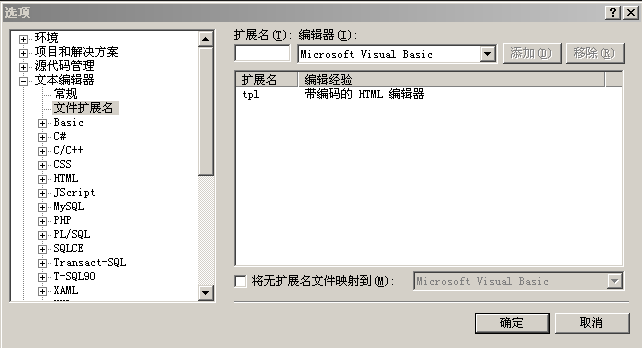
後記:如何讓VS支持tpl擴展名的HTML編輯
在菜單[工具>選項]中設置,如下圖:
更多關於PHP相關內容感興趣的讀者可查看本站專題:《PHP網絡編程技巧總結》、《PHP基本語法入門教程》、《php操作office文檔技巧總結(包括word,excel,access,ppt)》、《php日期與時間用法總結》、《php面向對象程序設計入門教程》、《php字符串(string)用法總結》、《php+mysql數據庫操作入門教程》及《php常見數據庫操作技巧匯總》
希望本文所述對大家PHP程序設計有所幫助。