WordPress 3.5 新添加了一個提示框功能,可以創建一個提示框,然後指向任何元素,比如下邊的例子:
本文就來教你怎麼創建一個這樣的提示框。
首先需要添加提示框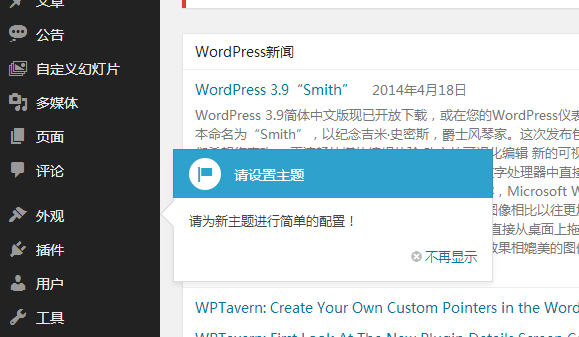 的腳本,這樣才能使用提示框的 JS 方法。
//掛載提示框腳本
function Bing_admin_pointer_enqueue_scripts(){
  wp_enqueue_style( 'wp-pointer' );
  wp_enqueue_script( 'wp-pointer' );
}
add_action( 'admin_enqueue_scripts', 'Bing_admin_pointer_enqueue_scripts' );
然後使用 pointer() 方法創建一個簡單的提示框:
/**
  *WordPress 後台添加提示框
  *http://www.endskin.com/admin-help-box/
*/
function Bing_add_pointer_scripts(){
  $content = '<h3>請設置主題</h3>';
  $content .= '<p>請為新主題進行簡單的配置!';
?>
  <script type="text/javascript">
  //<![CDATA[
  jQuery(document).ready(function($){
    $('#menu-appearance').pointer({//可以指向任何元素
      content: '<?php echo $content; ?>',
      position: {
        edge: 'left',
        align: 'center'
      },
      close: function(){
        //提示框打開之後做的事情
      }
    }).pointer('open');
  });
  //]]>
  </script>
<?php
}
add_action( 'admin_print_footer_scripts', 'Bing_add_pointer_scripts' );
綜合代碼:
/**
  *WordPress 後台添加提示框
  *http://www.endskin.com/admin-help-box/
*/
function Bing_add_pointer_scripts(){
  $content = '<h3>請設置主題</h3>';
  $content .= '<p>請為新主題進行簡單的配置!';
?>
  <script type="text/javascript">
  //<![CDATA[
  jQuery(document).ready(function($){
    $('#menu-appearance').pointer({//可以指向任何元素
      content: '<?php echo $content; ?>',
      position: {
        edge: 'left',
        align: 'center'
      },
      close: function(){
        //提示框打開之後做的事情
      }
    }).pointer('open');
  });
  //]]>
  </script>
<?php
}
add_action( 'admin_print_footer_scripts', 'Bing_add_pointer_scripts' );

//掛載提示框腳本
function Bing_admin_pointer_enqueue_scripts(){
  wp_enqueue_style( 'wp-pointer' );
  wp_enqueue_script( 'wp-pointer' );
}
add_action( 'admin_enqueue_scripts', 'Bing_admin_pointer_enqueue_scripts' );