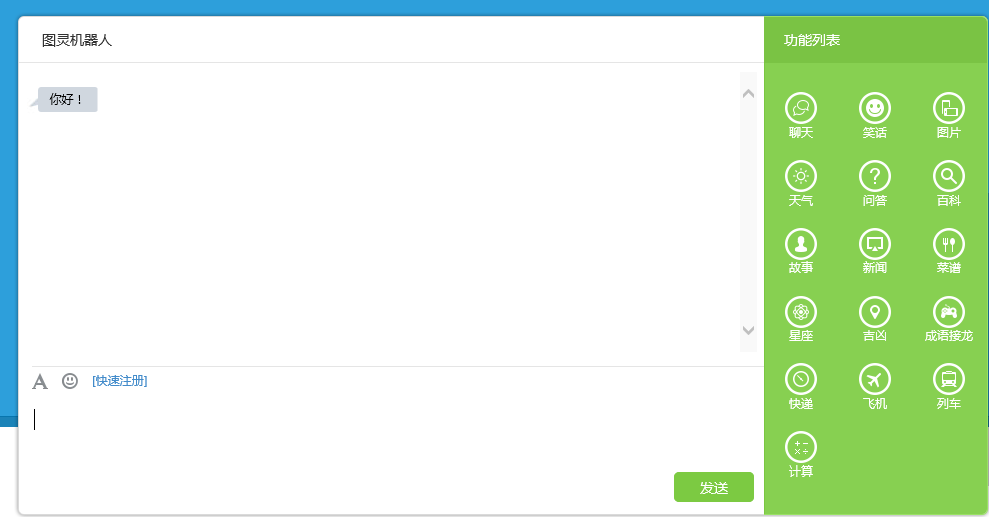
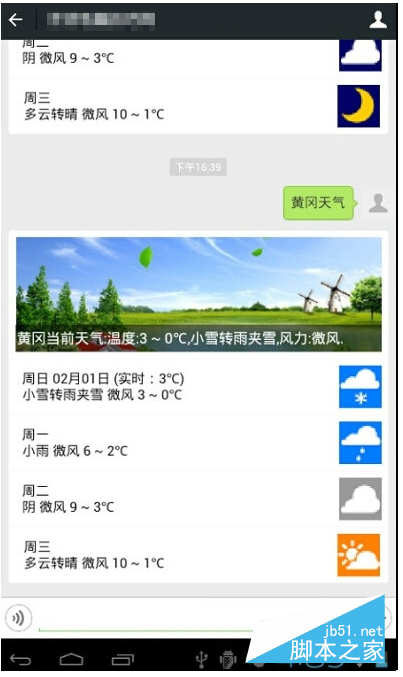
最近有項目需求給微信公眾號上增加了天氣預報功能,使用百度提供的車聯網API V3.0中的天氣查詢功能實現.先上一張最終效果圖:
項目需求:有連接好的微信平台,有百度注冊帳號,需要在百度LBS開放雲平台,添加應用,獲取AK代碼,PHP代碼編輯器,如EditPlus等
下面詳細介紹下開發步驟:
第一步:准備工作
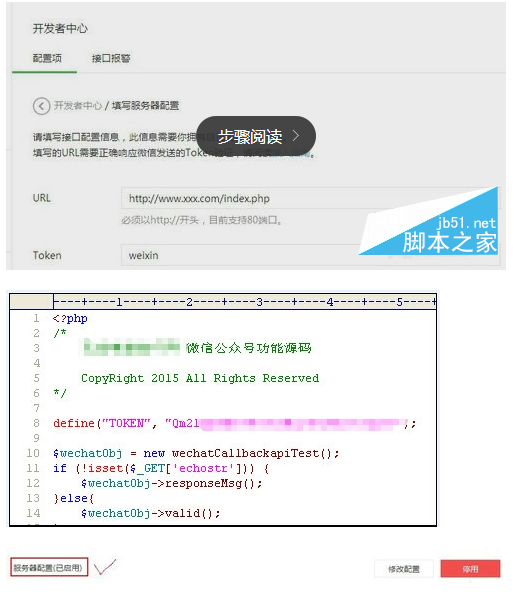
登錄微信公眾平台,檢查服務器配置是否已啟用,URL(服務器地址) 是否已配置Token(令牌),與自己寫的微信入口文件中的Token(令牌一致),如下圖:然後點擊提交,只至網頁上提示綠色背景的提交成功信息,則完成本步驟的操作
第二步:微信天氣預報數據源准備
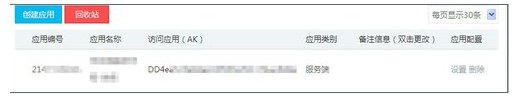
用已注冊好的百度帳號,登錄百度LBS雲平台,添加一個應用,獲取訪問應用AK,及了解車聯API V3.0,天氣查詢功能相應的接口說明文件,以按需調用需要的天氣信息.
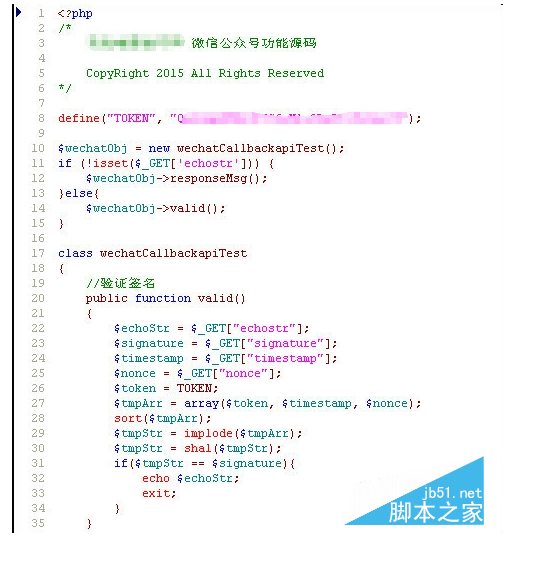
第三步:微信公眾平台,接口文件編寫 jiekou.php
<?php
/*
 無憂電腦技巧網 微信公眾號功能源碼
 CopyRight 2015 All Rights Reserved
*/
define("TOKEN", "weixin2015");
$wechatObj = new wechatCallbackapiTest();
if (!isset($_GET['echostr'])) {
 $wechatObj->responseMsg();
}else{
 $wechatObj->valid();
}
class wechatCallbackapiTest
{
 //驗證簽名
 public function valid()
 {
 $echoStr = $_GET["echostr"];
 $signature = $_GET["signature"];
 $timestamp = $_GET["timestamp"];
 $nonce = $_GET["nonce"];
 $token = TOKEN;
 $tmpArr = array($token, $timestamp, $nonce);
 sort($tmpArr);
 $tmpStr = implode($tmpArr);
 $tmpStr = sha1($tmpStr);
 if($tmpStr == $signature){
  echo $echoStr;
  exit;
 }
 }
 public function responseMsg()
 {
 // $postStr = $GLOBALS["HTTP_RAW_POST_DATA"];
 $postStr = file_get_contents("php://input");
 if (!empty($postStr)){
  $this->logger("R ".$postStr);
  $postObj = simplexml_load_string($postStr, 'SimpleXMLElement', LIBXML_NOCDATA);
  $RX_TYPE = trim($postObj->MsgType);
 $result = "";
  switch ($RX_TYPE)
  {
  case "event":
   $result = $this->receiveEvent($postObj);
   break;
  case "text":
   $result = $this->receiveText($postObj);
   break;
  }
  $this->logger("T ".$result);
  echo $result;
 }else {
  echo "";
  exit;
 }
 }
 private function receiveEvent($object)
 {
 switch ($object->Event)
 {
  case "subscribe":
  $content = "歡迎關注無憂電腦技巧網 ";
  break;
 }
 $result = $this->transmitText($object, $content);
 return $result;
 }
 private function receiveText($object)
 {
 $keyword = trim($object->Content); //獲得用戶輸入的信息
 //判斷天氣
 if(!empty( $keyword )){ //!empty 函數,判斷 $keyword獲得的值是否為空
 $city = mb_substr($keyword, 0, 2, 'utf-8'); //取用戶輸入內容前兩個字符,如"黃岡天氣" 最終取值"黃岡"
 include("weather.php"); //調用天氣接口文件
 $content = getWeatherInfo($city); //執行天氣接口文件中的 getWeatherInfo方法.查詢 黃岡天氣.
 } else{
 $content = date("Y-m-d H:i:s",time())."\n技術支持 無憂電腦技巧網\nwww.51pcjq.com"; //發送其它內容默認回復的內容.
 }
 if(is_array($content)){
 if (isset($content[0]['PicUrl'])){
  $result = $this->transmitNews($object, $content);
 }else if (isset($content['MusicUrl'])){
  $result = $this->transmitMusic($object, $content);
 }
 }else{
 $result = $this->transmitText($object, $content);
 }
 return $result;
 }
 private function transmitText($object, $content)
 {
 if (!isset($content) || empty($content)){
 return "";
 }
 $textTpl = "<xml>
<ToUserName><![CDATA[%s]]></ToUserName>
<FromUserName><![CDATA[%s]]></FromUserName>
<CreateTime>%s</CreateTime>
<MsgType><![CDATA[text]]></MsgType>
<Content><![CDATA[%s]]></Content>
</xml>";
 $result = sprintf($textTpl, $object->FromUserName, $object->ToUserName, time(), $content);
 return $result;
 }
 private function transmitNews($object, $newsArray)
 {
 if(!is_array($newsArray)){
  return "";
 }
 $itemTpl = " <item>
 <Title><![CDATA[%s]]></Title>
 <Description><![CDATA[%s]]></Description>
 <PicUrl><![CDATA[%s]]></PicUrl>
 <Url><![CDATA[%s]]></Url>
 </item>
";
 $item_str = "";
 foreach ($newsArray as $item){
  $item_str .= sprintf($itemTpl, $item['Title'], $item['Description'], $item['PicUrl'], $item['Url']);
 }
 $newsTpl = "<xml>
<ToUserName><![CDATA[%s]]></ToUserName>
<FromUserName><![CDATA[%s]]></FromUserName>
<CreateTime>%s</CreateTime>
<MsgType><![CDATA[news]]></MsgType>
<Content><![CDATA[]]></Content>
<ArticleCount>%s</ArticleCount>
<Articles>
$item_str</Articles>
</xml>";
 $result = sprintf($newsTpl, $object->FromUserName, $object->ToUserName, time(), count($newsArray));
 return $result;
 }
 private function logger($log_content)
 {
 }
}
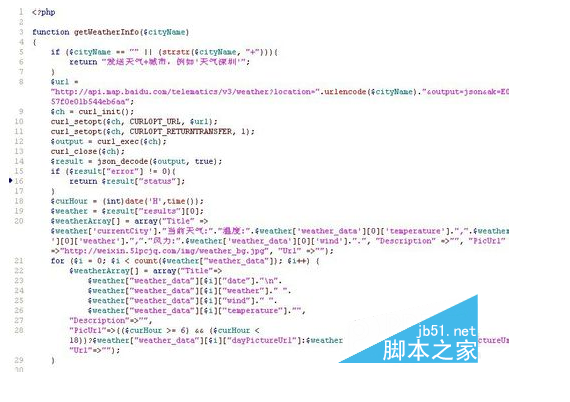
第四步:使用百度車聯API V3.0接口,及訪問應用AK碼,編號微信天氣接口源碼:
weatger.php
<?php
function getWeatherInfo($cityName){
if ($cityName == "" || (strstr($cityName, "+"))){
return "發送天氣+城市,例如'天氣深圳'"; }//用戶查詢天氣,回復關鍵詞 規則
$url = "http://api.map.baidu.com/telematics/v3/weather?location=".urlencode($cityName)."&output=json&ak=自已申請的百度車聯API AK代碼";//構建通過百度車聯API V3.0查詢天氣url鏈接
$ch = curl_init();//初始化會話 curl_setopt($ch, CURLOPT_URL, $url);//設置會話參數 curl_setopt($ch, CURLOPT_RETURNTRANSFER, 1);//設置會話參數 $output = curl_exec($ch);//執行curl會話
curl_close($ch);//關閉curl會話
$result = json_decode($output, true);//函數json_decode() 的功能時將json數據格式轉換為數組。
 if ($result["error"] != 0){
 return $result["status"]; }
 $curHour = (int)date('H',time());
 $weather = $result["results"][0];//按照微信公眾號開發文檔,組建設多圖文回復信息
 $weatherArray[] = array("Title" => $weather['currentCity']."當前天氣:"."溫度:".$weather['weather_data'][0]['temperature'].",".$weather['weather_data'][0]['weather'].","."風力:".$weather['weather_data'][0]['wind'].".", "Description" =>"", "PicUrl" =>"http://weixin.51pcjq.com/img/weather_bg.jpg", "Url" =>"");
 for ($i = 0; $i < count($weather["weather_data"]); $i++) {
 $weatherArray[] = array("Title"=>
 $weather["weather_data"][$i]["date"]."\n".
 $weather["weather_data"][$i]["weather"]." ".
 $weather["weather_data"][$i]["wind"]." ".
 $weather["weather_data"][$i]["temperature"]."",
 "Description"=>"",
 "PicUrl"=>(($curHour >= 6)
 && ($curHour < 18))?$weather["weather_data"][$i]["dayPictureUrl"]:$weather["weather_data"][$i]["nightPictureUrl"], "Url"=>"");
 }
 return $weatherArray;}?>
注意事項
微信公眾平台 TOKEN 與自己編寫的微信接口文件中的 TOKEN 的值必須保持一致
編寫php代碼,需使用專業的php編輯工具,如EditPlus,Dreamweaver等
上述天氣接口文件中,百度車聯api AK代碼已換成 "自已申請的百度車聯API AK代碼:請申請好後,自行填入
如要不明白的地方,可以關注我的百度空間.留言和我聯系!
微信天氣預報開發最新代碼:
 <meta http-equiv="Content-Type" content="text/html; charset=utf" />
 <?php
 header("Content-Type:text/html;charset=UTF-");
 date_default_timezone_set("PRC");
 /**
 * 最開始用的是微信提供的demo老是不成功,用了這個網上下載的才成功
 */

 //define your token
 define("TOKEN", "djjc");
 $wechatObj = new wechatCallbackapiTest();
 //微信接入操作,成功接入了直接注釋了就行了
 $wechatObj->responseMsg();
 //$wechatObj->valid();

 class wechatCallbackapiTest
 {
 /*public function valid()
 {
 $echoStr = $_GET["echostr"];

 //valid signature , option
 if($this->checkSignature()){
 echo $echoStr;
 exit;
 }
 }*/

 public function responseMsg()
 {
 //get post data, May be due to the different environments
 $postStr = $GLOBALS["HTTP_RAW_POST_DATA"];

 //extract post data
 if (!empty($postStr)){

 $postObj = simplexml_load_string($postStr, ‘SimpleXMLElement‘, LIBXML_NOCDATA);
 $RX_TYPE = trim($postObj->MsgType);

 switch($RX_TYPE)
 {
 case "text":
 $resultStr = $this->handleText($postObj);
 break;
 case "event":
 $resultStr = $this->handleEvent($postObj);
 break;
 default:
 $resultStr = "Unknow msg type: ".$RX_TYPE;
 break;
 }
 echo $resultStr;
 }else {
 echo "";
 exit;
 }
 }
 //測試文字回復
 public function handleText($postObj)
 {
 $fromUsername = $postObj->FromUserName;
 $toUsername = $postObj->ToUserName;
 $keyword = trim($postObj->Content);
 $time = time();
 $textTpl = "<xml>
 <ToUserName><![CDATA[%s]]></ToUserName>
 <FromUserName><![CDATA[%s]]></FromUserName>
 <CreateTime>%s</CreateTime>
 <MsgType><![CDATA[%s]]></MsgType>
 <Content><![CDATA[%s]]></Content>
 <FuncFlag></FuncFlag>
 </xml>";
 if(!empty( $keyword ))
 {
 $msgType = "text";
 switch($keyword){
 case "你好":
 $contentStr = "你好!";
 break;
 case "你叫什麼名字":
 $contentStr = "我是頂尖機器人";
 break;
//判斷是否為天氣
 case $keywords+"天氣";
 $str = mb_substr($keyword,-,,"UTF-");
 $str_key = mb_substr($keyword,,-,"UTF-");
 if($str=="天氣"){
 $data = $this->weather($str_key)->showapi_res_body;
 $data=‘[今天白天]‘.$data->f->day_weather."\n";
 $data=‘[今天夜間]‘.$data->f->night_weather."\n";
 $data=‘[明天白天]‘.$data->f->day_weather."\n";
 $data=‘[明天夜間]‘.$data->f->night_weather."\n";
 $contentStr = $data.$data.$data.$data;
 }
 break;
 default:
 $contentStr = "聽不懂您在講什麼";
 break;
 }
 $resultStr = sprintf($textTpl, $fromUsername, $toUsername, $time, $msgType, $contentStr);
 echo $resultStr;
 }else{
 echo "Input something...";
 }
 }

 public function handleEvent($object)
 {
 $contentStr = "";
 switch ($object->Event)
 {
 case "subscribe":
 $contentStr = "感謝您關注頂尖教程網,在這裡您將得到海量免費學習資源!";
 break;
 default :
 $contentStr = "Unknow Event: ".$object->Event;
 break;
 }
 $resultStr = $this->responseText($object, $contentStr);
 return $resultStr;
 }

 public function responseText($object, $content)
 {
 $textTpl = "<xml>
 <ToUserName><![CDATA[%s]]></ToUserName>
 <FromUserName><![CDATA[%s]]></FromUserName>
 <CreateTime>%s</CreateTime>
 <MsgType><![CDATA[text]]></MsgType>
 <Content><![CDATA[%s]]></Content>
 <FuncFlag></FuncFlag>
 </xml>";
 $resultStr = sprintf($textTpl, $object->FromUserName, $object->ToUserName, time(), $content, $flag);
 return $resultStr;
 }

 private function checkSignature()
 {
 $signature = $_GET["signature"];
 $timestamp = $_GET["timestamp"];
 $nonce = $_GET["nonce"];

 $token = TOKEN;
 $tmpArr = array($token, $timestamp, $nonce);
 sort($tmpArr);
 $tmpStr = implode( $tmpArr );
 $tmpStr = sha( $tmpStr );

 if( $tmpStr == $signature ){
 return true;
 }else{
 return false;
 }
 }
 //天氣預報 此處漢字需要處理,想了很多辦法才沒亂碼
 private function weather($k){
 $n=urlencode($k);
 $showapi_appid = ‘‘; //去相關網站申請就行
 $showapi_sign = ‘deafcacefdea‘;
 $showapi_timestamp = date(‘YmdHis‘);
 $areaid=‘‘;
 $paramArr = ‘‘;
 $needHourData=‘‘;
 $url = iconv(‘gbk‘,‘utf-‘,‘http://route.showapi.com/-?‘.‘area=‘.$n.‘&areaid=&needHourData=&needIndex=&needMoreDay=&showapi_appid=‘.$showapi_appid.‘&showapi_timestamp=‘.$showapi_timestamp.‘&showapi_sign=‘.$showapi_sign);
 $result = file_get_contents($url);
 $result = json_decode($result);
 return $result;
 }
 }
 ?>