HttpListener提供一個簡單的、可通過編程方式控制的 HTTP 協議偵聽器.使用它可以很容易的提供一些Http服務,而無需啟動IIS這類大型服務程序。使用HttpListener的方法流程很簡單:主要分為以下幾步
1.創建一個HTTP偵聽器對象並初始化
2.添加需要監聽的URI 前綴
3.開始偵聽來自客戶端的請求
4.處理客戶端的Http請求
5.關閉HTTP偵聽器
例如:我們要實現一個簡單Http服務,進行文件的下載,或者進行一些其他的操作,例如要發送郵件,使用HttpListener監聽,處理郵件隊列,避免在網站上的同步等待。以及獲取一些緩存的數據等等行為
using System;
using System.Collections.Generic;
using System.Linq;
using System.Net;
using System.Text;
using System.Threading;
using System.Web;
using System.IO;
using Newtonsoft.Json;

namespace HttpListenerApp
{
 /// <summary>
 /// HttpRequest邏輯處理
 /// </summary>
 public class HttpProvider
 {

  private static HttpListener httpFiledownload; //文件下載處理請求監聽
  private static HttpListener httOtherRequest; //其他超做請求監聽

  /// <summary>
  /// 開啟HttpListener監聽
  /// </summary>
  public static void Init()
  {
   httpFiledownload = new HttpListener(); //創建監聽實例
   httpFiledownload.Prefixes.Add("http://10.0.0.217:20009/FileManageApi/Download/"); //添加監聽地址 注意是以/結尾。
   httpFiledownload.Start(); //允許該監聽地址接受請求的傳入。
   Thread ThreadhttpFiledownload = new Thread(new ThreadStart(GethttpFiledownload)); //創建開啟一個線程監聽該地址得請求
   ThreadhttpFiledownload.Start();

   httOtherRequest = new HttpListener();
   httOtherRequest.Prefixes.Add("http://10.0.0.217:20009/BehaviorApi/EmailSend/"); //添加監聽地址 注意是以/結尾。
   httOtherRequest.Start(); //允許該監聽地址接受請求的傳入。
   Thread ThreadhttOtherRequest = new Thread(new ThreadStart(GethttOtherRequest));
   ThreadhttOtherRequest.Start();
  }

  /// <summary>
  /// 執行文件下載處理請求監聽行為
  /// </summary>
  public static void GethttpFiledownload()
  {
   while (true)
   {
    HttpListenerContext requestContext = httpFiledownload.GetContext(); //接受到新的請求
    try
    {
     //reecontext 為開啟線程傳入的 requestContext請求對象
     Thread subthread = new Thread(new ParameterizedThreadStart((reecontext) =>
     {
      Console.WriteLine("執行文件處理請求監聽行為");

      var request = (HttpListenerContext)reecontext;
      var image = HttpUtility.UrlDecode(request.Request.QueryString["imgname"]); //接受GET請求過來的參數;
      string filepath = AppDomain.CurrentDomain.BaseDirectory + image;
      if (!File.Exists(filepath))
      {
       filepath = AppDomain.CurrentDomain.BaseDirectory + "default.jpg";  //下載默認圖片
      }
      using (FileStream fs = new FileStream(filepath, FileMode.Open, FileAccess.Read))
      {
       byte[] buffer = new byte[fs.Length];
       fs.Read(buffer, 0, (int)fs.Length); //將文件讀到緩存區
       request.Response.StatusCode = 200;
       request.Response.Headers.Add("Access-Control-Allow-Origin", "*");
       request.Response.ContentType = "image/jpg";
       request.Response.ContentLength64 = buffer.Length;
       var output = request.Response.OutputStream; //獲取請求流
       output.Write(buffer, 0, buffer.Length);  //將緩存區的字節數寫入當前請求流返回
       output.Close();
      }
     }));
     subthread.Start(requestContext); //開啟處理線程處理下載文件
    }
    catch (Exception ex)
    {
     try
     {
      requestContext.Response.StatusCode = 500;
      requestContext.Response.ContentType = "application/text";
      requestContext.Response.ContentEncoding = Encoding.UTF8;
      byte[] buffer = System.Text.Encoding.UTF8.GetBytes("System Error");
      //對客戶端輸出相應信息.
      requestContext.Response.ContentLength64 = buffer.Length;
      System.IO.Stream output = requestContext.Response.OutputStream;
      output.Write(buffer, 0, buffer.Length);
      //關閉輸出流,釋放相應資源
      output.Close();
     }
     catch { }
    }
   }
  }

  /// <summary>
  /// 執行其他超做請求監聽行為
  /// </summary>
  public static void GethttOtherRequest()
  {
   while (true)
   {
    HttpListenerContext requestContext = httOtherRequest.GetContext(); //接受到新的請求
    try
    {
     //reecontext 為開啟線程傳入的 requestContext請求對象
     Thread subthread = new Thread(new ParameterizedThreadStart((reecontext) =>
     {
      Console.WriteLine("執行其他超做請求監聽行為");
      var request = (HttpListenerContext)reecontext;
      var msg = HttpUtility.UrlDecode(request.Request.QueryString["behavior"]); //接受GET請求過來的參數;
      //在此處執行你需要進行的操作>>比如什麼緩存數據讀取,隊列消息處理,郵件消息隊列添加等等。

      request.Response.StatusCode = 200;
      request.Response.Headers.Add("Access-Control-Allow-Origin", "*");
      request.Response.ContentType = "application/json";
      requestContext.Response.ContentEncoding = Encoding.UTF8;
      byte[] buffer = System.Text.Encoding.UTF8.GetBytes(JsonConvert.SerializeObject(new { success = true, behavior = msg }));
      request.Response.ContentLength64 = buffer.Length;
      var output = request.Response.OutputStream;
      output.Write(buffer, 0, buffer.Length);
      output.Close();
     }));
     subthread.Start(requestContext); //開啟處理線程處理下載文件
    }
    catch (Exception ex)
    {
     try
     {
      requestContext.Response.StatusCode = 500;
      requestContext.Response.ContentType = "application/text";
      requestContext.Response.ContentEncoding = Encoding.UTF8;
      byte[] buffer = System.Text.Encoding.UTF8.GetBytes("System Error");
      //對客戶端輸出相應信息.
      requestContext.Response.ContentLength64 = buffer.Length;
      System.IO.Stream output = requestContext.Response.OutputStream;
      output.Write(buffer, 0, buffer.Length);
      //關閉輸出流,釋放相應資源
      output.Close();
     }
     catch { }
    }
   }
  }
 }
}
調用方式:注意這裡啟動程序必須以管理員身份運行,因為上午的監聽需要開啟端口,所有需要以管理員身份運行。
using System;
using System.Collections.Generic;
using System.Linq;
using System.Text;

namespace HttpListenerApp
{
 class Program
 {
  static void Main(string[] args)
  {
   //開啟請求監聽
   HttpProvider.Init();
  }
 }
}
執行後的結果為:
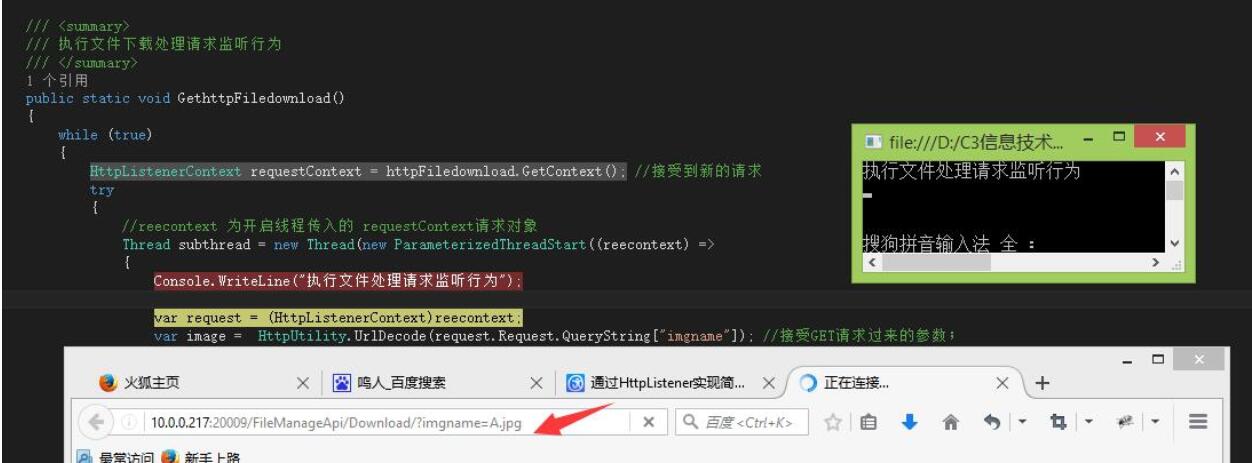
這裡通過一個簡單的控制程序在裡面使用HttpListener實現了簡單的Http服務程序。裡面有少量的線程和和異步處理,比如收到行為信息請求可以先返回給用戶,讓用戶不用同步等待,就可以執行下一步操作,又比如實現的簡單郵件服務器,將請求發給HttpListener接收到請求後就立即返回,交給隊列去發送郵件。郵件的發送會出現延遲等待等情況出現,這樣就不用等待。
以上就是本文的全部內容,希望對大家的學習有所幫助,也希望大家多多支持腳本之家。