前言:打算做一個藥材價格查詢的功能,但剛開始一點數據都沒有靠自己找信息錄入的話很麻煩的,所以只有先到其它網站抓取存到數據庫再開始做這個了。
HtmlAgilityPack在c#裡應該很多人用吧,簡單又強大。之前也用它做過幾個爬取信息的小工具。不過很久了源代碼都沒有了,都忘了怎麼用了,這次也是一點一點找資料慢慢做出來的!
(不過最麻煩的是將數據存到mysql,.net數據庫我一直用的都是mssql,所以第一次做連接mysql遇到了好多問題。)
1、使用HtmlAgilityPack
我這裡使用的控制台項目
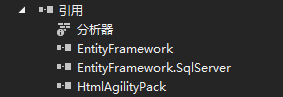
項目添加引用
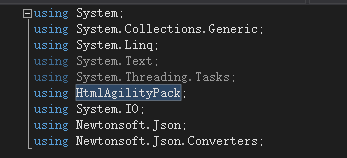
代碼裡添加引用
2、分析網頁
首先看每一頁的url變化,觀察後發現這個很簡單:
第一頁就是:1-0-0或者1-0-0-1表示第一頁
第二頁就是:1-0-0-2一次類推
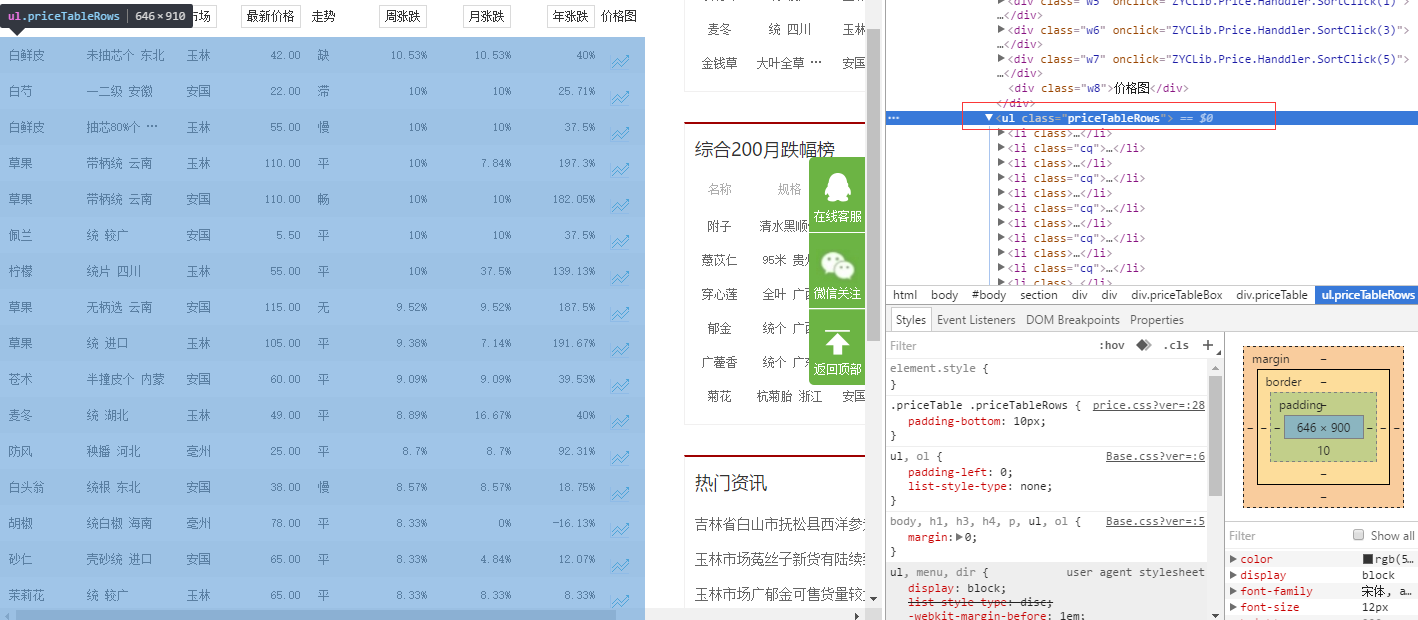
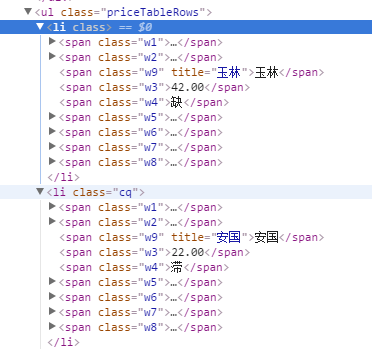
很明顯這一頁的數據都放在了ul標簽裡了,而且還有類名:<ul class="priceTableRows">,
然後再看下ul下的li標簽,li標簽裡的html寫的也都相同,然後就可以開始寫代碼抓取了。
3、抓取信息
//------------------------------------------------------------------------------
// <auto-generated>
//     此代碼已從模板生成。
//
//     手動更改此文件可能導致應用程序出現意外的行為。
//     如果重新生成代碼,將覆蓋對此文件的手動更改。
// </auto-generated>
//------------------------------------------------------------------------------

namespace 測試項目1
{
    using System;
    using System.Collections.Generic;

    public partial class C33hao_price
    {
        public long ID { get; set; }
        public string Name { get; set; }
        public string Guige { get; set; }
        public string Shichang { get; set; }
        public decimal Price { get; set; }
        public string Zoushi { get; set; }
        public decimal Zhouzd { get; set; }
        public decimal Yuezd { get; set; }
        public decimal Nianzd { get; set; }
        public int editDate { get; set; }
        public string other { get; set; }
    }
}
using System;
using System.Collections.Generic;
using System.Linq;
using System.Text;
using System.Threading.Tasks;

namespace 測試項目1
{
    public class Product
    {
        /// <summary>
        /// 品名
        /// </summary>
        public string Name { get; set; }
        /// <summary>
        /// 規格
        /// </summary>
        public string Guige { get; set; }
        /// <summary>
        /// 市場
        /// </summary>
        public string Shichang { get; set; }
        /// <summary>
        /// 最新價格
        /// </summary>
        public string Price { get; set; }
        /// <summary>
        /// 走勢
        /// </summary>
        public string Zoushi { get; set; }
        /// <summary>
        /// 周漲跌
        /// </summary>
        public string Zhouzd { get; set; }
        /// <summary>
        /// 月漲跌
        /// </summary>
        public string Yuezd { get; set; }
        /// <summary>
        /// 年漲跌
        /// </summary>
        public string Nianzt { get; set; }

    }
}
下面是主要的處理代碼
using System;
using System.Collections.Generic;
using System.Linq;
using System.Text;
using System.Threading.Tasks;
using HtmlAgilityPack;
using System.IO;
using Newtonsoft.Json;
using Newtonsoft.Json.Converters;

namespace 測試項目1
{
    public class Program
    {
        /// <summary>
        /// 本地測試信息類
        /// </summary>
        static List<Product> ProductList = new List<Product>();
        /// <summary>
        /// 數據庫生成的信息類
        /// </summary>
        static List<C33hao_price> PriceList = new List<C33hao_price>();
        public static void Main(string[] args)
        {

            int start = 1;//開始頁數
            int end = 10;//結束頁數
            Console.WriteLine("請輸入開始和結束頁數例如1-100,默認為1-10");
            string index = Console.ReadLine();//獲取用戶輸入的頁數

            if(index != "")
            {
                //分割頁數
                string[] stt = index.Split('-');
                start = Int32.Parse(stt[0]);
                end = Int32.Parse(stt[1]);
            }
            //循環抓取
            for(int i = start; i<= end; i++)
            {
                string url = string.Format("http://www.zyctd.com/jiage/1-0-0-{0}.html", i);


            HtmlWeb web = new HtmlWeb();
            HtmlDocument doc = web.Load(url);//獲取網頁

            HtmlNode node = doc.DocumentNode;
            string xpathstring = "//ul[@class='priceTableRows']/li";//路徑
            HtmlNodeCollection aa = node.SelectNodes(xpathstring);//獲取每一頁ul下的所有li標簽裡的html
                if (aa == null)
                {
                    Console.WriteLine("出錯:當前頁為{0}", i.ToString());
                    continue;
                }
            foreach(var item in aa)
            {
                //處理li標簽信息添加到集合
                string cc = item.InnerHtml;
                test(cc);

            }
            }
            //寫入json並存到本地
            //string path = "json/test.json";
            //using(StreamWriter sw = new StreamWriter(path))
            //{
            //    try
            //    {
            //        JsonSerializer serializer = new JsonSerializer();
            //        serializer.Converters.Add(new JavaScriptDateTimeConverter());
            //        serializer.NullValueHandling = NullValueHandling.Ignore;
            //        //構建Json.net的寫入流
            //        JsonWriter writer = new JsonTextWriter(sw);
            //        //把模型數據序列化並寫入Json.net的JsonWriter流中
            //        serializer.Serialize(writer,ProductList);
            //        //ser.Serialize(writer, ht);
            //        writer.Close();
            //        sw.Close();
            //    }
            //    catch (Exception ex)
            //    {
            //        string error = ex.Message.ToString();
            //        Console.WriteLine(error);
            //    }
            //}
            int count = PriceList.Count();//抓取到的信息條數
            Console.WriteLine("獲取信息{0}條", count);
            Console.WriteLine("開始添加到數據庫");
            Insert();//插入到數據庫
            Console.WriteLine("數據添加完畢");
            Console.ReadLine();
        }
        /// <summary>
        /// 處理信息並添加到集合中
        /// </summary>
        /// <param name="str">li標簽的html內容</param>
        static void test(string str)
        {
            //Product product = new Product();
            C33hao_price Price = new C33hao_price();

            HtmlDocument doc = new HtmlDocument();
            doc.LoadHtml(str);
            HtmlNode node = doc.DocumentNode;
            //獲取藥材名稱
            string namepath = "//span[@class='w1']/a[1]";//名稱路徑
            HtmlNodeCollection DomNode = node.SelectNodes(namepath);//根據路徑獲取內容
            //product.Name = DomNode[0].InnerText;
            Price.Name = DomNode[0].InnerText;//將內容添加到對象中
            //獲取規格
            string GuigePath = "//span[@class='w2']/a[1]";
            DomNode = node.SelectNodes(GuigePath);
            //product
            Price.Guige = DomNode[0].InnerText;
            //獲取市場名稱
            string adsPath = "//span[@class='w9']";
            DomNode = node.SelectNodes(adsPath);
            Price.Shichang = DomNode[0].InnerText;
            //獲取最新價格
            string pricePath = "//span[@class='w3']";
            DomNode = node.SelectNodes(pricePath);
            Price.Price = decimal.Parse(DomNode[0].InnerText);
            //獲取走勢
            string zoushiPath = "//span[@class='w4']";
            DomNode = node.SelectNodes(zoushiPath);
            Price.Zoushi = DomNode[0].InnerText;
            //獲取周漲跌
            string zhouzdPath = "//span[@class='w5']/em[1]";
            DomNode = node.SelectNodes(zhouzdPath);
            Price.Zhouzd = decimal.Parse(GetZD(DomNode[0].InnerText));
            //獲取月漲跌
            string yuezdPath = "//span[@class='w6']/em[1]";
            DomNode = node.SelectNodes(yuezdPath);
            Price.Yuezd = decimal.Parse(GetZD(DomNode[0].InnerText));
            //獲取年漲跌
            string nianzdPath = "//span[@class='w7']/em[1]";
            DomNode = node.SelectNodes(nianzdPath);
            Price.Nianzd = decimal.Parse(GetZD(DomNode[0].InnerText));
            //添加時間
            Price.editDate = Int32.Parse(GetTimeStamp());//轉換為時間戳格式,方便php使用
            //ProductList.Add(product);
            PriceList.Add(Price);//添加到對象集合
        }

        //查詢
        static void Query()
        {
            var context = new mallyobo360Entities();
            var member = from e in context.C33hao_member select e;
            foreach(var u in member)
            {
                Console.WriteLine(u.member_name);
                Console.WriteLine(u.member_mobile);
            }
            Console.ReadLine();
        }
        //插入
        static void Insert()
        {
            var context = new mallyobo360Entities();
            C33hao_price Price = new C33hao_price();
            int i = 0;
            foreach (C33hao_price item in PriceList)
            {
                context.C33hao_price.Add(item);
                context.SaveChanges();
                i++;
                Console.WriteLine("{0}/{1}", i, PriceList.Count);
            }
        }
        /// <summary>
        /// 獲取時間戳
        /// </summary>
        /// <returns></returns>
        public static string GetTimeStamp()
        {
            TimeSpan ts = DateTime.UtcNow - new DateTime(1970, 1, 1, 0, 0, 0, 0);
            return Convert.ToInt64(ts.TotalSeconds).ToString();
        }
        /// <summary>
        /// 去除字符串中的百分比
        /// </summary>
        /// <param name="str">處理的字符串</param>
        /// <returns></returns>
        public static string GetZD(string str)
        {
            string st = str.Substring(0, str.Length - 1);
            return st;
        }

    }
}
4、存儲到本地
存儲到本地只需要把test方法裡的Price對象改為Product類型,然後再add到ProductList集合裡,再把注釋的//寫入json並存到本地//方法取消注釋就好了。
待續。。。。。。。。。。