談到HTTP協議(超文本傳輸協議),HTTP協議是一個基於請求與響應模式的、無狀態的、應用層的協議,常基於TCP的連接方式,HTTP1.1版本中給出一種持續連接的機制,絕大多數的Web開發,都是構建在HTTP協議之上的Web應用。
HTTP是一個屬於應用層的面向對象的協議,由於其簡捷、快速的方式,適用於分布式超媒體信息系統。HTTP協議的主要特點可概括為:1.支持客戶/服務器模式。2.簡單快速:客戶向服務器請求服務時,只需傳送請求方法和路徑。3.靈活:HTTP允許傳輸任意類型的數據對象。4.無連接:無連接的含義是限制每次連接只處理一個請求。5.無狀態:HTTP協議是無狀態協議。
在.NET框架裡面對HTTP協議的處理主要采用WebRequest對象,在我們的.NET項目中如果需要生成HTTP請求或者處理HTTP請求,會運用HttpWebRequest和HttpWebResponse對象。在實際項目的開發中,有一些需求需要同地方平台進行數據交互,例如我們經常使用的微信,支付寶,QQ等等平台,這就需要我們在自己的項目中生成對應的HTTP請求和處理相關HTTP請求信息。
如何在我們的系統中後台生成對應的HTTP請求,這個事情就需要對HTTP協議做一個簡單的了解:
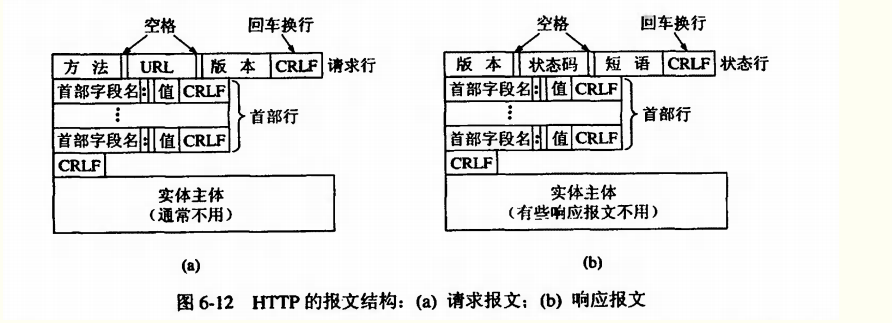
HTTP請求由三部分組成,分別是:請求行、消息報頭、請求正文。HTTP響應也是由三個部分組成,分別是:狀態行、消息報頭、響應正文。HTTP消息由客戶端到服務器的請求和服務器到客戶端的響應組成。請求消息和響應消息都是由開始行(對於請求消息,開始行就是請求行,對於響應消息,開始行就是狀態行),消息報頭(可選),空行(只有CRLF的行),消息正文(可選)組成。
現在提供一個較為通用的處理HTTP請求的代碼,此部分主要是生成同步HTTP請求。
在談到.NET的同步中,需要介紹一下同步和異步的相關內容:
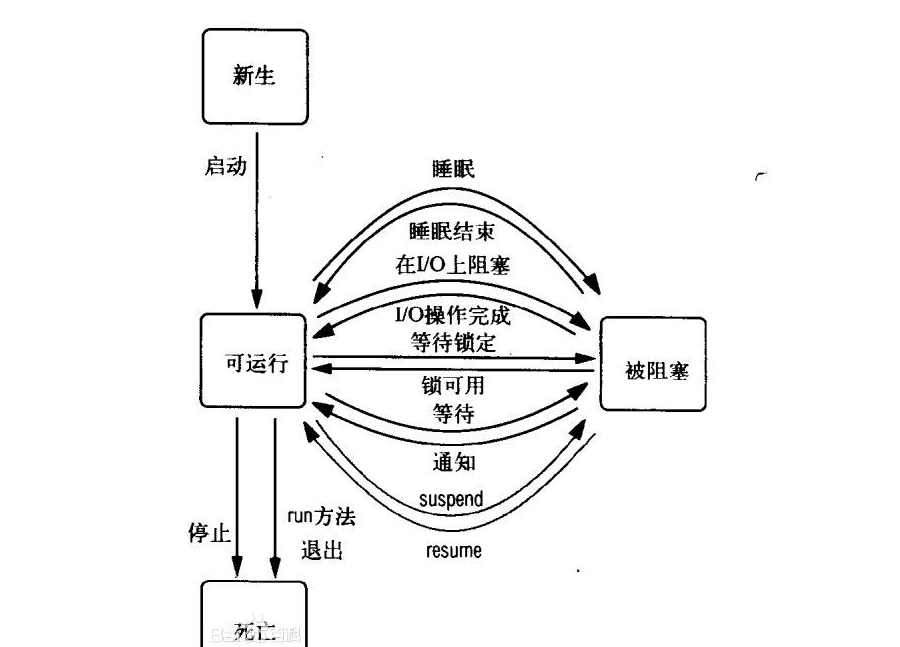
同步,可以理解為在執行完一個函數或方法之後,一直等待系統返回值或消息,這時程序是出於阻塞的,只有接收到返回的值或消息後才往下執行其他的命令。
異步,執行完函數或方法後,不必阻塞性地等待返回值或消息,只需要向系統委托一個異步過程,那麼當系統接收到返回值或消息時,系統會自動觸發委托的異步過程,從而完成一個完整的流程。
(以上的圖都是從別處截的,感謝提供資料的博主們。)
現在直接給出相關代碼:
         /// <summary>
         /// 訪問次數字典
        /// </summary>
        private readonly ConcurrentDictionary<string, int> _urlTryList = new ConcurrentDictionary<string, int>();
       /// <summary>
        /// Post數據
        /// </summary>
        public String PostData { set; private get; }
        /// <summary>
        /// 同步請求
        /// </summary>
        /// <param name="url">請求地址</param>
        /// <param name="tryTimes">錯誤重試次數</param>
        public string SyncRequest(string url, int tryTimes = 3)
        {
            if (string.IsNullOrEmpty(url))
            {
                throw new ArgumentNullException(url);
            }
            Trace.TraceInformation(string.Concat("開始同步請求:", url));
            _urlTryList.TryAdd(url, tryTimes);
            //創建並定義HTTP請求相關信息
            var request = WebRequest.Create(url) as HttpWebRequest;
            if (request == null) return string.Empty;
            request.Headers.Add("Accept-Encoding", "gzip,deflate,sdch");
            request.Headers.Add("Accept-Language", "zh-CN,zh;q=0.8");
            request.AutomaticDecompression = DecompressionMethods.GZip | DecompressionMethods.Deflate | DecompressionMethods.None;
            request.Credentials = CredentialCache.DefaultNetworkCredentials;
            request.UseDefaultCredentials = false;
            request.KeepAlive = false;
            request.PreAuthenticate = false;
            request.ProtocolVersion = HttpVersion.Version10;
            request.UserAgent =
                "Mozilla/5.0 (Windows NT 6.2; WOW64) AppleWebKit/537.36 (KHTML, like Gecko) Chrome/34.0.1847.116 Safari/537.36";
            request.Accept = "text/html,application/xhtml+xml,application/xml;q=0.9,image/webp,*/*;q=0.8";
            request.CachePolicy = new RequestCachePolicy(RequestCacheLevel.NoCacheNoStore);
            request.Timeout = 1000 * 60 * 3;
            request.CookieContainer = CookieContainer;
            request.AllowAutoRedirect = true;
            //判斷POST請求是否為空
            if (!string.IsNullOrEmpty(PostData))
            {
                request.ContentType = "application/x-www-form-urlencoded";
                request.Method = "POST";
                using (var postStream = request.GetRequestStream())
                {
                    var byteArray = Encoding.GetBytes(PostData);
                    postStream.Write(byteArray, 0, PostData.Length);
                    postStream.Close();
                }
            }
            else
            {
                request.AllowWriteStreamBuffering = false;
            }
            try
            {
                using (var response = request.GetResponse() as HttpWebResponse)
                {
                    if (response != null)
                    {
                        if (response.StatusCode != HttpStatusCode.OK)
                        {
                            Trace.TraceError(string.Concat("請求地址:", request.RequestUri, " 失敗,HttpStatusCode",
                                response.StatusCode));
                            return string.Empty;
                        }
                        using (var streamResponse = response.GetResponseStream())
                        {
                            if (streamResponse != null)
                            {
                                if (!IsText(response.ContentType))
                                {
                                    var contentEncodingStr = response.ContentEncoding;
                                    var contentEncoding = Encoding;
                                    if (!string.IsNullOrEmpty(contentEncodingStr))
                                        contentEncoding = Encoding.GetEncoding(contentEncodingStr);
                                    var streamRead = new StreamReader(streamResponse, contentEncoding);
                                    var str = streamRead.ReadToEnd();
                                    if (CallBackAction != null && !String.IsNullOrEmpty(str))
                                        CallBackAction.BeginInvoke(str, request.RequestUri.ToString(), (s) => { }, null);
                                    return str;
                                }
                                //創建並指定文件夾
                                var fileName = string.Concat(DateTime.Now.ToString("yyyyMMdd"), "/", DateTime.Now.ToString("yyyyMMddHHmmssffff"),
                                    Path.GetExtension(request.RequestUri.AbsoluteUri));
                                var fileDirectory = Path.Combine(FileSavePath, DateTime.Now.ToString("yyyyMMdd"));
                                if (!Directory.Exists(fileDirectory))
                                    Directory.CreateDirectory(fileDirectory);
                                try
                                {
                                    //下載文件
                                    using (var fileStream = new FileStream(Path.Combine(FileSavePath, fileName), FileMode.Create))
                                    {
                                        var buffer = new byte[2048];
                                        int readLength;
                                        do
                                        {
                                            readLength = streamResponse.Read(buffer, 0, buffer.Length);
                                            fileStream.Write(buffer, 0, readLength);
                                        } while (readLength != 0);
                                    }
                                    if (CallBackAction != null && !String.IsNullOrEmpty(fileName))
                                        CallBackAction.BeginInvoke(fileName, request.RequestUri.ToString(), (s) => { }, null);
                                    return fileName;
                                }
                                catch (IOException ex)
                                {
                                    throw new IOException(ex.Message, ex);
                                }
                            }
                        }
                        response.Close();
                    }
                }
            }
            catch (WebException ex)
            {
                Trace.TraceError(string.Concat("請求地址:", request.RequestUri, " 失敗信息:", ex.Message));
                var toUrl = request.RequestUri.ToString();
                if (_urlTryList.TryGetValue(toUrl, out tryTimes))
                {
                    _urlTryList.TryUpdate(toUrl, tryTimes, tryTimes - 1);
                    if (tryTimes - 1 <= 0)
                    {
                        _urlTryList.TryRemove(toUrl, out tryTimes);
                        Trace.TraceError(string.Concat("請求地址重試失敗:", request.RequestUri));
                        return string.Empty;
                    }
                    SyncRequest(toUrl);
                }
            }
            finally
            {
                request.Abort();
            }
            return string.Empty;
        }
以上就是對相關概念和代碼的解析。有寫的不到位的地方,敬請諒解。