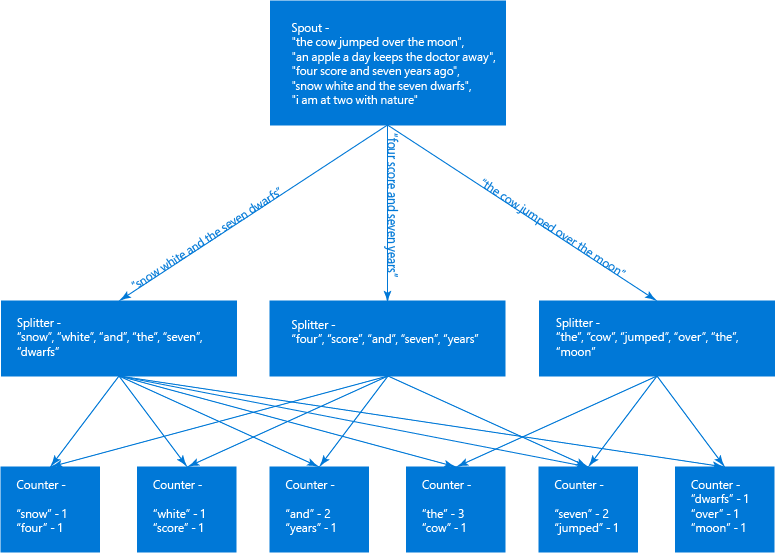
WordCount在大數據領域就像學習一門語言時的hello world,得益於Storm的開源以及Storm.Net.Adapter,現在我們也可以像Java或Python一樣,使用Csharp創建原生支持的Storm Topologies。下面我將通過介紹wordcount來展示如何使用Csharp開發Storm拓撲。
上篇博客已經介紹了如何部署Storm開發環境,本文所講述demo已包含在Storm.Net.Adapter中,如果你覺得對你有幫助,歡迎Star和Fork,讓更多人看到來幫助完善這個項目。
首先,我們創建一個控制台應用程序(使用控制台是方便調用) StormSimple;使用Nuget添加添加Storm.Net.Adapter(該類庫的namespace為Storm)。
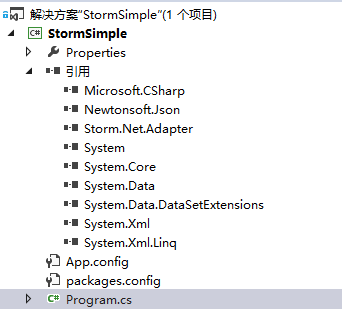
STEP1:通過繼承ISpout創建一個Spout:Generator,實現ISpout的四個方法:
void Open(Config stormConf, TopologyContext context);
void NextTuple();
void Ack(long seqId);
void Fail(long seqId);
在實現這4個方法之前,我們還需要創建一些變量和方法來初始化這個類:
private Context ctx;

public Generator(Context ctx)
{
    Context.Logger.Info("Generator constructor called");
    this.ctx = ctx;

    // Declare Output schema
    Dictionary<string, List<Type>> outputSchema = new Dictionary<string, List<Type>>();
    outputSchema.Add("default", new List<Type>() { typeof(string) });
    this.ctx.DeclareComponentSchema(new ComponentStreamSchema(null, outputSchema));
}
我使用了一個私有變量ctx來保存實例化時傳入的Context對象,Context有一個靜態的Logger,用於日志的發送,我們無需實例化即可使用它。根據日志級別不同,包含 Trace Debug Info Warn Error 五個級別,另外我們在實例化方法裡還需要定義輸入和輸出的參數的數量和類型,本例子中輸入為null,輸出為一個字符串。另外我們還創建一個方法來直接返回實例化後的類:
/// <summary>
///  Implements of delegate "newPlugin", which is used to create a instance of this spout/bolt
/// </summary>
/// <param name="ctx">Context instance</param>
/// <returns></returns>
public static Generator Get(Context ctx)
{
    return new Generator(ctx);
}
其中Open在該類第一次任務調用前執行,主要用於預處理和一些配置信息的傳入,大多數情況下,我們並不需要做什麼;NextTuple方法用於生成Tuple,會不斷被調用,因此如果沒什麼任務要向下發送,可以使用Thread.Sleep(50);來減少CPU的消耗(具體休息時間與Topology設置有關,只要不超過超時時間就沒有問題)。
本例子中NextTuple主要用於從一個包含英語句子的數組中隨機取出一條句子,並把它發送到下一個環節,為了能夠保證所有的任務都被成功執行一遍,我們將發送的消息緩存起來,並且限制正在執行中的任務數量為20。
private const int MAX_PENDING_TUPLE_NUM = 20;
private long lastSeqId = 0;
private Dictionary<long, string> cachedTuples = new Dictionary<long, string>();

private Random rand = new Random();
string[] sentences = new string[] {
                                  "the cow jumped over the moon",
                                  "an apple a day keeps the doctor away",
                                  "four score and seven years ago",
                                  "snow white and the seven dwarfs",
                                  "i am at two with nature"};
/// <summary>
/// This method is used to emit one or more tuples. If there is nothing to emit, this method should return without emitting anything.
/// It should be noted that NextTuple(), Ack(), and Fail() are all called in a tight loop in a single thread in C# process.
/// When there are no tuples to emit, it is courteous to have NextTuple sleep for a short amount of time (such as 10 milliseconds), so as not to waste too much CPU.
/// </summary>
public void NextTuple()
{
    Context.Logger.Info("NextTuple enter");
    string sentence;

    if (cachedTuples.Count <= MAX_PENDING_TUPLE_NUM)
    {
        lastSeqId++;
        sentence = sentences[rand.Next(0, sentences.Length - 1)];
        Context.Logger.Info("Generator Emit: {0}, seqId: {1}", sentence, lastSeqId);
        this.ctx.Emit("default", new List<object>() { sentence }, lastSeqId);
        cachedTuples[lastSeqId] = sentence;
    }
    else
    {
        // if have nothing to emit, then sleep for a little while to release CPU
        Thread.Sleep(50);
    }
    Context.Logger.Info("cached tuple num: {0}", cachedTuples.Count);

    Context.Logger.Info("Generator NextTx exit");
}
this.ctx.Emit 即用來把Topology發送給下一個Bolt。
Ack()和Fail()方法分別在整個Topology執行成功和Topology失敗時被調用。本例中Ack主要是移除緩存,Fail主要是用於取出緩存數據並重新發送Tuple。
/// <summary>
/// Ack() will be called only when ack mechanism is enabled in spec file.
/// If ack is not supported in non-transactional topology, the Ack() can be left as empty function.
/// </summary>
/// <param name="seqId">Sequence Id of the tuple which is acked.</param>
public void Ack(long seqId)
{
    Context.Logger.Info("Ack, seqId: {0}", seqId);
    bool result = cachedTuples.Remove(seqId);
    if (!result)
    {
        Context.Logger.Warn("Ack(), remove cached tuple for seqId {0} fail!", seqId);
    }
}

/// <summary>
/// Fail() will be called only when ack mechanism is enabled in spec file.
/// If ack is not supported in non-transactional topology, the Fail() can be left as empty function.
/// </summary>
/// <param name="seqId">Sequence Id of the tuple which is failed.</param>
public void Fail(long seqId)
{
    Context.Logger.Info("Fail, seqId: {0}", seqId);
    if (cachedTuples.ContainsKey(seqId))
    {
        string sentence = cachedTuples[seqId];
        Context.Logger.Info("Re-Emit: {0}, seqId: {1}", sentence, seqId);
        this.ctx.Emit("default", new List<object>() { sentence }, seqId);
    }
    else
    {
        Context.Logger.Warn("Fail(), can't find cached tuple for seqId {0}!", seqId);
    }
}
至此,一個Spout就算完成了,下面我們繼續分析Bolt。
STEP2:通過繼承IBasicBolt創建Bolt:Splitter、Counter。
Splitter是一個通過空格來拆分英語句子為一個個獨立的單詞,Counter則用來統計各個單詞出現的次數。我們只詳細分析Splitter,Counter類僅貼出全部源碼。
和Generator相同,我們首先也要構造一個實例化方法方便使用者傳參和調用:
private Context ctx;
private int msgTimeoutSecs;

public Splitter(Context ctx)
{
    Context.Logger.Info("Splitter constructor called");
    this.ctx = ctx;

    // Declare Input and Output schemas
    Dictionary<string, List<Type>> inputSchema = new Dictionary<string, List<Type>>();
    inputSchema.Add("default", new List<Type>() { typeof(string) });
    Dictionary<string, List<Type>> outputSchema = new Dictionary<string, List<Type>>();
    outputSchema.Add("default", new List<Type>() { typeof(string), typeof(char) });
    this.ctx.DeclareComponentSchema(new ComponentStreamSchema(inputSchema, outputSchema));

    // Demo how to get stormConf info
    if (Context.Config.StormConf.ContainsKey("topology.message.timeout.secs"))
    {
        msgTimeoutSecs = Convert.ToInt32(Context.Config.StormConf["topology.message.timeout.secs"]);
    }
    Context.Logger.Info("msgTimeoutSecs: {0}", msgTimeoutSecs);
}

/// <summary>
///  Implements of delegate "newPlugin", which is used to create a instance of this spout/bolt
/// </summary>
/// <param name="ctx">Context instance</param>
/// <returns></returns>
public static Splitter Get(Context ctx)
{
    return new Splitter(ctx);
}
在這個實例化方法中,我們增加了一個沒有使用的變量msgTimeoutSecs用來展示如何獲取Topology的配置。
由於繼承了IBasicBolt,我們需要實現以下兩個方法:
void Prepare(Config stormConf, TopologyContext context);
void Execute(StormTuple tuple);
這和IBolt是一致的,IBasicBolt和IBolt的區別僅僅在於後者需要自己處理何時向Storm發送Ack或Fail,IBasicBolt則不需要關心這些,如果你的Execute沒有拋出異常的話,總會在最後向Storm發送Ack,否則則發送Fail。Prepare則是用於執行前的預處理,此例子裡同樣什麼都不需要做。
/// <summary>
/// The Execute() function will be called, when a new tuple is available.
/// </summary>
/// <param name="tuple"></param>
public void Execute(StormTuple tuple)
{
    Context.Logger.Info("Execute enter");

    string sentence = tuple.GetString(0);

    foreach (string word in sentence.Split(' '))
    {
        Context.Logger.Info("Splitter Emit: {0}", word);
        this.ctx.Emit("default", new List<StormTuple> { tuple }, new List<object> { word, word[0] });
    }

    Context.Logger.Info("Splitter Execute exit");
}

public void Prepare(Config stormConf, TopologyContext context)
{
    return;
}
Counter和上述的代碼類似:
using Storm;
using System;
using System.Collections.Generic;

namespace StormSample
{
    /// <summary>
    /// The bolt "counter" uses a dictionary to record the occurrence number of each word.
    /// </summary>
    public class Counter : IBasicBolt
    {
        private Context ctx;

        private Dictionary<string, int> counts = new Dictionary<string, int>();

        public Counter(Context ctx)
        {
            Context.Logger.Info("Counter constructor called");

            this.ctx = ctx;

            // Declare Input and Output schemas
            Dictionary<string, List<Type>> inputSchema = new Dictionary<string, List<Type>>();
            inputSchema.Add("default", new List<Type>() { typeof(string), typeof(char) });

            Dictionary<string, List<Type>> outputSchema = new Dictionary<string, List<Type>>();
            outputSchema.Add("default", new List<Type>() { typeof(string), typeof(int) });
            this.ctx.DeclareComponentSchema(new ComponentStreamSchema(inputSchema, outputSchema));
        }

        /// <summary>
        /// The Execute() function will be called, when a new tuple is available.
        /// </summary>
        /// <param name="tuple"></param>
        public void Execute(StormTuple tuple)
        {
            Context.Logger.Info("Execute enter");

            string word = tuple.GetString(0);
            int count = counts.ContainsKey(word) ? counts[word] : 0;
            count++;
            counts[word] = count;

            Context.Logger.Info("Counter Emit: {0}, count: {1}", word, count);
            this.ctx.Emit("default", new List<StormTuple> { tuple }, new List<object> { word, count });

            Context.Logger.Info("Counter Execute exit");
        }

        /// <summary>
        ///  Implements of delegate "newPlugin", which is used to create a instance of this spout/bolt
        /// </summary>
        /// <param name="ctx">Context instance</param>
        /// <returns></returns>
        public static Counter Get(Context ctx)
        {
            return new Counter(ctx);
        }

        public void Prepare(Config stormConf, TopologyContext context)
        {
            return;
        }
    }
}
STEP3:修改Program.cs來方便使用Java調用。
using Storm;
using System;
using System.Linq;

namespace StormSample
{
    class Program
    {
        static void Main(string[] args)
        {
            if (args.Count() > 0)
            {
                string compName = args[0];

                try
                {
                    if ("generator".Equals(compName))
                    {
                        ApacheStorm.LaunchPlugin(new newPlugin(Generator.Get));
                    }
                    else if ("splitter".Equals(compName))
                    {
                        ApacheStorm.LaunchPlugin(new newPlugin(Splitter.Get));
                    }
                    else if ("counter".Equals(compName))
                    {
                        ApacheStorm.LaunchPlugin(new newPlugin(Counter.Get));
                    }
                    else
                    {
                        throw new Exception(string.Format("unexpected compName: {0}", compName));
                    }
                }
                catch (Exception ex)
                {
                    Context.Logger.Error(ex.ToString());
                }
            }
            else
            {
                Context.Logger.Error("Not support local model.");
            }
        }
    }
}
我們在Main方法裡使用參數來確定具體調用的是哪個Spout/Bolt,ApacheStorm是一個包含主要方法的類,之所以不使用Storm只是因為命名空間占用了它。Csharp端的代碼到此就全部結束了,Java端的代碼與部署發布將在下一篇詳細介紹,敬請期待!下面讓我們來看一看整個Topology的流程吧!