C#超市收銀系統設計。本站提示廣大學習愛好者:(C#超市收銀系統設計)文章只能為提供參考,不一定能成為您想要的結果。以下是C#超市收銀系統設計正文
作者:懶懶的
這篇文章主要為大家詳細介紹了C#超市收銀系統設計,具有一定的參考價值,感興趣的小伙伴們可以參考一下本文實例為大家分享了C#超市收銀系統設計的具體代碼,供大家參考,具體內容如下
1.登錄界面
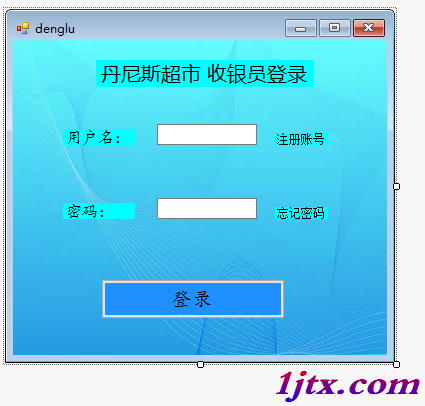
代碼如下:
using System;
using System.Collections.Generic;
using System.ComponentModel;
using System.Data;
using System.Data.SqlClient;
using System.Drawing;
using System.Linq;
using System.Text;
using System.Threading.Tasks;
using System.Windows.Forms;

namespace 夢之翼小組項目
{
 public partial class denglu : Form
 {
  public denglu()
  {
   InitializeComponent();
  }
  model db = new model(); //實例化數據庫對象

  private void button1_Click(object sender, EventArgs e)
  {
   string strConn = "Data Source=.;Initial Catalog=shopInfo;Integrated Security=True"; //連接數據庫
   SqlConnection Connection = new SqlConnection(strConn);

   try
   {

    string sqlStr = "select userName,userPassword from register where userName=@userName"; //查詢
    DataSet ds = new DataSet();

    Connection.ConnectionString = Connection.ConnectionString;
    Connection.Open();

    SqlCommand cmd = new SqlCommand(sqlStr, Connection);
    cmd.Parameters.Add(new SqlParameter("@userName", SqlDbType.VarChar, 30)); //傳參
    cmd.Parameters["@userName"].Value = userName.Text;   //給user文本框賦值
    SqlDataReader dater = cmd.ExecuteReader();

    if (userName.Text.Trim() == "")   //如果user的值等於空
    {
     MessageBox.Show( "用戶名不允許為空!");

    }
    else if (passWord.Text.Trim() == "")   //同上
    {
     MessageBox.Show( "密碼不能為空!");
    }
    else if (!dater.Read())    //如果輸入的用戶名沒有被dater讀到,則用戶名不存在
    {
     MessageBox.Show( "用戶名不存在!");
     userName.Text = "";
     passWord.Text = "";
    }
    else if (dater["userPassWord"].ToString().Trim() == passWord.Text.Trim()) //輸入密碼等於數據庫密碼登錄成功且彈出音樂框
    {
     MessageBox.Show( "登錄成功!");
     userName.Text = "";
     passWord.Text = "";
     caozuoyemain frm = new caozuoyemain();
     frm.ShowDialog();
    }
    else
    {
     MessageBox.Show("密碼錯誤!");  //否則密碼錯誤
     userName.Text = "";
     passWord.Text = "";

    }
   }
   catch (Exception)
   {
    throw;    //拋出異常
   }
   finally
   {
    Connection.Close();  //關閉數據庫
   }

  }

  private void label4_Click(object sender, EventArgs e)
  {
   zhuce fra = new zhuce();
   fra.ShowDialog();
  }

  private void label6_Click(object sender, EventArgs e)
  {
   zhaohuimima fra = new zhaohuimima();
   fra.ShowDialog();
  }

  private void denglu_Load(object sender, EventArgs e)
  {

  }
 }
}
2.操作界面:
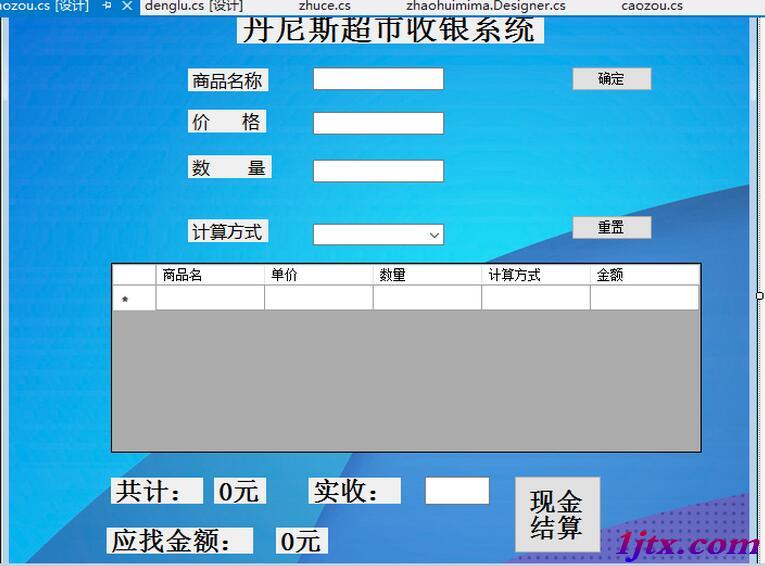
代碼如下:
using System;
using System.Collections.Generic;
using System.ComponentModel;
using System.Data;
using System.Drawing;
using System.Linq;
using System.Text;
using System.Threading.Tasks;
using System.Windows.Forms;

namespace 夢之翼小組項目
{
 public partial class caozuoyemain : Form
 {
  public caozuoyemain()
  {
   InitializeComponent();
  }
  public double totalPrice;//每種商品的總價
  public double total; //所有商品的總價
  public double shijijin;//顧客給的錢數
  public double yingzhao;// 找給顧客的錢數
  public string mingcheng;//每件商品的名稱
  public double shuliang;//每件商品的數量
  public double jiage;//每件商品的價格
  public int i = 0; //商品收費的id

  model db = new model(); //實例化數據庫對象

  public void fanli() //單件物品的返利方法
  {
   if (jiage * shuliang < 600 && jiage * shuliang > 300)
   {
    totalPrice = jiage * shuliang - 100;
   }
   else
   {
    totalPrice = jiage * shuliang;
   }
  }

  private void confirm_Click(object sender, EventArgs e) //單擊確定按鈕的事件
  {
   totalPrice = 0; //每一次商品的單個金額

   jiage = Convert.ToDouble(price.Text);
   shuliang = Convert.ToDouble(number.Text); //數據類型的轉換

   switch (jisuanfangshi.SelectedIndex)
   {
    case 0:
     totalPrice = jiage * shuliang;

     break;
    case 1:
      totalPrice = jiage * shuliang*0.8;

     break;
    case 2:
     fanli(); //調用單個物品的返利方法

     break;
   }


   total = totalPrice + total; //所有商品的總金額

   zongjine.Text = total.ToString();//總金額轉換數據類型,顯示到文本框裡面


   i++; //每一次的商品id加1,為了調出所有商品的最後一個數據

   db.dbcon();
   try
   {
    string insertInfo = "insert wupin values('" + i.ToString() + "','" + tradeName.Text + "','" + price.Text + "','" +
     number.Text + "','" + jisuanfangshi.Text + "','" + totalPrice.ToString() + "')";
    db.dbInsert(insertInfo);

    string selstr = "select top "+i+" * from wupin order by 物品ID desc";
    db.dbFill(selstr);
    dataGridView1.DataSource = db.dt;
   }
   catch (Exception)
   {
    MessageBox.Show("不好意思,信息有誤,注冊失敗");
   }
  }

  private void caozuoyemain_Load(object sender, EventArgs e)
  {
   db.dbcon();
   string qingkong = "TRUNCATE TABLE wupin";
   db.dbInsert(qingkong);
   jisuanfangshi.SelectedIndex = 0;
  }

  private void jiesuan_Click(object sender, EventArgs e)
  {
   shijijin = Convert.ToDouble(shishoujine.Text);
   yingzhao=Convert.ToDouble(zongjine.Text) ;
   yingzhao = shijijin - total;
   zhaojine.Text = yingzhao.ToString()+"元";
  }

  private void resetting_Click(object sender, EventArgs e)
  {
   tradeName.Text = "";
   price.Text = "";
   number.Text = "";
  }
 }
}
3.收銀員注冊界面:
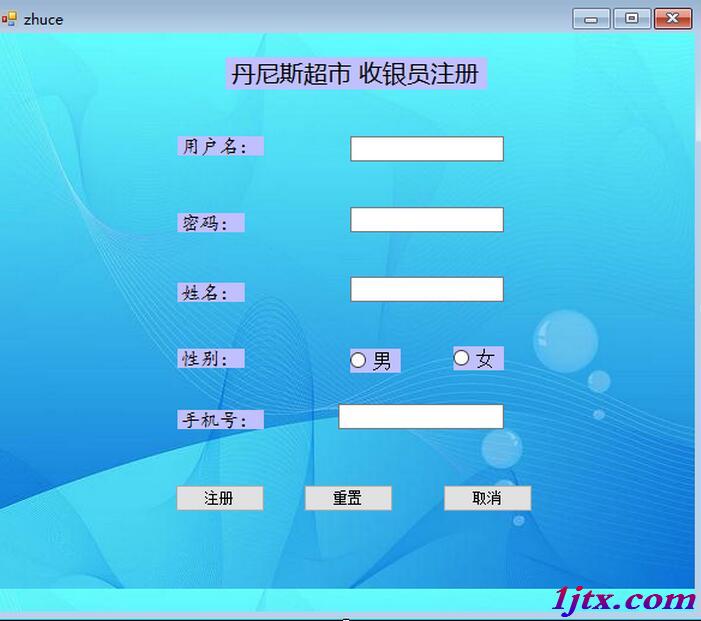
代碼如下:
using System;
using System.Collections.Generic;
using System.ComponentModel;
using System.Data;
using System.Drawing;
using System.Linq;
using System.Text;
using System.Text.RegularExpressions;
using System.Threading.Tasks;
using System.Windows.Forms;

namespace 夢之翼小組項目
{
 public partial class zhuce : Form
 {
  public zhuce()
  {
   InitializeComponent();
  }
  public string sexValue; //接收性別的字段
  model db = new model(); //實例化數據庫對象

  private bool testuserName(string strUsername) //檢測用戶名的方法
  {
   bool strResult;// 判斷結果的接收
   Regex exStrUserName = new Regex(@"^[a-zA-Z][a-zA-Z0-9]{3,8}$");
   //正則表達式的書寫
   if (strResult = exStrUserName.Match(strUsername).Success)
   {
    yonghuming_test.Text = "✔";
   }
   else
   {
    MessageBox.Show("用戶名由3—6位的字母和數字組成,必須以字母開頭");

   }
   return strResult;
  }

  private bool testPassWord(string strUsername) //檢測密碼的方法
  {
   bool strResult;// 判斷結果的接收
   Regex exStrUserName = new Regex(@"^[\w\-~!@#$%^&*()+{}[ \]:]{6,16}");
   //正則表達式的書寫
   if (strResult = exStrUserName.Match(strUsername).Success)
   {
    mima_test.Text = "✔";
   }
   else
   {
    mima_test.Text = "✘";
    MessageBox.Show("密碼由6—16位的字母和數字或符號組成");

   }
   return strResult;
  }
  private bool testName(string strUsername) //檢測姓名的方法
  {
   bool strResult;// 判斷結果的接收
   Regex exStrUserName = new Regex(@"^([a-zA-Z0-9\u4e00-\u9fa5\·]{2,3})$");
   //正則表達式的書寫
   if (strResult = exStrUserName.Match(strUsername).Success)
   {
    name_test.Text = "✔";
   }
   else
   {
    name_test.Text = "✘";
    MessageBox.Show("請文明用語,輸入合法的中文姓名哦");

   }

   if (name_text.Text == "小貓" || name_text.Text == "小狗" || name_text.Text == "傻逼")
   {
    name_test.Text = "✘";
    MessageBox.Show("請文明用語,輸入合法的中文姓名哦");
   }
   return strResult;
  }

  private bool testPhonnumber(string strUsername) //檢測手機號的方法
  {
   bool strResult;// 判斷結果的接收
   Regex exStrUserName = new Regex(@"^(13[0-9]|15[012356789]|17[678]|18[0-9]|14[57])[0-9]{8}$");
   //正則表達式的書寫
   if (strResult = exStrUserName.Match(strUsername).Success)
   {
    phonnumber_test.Text = "✔";
   }
   else
   {
    phonnumber_test.Text = "✘";
    MessageBox.Show("請輸入正確的手機號碼");

   }
   return strResult;
  }

  private void nan_rb_CheckedChanged(object sender, EventArgs e) //選擇性別的事件
  {
   sexValue = nan_rb.Text;
  }
  private void nv_rb_CheckedChanged(object sender, EventArgs e)
  {
   sexValue = nv_rb.Text;
  }


  private void zhuce_bt_Click(object sender, EventArgs e) //注冊的點擊事件
  {
   db.dbcon();
   try
   {
    string insertInfo = "insert register values('" + username_text.Text + "','" + password_text.Text+ "','" + name_text.Text+
      "','" + sexValue + "','" + phonnumber_text.Text + "')";
    db.dbInsert(insertInfo);
    DialogResult dr=MessageBox.Show("恭喜你注冊成功,是否轉到登錄界面","注冊成功對話框",MessageBoxButtons.OKCancel,MessageBoxIcon.Information);
    if (dr == DialogResult.OK)
    {
     this.Close();
     denglu fra = new denglu();
     fra.ShowDialog();

    }
    else if (dr == DialogResult.Cancel)
    {
     this.Close();
    }

   }
   catch (Exception)
   {
    MessageBox.Show("不好意思,信息有誤,注冊失敗");
   }
  }

  private void username_text_Leave(object sender, EventArgs e) //用戶名文本框的光標事件
  {
   if (username_text.Text == "")
   {
    MessageBox.Show("用戶名不能為空");
   }
   else
   {
    testuserName(username_text.Text);
   }
  }

  private void password_text_Leave(object sender, EventArgs e)//密碼文本框的光標事件
  {
   if (password_text.Text == "")
   {
    MessageBox.Show("密碼不能為空");
   }
   else
   {
    testPassWord(password_text.Text);
   }
  }

  private void name_text_Leave(object sender, EventArgs e)//姓名文本框的光標事件
  {
   if (name_text.Text == "")
   {
    MessageBox.Show("姓名不能為空");
   }
   else
   {
    testName(name_text.Text);
   }
  }

  private void phonnumber_text_Leave(object sender, EventArgs e)//手機號文本框的光標事件
  {
   if (phonnumber_text.Text == "")
   {
    MessageBox.Show("手機號不能為空");
   }
   else
   {
    testPhonnumber(phonnumber_text.Text);
   }
  }

  private void chongzhi_bt_Click(object sender, EventArgs e) //重置按鈕
  {
   username_text.Text = "";
   phonnumber_text.Text = "";
   name_text.Text = "";
   phonnumber_text.Text = "";
  }

  private void quxiao_bt_Click(object sender, EventArgs e)// 取消事件
  {
   this.Close();
  }

  private void zhuce_Load(object sender, EventArgs e)
  {

  }

 }
}
以上就是本文的全部內容,希望對大家的學習有所幫助,也希望大家多多支持。