C#入門教程之集合ArrayList用法詳解。本站提示廣大學習愛好者:(C#入門教程之集合ArrayList用法詳解)文章只能為提供參考,不一定能成為您想要的結果。以下是C#入門教程之集合ArrayList用法詳解正文
作者:傻丫頭與科技
這篇文章主要介紹了C#入門教程之集合ArrayList用法,結合具體實例分析了C#中集合的概念、功能、創建與使用方法,需要的朋友可以參考下本文實例講述了C#入門教程之集合ArrayList用法。分享給大家供大家參考,具體如下:
.NET Framework提供了用於數據存儲和檢索的專用類,這些類統稱集合。這些類提供對堆棧、隊列、列表和哈希表的支持。大多數集合類實現系統的接口。下面我們主要來講一下ArrayList。
ArrayList是命名空間Systrm.Collections下的一部分,它是使用大小可按需動態增加的數組實現IList接口。
ArrayList的容量是ArrayList可以保存的元素數。ArrayList的默認初始容量為0.隨著元素添加到ArrayList中,容量會根據需要通過重新分配自動增加。使用證書索引可以訪問此集合中的元素。此集合中的索引從零開始。
下面我們先來看一個例子:
using System;
using System.Collections.Generic;
using System.Linq;
using System.Text;
using System.Threading.Tasks;
using System.Collections;
namespace 集合{
  //動物類
  public abstract class Animal
  {
    protected string name;   //動物的名字
    public string Name
    {
      get { return name; }
      set { name = value; }
    }
    public Animal()
    {
      name="The animal with no name";
    }
    public Animal(string newName)
    {
      name=newName;
    }
    public void Feed()   //繁殖後代
    {
      Console.WriteLine("{0} has been fed.",name);
    }
  }
  //奶牛類
  public class Cow : Animal
  {
    public Cow(string newName): base(newName)
    { }
    public void Milk()   //產牛奶
    {
      Console.WriteLine("{0} has been milked.", name);
    }
  }
  //母雞類
  public class Chicken : Animal
  {
    public Chicken(string newName):base(newName)
    { }
    public void LayEgg()  //下蛋
    {
      Console.WriteLine("{0} has laid an egg.", name);
    }
  }
  class Program
  {
    static void Main(string[] args)
    {
      //用數組的方法實現
      Console.WriteLine("Create an Array type collection of Animal object and use it:");
      Animal[] animalArray = new Animal[2];
      Cow myCow1 = new Cow("Deirdre");
      animalArray[0] = myCow1;
      animalArray[1] = new Chicken("Ken");
      foreach (Animal myAnimal in animalArray )
      {
        Console.WriteLine("New {0} object added to Array collection,Name={1}", myAnimal.ToString(), myAnimal.Name);
      }
      Console.WriteLine("Array collection contains {0} objects.",animalArray .Length );
      animalArray[0].Feed();
      ((Chicken)animalArray[1]).LayEgg();
      Console.WriteLine();
      //用集合的方法實現
      Console.WriteLine("Create an ArrayList type collection of Animal objects and use it;");
      ArrayList animalArrayList = new ArrayList();
      Cow myCow2 = new Cow("HayLey");
      animalArrayList.Add(myCow2);
      animalArrayList.Add(new Chicken("Roy"));
      foreach (Animal myAnimal in animalArrayList)
      {
        Console.WriteLine("New {0} object added to ArrayList collection,Name={1}", myAnimal.ToString(), myAnimal.Name);
      }
      Console.WriteLine("ArrayList collection contains {0} objects.", animalArrayList.Count);
      ((Animal)animalArrayList[0]).Feed();
      ((Chicken)animalArrayList[1]).LayEgg();
      Console.WriteLine();
    }
  }
}
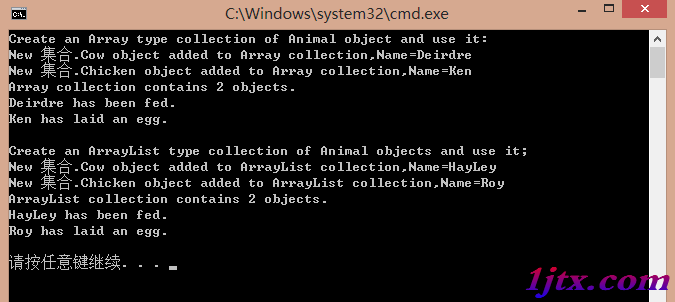
集合的創建
對於簡單的數組來說,只有用固定的大小來初始化數組,才能使用它。
Animal[] animalArray = new Aimal[2];
而ArrayList集合不需要初始化其大小
ArrayList animalArrayList = new ArrayList();
這個類還有另外兩個構造函數。第一個構造函數把現有的集合作為一個參數,把現有集合的內容復制到新實例中;而另一個構造函數通過一個參數設置集合的容量(capacity)。這個容量用一個int值指定,設置集合中可以包含的初始項數。但這並不是真實的容量,因為如果集合中的項數超過了這個值,容量就會自動增加一倍。
對於ArrayList集合,它沒有現成的項,也沒有null引用的項。我們使用ArrayList對象的Add()方法添加新項:
Cow myCow2 = new Cow("Hayley");
anmialArrayList.Add(myCow2);
anmialArrayList.Add(new Chicken("Roy"));
ArrayList對象支持IEnumerable接口,這個接口的唯一方法GetEnuumerator()可以迭代集合中的各項。所以可以與foreach一起使用
foreach (Animal myAnimal in animalArrayList)
{
  Console.WriteLine("New {0} object added to ArrayList collection,Name = {1}",myAnimal.Tostring(),myAnimal.Name);
}
ArrayList集合是System.Object對象的集合(通過多態性賦給Animal對象),所以必須用所有的項進行數據類型轉換:
((Animal)animalArrayList[0]).Feed();
((Chichen)animalArrayList[1]).LayEgg();
我們可以使用Remove()和RemoveAt()方法刪除項,這兩個方法是在ArrayList類中實現的IList接口的一部分。它們分別根據項的引用或索引從集合中刪除項:
animalArrayList.RemoveAt(0);
animalArrayList.Remove(myCow2);
ArrayList集合可以用AddRange()方法一次添加好幾個項。這個方法接受帶有ICollection接口的任何對象,包括數組:
animalArrayList.AddRange(animalArray);
AddRange()方法不是ArrayList提供的任何接口的一部分。這個方法專用於ArrayList類,
更多關於C#相關內容感興趣的讀者可查看本站專題:《C#字符串操作技巧總結》、《C#數組操作技巧總結》、《C#中XML文件操作技巧匯總》、《C#常見控件用法教程》、《WinForm控件用法總結》、《C#數據結構與算法教程》及《C#面向對象程序設計入門教程》
希望本文所述對大家C#程序設計有所幫助。