前言
說起來慚愧,學了大半年的C#,其實最開始就接觸到了封裝的部分,但是一直模模糊糊的弄不清楚,也覺得沒什麼影響就沒怎麼在意,現在才開始認真的看這部分內容,看懂了過後好多東西清晰了不少,才發現封裝這個基礎那麼那麼重要。
現在反過來一想,封裝和類這些其實就是當初最開始學習面向對象編程的時候老師教的定義,最基礎的最基礎,我居然到現在才弄懂,我也是對不起我以前交的學費啊!(悲痛!)
但是以前學習的時候,老師也是拿著書本,我也是拿著書本,沒有練在手上,所以很多東西都太空洞了!還是那句話:“紙上得來終覺淺,絕知此事要躬行”!
定義
封裝就是將數據或函數等集合在一個個的單元中。
在我的理解裡封裝就是“打包”,至於你是打包帶走,還是打包扔了,還是打包給誰,都是你的自由。
就像我要去上學,我就要把所有要用的東西全部裝到書包裡帶走到學校一樣,我把所有的教科書、練習冊、文具盒、筆記本、便利貼等等全部都放在一個包裡,我要去上學,我就執行背上書包的動作就好了,因為我的所有的工具都已經“打包”好了,要是讓別人幫我把書包帶到學校去也是一樣的道理,他們並不需要知道我書包裡裝了什麼,他們只要執行幫我帶書包這個動作就好了。我的書包裡面的東西他們可以用久了廢了然後扔了,也可以一直都在,還可以裝入新的東西。當然這些操作是我書包裡面的內部操作,這個只需要我知道就好了,外面的人他們並不關心裡面到底發生了什麼。
這就是封裝的作用:保護數據不被外來因素無意間破壞,同時卻也方便外面的操作直接調用。
使用
實際代碼操作:
  1    class Program
  2     {
  3         static void Main(string[] args)
  4         {
  5             Console.WriteLine("Buy a new car.................");
  6             Car car = new Car();
  7             Console.WriteLine("Here is the information of new car:");
  8             Console.WriteLine("car's color is:{0}", car.Color);
  9             Console.WriteLine("car has {0} types", car.TypeNum);
 10             Console.WriteLine("car's oil is:{0}\t\n", car.Oil);
 11             car.run();
 12             Console.WriteLine("I wanna change the color of car");
 13             car.changeColor(car.Color);
 14             car.fillOil(car.Oil);
 15             Console.Read();
 16         }
 17     }
 18
 19
 20     /// <summary>
 21     /// package
 22     /// all things about car can be packaged in the one class
 23     /// </summary>
 24     public class Car
 25     {
 26         int typeNum = 4;
 27         string color = "red";
 28         int oil = 75;
 29
 30         /// <summary>
 31         /// the number of type
 32         /// not allowed to modify,onlyread
 33         /// </summary>
 34         public int TypeNum
 35         {
 36             get
 37             {
 38                 return typeNum;
 39             }
 40         }
 41
 42         /// <summary>
 43         /// the color of car
 44         /// but we can change the color
 45         /// </summary>
 46         public string Color
 47         {
 48             get
 49             {
 50                 return color;
 51             }
 52
 53             set
 54             {
 55                 color = value;
 56             }
 57         }
 58
 59         /// <summary>
 60         /// the oil
 61         /// it always change
 62         /// </summary>
 63         public int Oil
 64         {
 65             get
 66             {
 67                 return oil;
 68             }
 69
 70             set
 71             {
 72                 oil = value;
 73             }
 74         }
 75
 76
 77
 78         public void run()
 79         {
 80             Console.WriteLine("Running for a while................\t\n");
 81         }
 82
 83         public void changeColor(string oldColor)
 84         {
 85             string newColor = "";
 86             string yORn = "";
 87             Console.WriteLine("Are you sure change the color of your car?Y/N");
 88             yORn = Console.ReadLine();
 89
 90             if (yORn == "y" || yORn == "Y")
 91             {
 92                 Console.WriteLine("Please input which color you wanna");
 93                 newColor = Console.ReadLine();
 94
 95                 if (newColor != oldColor)
 96                 {
 97                     Console.WriteLine("Your car's new color is {0}", newColor);
 98                 }
 99                 else
100                 {
101                     Console.WriteLine("Your new color is as same as the old one,so you don't need to change!");
102                 }
103                 Console.Read();
104             }
105             else
106             {
107                 Console.WriteLine("Fine! Your car's color still is{0}", oldColor);
108                 Console.Read();
109             }
110         }
111
112
113         public void fillOil(int previousOil)
114         {
115             int presentOil = 100;
116             Console.WriteLine("Your car's oil is{0}%", previousOil);
117             Console.WriteLine("Filling the oil.................");
118             Console.WriteLine("Now,yourcar's oil is{0}%\t\n", presentOil);
119             Console.WriteLine("Fine!Have a nice day");
120             Console.Read();
121
122         }
123     }
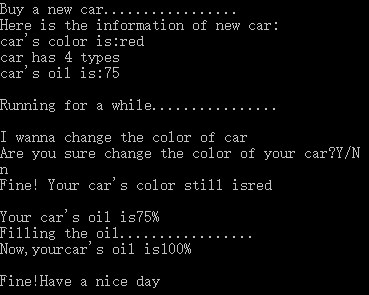
效果預覽: