Spring(AbstractRoutingDataSource)實現動態數據源切換示例。本站提示廣大學習愛好者:(Spring(AbstractRoutingDataSource)實現動態數據源切換示例)文章只能為提供參考,不一定能成為您想要的結果。以下是Spring(AbstractRoutingDataSource)實現動態數據源切換示例正文
一、前言
近期一項目A需實現數據同步到另一項目B數據庫中,在不改變B項目的情況下,只好選擇項目A中切換數據源,直接把數據寫入項目B的數據庫中。這種需求,在數據同步與定時任務中經常需要。
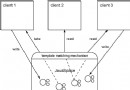
那麼問題來了,該如何解決多數據源問題呢?不光是要配置多個數據源,還得能靈活動態的切換數據源。以spring+hibernate框架項目為例:

單個數據源綁定給sessionFactory,再在Dao層操作,若多個數據源的話,那不是就成了下圖:
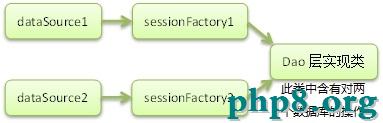
可見,sessionFactory都寫死在了Dao層,若我再添加個數據源的話,則又得添加一個sessionFactory。所以比較好的做法應該是下圖:
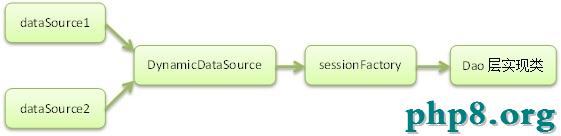
接下來就為大家講解下如何用spring來整合這些數據源,同樣以spring+hibernate配置為例。
二、實現原理
1、擴展Spring的AbstractRoutingDataSource抽象類(該類充當了DataSource的路由中介, 能有在運行時, 根據某種key值來動態切換到真正的DataSource上。)
從AbstractRoutingDataSource的源碼中:
復制代碼 代碼如下:
public abstract class AbstractRoutingDataSource extends AbstractDataSource implements InitializingBean
我們可以看到,它繼承了AbstractDataSource,而AbstractDataSource不就是javax.sql.DataSource的子類,So我們可以分析下它的getConnection方法:
public Connection getConnection() throws SQLException {
 return determineTargetDataSource().getConnection();
}

public Connection getConnection(String username, String password) throws SQLException {
  return determineTargetDataSource().getConnection(username, password);
}
獲取連接的方法中,重點是determineTargetDataSource()方法,看源碼:
/**
  * Retrieve the current target DataSource. Determines the
  * {@link #determineCurrentLookupKey() current lookup key}, performs
  * a lookup in the {@link #setTargetDataSources targetDataSources} map,
  * falls back to the specified
  * {@link #setDefaultTargetDataSource default target DataSource} if necessary.
  * @see #determineCurrentLookupKey()
  */
 protected DataSource determineTargetDataSource() {
  Assert.notNull(this.resolvedDataSources, "DataSource router not initialized");
  Object lookupKey = determineCurrentLookupKey();
  DataSource dataSource = this.resolvedDataSources.get(lookupKey);
  if (dataSource == null && (this.lenientFallback || lookupKey == null)) {
   dataSource = this.resolvedDefaultDataSource;
  }
  if (dataSource == null) {
   throw new IllegalStateException("Cannot determine target DataSource for lookup key [" + lookupKey + "]");
  }
  return dataSource;
 }
上面這段源碼的重點在於determineCurrentLookupKey()方法,這是AbstractRoutingDataSource類中的一個抽象方法,而它的返回值是你所要用的數據源dataSource的key值,有了這個key值,resolvedDataSource(這是個map,由配置文件中設置好後存入的)就從中取出對應的DataSource,如果找不到,就用配置默認的數據源。
看完源碼,應該有點啟發了吧,沒錯!你要擴展AbstractRoutingDataSource類,並重寫其中的determineCurrentLookupKey()方法,來實現數據源的切換:
package com.datasource.test.util.database;

import org.springframework.jdbc.datasource.lookup.AbstractRoutingDataSource;

/**
 * 獲取數據源(依賴於spring)
 * @author linhy
 */
public class DynamicDataSource extends AbstractRoutingDataSource{
 @Override
 protected Object determineCurrentLookupKey() {
  return DataSourceHolder.getDataSource();
 }
}
DataSourceHolder這個類則是我們自己封裝的對數據源進行操作的類:
package com.datasource.test.util.database;

/**
 * 數據源操作
 * @author linhy
 */
public class DataSourceHolder {
 //線程本地環境
 private static final ThreadLocal<String> dataSources = new ThreadLocal<String>();
 //設置數據源
 public static void setDataSource(String customerType) {
  dataSources.set(customerType);
 }
 //獲取數據源
 public static String getDataSource() {
  return (String) dataSources.get();
 }
 //清除數據源
 public static void clearDataSource() {
  dataSources.remove();
 }

}
2、有人就要問,那你setDataSource這方法是要在什麼時候執行呢?當然是在你需要切換數據源的時候執行啦。手動在代碼中調用寫死嗎?這是多蠢的方法,當然要讓它動態咯。所以我們可以應用spring aop來設置,把配置的數據源類型都設置成為注解標簽,在service層中需要切換數據源的方法上,寫上注解標簽,調用相應方法切換數據源咯(就跟你設置事務一樣):
@DataSource(name=DataSource.slave1)
public List getProducts(){
當然,注解標簽的用法可能很少人用到,但它可是個好東西哦,大大的幫助了我們開發:
package com.datasource.test.util.database;

import java.lang.annotation.*;

@Target({ElementType.METHOD, ElementType.TYPE})
@Retention(RetentionPolicy.RUNTIME)
@Documented
public @interface DataSource {
 String name() default DataSource.master;

 public static String master = "dataSource1";

 public static String slave1 = "dataSource2";

 public static String slave2 = "dataSource3";

}
三、配置文件
為了精簡篇幅,省略了無關本內容主題的配置。
項目中單獨分離出application-database.xml,關於數據源配置的文件。
<?xml version="1.0" encoding="UTF-8"?>
<!-- Spring 數據庫相關配置 放在這裡 -->
<beans xmlns="http://www.springframework.org/schema/beans"
  xmlns:xsi="http://www.w3.org/2001/XMLSchema-instance"
  xmlns:aop="http://www.springframework.org/schema/aop"
  xmlns:tx="http://www.springframework.org/schema/tx"
  xsi:schemaLocation="http://www.springframework.org/schema/beans
  http://www.springframework.org/schema/beans/spring-beans.xsd
  http://www.springframework.org/schema/aop
  http://www.springframework.org/schema/aop/spring-aop-3.0.xsd
  http://www.springframework.org/schema/tx
  http://www.springframework.org/schema/tx/spring-tx-3.0.xsd">

 <bean id = "dataSource1" class = "com.mysql.jdbc.jdbc2.optional.MysqlDataSource">
  <property name="url" value="${db1.url}"/>
  <property name = "user" value = "${db1.user}"/>
  <property name = "password" value = "${db1.pwd}"/>
  <property name="autoReconnect" value="true"/>
  <property name="useUnicode" value="true"/>
  <property name="characterEncoding" value="UTF-8"/>
 </bean>

 <bean id = "dataSource2" class = "com.mysql.jdbc.jdbc2.optional.MysqlDataSource">
  <property name="url" value="${db2.url}"/>
  <property name = "user" value = "${db2.user}"/>
  <property name = "password" value = "${db2.pwd}"/>
  <property name="autoReconnect" value="true"/>
  <property name="useUnicode" value="true"/>
  <property name="characterEncoding" value="UTF-8"/>
 </bean>

 <bean id = "dataSource3" class = "com.mysql.jdbc.jdbc2.optional.MysqlDataSource">
  <property name="url" value="${db3.url}"/>
  <property name = "user" value = "${db3.user}"/>
  <property name = "password" value = "${db3.pwd}"/>
  <property name="autoReconnect" value="true"/>
  <property name="useUnicode" value="true"/>
  <property name="characterEncoding" value="UTF-8"/>
 </bean>
 <!-- 配置多數據源映射關系 -->
 <bean id="dataSource" class="com.datasource.test.util.database.DynamicDataSource">
  <property name="targetDataSources">
   <map key-type="java.lang.String">
  <entry key="dataSource1" value-ref="dataSource1"></entry>
    <entry key="dataSource2" value-ref="dataSource2"></entry>
    <entry key="dataSource3" value-ref="dataSource3"></entry>
   </map>
  </property>
 <!-- 默認目標數據源為你主庫數據源 -->
  <property name="defaultTargetDataSource" ref="dataSource1"/>
 </bean>

 <bean id="sessionFactoryHibernate" class="org.springframework.orm.hibernate3.LocalSessionFactoryBean">
  <property name="dataSource" ref="dataSource"/>
  <property name="hibernateProperties">
   <props>
    <prop key="hibernate.dialect">com.datasource.test.util.database.ExtendedMySQLDialect</prop>
    <prop key="hibernate.show_sql">${SHOWSQL}</prop>
    <prop key="hibernate.format_sql">${SHOWSQL}</prop>
    <prop key="query.factory_class">org.hibernate.hql.classic.ClassicQueryTranslatorFactory</prop>
    <prop key="hibernate.connection.provider_class">org.hibernate.connection.C3P0ConnectionProvider</prop>
    <prop key="hibernate.c3p0.max_size">30</prop>
    <prop key="hibernate.c3p0.min_size">5</prop>
    <prop key="hibernate.c3p0.timeout">120</prop>
    <prop key="hibernate.c3p0.idle_test_period">120</prop>
    <prop key="hibernate.c3p0.acquire_increment">2</prop>
    <prop key="hibernate.c3p0.validate">true</prop>
    <prop key="hibernate.c3p0.max_statements">100</prop>
   </props>
  </property>
 </bean>

 <bean id="hibernateTemplate" class="org.springframework.orm.hibernate3.HibernateTemplate">
  <property name="sessionFactory" ref="sessionFactoryHibernate"/>
 </bean>

 <bean id="dataSourceExchange" class="com.datasource.test.util.database.DataSourceExchange"/>

 <bean id="transactionManager" class="org.springframework.orm.hibernate3.HibernateTransactionManager">
  <property name="sessionFactory" ref="sessionFactoryHibernate"/>
 </bean>

 <tx:advice id="txAdvice" transaction-manager="transactionManager">
  <tx:attributes>
   <tx:method name="insert*" propagation="NESTED" rollback-for="Exception"/>
   <tx:method name="add*" propagation="NESTED" rollback-for="Exception"/>
   <tx:method name="update*" propagation="NESTED" rollback-for="Exception"/>
   <tx:method name="modify*" propagation="NESTED" rollback-for="Exception"/>
   <tx:method name="edit*" propagation="NESTED" rollback-for="Exception"/>
   <tx:method name="del*" propagation="NESTED" rollback-for="Exception"/>
   <tx:method name="save*" propagation="NESTED" rollback-for="Exception"/>
   <tx:method name="send*" propagation="NESTED" rollback-for="Exception"/>
   <tx:method name="get*" read-only="true"/>
   <tx:method name="find*" read-only="true"/>
   <tx:method name="query*" read-only="true"/>
   <tx:method name="search*" read-only="true"/>
   <tx:method name="select*" read-only="true"/>
   <tx:method name="count*" read-only="true"/>
  </tx:attributes>
 </tx:advice>

 <aop:config>
  <aop:pointcut id="service" expression="execution(* com.datasource..*.service.*.*(..))"/>
  <!-- 關鍵配置,切換數據源一定要比持久層代碼更先執行(事務也算持久層代碼) -->
  <aop:advisor advice-ref="txAdvice" pointcut-ref="service" order="2"/>
  <aop:advisor advice-ref="dataSourceExchange" pointcut-ref="service" order="1"/>
 </aop:config>

</beans>
四、疑問
多數據源切換是成功了,但牽涉到事務呢?單數據源事務是ok的,但如果多數據源需要同時使用一個事務呢?這個問題有點頭大,網絡上有人提出用atomikos開源項目實現JTA分布式事務處理。你怎麼看?
以上就是本文的全部內容,希望對大家的學習有所幫助,也希望大家多多支持。