利用Java EE相關技術實現一個簡單的Web聊天室系統,具體要求如下。
(1)編寫一個登錄頁面,登錄信息中有用戶名和密碼,分別用兩個按鈕來提交和重置登錄信息。
(2)編寫一個Servlet程序Main.java通過請求指派來處理用戶提交的登錄信息,如果用戶名為本小組成員的名字且密碼為對應的學號時,跳轉到LoginSuccess顯示聊天界面(類似於QQ群聊天界面,可使用HTML中的frameset標簽生成兩個窗口,一個用來實現用戶信息輸入,另一個顯示所有用戶聊天記錄的);否則跳轉到LoginFail頁面,提示用戶重新登錄(注:此頁面要包含前面的登錄界面)。
(3)編寫兩個Servlet程序,分別用來顯示“信息輸入”窗口和“聊天記錄顯示”窗口的內容;用戶在“信息輸入”窗口中鍵入聊天內容,點擊“發送”按鈕後,在“聊天記錄顯示”窗口中顯示發送消息的用戶名稱和聊天內容。提示:利用HTML中的textarea標簽來實現。
(4)在登錄界面上實現記住用戶名和密碼的功能,使得當用戶選擇了此功能並成功登錄後,在其下次登錄時可以不用再輸入用戶名和密碼即可登錄。提示:此功能可通過兩個Cookie來實現。
以下功能選做:
(5)編寫一個Listener程序來監聽會話的創建和銷毀事件,以此統計當前在線(登錄)人數,並將其顯示在聊天界面上。
(6)添加一個Filter對本系統所有的Servlet程序進行過濾,該Filter實現對請求和響應對象的編碼格式的設置(實現此功能後,Servlet可以直接從請求對象中獲取參數信息而無需實現對請求進行格式的編碼)。在【GlassFish Server】視圖中輸出程序在Filter和其它資源之間的執行順序。
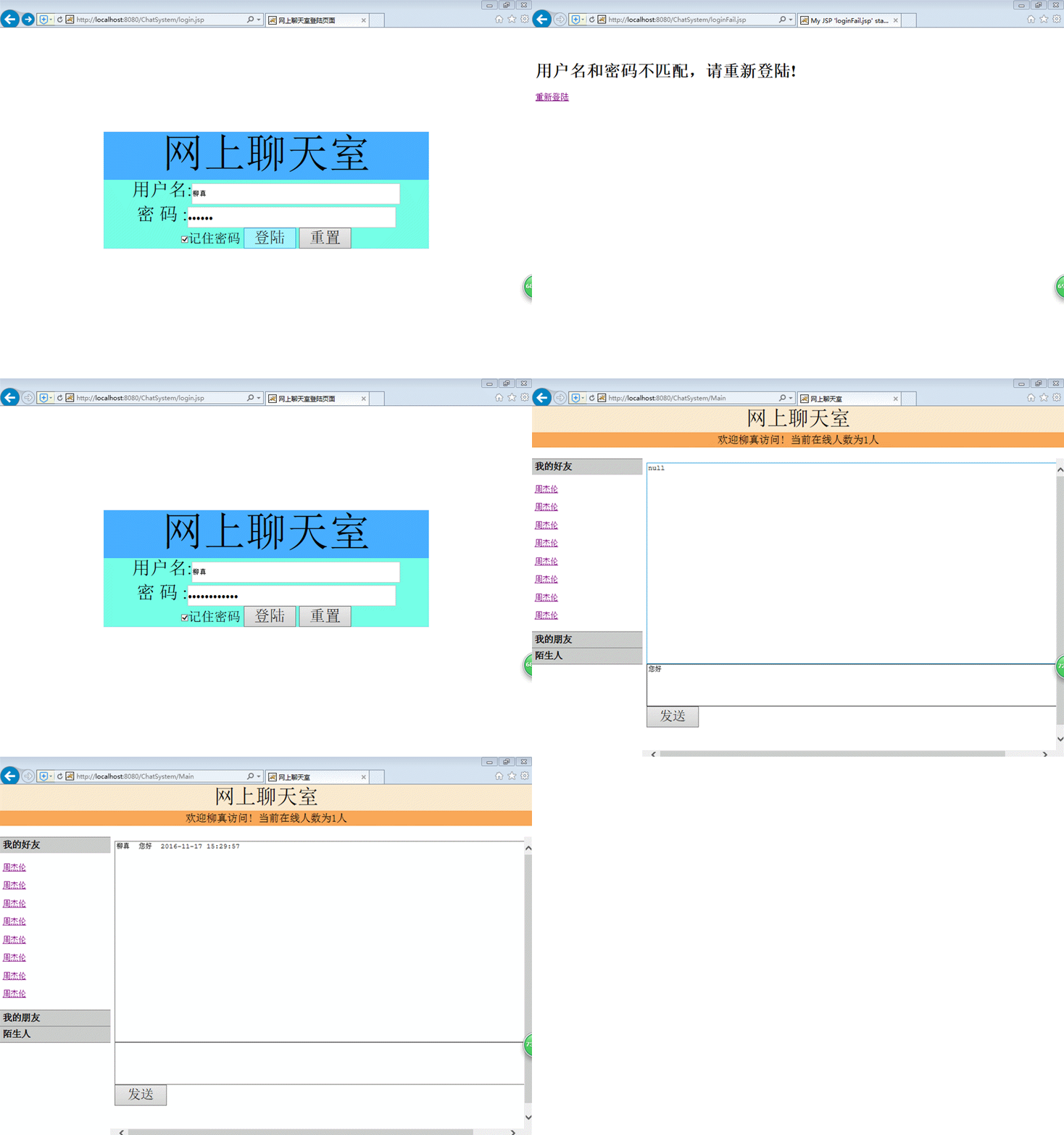
圖一:網上聊天系統運行示意圖
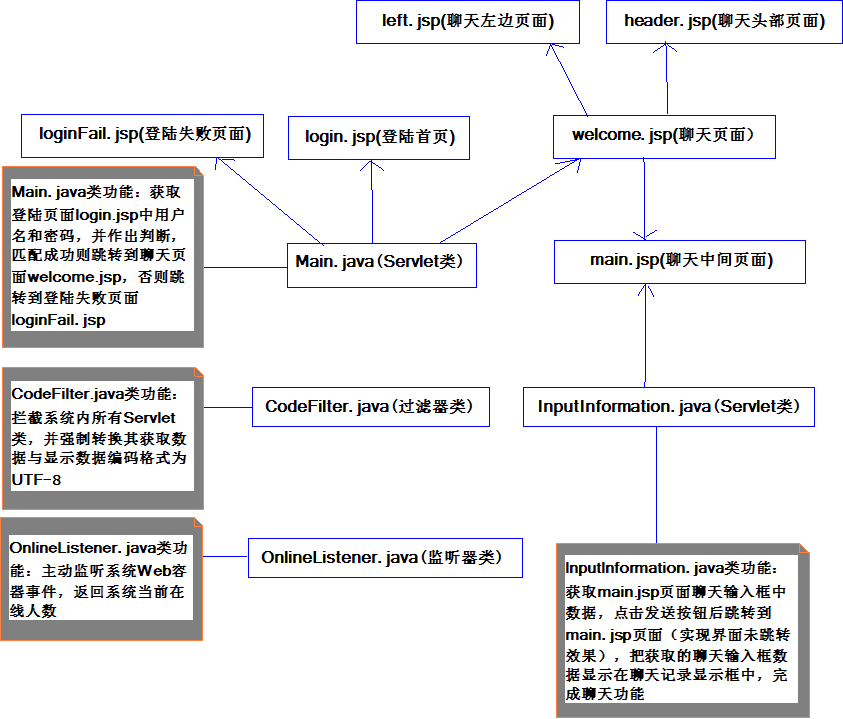
圖二:系統結構示意圖
welcome.jsp具體頁面:
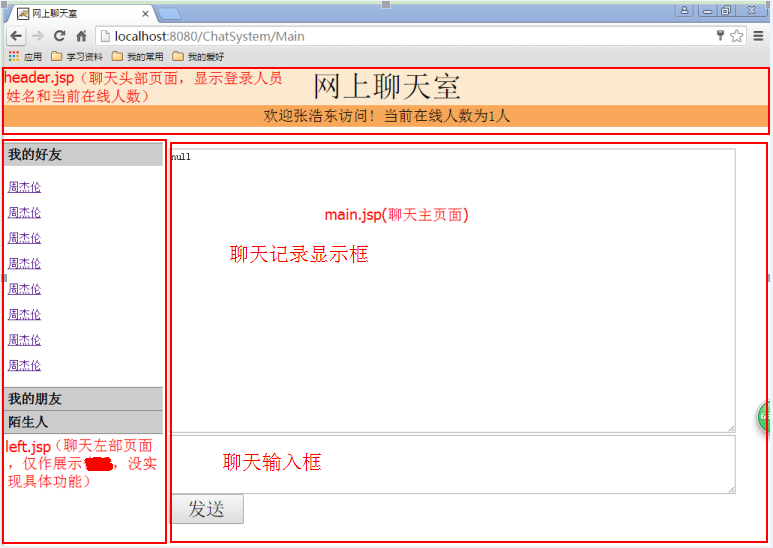
圖三:welcome.jsp實際運行圖
(1)Main.java(Servlet類)通過請求指派來處理login.jsp頁面用戶提交的登錄信息(並使用Cookie實現記住用戶登錄用戶名和密碼功能),成功則跳轉到welcome.jsp,失敗則跳轉到login.jsp。具體實現如下:
網上聊天系統登陸首頁login.jsp頁面代碼:
<%@ page language="java" import="java.util.*" pageEncoding="utf-8"%>
<%
String path = request.getContextPath();
String basePath = request.getScheme()+"://"+request.getServerName()+":"+request.getServerPort()+path+"/";
String username = "";
String password = "";
//String[] checkBox = request.getParameterValues("save_password");
//獲取當前站點的所有Cookie
Cookie[] cookies = request.getCookies();
for (int i = 0; i < cookies.length; i++) {
//對cookies中的數據進行遍歷,找到用戶名、密碼的數據
if ("username".equals(cookies[i].getName())) {
//讀取時URLDecoder.decode進行解碼(PS:Cookie存取時用URLEncoder.encode進行編碼)
username = java.net.URLDecoder.decode(cookies[i].getValue(),"UTF-8");
} else if ("password".equals(cookies[i].getName())) {
password = java.net.URLDecoder.decode(cookies[i].getValue(),"UTF-8");
}
}
%>
<!DOCTYPE HTML PUBLIC "-//W3C//DTD HTML 4.01 Transitional//EN">
<html>
<head>
<base href="<%=basePath%>">
<title>網上聊天室登陸頁面</title>
<meta http-equiv="pragma" content="no-cache">
<meta http-equiv="cache-control" content="no-cache">
<meta http-equiv="expires" content="0">
<meta http-equiv="keywords" content="keyword1,keyword2,keyword3">
<meta http-equiv="content-type" content="text/html; charset=utf-8">
<meta http-equiv="description" content="This is my page">
<!--
<link rel="stylesheet" type="text/css" href="styles.css">
-->
<style type="text/css">
*
{
margin: 0;
padding: 0;
}
body
{
font-size: 0px;
padding: 200px;
}
</style>
</head>
<body>
<form action="Main" method="post">
<div>記住密碼
<input type="submit" value="登陸" name="login">Main.java類代碼:
package com.liuzhen.chart;
import java.io.IOException;
import java.net.URLEncoder;
import javax.servlet.ServletException;
import javax.servlet.http.Cookie;
import javax.servlet.http.HttpServlet;
import javax.servlet.http.HttpServletRequest;
import javax.servlet.http.HttpServletResponse;
@SuppressWarnings("serial")
public class Main extends HttpServlet {
/**
* Constructor of the object.
*/
public Main() {
super();
}
/**
* Destruction of the servlet. <br>
*/
public void destroy() {
super.destroy(); // Just puts "destroy" string in log
// Put your code here
}
public void doGet(HttpServletRequest request, HttpServletResponse response)
throws ServletException, IOException {
doPost(request,response);
}
public void doPost(HttpServletRequest request, HttpServletResponse response)
throws ServletException, IOException {
//response.setContentType("text/html;charset=utf-8");
//此出注解是因為使用CodeFilter類過濾所有Servlet,轉換編碼
//request.setCharacterEncoding("utf-8");
String userName = request.getParameter("username");
String passWord = request.getParameter("password");
String checkBox = request.getParameter("save_password");
System.out.println("userName:"+userName+"\n"+"passWord:"+passWord);
request.getSession().setAttribute("nameSession", userName); //將用戶名存入session中
String[] name_one = {"柳真","劉仁傑","吳超","張浩東","陳初相"};
String[] pwd_one = {"201421092073","201421092068","201421092077","201421092082","201421092119"};
String name_two = "";
String pwd_two = "";
boolean login_test = false;
for(int i=0;i<5;i++){
name_two = name_one[i];
pwd_two = pwd_one[i];
if(userName.equals(name_two) && passWord.equals(pwd_two))
login_test = true;
}
if(login_test) {
if ("save".equals(checkBox)) {
//Cookie存取時用URLEncoder.encode進行編碼(PS:讀取時URLDecoder.decode進行解碼)
String name = URLEncoder.encode(userName,"UTF-8");
//創建兩個Cookie對象
Cookie nameCookie = new Cookie("username", name);
//設置Cookie的有效期為3天
nameCookie.setMaxAge(60 * 60 * 24 * 3);
String pwd = URLEncoder.encode(passWord,"UTF-8");
Cookie pwdCookie = new Cookie("password", pwd);
pwdCookie.setMaxAge(60 * 60 * 24 * 3);
response.addCookie(nameCookie);
response.addCookie(pwdCookie);
}
request.getRequestDispatcher("welcome.jsp").forward(request, response);
}
else{
response.sendRedirect("loginFail.jsp");
// request.getRequestDispatcher("loginFail.jsp").forward(request, response);
}
}
/**
* Initialization of the servlet. <br>
*
* @throws ServletException if an error occurs
*/
public void init() throws ServletException {
// Put your code here
}
}
登陸失敗頁面loginFail.jsp頁面代碼:

![]()
<%@ page language="java" import="java.util.*" pageEncoding="UTF-8"%>
<%
String path = request.getContextPath();
String basePath = request.getScheme()+"://"+request.getServerName()+":"+request.getServerPort()+path+"/";
%>
<!DOCTYPE HTML PUBLIC "-//W3C//DTD HTML 4.01 Transitional//EN">
<html>
<head>
<base href="<%=basePath%>">
<title>My JSP 'loginFail.jsp' starting page</title>
<meta http-equiv="pragma" content="no-cache">
<meta http-equiv="cache-control" content="no-cache">
<meta http-equiv="expires" content="0">
<meta http-equiv="keywords" content="keyword1,keyword2,keyword3">
<meta http-equiv="content-type" content="text/html; charset=gb2312">
<meta http-equiv="description" content="This is my page">
<!--
<link rel="stylesheet" type="text/css" href="styles.css">
-->
</head>
<body>
<br>
<br>
<h1>用戶名和密碼不匹配,請重新登陸!</h1>
<a href="login.jsp">重新登陸</a>
</body>
</html>
View Code
登陸成功頁面welcome.jsp頁面代碼(此處使用frameset標簽,分為頭部、左部和中間主頁三部分,分別對象header.jsp、left.jsp和main.jsp頁面):
<%@ page language="java" import="java.util.*" pageEncoding="UTF-8"%>
<%
String path = request.getContextPath();
String basePath = request.getScheme()+"://"+request.getServerName()+":"+request.getServerPort()+path+"/";
%>
<!DOCTYPE HTML PUBLIC "-//W3C//DTD HTML 4.01 Transitional//EN">
<html>
<head>
<base href="<%=basePath%>">
<title>網上聊天室</title>
<meta http-equiv="pragma" content="no-cache">
<meta http-equiv="cache-control" content="no-cache">
<meta http-equiv="expires" content="0">
<meta http-equiv="keywords" content="keyword1,keyword2,keyword3">
<meta http-equiv="content-type" content="text/html; charset=gb2312">
<meta http-equiv="description" content="This is my page">
<!--
<link rel="stylesheet" type="text/css" href="styles.css">
-->
</head>
<frameset rows="100,*" cols="*" frameborder="no" border="0" framespacing="0">
<frame src="header.jsp" name="topFrame" scrolling="auto" noresize="noresize" id="topFrame"/>
<frameset cols="213,*" frameborder="no" border="0" framespacing="0">
<frame src="left.jsp" name="leftFrame" scrolling="No" noresize="noresize" id="leftFrame"/>
<frame src="main.jsp" name="mainFrame" scrolling="auto" id="mainFrame"/>
</frameset>
</frameset>
<body>
</body>
</html>
聊天頭部header.jsp頁面代碼:
![]()
<%@ page language="java" import="java.util.*" contentType="text/html;charset=gb2312" pageEncoding="gb2312"%>
<%
String path = request.getContextPath();
String basePath = request.getScheme()+"://"+request.getServerName()+":"+request.getServerPort()+path+"/";
%>
<!DOCTYPE HTML PUBLIC "-//W3C//DTD HTML 4.01 Transitional//EN">
<html>
<head>
<base href="<%=basePath%>">
<title></title>
<meta http-equiv="pragma" content="no-cache">
<meta http-equiv="cache-control" content="no-cache">
<meta http-equiv="expires" content="0">
<meta http-equiv="keywords" content="keyword1,keyword2,keyword3">
<meta http-equiv="description" content="This is my page">
<meta http-equiv="Content-Type" content="text/html;charset=gb2312">
<!--
<link rel="stylesheet" type="text/css" href="styles.css">
-->
</head>
<body topmargin="0" leftmargin="0" rightmargin="0">
<form action="">
<table width="100%" height="79" border="0" cellpadding="0"
cellspacing="0" align=center>
<tr>
<td bgcolor="F9A859" valign="top">
<table width="100%" height="50" border="0" align="center"
cellpadding="0" cellspacing="0" bgcolor="FBEAD0">
<tr>
<td align="center">
網上聊天室
</td>
</tr>
</table>
</td>
</tr>
<tr>
<td bgcolor="F9A859" valign="top">
<table width="100%" border="0" align="center" cellpadding="0"
cellspacing="0">
<tr>
<td align="center">
歡迎<%=(String)request.getSession().getAttribute("nameSession") %>訪問!
當前在線人數為<%=application.getAttribute("peopleOnline")%>人
</td>
</tr>
</table>
</td>
</tr>
</table>
</form>
</body>
</html>
View Code
聊天左部left.jsp頁面代碼(此處為了顯示美觀,使用了jquery-1.4.2包):
![]()
<%@ page language="java" import="java.util.*" pageEncoding="UTF-8"%>
<%
String path = request.getContextPath();
String basePath = request.getScheme()+"://"+request.getServerName()+":"+request.getServerPort()+path+"/";
%>
<!DOCTYPE HTML PUBLIC "-//W3C//DTD HTML 4.01 Transitional//EN">
<html>
<head>
<base href="<%=basePath%>">
<title>My JSP 'test.jsp' starting page</title>
<meta http-equiv="pragma" content="no-cache">
<meta http-equiv="cache-control" content="no-cache">
<meta http-equiv="expires" content="0">
<meta http-equiv="keywords" content="keyword1,keyword2,keyword3">
<meta http-equiv="content-type" content="text/html; charset=gb2312">
<meta http-equiv="description" content="This is my page">
<!--
<link rel="stylesheet" type="text/css" href="styles.css">
-->
<style type="text/css">
*
{
margin: 0;
padding: 0;
}
body
{
font-size: 15px;
padding: 00px;
}
.menu
{
width: 500px;
border-bottom: solid 1px gray;
}
.menu h3
{
border: solid 1px gray;
height: 30px;
line-height: 30px;
padding-left: 10px;
padding:0 5px;
border-bottom: none;
cursor: pointer;
}
.menu p
{
border-left: solid 1px gray;
border-right: solid 1px gray;
padding: 20px 0;
padding-left: 5px;
}
.changecolor{background-color:red;}
</style>
<script src="js/jquery-1.4.2.min.js" type="text/javascript"></script>
<script type="text/javascript">
$(function () {
$(".menu p:not(:first)").hide();
$(".menu h3").css("background", "#ccc");
$(".menu h3").hover(function () { $(this).css("background-color", "gray").siblings("h3").css
("background-color", "#ccc");});
$(".menu h3").mouseleave(function () {
$(".menu h3").css("background", "#ccc");}); //離開時將其變為原來顏色
var index = $(".menu h3").index(this);
$(".menu h3").click(function () { $(this).next("p").slideToggle().siblings("p").slideUp(); });
});
</script>
</head>
<body>
<div class="menu">
<h3>
我的好友</h3>
<p>
<a href="index.jsp">周傑倫</a><br/><br/>
<a href="index.jsp">周傑倫</a><br/><br/>
<a href="index.jsp">周傑倫</a><br/><br/>
<a href="index.jsp">周傑倫</a><br/><br/>
<a href="index.jsp">周傑倫</a><br/><br/>
<a href="index.jsp">周傑倫</a><br/><br/>
<a href="index.jsp">周傑倫</a><br/><br/>
<a href="index.jsp">周傑倫</a><br/>
</p>
<h3>
我的朋友</h3>
<p>
<a href="index.jsp">李連傑</a><br/><br/>
<a href="index.jsp">李連傑</a><br/><br/>
<a href="index.jsp">李連傑</a><br/><br/>
<a href="index.jsp">李連傑</a><br/><br/>
<a href="index.jsp">李連傑</a><br/><br/>
<a href="index.jsp">李連傑</a><br/><br/>
<a href="index.jsp">李連傑</a><br/><br/>
<a href="index.jsp">李連傑</a><br/>
</p>
<h3>
陌生人</h3>
<p>
<a href="index.jsp">比爾蓋茨</a><br/><br/>
<a href="index.jsp">比爾蓋茨</a><br/><br/>
<a href="index.jsp">比爾蓋茨</a><br/><br/>
<a href="index.jsp">比爾蓋茨</a><br/><br/>
<a href="index.jsp">比爾蓋茨</a><br/><br/>
<a href="index.jsp">比爾蓋茨</a><br/><br/>
<a href="index.jsp">比爾蓋茨</a><br/>
</p>
</div>
</body>
</html>
View Code
聊天主頁main.jsp頁面代碼:
<%@ page language="java" import="java.util.*" pageEncoding="UTF-8"%>
<%
String path = request.getContextPath();
String basePath = request.getScheme()+"://"+request.getServerName()+":"+request.getServerPort()+path+"/";
%>
<!DOCTYPE HTML PUBLIC "-//W3C//DTD HTML 4.01 Transitional//EN">
<html>
<head>
<base href="<%=basePath%>">
<title>My JSP 'main.jsp' starting page</title>
<meta http-equiv="pragma" content="no-cache">
<meta http-equiv="cache-control" content="no-cache">
<meta http-equiv="expires" content="0">
<meta http-equiv="keywords" content="keyword1,keyword2,keyword3">
<meta http-equiv="content-type" content="text/html; charset=utf-8">
<meta http-equiv="description" content="This is my page">
<!--
<link rel="stylesheet" type="text/css" href="styles.css">
-->
</head>
<body>
<form action="InputInformation" method=post>
<textarea cols="105" rows="25" name="show_textarea"><%=request.getAttribute("input_textarea")%></textarea>
<br>
<textarea cols="105" rows="5" name="input_textarea"></textarea><br>
<input type="submit" value="發送" name="button_one"
><br>
</form>
</body>
</html>
(2)InputInformation.java(Servlet類)通過請求指派獲取main.jsp聊天輸入框中輸入信息,跳轉到main.jsp頁面,並在聊天記錄顯示框中顯示聊天信息。具體實現如下:
InputInformation.java類代碼如下:
package com.liuzhen.chart;
import java.io.IOException;
import java.text.SimpleDateFormat;
import java.util.Date;
import javax.servlet.ServletException;
import javax.servlet.http.HttpServlet;
import javax.servlet.http.HttpServletRequest;
import javax.servlet.http.HttpServletResponse;
@SuppressWarnings("serial")
public class InputInformation extends HttpServlet {
public String chat_record = ""; //定義聊天記錄變量,此處為全局變量
/**
* Constructor of the object.
*/
public InputInformation() {
super();
}
/**
* Destruction of the servlet. <br>
*/
public void destroy() {
super.destroy(); // Just puts "destroy" string in log
// Put your code here
}
public void doGet(HttpServletRequest request, HttpServletResponse response)
throws ServletException, IOException {
doPost(request,response);
}
public void doPost(HttpServletRequest request, HttpServletResponse response)
throws ServletException, IOException {
//response.setContentType("text/html;charset=utf-8");
//此出注解是因為使用CodeFilter類過濾所有Servlet,轉換編碼
//request.setCharacterEncoding("utf-8");
String input_textarea = request.getParameter("input_textarea");
Date now = new Date(); //創建日期對象,及系統當前時間
SimpleDateFormat dateFormat = new SimpleDateFormat("yyyy-MM-dd HH:mm:ss");//設置日期格式
String time = dateFormat.format( now ); //按照給定的日期格式獲取系統當前時間
String t = (String)request.getSession().getAttribute("nameSession"); //獲取登陸頁面用戶名
chat_record += t+" "+input_textarea+" "+time+"\n"; //聊天記錄存儲
request.setAttribute("input_textarea",chat_record); //將當前聊天輸入內容存儲
request.getRequestDispatcher("main.jsp").forward(request,response); //跳轉到當前聊天輸入界面,即界面布局不變
}
/**
* Initialization of the servlet. <br>
*
* @throws ServletException if an error occurs
*/
public void init() throws ServletException {
// Put your code here
}
}
(3)CodeFilter.java(過濾器類)截取系統所有Servlet類,實現對請求和響應對象的編碼格式的設置,均設置為UTF-8。具體實現如下:
CodeFilter.java類代碼如下:
package com.liuzhen.chart;
import java.io.IOException;
import javax.servlet.Filter;
import javax.servlet.FilterChain;
import javax.servlet.FilterConfig;
import javax.servlet.ServletException;
import javax.servlet.ServletRequest;
import javax.servlet.ServletResponse;
import javax.servlet.annotation.WebFilter;
import javax.servlet.http.HttpServletRequest;
import javax.servlet.http.HttpServletResponse;
//采用注解方式配置URL,此處就不必再在web.xml文件中配置。如果兩者均配置的話,系統將以web.xml文件中配置信息為准
@WebFilter(filterName="CodeFilter",urlPatterns={"/*"})
public class CodeFilter implements Filter{
@Override
public void destroy() {
System.out.println("destroy---CodeFilter");
}
@Override
public void doFilter(ServletRequest arg0, ServletResponse arg1, FilterChain arg2)
throws IOException, ServletException {
System.out.println("start----doFilter--CodeFilter");
HttpServletRequest request =(HttpServletRequest) arg0;
HttpServletResponse response =(HttpServletResponse) arg1;
//以上是強制內型轉換,使用request對象和response對象
request.setCharacterEncoding("utf-8"); //設置過濾頁面提取數據的編碼
response.setContentType("text/html;charset=utf-8"); //設置過濾頁面顯示數據的編碼
arg2.doFilter(arg0, arg1);//在頁面跳轉之前執行此語句前面的代碼,執行完頁面的代碼之後,在執行後面的語句
System.out.println("第一個字符過濾器");
System.out.println("end------doFilter--CodeFilter");
}
@Override
public void init(FilterConfig filterConfig) throws ServletException {
System.out.println("init----CodeFilter");
}
}
(4)OnlineListener.java(監聽器類)主動監聽系統Web容器,返回當前聊天系統在線人數,具體實現如下:
OnlineListener.java類代碼如下:
package com.liuzhen.chart;
import javax.servlet.ServletContext;
import javax.servlet.http.HttpSessionEvent;
import javax.servlet.http.HttpSessionListener;
public class OnlineListener implements HttpSessionListener{
public void sessionCreated(HttpSessionEvent arg0) {
ServletContext context = arg0.getSession().getServletContext();
Integer count = (Integer) context.getAttribute("peopleOnline");
if (count == null) {
count = 1;
} else {
count++;
}
context.setAttribute("peopleOnline", count);
}
public void sessionDestroyed(HttpSessionEvent arg0) {
ServletContext context = arg0.getSession().getServletContext();
Integer count = (Integer) context.getAttribute("peopleOnline");
count--;
context.setAttribute("peopleOnline", count);
}
}
此處還要給OnlineListener監聽器類在web.xml文件中配置路徑,web.xml配置代碼具體如下(紅色標記代碼):
<?xml version="1.0" encoding="UTF-8"?>
<web-app version="3.0"
xmlns="http://java.sun.com/xml/ns/javaee"
xmlns:xsi="http://www.w3.org/2001/XMLSchema-instance"
xsi:schemaLocation="http://java.sun.com/xml/ns/javaee
http://java.sun.com/xml/ns/javaee/web-app_3_0.xsd">
<display-name></display-name>
<listener>
<listener-class>com.liuzhen.chart.OnlineListener</listener-class>
</listener>
<servlet>
<description>This is the description of my J2EE component</description>
<display-name>This is the display name of my J2EE component</display-name>
<servlet-name>Main</servlet-name>
<servlet-class>com.liuzhen.chart.Main</servlet-class>
</servlet>
<servlet>
<description>This is the description of my J2EE component</description>
<display-name>This is the display name of my J2EE component</display-name>
<servlet-name>InputInformation</servlet-name>
<servlet-class>com.liuzhen.chart.InputInformation</servlet-class>
</servlet>
<servlet-mapping>
<servlet-name>Main</servlet-name>
<url-pattern>/Main</url-pattern>
</servlet-mapping>
<servlet-mapping>
<servlet-name>InputInformation</servlet-name>
<url-pattern>/InputInformation</url-pattern>
</servlet-mapping>
<welcome-file-list>
<welcome-file>login.jsp</welcome-file>
</welcome-file-list>
</web-app>
在調用監聽器類實現監聽系統當前在線人數時,本機上同一個浏覽器同時登陸多個用戶,只能算作一次,本機上不同浏覽器登陸則分別算作一次。以下分別是在IE、谷歌和360浏覽器登陸在線人數顯示:
![]()
圖四:IE浏覽器登陸,顯示在線人數1人
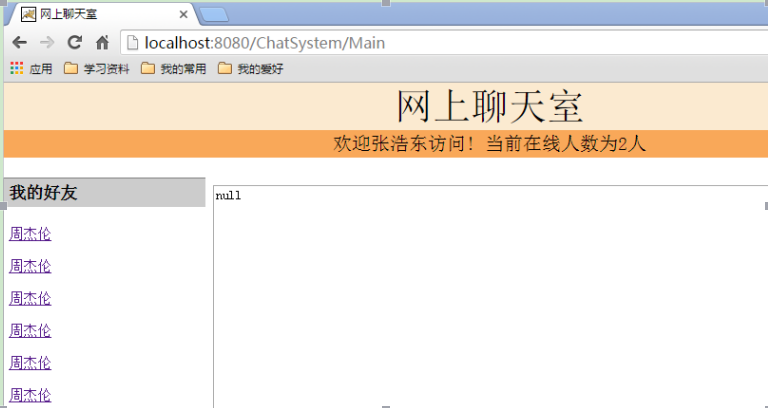
圖五:谷歌浏覽器登陸,顯示在線人數2人
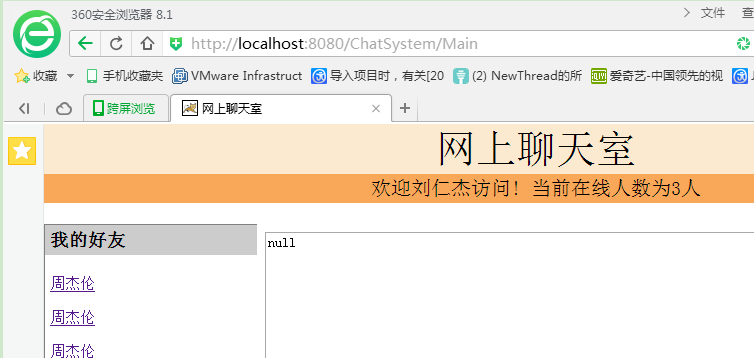
圖六:360浏覽器登陸,顯示在線人數3人
附:本文系統代碼Coding鏈接:https://coding.net/u/LiuZhen1995/p/MyDemo/git/tree/origin_seven
參考資料:
1、cookie實現記住密碼
2、監聽器(實現在線統計人數,踢人)
3、Java Filter過濾機制詳解
4、jsp與servlet之間頁面跳轉及參數傳遞實例