客戶端:
1.服務端點
2.讀取客戶端已有的圖片數據
3.通過socket輸出流將數據發給服務端
4.讀取服務端反饋信息
5.關閉
獲取Socket對象,new出來,構造參數:String的服務端ip,int的端口號
調用Socket對象的getOutputStream()方法,得到OutputStream輸出流對象
獲取FileInputStream對象,new出來,構造參數:String的文件路徑
while循環調用,條件FileInputStream對象的read()方法,讀取到字節數組中
循環中,調用OutputStream輸出流對象的write()方法,寫入數據,參數:byte[],0,len
調用Socket對象的shutDownOutput()方法,通知服務端寫入完成
調用Socket對象的getInputStream()方法,得到InputStream輸入流對象
調用InputStream輸入流對象的read()方法,讀取,並打印
調用FileInputStream對象的close()方法
調用Socket對象的close()方法
服務端:
正常讀取
解決並發
上面的例子,一次只能有一個客戶端服務,解決並發上傳的問題,使用多線程處理每個來訪的客戶
定義一個類PicThread,實現Runnable接口
定義構造函數,傳遞進來Socket對象
實現run()方法,在try-catch中捕獲異常,正常讀取Socket對象的流
解決文件覆蓋
文件的名稱采用ip+(數字),例如:192.168.1.100(2).jpg
獲取ip 方法,socket.getInetAddress().getHostAddress()
第一次進入,文件名192.168.1.100.jpg
第二次進入,判讀文件已存在,文件名變成192.168.1.100(1).jpg
主函數傳值形式並判斷
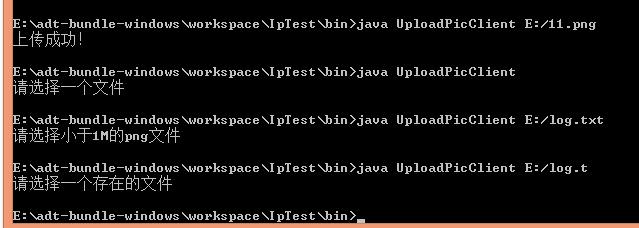
判斷有一個參數 arg.length==1
判斷是文件,並且存在 File對象的exists()方法和isFile()方法
判斷文件後綴,File對象的getName().endsWith(“.jpg”)方法
判斷文件大小,File對象的length()方法
import java.io.File;
import java.io.FileInputStream;
import java.io.FileOutputStream;
import java.io.IOException;
import java.io.InputStream;
import java.io.OutputStream;
import java.net.ServerSocket;
import java.net.Socket;
import java.net.UnknownHostException;

class UploadPicClient {

    /**
     * @param args
     * @throws IOException
     * @throws UnknownHostException
     */
    public static void main(String[] args) throws Exception {
        //判斷參數
        if(args.length!=1){
            System.out.println("請選擇一個文件");
            return;
        }
        File file=new File(args[0]);
        if(!file.exists()||!file.isFile()){
            System.out.println("請選擇一個存在的文件");
            return;
        }
        if(!file.getName().endsWith(".png")||file.length()>(1024*1024)){
            System.out.println("請選擇小於1M的png文件");
            return;
        }
        Socket socket = new Socket("127.0.0.1", 10001);
        OutputStream out = socket.getOutputStream();
        // 輸出
        FileInputStream fileInputStream = new FileInputStream("E:/11.png");
        byte[] b = new byte[1024];
        int len = 0;
        while ((len = fileInputStream.read(b)) != -1) {
            out.write(b, 0, len);
        }
        // 通知服務端
        socket.shutdownOutput();

        // 接收反饋
        InputStream inputStream = socket.getInputStream();
        byte[] res = new byte[1024];
        len = inputStream.read(res);
        System.out.println(new String(res, 0, len));

        out.close();
        socket.close();
    }

}
/**
 * 多線程上傳
 * @author taoshihan
 *
 */
class UploadPicServerThread implements Runnable {
    private Socket socket;

    public UploadPicServerThread(Socket s) {
        this.socket = s;
    }

    @Override
    public void run() {
        // 讀取
        InputStream is;
        try {
            is = socket.getInputStream();

            byte[] res = new byte[1024];
            int len = 0;
            // 解決文件覆蓋
            String ip = socket.getInetAddress().getHostAddress();
            int fileNum = 1;
            File file = new File(ip + ".png");
            while (file.exists()) {
                file = new File(ip + "(" + (fileNum++) + ").png");
            }
            FileOutputStream fos = new FileOutputStream(file);
            while ((len = is.read(res)) != -1) {
                fos.write(res, 0, len);
            }

            // 反饋
            OutputStream os = socket.getOutputStream();
            os.write("上傳成功!".getBytes());
            is.close();
            os.close();
            fos.close();
        } catch (Exception e) {
            e.printStackTrace();
        }
    }

}

// 服務端
public class UploadPicServer {

    /**
     * @param args
     * @throws Exception
     */
    public static void main(String[] args) throws Exception {
        ServerSocket serverSocket = new ServerSocket(10001);

        while (true) {
            Socket socket = serverSocket.accept();
            new Thread(new UploadPicServerThread(socket)).start();
        }
    }

}